This is the full developer documentation for UmbSocial
# Drafting with AI
> Set up UmbSocial AI with Umbraco.AI and your own provider, then draft, rewrite and suggest alt text, with a person reviewing every AI result
UmbSocial AI is the AI add-on for UmbSocial Pro. In the composer it adds three things:
* **Draft with AI** writes a new draft post from a short brief, or from a page on your own site.
* **Rewrite** rewrites a channel’s own text to suit its network, or to make it shorter, friendlier or more formal.
* **Suggest alt text** describes the post’s image for screen readers.
It works through [Umbraco.AI](https://www.nuget.org/packages/Umbraco.AI), with the AI provider you choose. UmbSocial never stores a provider key: the key lives in Umbraco.AI’s connection.
AI only ever writes text for a person to check. It never schedules or publishes anything, and a post AI has helped to write can’t go on the calendar until someone who may review it puts it there (see [Review before scheduling](#review-before-scheduling)).
### What you need
[Section titled “What you need”](#what-you-need)
* UmbSocial Pro, licensed for the site (a Pro or Agency licence). The AI add-on runs under the same licence and does nothing without one.
* Umbraco.AI 17.7 or later, with a provider package for your AI provider.
* We recommend **Umbraco CMS 17.8.1 or later**. Umbraco.AI brings in a version of the SixLabors.ImageSharp image library with known vulnerabilities; Umbraco CMS 17.8.1 depends on the fixed version, so a site on it gets that one instead.
### Setting it up
[Section titled “Setting it up”](#setting-it-up)
These steps use Anthropic as the example provider. Any provider Umbraco.AI supports works the same way.
#### 1. Install the packages
[Section titled “1. Install the packages”](#1-install-the-packages)
```bash
dotnet add package UmbSocial.AI
dotnet add package Umbraco.AI
dotnet add package Umbraco.AI.Anthropic
```
`UmbSocial.AI` brings UmbSocial Pro and Umbraco.AI’s core with it. Restart the site afterwards.
#### 2. Add a connection
[Section titled “2. Add a connection”](#2-add-a-connection)
In the backoffice, go to **AI › Connections**, add an **Anthropic** connection and paste your Anthropic API key. Umbraco.AI stores the key; UmbSocial only ever refers to the connection.
#### 3. Check the profile and the brand voice
[Section titled “3. Check the profile and the brand voice”](#3-check-the-profile-and-the-brand-voice)
Open **Settings › UmbSocial › Schedule & writing**. The **AI** box there sets itself up the first time it opens: UmbSocial creates a **UmbSocial copywriter** profile on your connection, and a **UmbSocial brand voice** context for you to fill in under **AI › Contexts**. You can choose another chat profile, or **No brand voice**. Save the page. [AI Settings](/17/ai/ai-settings/) describes the box in full.
#### 4. Choose the sites AI may read
[Section titled “4. Choose the sites AI may read”](#4-choose-the-sites-ai-may-read)
**Draft with AI** can start from a page, but only from a site listed under **Sites to start from** in the same box, such as `example.com` (which covers its subdomains too). Leave it empty to turn starting from a page off. Only list sites you trust: AI reads what the page says.
#### 5. Give people the permission
[Section titled “5. Give people the permission”](#5-give-people-the-permission)
AI’s buttons need the **UseAi** permission on the user group (**Users › User groups › (group)**, in the **UmbSocial** box). See [Permissions](#permissions) below.
#### 6. Try it
[Section titled “6. Try it”](#6-try-it)
Open a new post in **UmbSocial › Compose** and choose **Draft with AI**. If the buttons stay disabled, hover over one to see why. “AI isn’t set up yet” means there is no working connection or chat profile: check steps 2 and 3.
### In the composer
[Section titled “In the composer”](#in-the-composer)
#### Draft with AI
[Section titled “Draft with AI”](#draft-with-ai)
**Draft with AI** is in the composer’s top bar. It opens a panel with two tabs:
* **Brief**: what the post is about, in a sentence or two (up to 2,000 characters).
* **From a link**: an https page on one of the sites listed under **Sites to start from**. UmbSocial reads the page itself (https only, on the listed sites only, every redirect checked again, at most 512 KiB, within 5 seconds) and passes its text to AI. The tab is disabled while no sites are listed.
Choose the channels the post is for, then **Write draft**. AI writes the main text, and its own version for any network that needs one (a shorter one for X, say). Two channels on the same network share that network’s version. Every text is checked against its network’s limit, counted the way the network counts it; an answer that doesn’t fit is sent back to AI once with the problem, and refused if it still doesn’t fit (`ai.bad_output`).
The new post opens as a **draft**. A draft from a page gets the page as its link, with the page’s own title and description on the link card (not AI’s), so check them as you would any link. A draft never gets alt text: add an image, then use **Suggest alt text**.
Draft with AI creates a separate post, so it can be used from any post, saved or not. If the post you are on has unsaved changes, Umbraco asks before leaving it.
#### Rewrite
[Section titled “Rewrite”](#rewrite)
**Rewrite** is on the card of each channel whose text you have customised (**Customise for each channel**), beside **Use main text**. Its menu has **Rewrite**, **Shorter**, **Friendlier** and **More formal**. The rewritten text replaces that channel’s text in the composer, counted with the post’s link as the network will count it. The text isn’t saved until you save the post, so you can change it or undo it, but the post is marked as written with AI straight away, even if you undo the text.
The main text has no Rewrite button: customise a channel’s text first.
#### Suggest alt text
[Section titled “Suggest alt text”](#suggest-alt-text)
**Suggest alt text** is beside the image’s alt-text field once the post has an image. UmbSocial sends the image to AI (scaled down first, if it is large) and puts the answer in the field, within the strictest alt-text limit of the post’s channels.
Caution
**Suggest alt text needs a model that can read images.** Choose a profile whose model can. A model that can’t may still answer, and invent a description, so always check the alt text against the picture.
#### When the buttons are disabled
[Section titled “When the buttons are disabled”](#when-the-buttons-are-disabled)
* **Rewrite** and **Suggest alt text** work on the saved post, so they are disabled until the post has been saved (“Save the draft first”), and while the post can’t be changed (it is being sent, for example, or you may not change it).
* All three are disabled while AI isn’t set up: no connection, or no chat profile.
Hover over a disabled button to see why.
#### The AI tag
[Section titled “The AI tag”](#the-ai-tag)
A post AI has helped to write carries a tag in the composer’s top bar, and in the queue, the calendar and Published:
* **AI draft, needs review** while it is a draft or awaiting approval;
* **AI-assisted** once a reviewer has put it on the calendar.
### Review before scheduling
[Section titled “Review before scheduling”](#review-before-scheduling)
When AI is used on a post, whether it drafted the post, rewrote a channel’s text or suggested its alt text, the server marks the post as written with AI. The mark stays for good: rewriting every word yourself doesn’t remove it, and it is set by the server alone, so no request can set or clear it. Using AI on a post that was already scheduled takes it back to a draft, which then needs reviewing again.
Such a post goes on the calendar only when a reviewer puts it there:
| Approvals | Who reviews |
| --------- | --------------------------------------- |
| On (Pro) | Anyone with **Approve** |
| Off | Anyone with **Approve** or **Schedule** |
On such a post, a reviewer’s **Add to queue**, **Schedule** and **Approve** buttons read **Review and schedule**.
Everyone else can still save the post as a draft. With approvals on, a writer submits it for approval as usual, and the composer explains: “Drafted with AI: someone with Approve must review it before it’s scheduled.” Anything else is refused with `ai.needs_review`, through the API as well as the composer. The reviewer is recorded on the post and in its **History**.
[Writing and scheduling posts](/17/using-social/writing-and-scheduling-posts/#posts-written-with-ai) has the full rule, including how Umbraco API users are treated.
### Drafts from an AI agent
[Section titled “Drafts from an AI agent”](#drafts-from-an-ai-agent)
An Umbraco Automate automation can have an AI agent write a post too, through Umbraco.AI’s **Run AI Agent** action and Pro’s **Create social draft**. Those posts are reviewed in the same way. See [Drafts from an AI agent](/17/pro/automation-drafts/#drafts-from-an-ai-agent).
### Permissions
[Section titled “Permissions”](#permissions)
| Action | Needs |
| ---------------------------------------------- | ------------------------------------------------------------------------------------------------------------------------ |
| Draft with AI | **UseAi** and **Write** |
| Rewrite | **UseAi**, and being allowed to change the post, as for saving it (see [Permissions](/17/getting-started/permissions/)) |
| Suggest alt text | **UseAi**, being allowed to change the post, and access to the image in the media library (the user’s media start nodes) |
| The AI box on Schedule & writing | **ManageSettings** |
| Putting a post written with AI on the calendar | **Approve**, or **Schedule** while approvals are off (see above) |
Someone without UseAi doesn’t see the AI buttons. A post the person may not change, or an image outside their media start nodes, is answered as if it didn’t exist.
### Limits
[Section titled “Limits”](#limits)
Each person can make **10 AI requests a minute**, across Draft with AI, Rewrite and Suggest alt text together. A request over the limit is refused (`ai.too_many`, HTTP 429) without calling the provider. The limit is counted per server. Your provider has its own limits too; when it refuses for that reason, the message says so (`ai.rate_limited`).
### Privacy
[Section titled “Privacy”](#privacy)
Note
**Post text and fetched page text are sent to the site’s own AI provider**, through the Umbraco.AI connection you set up: the post’s text when you rewrite it, your brief, the text of a page you start from, and your brand voice. For **Suggest alt text**, the image is sent too. None of it is sent to UmbHost. What the provider keeps, and for how long, is set by your agreement with them.
**Umbraco.AI keeps request logs for 14 days by default.** Its audit log records each call, including the prompt and the answer, under the alias `umbsocial-draft`, `umbsocial-rewrite` or `umbsocial-alt-text`, and deletes entries after 14 days. Change this in configuration under `Umbraco:AI:AuditLog` (`RetentionDays`, or `PersistPrompts` and `PersistResponses` set to `false` to keep only the call’s details).
appsettings.json
```json
{
"Umbraco": {
"AI": {
"AuditLog": {
"RetentionDays": 7
}
}
}
}
```
UmbSocial itself stores only the result you keep: the post, its **History** entry saying AI was used, and its reviewer.
### Safeguards
[Section titled “Safeguards”](#safeguards)
* **AI only returns text.** No tools are offered to the model, so it can’t act on the site, and nothing it returns can schedule, publish or review a post.
* **Pages are material, not instructions.** A page’s text, and your brief, are passed to the model as quoted material, so text on a page that tries to give the model orders is treated as part of the page.
* **Pages are fetched by UmbSocial, not by the model.** Only https pages on the sites you listed, with the same guards as link cards: no private or internal addresses, every redirect checked against the list again.
* **Nothing is half-applied.** An answer is used whole, or refused with a message.
### When something goes wrong
[Section titled “When something goes wrong”](#when-something-goes-wrong)
Each refusal has a message in the composer that says what to do. The codes are listed in [Error Codes](/17/reference/error-codes/#ai).
### The management API
[Section titled “The management API”](#the-management-api)
The composer uses these endpoints, under `/umbraco/management/api/v1/umbsocial/pro/ai/`. They need UmbSocial to be licensed (`licence.pro_required` otherwise).
| Method and route | Needs | Body | Returns |
| ---------------- | --------------- | --------------------------------------------------------------------------------------------------- | ---------------------------------------------------------------------------------------------------------- |
| `GET status` | UseAi | | `{ "configured", "startFromLink" }`: whether AI is set up, and whether any sites are listed to start from. |
| `POST draft` | UseAi and Write | `{ "brief" }` or `{ "link" }`, and `"channelKeys": []` | `{ "key", "version" }` of the new draft. |
| `POST rewrite` | UseAi | `{ "postKey", "channelKey", "text", "instruction" }` (`instruction` optional, up to 500 characters) | `{ "text", "version" }` |
| `POST alt-text` | UseAi | `{ "postKey", "mediaKey" }` | `{ "text", "version" }` |
Rewrite and alt text return the post’s new `version`, because using AI marks the post: send it with your next save, or the save is refused as out of date (`post.changed`). Neither saves the text. The [AI Settings](/17/ai/ai-settings/#the-api) endpoints are described with the settings.
# AI Settings
> How UmbSocial AI chooses the Umbraco.AI profile and brand voice it writes with, and which sites it may read for Start from a link
UmbSocial AI writes through [Umbraco.AI](https://www.nuget.org/packages/Umbraco.AI), with your own provider: Anthropic, OpenAI or another one Umbraco.AI supports. UmbSocial never stores a provider key; the key lives in Umbraco.AI’s connection, under **AI › Connections**.
The AI settings are a box called **AI** on **Settings › UmbSocial › Schedule & writing**, under the page’s own boxes, and the page’s **Save** saves them with the rest of the page. They need the **ManageSettings** permission, and UmbSocial must be licensed.
### What UmbSocial sets up for you
[Section titled “What UmbSocial sets up for you”](#what-umbsocial-sets-up-for-you)
The first time the page opens, UmbSocial sets up two things in Umbraco.AI, which you then change there like anything else:
* **UmbSocial brand voice**: an Umbraco.AI context (alias `umbsocial-brand-voice`) with one empty brand-voice resource. Fill in your tone, audience, style guidelines and what to avoid under **AI › Contexts**. It needs no connection, so it is always created.
* **UmbSocial copywriter**: an Umbraco.AI profile (alias `umbsocial-copywriter`), once there is an AI connection that can chat. It uses that connection’s first model, a temperature of 0.7 and a system prompt written for social posts, which you can edit under **AI › Profiles**.
Each is created once: if one with its alias is already there, UmbSocial uses it. If a profile or context the settings point at is deleted, the page points at the defaults again the next time it opens.
### No AI connection yet
[Section titled “No AI connection yet”](#no-ai-connection-yet)
A profile needs a connection. Without one, UmbSocial uses the site’s **default chat profile**, if Umbraco.AI has one. It doesn’t save that choice, so once you add a connection, UmbSocial still creates the UmbSocial copywriter for you.
With no connection and no default chat profile, the box only says: “Add an AI connection under AI › Connections first.”
### The settings
[Section titled “The settings”](#the-settings)
| Setting | What it does |
| ----------------------- | ---------------------------------------------------------------------------------------------------------------------------------------------------------------------------------------------------------------------------------------------- |
| **Profile** | The chat profile UmbSocial writes with: its connection, model and system prompt. Only chat profiles are listed. |
| **Brand voice** | The context that describes your brand. Choose **No brand voice** to write without one; UmbSocial then leaves it unset and doesn’t create one again. |
| **Sites to start from** | The sites whose pages **Start from a link** may read, one per line, such as `example.com`. Each one covers its subdomains too, so `example.com` covers `www.example.com` and `blog.example.com`. Leave it empty to turn Start from a link off. |
A site is stored as its host name: lowercase, without `https://`, a path or `www.`, and a name in another script in its ASCII form (`bücher.de` is stored as `xn--bcher-kva.de`). An IP address, or a single name such as `localhost`, isn’t accepted, and there can be at most 20 sites.
### Why the lists aren’t Umbraco.AI’s own pickers
[Section titled “Why the lists aren’t Umbraco.AI’s own pickers”](#why-the-lists-arent-umbracoais-own-pickers)
Umbraco.AI’s profile and context pickers read Umbraco.AI’s management API, which needs access to the **AI** section. Someone who may manage UmbSocial’s settings doesn’t always have that, so the box lists profiles and contexts through UmbSocial’s own endpoint, which needs only **ManageSettings**. You still create and edit profiles and contexts in the AI section.
### The API
[Section titled “The API”](#the-api)
* `GET /umbraco/management/api/v1/umbsocial/pro/ai/options` returns `{ "profiles": [{ "id", "name", "model" }], "contexts": [{ "id", "name" }], "hasConnection": true }`. `model` is `provider/model`, and only chat profiles are listed.
* `GET /umbraco/management/api/v1/umbsocial/pro/ai/settings` returns `{ "profileId", "contextId", "sourceHosts": [] }`, after setting up the defaults described above. `contextId` is `null` for no brand voice, and `profileId` is `null` only while there is nothing to write with.
* `PUT` to the same address saves a body in that shape and returns the settings as saved, with the hosts normalised. If any part is refused, nothing is saved:
| Code | When |
| ------------------------- | ---------------------------------------------- |
| `ai.profile_invalid` | No profile, or one that is gone or can’t chat. |
| `ai.context_invalid` | A brand voice that is gone. |
| `ai.host_invalid:` | An entry that isn’t a host name. |
| `ai.hosts_too_many` | More than 20 sites. |
All three need the **ManageSettings** permission, and UmbSocial must be licensed (`licence.pro_required` otherwise). The values are kept in UmbSocial’s own settings (Umbraco’s key/value store), so every server of a load-balanced site has the same ones.
# Umbraco Engage
> Connect your social posts to Umbraco Engage with the UmbSocial Engage add-on, so you can see which posts bring people to your site and what they go on to do there
UmbSocial Engage connects your social posts to [Umbraco Engage](https://umbraco.com/products/add-ons/engage/), Umbraco’s analytics and personalisation add-on. With it you can see which posts bring people to your site, and what those people go on to do there.
It works at two levels, and draws both in Engage’s own section as charts (see [Charts in Engage](#charts-in-engage)):
* **Level 1, by campaign and network.** Engage’s own reports already break down the visits that UmbSocial Pro’s [UTM tags](/17/pro/utm-tags/) bring in. The add-on shows those figures on each campaign and beside each published channel. They are updated nightly.
* **Level 2, by post.** The add-on marks each post’s links to your site, records a goal in Engage when someone arrives through one, and shows each post’s visits and the goals reached in those visits.
### What you need
[Section titled “What you need”](#what-you-need)
* **UmbSocial Pro**, licensed for the site (a Pro, Agency or GreenStack Pro licence), and **the UmbSocial Engage add-on on your UmbSocial licence**. Engage is a paid extra on top of Pro: you add it to your licence in UmbPanel, where it is listed as `UmbSocial.Engage`, and it must be active. Without both, the add-on does nothing: it adds no marker, records nothing and shows no figures, and its endpoints answer `licence.engage_required`. A development licence, or development mode on your own machine, includes it.
* **Umbraco Engage 17.5 or later** (on the 17 line). Installing UmbSocial Engage installs a complete Umbraco Engage with it, backoffice included, so you don’t install Engage separately.
* **An Umbraco Engage licence for each site**, from Umbraco. It is separate from your UmbSocial licence. Without one, Engage runs as a trial that collects only on `localhost` and on `*.local` and `*.test` hosts (and their `www.` versions), so you can try it on a development machine. On any other host an unlicensed Engage collects nothing, and so the add-on records nothing either.
* **SQL Server.** Umbraco Engage won’t start on SQLite, so a site on SQLite can’t use the add-on.
### Setting it up
[Section titled “Setting it up”](#setting-it-up)
1. Install the package, then restart the site:
```bash
dotnet add package UmbSocial.Engage
```
It brings UmbSocial Pro and Umbraco Engage with it. Its own tables are created in Umbraco’s database when the site starts.
2. Add your Umbraco Engage licence, as Engage’s documentation describes.
3. Decide how visitors give consent. Engage asks the site, through its `IModulePermissions` service; see [Consent](#consent) below.
4. Switch on **Tag outgoing links** under **Settings › UmbSocial › Links** (see [UTM Tags](/17/pro/utm-tags/)), and give your posts a campaign. Level 1 needs both. Level 2 needs only a link to your site in the post.
### What works with no code today
[Section titled “What works with no code today”](#what-works-with-no-code-today)
This part needs only UmbSocial Pro’s UTM tags, not the add-on: they make every social visit visible in Engage. Engage’s **Campaigns** report lists your campaigns by their analytics value (`utm_campaign`), and shows each campaign’s traffic by **source / medium**, one combined column such as `linkedin / social`. Short links are included, because a short link leads to the tagged address.
To read it:
* The **source** is the network the post went out on: `bluesky`, `linkedin` and so on, or the source you set for that network.
* The **medium** is `social` by default. Change Pro’s medium default to `social-{channel}` and each channel gets its own row in Engage’s reports, such as `linkedin / social-company-page`. The add-on’s own figures still add these up by network.
* Engage builds its reports **nightly, at 04:00 by default**, so today’s visits appear tomorrow.
* Engage knows a campaign only by its value. **If you change a campaign’s value, its history in Engage splits**: links that went out before carry the old value, and Engage reports the two values as two campaigns.
### Level 1: campaign figures
[Section titled “Level 1: campaign figures”](#level-1-campaign-figures)
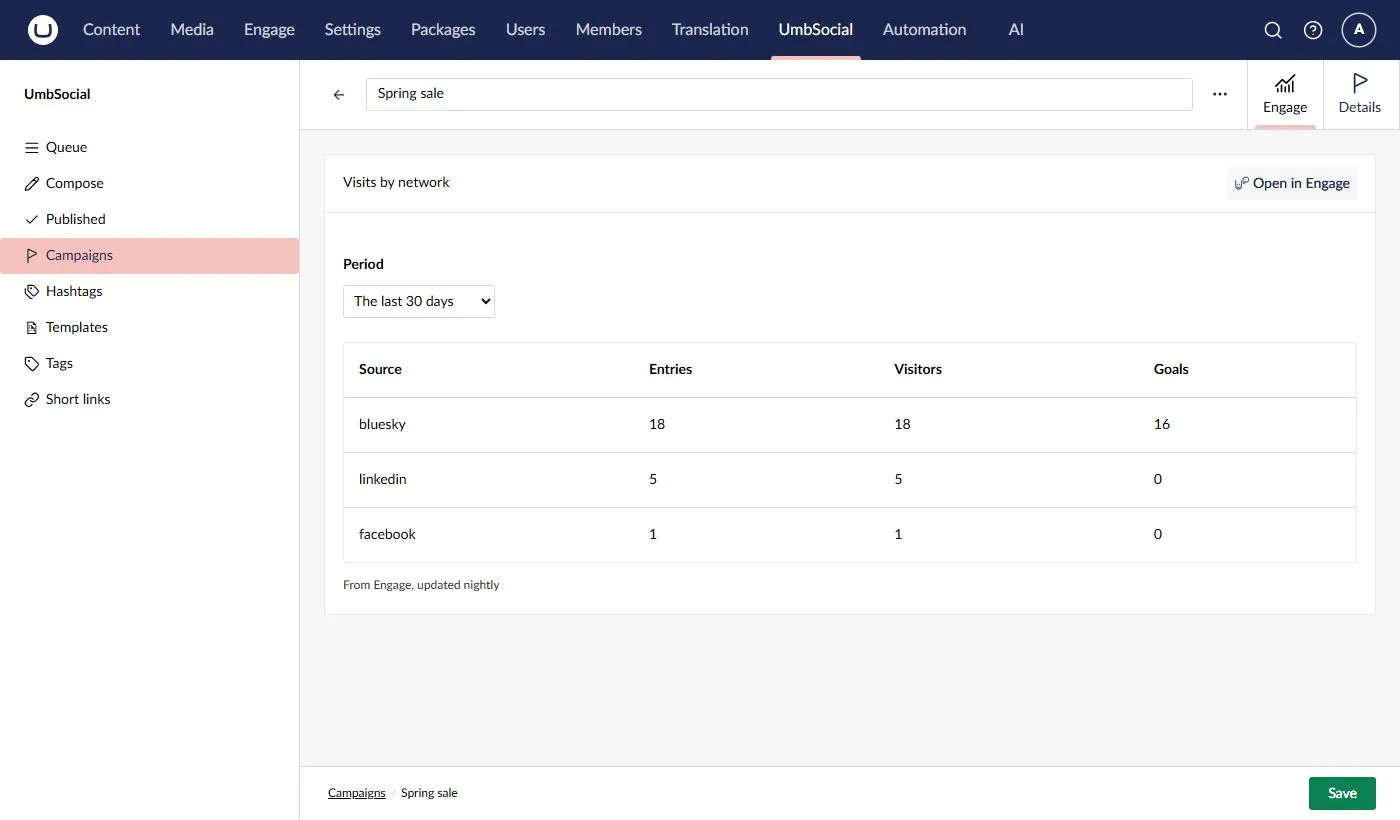
* **On a campaign.** Each campaign has an **Engage** tab. It shows the campaign’s visits by network for the last 7, 30 or 90 days, or the last 12 months: Engage’s **entries**, **visitors** and **goals** for each source. A source Engage recorded as blank is shown as **No source**. Anyone who can read campaigns (**View**, **Write** or **Manage settings**) sees the tab. 
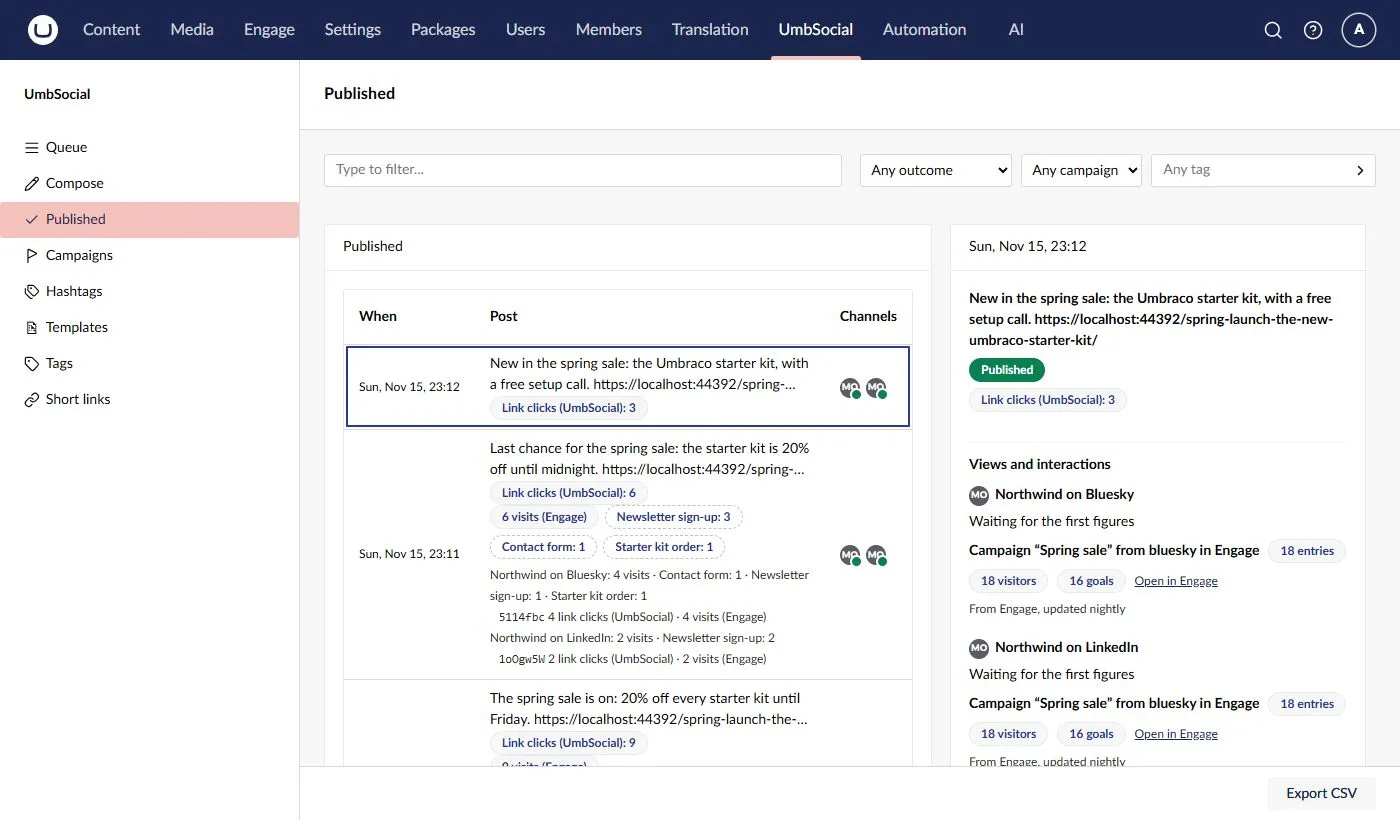
* **Beside a published channel.** In a post’s detail on **Published**, and on its **History** tab, each channel’s views and interactions are followed by a line such as *Campaign “Spring sale” from bluesky in Engage*, with the campaign’s entries, visitors and goals from that channel’s source since the post went out. The line is for the channel’s whole source and campaign, not just for that post. It uses the post’s UTM values and the link settings as they are now, so if you change them after the post went out, the line follows the new values.
Both have an **Open in Engage** link to the campaign’s charts in Engage (see [A campaign’s view](#a-campaigns-view)), shown when Engage’s section is one of the user’s sections.
Both say **From Engage, updated nightly**. Until Engage has built its first report, the tab says so. Figures are kept for an hour on each server, for each campaign and period.
### Level 2: visits and goals per post
[Section titled “Level 2: visits and goals per post”](#level-2-visits-and-goals-per-post)
#### The marker
[Section titled “The marker”](#the-marker)
Every link in a post that points to your own site gets one more query parameter as it goes out: `us=`. The code is a random seven-character code that the add-on makes for each post and channel, the first time a link is sent there. It is not the short link’s code. It says only “this visit came from a social post”, and which post and channel; it says nothing about the visitor. A site without the add-on never adds it.
* “Your own site” follows the same rule as the UTM tags: your pages (however their address is written), Umbraco’s domains and the main URL’s host, except a domain you switch off under **Settings › UmbSocial › Links**. **Other hosts** and the short link address don’t count.
* A link that already has a `us` parameter is never changed.
* The marker is added before the link is shortened, so a short link leads to the marked address.
* A short link made before the add-on was installed or licensed is reused when the post is sent again, so it still leads to the address without the marker, and visits through it aren’t counted.
* The composer’s previews show `us=xxxxxxx`, so the length is right, and nothing is stored.
Engage stores the full query string of every page it records, `us=` included, in its own pageview table (`umbracoEngageAnalyticsPageview`). It is kept there for as long as Engage’s own retention settings keep pageviews.
Engage’s middleware also runs on the short link path (`/s/` by default), and may set its visitor cookie there when the visitor allows it. That is Engage’s behaviour, not UmbSocial’s.
#### A landing
[Section titled “A landing”](#a-landing)
When a page answers a marked visit, the add-on asks Engage to record the **Arrived from a social post** goal on that pageview. It writes its own row, a *landing*, with the post and channel only when Engage accepts the goal. All of these must hold, or nothing is recorded:
* the request is a `GET` that the page answered with a 2xx status;
* the link has exactly one `us`, and it is a code the add-on made (an unknown or malformed code is ignored);
* the site is licensed for the add-on, and the visitor allows analytics;
* Engage has numbered a pageview for the request, and that pageview has no landing yet;
* the marker is under its cap: **60 landings a minute for each marker**, on each server. A marker is public in every shared link, so the cap stops anyone writing a row per request by replaying it. Bot and link-preview fetches count towards the cap, because it is checked before Engage decides whether a request is a bot. A network’s preview crawlers fetching a freshly posted link many times can use up that minute’s allowance.
The add-on reads only the request’s method, status, path, the `us` parameter and the page Umbraco routed to. It never reads the visitor’s IP address, browser, referrer or cookies, and it adds nothing to the response. If it fails (Engage or the database is unavailable, say), it logs the failure and the page is served as normal.
When a visitor came through one of the post’s short links, the landing records which one: the channel’s short link to the page the visitor landed on (by the page’s key or, for a link stored as an address, by its path when that address carries this marker). If no link or more than one matches, the landing counts for the channel only.
#### Visits
[Section titled “Visits”](#visits)
A landing counts as a visit **only once Engage has stored its pageview**. The add-on checks a few minutes after the landing, every 15 minutes, and gives up on a landing whose pageview Engage hasn’t stored within an hour. Engage keeps only the pageviews of browsers that run its script (the script pings Engage within 30 seconds), and drops bots. So a visit that bounced before the page loaded, a browser without JavaScript and most bots never become visits.
A visit counts **once for each marker and Engage session**: refreshing the page, or arriving through the same post’s link again in the same session, doesn’t add another. A post’s total is the number of distinct sessions, so a session that arrived through two of the post’s channels counts once for the post, and once for each channel.
#### Goals
[Section titled “Goals”](#goals)
The add-on then looks in each visit’s Engage session for the goals the visitor reached **on or after the landing, within 4 hours of it**, and credits them to the landing’s post and channel. The **Arrived from a social post** goal itself isn’t counted again. Engage ends a session after 30 minutes without activity, so later visits are new sessions.
* Goals appear **after the 4-hour window plus an hour**, so that Engage has stored them, and the add-on matches them **every 6 hours**. So a visit’s goals show between 5 and about 11 hours after the visit.
* A goal counts for **every post with a landing in that session**. If a visitor arrived from two posts before signing up, both get the sign-up, so goals added up across posts can be more than Engage recorded.
* A goal’s value comes from Engage’s activity history for the session. A value Engage gives no number for counts as 0, and the goal still counts.
* A goal is shown under its name in Engage, as it is now.
The window can be changed in configuration (at least an hour):
```json
{
"UmbSocial": {
"Engage": {
"SessionWindowHours": 4
}
}
}
```
#### Where you see them
[Section titled “Where you see them”](#where-you-see-them)
* **The queue, the calendar and Published** show *N visits (Engage)* on each post that has visits, after Pro’s *Link clicks (UmbSocial)*, with a tag for each goal (*Newsletter: 3*). When a post went to more than one channel, each channel gets its own line. When a post has two or more short links, each link gets a line: *12 link clicks (UmbSocial) · 5 visits (Engage)*. In the calendar, the number is shown, with the rest in its tooltip. Anyone who can read the post sees them: with **View**, every post’s; with **Write** alone, those of their own posts. 
* **UmbSocial › Short links** shows *· N visits (Engage)* after each link’s clicks, for people with **Manage settings**.
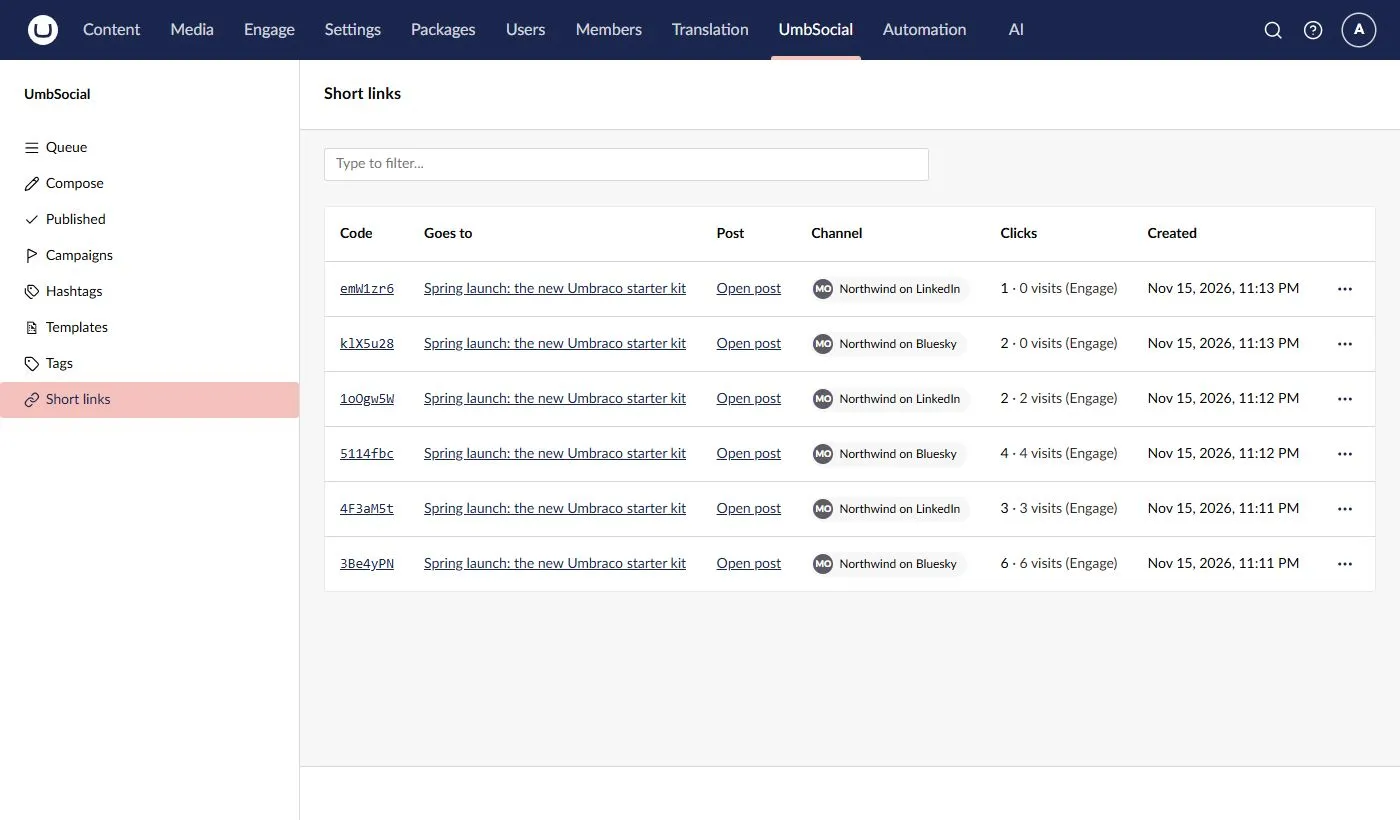
**Clicks and visits are never added together.** Link clicks are UmbSocial’s own count of every time a short link was followed (see [Short links](/17/pro/short-links/#what-is-counted)). Visits are Engage’s count of the people who allowed analytics and whose browser ran Engage’s script. Visits are lower than clicks, and the gap is not an error.
Landings and their goals are kept for 13 months, and landings that never became visits for 7 days. When a post is deleted, its markers, landings and goals are deleted with it.
### Charts in Engage
[Section titled “Charts in Engage”](#charts-in-engage)
The add-on adds an **UmbSocial** screen to Engage’s own section, beside Engage’s **Start**, **Analytics** and **Reporting**, at `/umbraco/section/engage/umbsocial`. It is drawn with Engage’s own cards and charts, so it looks and behaves like the rest of Engage.
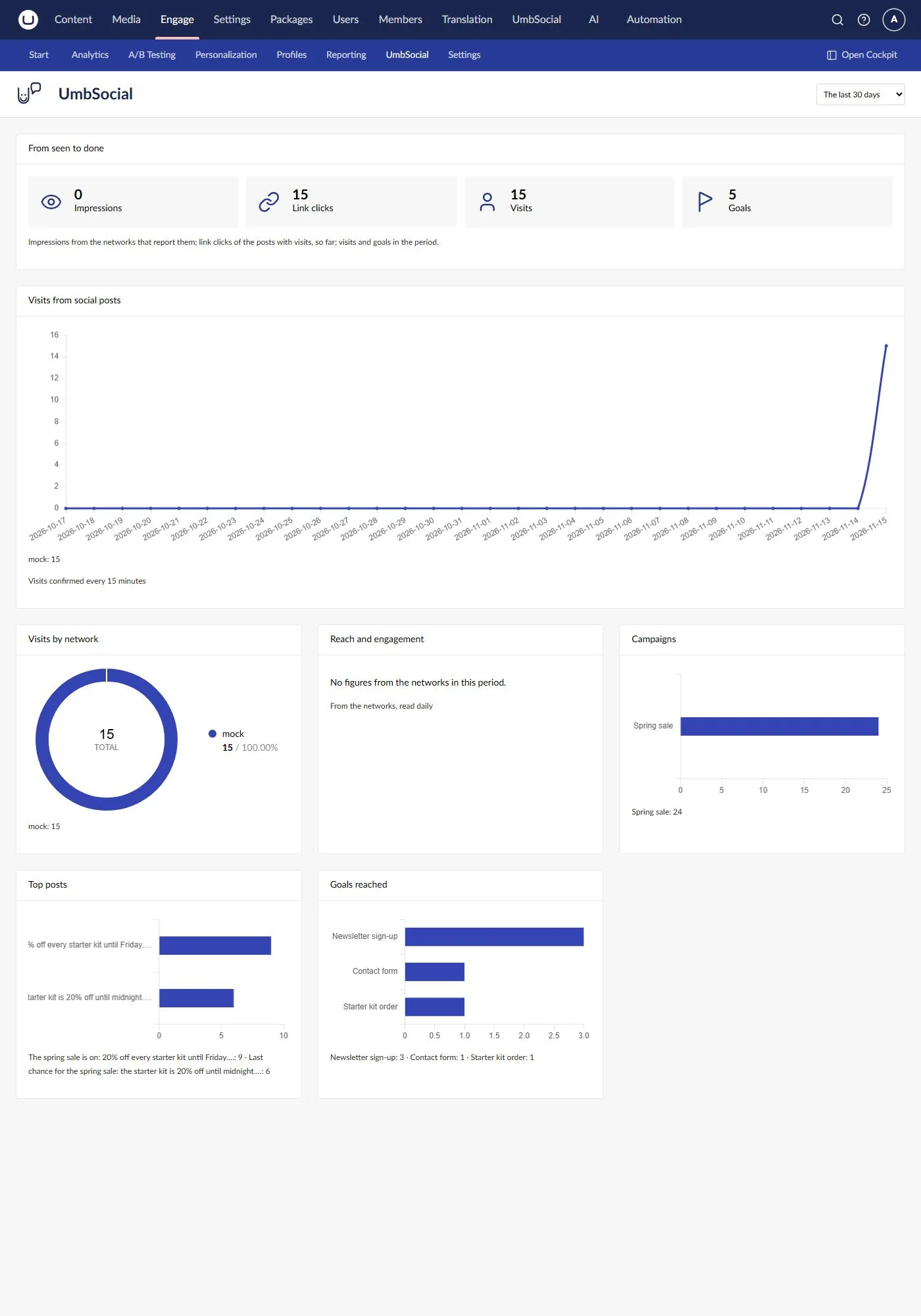
For the period you choose (the last 7, 30 or 90 days, or the last 12 months) it shows:
* **From seen to done**, the funnel: the **impressions** the networks report for your posts, the **link clicks** on the short links of the posts with visits, the **visits** and the **goals** reached. Impressions come from the networks that report them, as of the period’s last day. Link clicks are UmbSocial’s count so far, not just the period’s.
* **Visits from social posts**, a line for each network over every day of the period. Visits are confirmed every 15 minutes (see [Visits](#visits)).
* **Visits by network**, Engage’s donut chart of the same visits.
* **Reach and engagement**, the networks’ own figures over time (likes, reposts, replies, impressions and so on), added up across networks by what they mean. They are read from the networks once a day. Clicks the networks report are never added to UmbSocial’s link clicks.
* **Campaigns**, **Top posts** and **Goals reached**, ranked as bars: the ten campaigns with the most entries in Engage’s reports, the ten posts with the most visits, and the goals reached in those visits.
Under each chart its figures are also written out in words.
The screen shows to users with UmbSocial’s **View** permission while the site has the Engage add-on. It sits under Engage’s **Analytics** (Engage enables only its own screens), so Engage shows it when its analytics feature is licensed and the user has Engage’s analytics permission.
#### A campaign’s view
[Section titled “A campaign’s view”](#a-campaigns-view)
**Open in Engage**, on a campaign’s Engage tab or beside a published channel, opens that campaign in the UmbSocial screen (`?campaign=`). It shows the campaign’s **entries**, **visitors** and **goals** for the period in Engage’s cards, and its entries over time with a line for each network, by day for up to 31 days and by week (from Monday) beyond. The figures are Engage’s nightly reports, so today’s visits show tomorrow. **All social traffic** goes back to the whole screen.
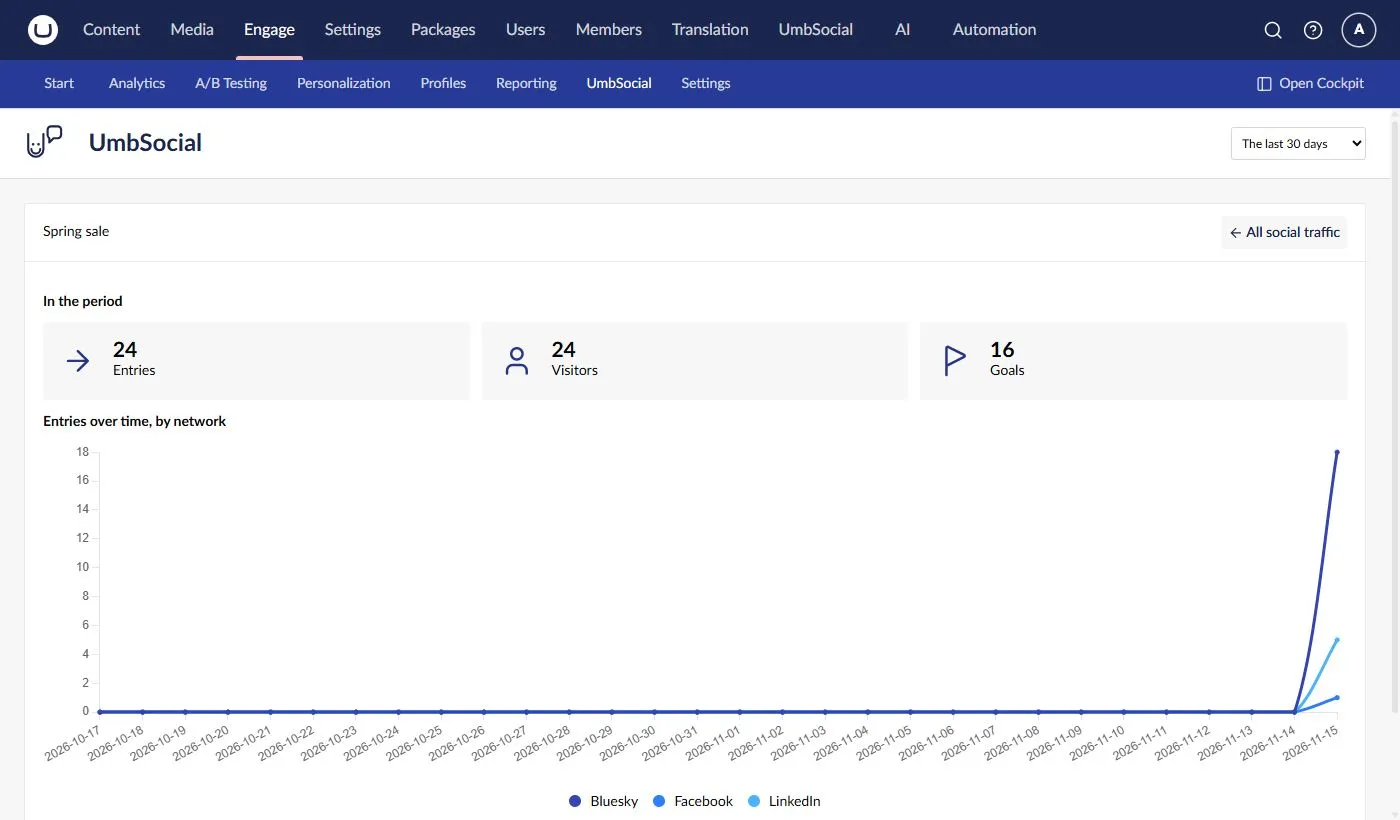
#### In Engage’s own reports
[Section titled “In Engage’s own reports”](#in-engages-own-reports)
Engage’s own **Analytics › Campaigns** and **Analytics › Goals** show the same traffic in Engage’s words: your campaigns by their UTM value, with their sources, and the **Arrived from a social post** goal beside your other goals. They open on the last seven days without today, so today’s visits show there tomorrow.
### Consent
[Section titled “Consent”](#consent)
Engage decides who allows analytics, through the `IModulePermissions` service the site registers. **With none registered, Engage treats every visitor as consenting**, so register your own if your site asks for consent (see Engage’s documentation on its cookie and module permissions).
“No consent, no goal and no landing” is UmbSocial’s rule: the add-on records nothing for a visitor who hasn’t allowed analytics. Engage itself still records an anonymous pageview for that visitor, with its UTM values, so Level 1 includes them while Level 2 doesn’t. A short link’s click is counted either way.
Every figure is a lower bound: visitors who don’t allow analytics, who block scripts, or who leave before the page loads are never counted.
### The goal
[Section titled “The goal”](#the-goal)
The first marked landing creates a goal in Engage called **Arrived from a social post**: an active goal of Engage’s **Custom code** type. The add-on keeps its key, so you can rename it in Engage. If it is deleted in Engage, or Engage marks it invalid, the add-on creates it again the next time someone arrives.
It is an ordinary Engage goal, so you can use it anywhere Engage uses goals:
* **Segments:** build a segment on Engage’s **Reached goals** parameter with this goal, and personalise pages for visitors who came from social media.
* **Personas:** score a persona when the goal is reached, with the Engage add-on for Umbraco Automate (its *custom goal completed* trigger and *score persona* action). Engage’s own campaign groups can also score personas for visits with a given UTM medium, such as `social`.
* **Reports:** it appears in Engage’s goal reports, beside your other goals.
### What isn’t possible
[Section titled “What isn’t possible”](#what-isnt-possible)
* **Engage can’t report on the marker, `utm_content` or `utm_term`.** Its reports and query service have no dimension for any of them, so per-post figures come only from the add-on’s own landings (Level 2), never from Engage’s reports. Pro puts the channel in `utm_content` by default; for per-channel rows in Engage’s own reports, use the medium instead (see above).
* **No figures from before the add-on was installed.** Level 2 needs the marker, which only links sent since then carry. Level 1 covers whatever Engage recorded with your UTM tags.
* **No live figures.** Level 1 is as old as Engage’s last nightly report, and Level 2 waits for Engage to store pageviews and for the goal window to pass.
* **No figures without an Engage licence for the site’s domain**, other than on development hosts (see [What you need](#what-you-need)).
### For developers
[Section titled “For developers”](#for-developers)
All the endpoints are under `/umbraco/management/api/v1/umbsocial/pro/engage/`, need UmbSocial to be licensed (`licence.pro_required` otherwise), and say why they refuse with the [error codes](/17/reference/error-codes/#umbraco-engage).
| Request | Needs | What it does |
| --------------------------------------- | ------------------------------------------ | ----------------------------------------------------------------------------------------------------------------------------------------------------------------------------------------------------- |
| `GET status` | **View** | The arrival goal’s key and its name in Engage; no goal before the first landing, or after the goal was deleted in Engage. |
| `GET campaigns/{key}/figures?from=&to=` | **View**, **Write** or **Manage settings** | A campaign’s entries, visitors and goals by source, for Engage’s reporting days `from` to `to` (at most 366 days). |
| `GET targets/{targetId}/figures` | **View** or **Write** | A published channel’s campaign figures for its source. A target of a post the caller can’t read is answered as one with nothing to show. |
| `POST posts/figures` | **View** or **Write** | `{ "postKeys": [ … ] }`, at most 200: each post’s visits and goals, in all, per channel and per short link. Posts the caller can’t read, and posts without visits, are left out. |
| `POST short-links/visits` | **Manage settings** | `{ "shortLinkCodes": [ … ] }`, at most 200: each code’s visits. |
| `GET social/overview?from=&to=` | **View** | The UmbSocial screen: visits by day and network, by network, the top campaigns, posts and goals, the networks’ own figures by day, and the funnel’s link clicks, visits and goals (at most 366 days). |
| `GET campaigns/{key}/series?from=&to=` | **View**, **Write** or **Manage settings** | A campaign’s name, and its entries, visitors and goals by period and source from Engage’s reports: by day for up to 31 days, else by week. |
The add-on extends UmbSocial and Pro through their public seams, which your own extensions can use too:
* **The link step.** The marker is a step of UmbSocial’s link rewriters (`EngageMarkerRewriter`), inserted just before Pro’s `ShortLinkRewriter`, or added last when a site has removed that step. See [Replacing services](/17/extending/replacing-services/#links-per-channel-ioutgoinglinkrewriter).
* **The UmbSocial screen** is an `engageScreenElement` (Engage’s own extension type for its section’s screens), registered while the user may see it. Its charts extend Engage’s published `UeBarChartElement` from `@umbraco-engage/backoffice/core`, so they use Engage’s Chart.js, colours and legend. If an Engage version no longer has what the screen uses, it says so instead of failing.
* **The campaign tab** is a `workspaceView` on `UMB_SOCIAL_CAMPAIGN_WORKSPACE_ALIAS` that reads `UMB_SOCIAL_CAMPAIGN_WORKSPACE_CONTEXT`. See [A tab on a campaign](/17/extending/backoffice-extensions/#a-tab-on-a-campaign).
* **The line beside a channel** is an `umbSocialTargetMetricsDetail` extension, and **the visits on a post** an `umbSocialQueueItemDetail` with weight **199**. Pro’s clicks detail has weight **200**, so a detail weighted just below it is drawn right after it.
* **The visits in the Short links list** are an `umbSocialProShortLinkDetail` extension. Pro’s list draws this slot in each row’s clicks cell and gives each element the row’s link as `item` (its code, post and channel). To load data for every row at once, consume Umbraco’s `UMB_COLLECTION_CONTEXT` and read its items.
* **Clicks for each link.** `IShortLinkService.LinkClicksAsync(postKeys)` (in `UmbSocial.Pro.Links`) returns each short link of up to 200 posts, with its post, channel, code and clicks, in one query (`ShortLinkClicks`). Removed links are left out; it returns null for more than 200 posts, and an empty list while UmbSocial isn’t licensed.
# Automate Integration
> The trigger and action UmbSocial adds to Umbraco Automate, and how to extend a channel's automation safely
UmbSocial adds two triggers and two actions to Umbraco Automate, all in the **UmbSocial** group. With UmbSocial Pro licensed there are two more actions, [Create social draft](#the-create-social-draft-action-pro) and [Create social post for a page](#the-create-social-post-for-a-page-action-pro). Each channel publishes through a **managed automation** that uses the first trigger and action, and reads its posts’ [views and interactions](/17/using-social/views-and-interactions/) through a [second one](#the-views-and-interactions-automation) that uses the other two.
### The “Social post due” trigger
[Section titled “The “Social post due” trigger”](#the-social-post-due-trigger)
| Alias | Name |
| ------------------- | --------------- |
| `umbsocial.postDue` | Social post due |
It fires when a post is due on a channel. UmbSocial sends each due post **directly to the channel’s managed automation**, so other automations using this trigger don’t run for it.
**Setting**
| Setting | Use |
| ---------------------- | ------------------------------------------------------------------------------------------------------------------------------------------- |
| Channel (`channelKey`) | The channel key the automation publishes for. UmbSocial sets it on the automations it manages. Left empty, the trigger accepts any channel. |
**Output** (bind with `${ trigger. }`)
| Field | Type | Use |
| ----------------- | ---------- | ------------------------------------------------------------------------------------------------------------------------------------------------------------------------------------------------------- |
| `targetId` | `int` | The post’s target on this channel. Pass it to the record step. |
| `channelKey` | `Guid` | The channel. |
| `network` | `string` | The channel’s network id, for example `linkedin`. |
| `text` | `string` | The text to post: the channel’s own text or the main text, with the link added at the end for networks that take it in the text. |
| `linkUrl` | `string?` | The link. For a network whose link is a button (Google Business Profile), the first link in the text when the post has no link of its own. |
| `linkTitle` | `string?` | The link’s title. |
| `linkDescription` | `string?` | The link’s description. |
| `linkImageUrl` | `string?` | The link card’s image, read from the page (absolute https). |
| `imageUrl` | `string?` | The image’s absolute public URL, cut to the network’s shape by its [framing](/17/using-social/writing-and-scheduling-posts/#images) (always a JPEG for Instagram, Threads and Google Business Profile). |
| `imageAltText` | `string?` | The image’s alt text. |
| `threadParts` | `string[]` | A thread’s parts after the text, in order. Always a list, empty for a single post: bind it with `${ trigger.threadParts \| json }`. |
| `firstComment` | `string?` | The first comment (LinkedIn). |
| `contentWarning` | `string?` | The content warning (Mastodon). |
| `pinTitle` | `string?` | The Pin’s title (Pinterest). |
| `callToAction` | `string?` | The button’s label (Google Business Profile): `LEARN_MORE`, `BOOK`, `ORDER`, `SHOP`, `SIGN_UP` or `CALL`, or empty for Google’s default, `LEARN_MORE`. |
| `attempt` | `int` | The attempt number (0 for the first; each retry adds 1). Pass it to the record step. |
Every field is data. Text that looks like a binding (`${ … }`) is passed through as plain text, never evaluated.
Each run is started with the correlation id and idempotency key `social::`, so the same attempt never runs twice, whatever replays it.
### The “Record social post result” action
[Section titled “The “Record social post result” action”](#the-record-social-post-result-action)
| Alias | Name |
| ------------------------ | ------------------------- |
| `umbsocial.recordResult` | Record social post result |
The last step of a channel’s automation: it marks the post as published on the channel, with its URL.
**Settings** (all take bindings)
| Setting | Usually | Use |
| -------------------------- | -------------------------- | ------------------------------------------------------------------------------------------------------------------------------------------------------------------------------------------------------------------------------------------------------------------------------------------------------ |
| Target (`targetId`) | `${ trigger.targetId }` | Which target to record. |
| Attempt (`attempt`) | `${ trigger.attempt }` | Which attempt this run is for. A result for any other attempt is ignored. |
| Post URL (`postUrl`) | `${ steps.post.postUrl }` | The live post’s URL. Only an absolute https URL is kept. |
| External ID (`externalId`) | `${ steps.post. }` | The network’s id for the post, from the post action’s output that the network’s template names (for example `${ steps.post.statusId }` for Mastodon). If it’s blank or over 500 characters, UmbSocial reads the id from the post URL where it can (X, Mastodon, Bluesky and Pinterest), or keeps none. |
**Output:** `targetId`.
It changes nothing (the step is **skipped**) when:
* the attempt isn’t the target’s current attempt;
* the target isn’t being published. The one exception is a target the 15-minute check marked Unknown: a late success still settles it as Published.
It **fails** (a validation error) when the target doesn’t exist, or the run isn’t the channel’s own managed automation. Only a channel’s own automation can record its results.
### The “Social metrics due” trigger
[Section titled “The “Social metrics due” trigger”](#the-social-metrics-due-trigger)
| Alias | Name |
| ---------------------- | ------------------ |
| `umbsocial.metricsDue` | Social metrics due |
It fires when some of a channel’s published posts are due to have their [views and interactions](/17/using-social/views-and-interactions/#how-often-theyre-read) read. UmbSocial sends each batch **directly to the channel’s views-and-interactions automation**, so other automations using this trigger don’t run for it.
**Setting:** Channel (`channelKey`), as for “Social post due”.
**Output** (bind with `${ trigger. }`)
| Field | Type | Use |
| ------------ | ---------- | ---------------------------------------------------------------------------------------------- |
| `channelKey` | `Guid` | The channel. Pass it to the record step. |
| `network` | `string` | The channel’s network id. |
| `batchId` | `Guid` | The batch. Pass it to the record step: it records only the posts sent in this batch. |
| `ids` | `string[]` | The network’s ids for the posts, 1 to 100, each once. Bind it with `${ trigger.ids \| json }`. |
Each run is started with the correlation id and idempotency key `social-metrics:` (the batch id as 32 hex digits without dashes).
### The “Record social post metrics” action
[Section titled “The “Record social post metrics” action”](#the-record-social-post-metrics-action)
| Alias | Name |
| ------------------------- | -------------------------- |
| `umbsocial.recordMetrics` | Record social post metrics |
The last step of a channel’s views-and-interactions automation: it stores what the network reported for each post.
**Settings** (all take bindings)
| Setting | Usually | Use |
| ---------------------- | ------------------------------------ | --------------------------------------------------------------------------------------------------------------------------------------------- |
| Channel (`channelKey`) | `${ trigger.channelKey }` | Which channel the results are for. |
| Batch (`batchId`) | `${ trigger.batchId }` | Which batch. Only that batch’s posts are recorded. |
| Results (`results`) | `${ steps.metrics.results \| json }` | The metrics action’s results, as a JSON array (see [Custom networks](/17/extending/custom-networks/#views-and-interactions) for their shape). |
**Output:** `recorded`, how many of the batch’s posts were recorded.
It **fails** (a validation error) when the channel doesn’t exist, when the run isn’t the channel’s own views-and-interactions automation, or when the results aren’t a JSON array. Only a channel’s own automation can record its figures, and only for that channel’s posts in the batch it was sent, so a replayed, stray or hand-built run changes nothing. Results for any other id are ignored, as are figures with names or values UmbSocial doesn’t keep. After saving, it publishes [SocialTargetMetricsRecordedNotification](/17/extending/notifications/socialtargetmetricsrecordednotification/) for each post it recorded.
### The “Create social draft” action (Pro)
[Section titled “The “Create social draft” action (Pro)”](#the-create-social-draft-action-pro)
| Alias | Name |
| ----------------------- | ------------------- |
| `umbsocial.createDraft` | Create social draft |
Creates a post for a person to review: awaiting approval when approvals are on, a draft when they are off. It never schedules or publishes. Settings: `text`, `linkUrl`, `linkTitle`, `linkDescription`, `mediaKey`, `imageAltText` and `channels`, all bindable. **Output:** `postKey`. See [Automation Drafts](/17/pro/automation-drafts/).
### The “Create social post for a page” action (Pro)
[Section titled “The “Create social post for a page” action (Pro)”](#the-create-social-post-for-a-page-action-pro)
| Alias | Name |
| -------------------------------- | ----------------------------- |
| `umbsocial.createPostForContent` | Create social post for a page |
Makes a post about a page that a **Content Published** trigger reports, once for each page and language, however often the page is published again. The post is left awaiting approval, as a draft, or in the queue’s next free slot: never for a time, and never published straight away. Settings: `contentKey` and `cultures` (bound from the trigger), `allCultures`, `mode`, `templateKey`, `channels` and `text`. **Output:** `postKeys` and `skipped`. **Post automatically for a document type…** under **UmbSocial › Templates** makes a ready-made automation around it. See [Posting Automatically](/17/pro/posting-automatically/).
### The managed automation
[Section titled “The managed automation”](#the-managed-automation)
When a channel is added, UmbSocial creates and publishes this automation in a [workspace that allows the channel’s connection](/17/getting-started/connecting-networks/#3-allow-the-connection-in-a-workspace):
| Part | Value |
| ------------------- | ------------------------------------------------------------------------------------------------------------------------------------------------------------------------------------------------------------------------------ |
| Alias | `umbSocial`, the key as 32 hex digits without dashes |
| Name | Publish to \ |
| Description | Managed by UmbSocial. Publishes this channel’s posts when they are due. |
| Trigger | Social post due, with Channel set to the channel’s key |
| Step `post` | The network’s post action, on the channel’s connection, with its settings bound from the trigger (for example `text` → `${ trigger.text }`) and the channel’s options as fixed values. **No retries; stops the run on error.** |
| Step `recordResult` | Record social post result, with Target `${ trigger.targetId }`, Attempt `${ trigger.attempt }`, Post URL `${ steps.post.postUrl }` and, for a network that returns its id for the post, External ID `${ steps.post. }` |
When the run finishes, UmbSocial reads the `post` step to decide the outcome (see [Publishing lifecycle](/17/using-social/publishing-lifecycle/#failed-or-unknown)). The record step is the run’s own report of success; if it records nothing, the outcome is still decided from the post step when the run finishes, and the network’s id for the post is still read from the post step’s output.
### The views-and-interactions automation
[Section titled “The views-and-interactions automation”](#the-views-and-interactions-automation)
When a channel’s network has an action that reads [views and interactions](/17/using-social/views-and-interactions/), and the network’s provider package includes it, UmbSocial also creates and publishes this automation, in the same workspace as the channel’s managed automation:
| Part | Value |
| -------------------- | --------------------------------------------------------------------------------------------------------------------------------------------------------------------------------------------------------------------------------------------------------------------------------------------------------------------------------- |
| Alias | `umbSocialMetrics`, the key as 32 hex digits without dashes |
| Name | Views and interactions for \ |
| Description | Managed by UmbSocial. Reads the views and interactions of this channel’s published posts. |
| Trigger | Social metrics due, with Channel set to the channel’s key |
| Step `metrics` | The network’s metrics action (for example `bluesky.getPostMetrics`), on the channel’s connection, with Ids `${ trigger.ids \| json }` and any channel options the action takes as fixed values (LinkedIn’s `organizationId`). Its error behaviour is **retry**: a read changes nothing on the network, so Automate may repeat it. |
| Step `recordMetrics` | Record social post metrics, with Channel `${ trigger.channelKey }`, Batch `${ trigger.batchId }` and Results `${ steps.metrics.results \| json }` |
Google Business Profile has no metrics action, so its channels have none. The rules for extending a channel’s automation apply here too: keep the two steps’ aliases and actions, the record step’s bindings and the trigger’s Channel setting, and keep the automation published. Changing the channel’s options in UmbSocial copies them into the `metrics` step as well. Removing the channel unpublishes both automations.
If the automation can’t be created when the channel is added (Automate refuses it, for example), the channel is still saved and publishes as normal. The answer carries the warning `channel.metrics_automation_pending`, the channel’s page says its views and interactions aren’t set up yet, and UmbSocial tries again every 5 minutes until it succeeds. **Create automation** on the channel’s page, `IChannelService.EnsureAutomationAsync` or `POST …/channels/{key}/automation` creates it at once. A newer version of UmbSocial adds any binding the automation lacks, as it does for publishing, and UmbSocial adopts an automation you built yourself under the alias above in the same way.
If a run fails because the network refused the connection’s credentials, the channel’s posts in that batch say *Reconnect … to allow insights*. After any other failed run, the posts are read again at their next time.
### Extending a channel’s automation
[Section titled “Extending a channel’s automation”](#extending-a-channels-automation)
The managed automation is an ordinary automation: open it on the Automate canvas and add steps, such as a notification to your team after the post, or an approval before it. To keep publishing safe:
* **Keep the `post` step’s alias and action.** UmbSocial finds it by its action to decide the outcome, and copies changed channel options into the step with the alias `post`.
* **Keep its retries at 0 and its error behaviour at stop.** Most networks have no idempotency key: a retry after an unclear failure can post twice.
* **Keep the record step after the post step**, with Target bound to `${ trigger.targetId }` and Attempt to `${ trigger.attempt }`.
* **Steps before the post step:** if one fails or stops the run, the post step never runs, and the target is **Failed** (nothing was sent).
* **Steps after the post step** don’t change the outcome: once the post step completed, the post is **Published**, even if a later step fails.
* **Don’t add a second step with the same post action.** UmbSocial reads the last one.
* **Keep the trigger’s Channel setting** and keep the automation **published**. UmbSocial doesn’t check that the automation is published before sending a post to it.
* Changing the channel’s options in UmbSocial overwrites those settings on the `post` step and republishes the automation. Nothing else you changed is touched.
### When UmbSocial adds a binding
[Section titled “When UmbSocial adds a binding”](#when-umbsocial-adds-a-binding)
A newer version of UmbSocial can bind more of the trigger’s fields into a network’s post step (for example the link card’s title, description and image for Bluesky). Once the site has started, the server that sends posts checks each channel’s managed automation in the background and adds any binding its network’s template now has that the `post` step lacks, then republishes it. It only adds settings that are missing: a setting you changed is kept as you made it, and nothing else in the automation is touched. A channel whose automation can’t be updated is logged and tried again at the next start.
### If the automation is missing
[Section titled “If the automation is missing”](#if-the-automation-is-missing)
If the channel’s automation has been deleted, ask UmbSocial to create it again: `IChannelService.EnsureAutomationAsync`, or `POST …/channels/{key}/automation` in the management API.
To use an automation you built yourself, give it the alias `umbSocial` (the key as 32 hex digits without dashes) **before** asking UmbSocial to create the automation. UmbSocial adopts an automation with that alias instead of creating a new one, and publishes it. It must follow the rules above: in particular, the record step’s Attempt must be bound to `${ trigger.attempt }`, or every result it reports is ignored. UmbSocial adopts it only when the channel’s recorded automation no longer exists.
### Run history
[Section titled “Run history”](#run-history)
Every post is a run in Automate’s run history, with its correlation id `social::`, and every read of a batch of views and interactions is a run with `social-metrics:`. That’s the place to see exactly what a network answered.
# Backoffice Extensions
> Adding your own actions, panels, details and filters to the composer, the queue, the calendar, the Published page, views and interactions, and Connections
UmbSocial’s backoffice is built from ordinary Umbraco extensions, and it adds extension types of its own wherever a screen shows actions, so a package can add to UmbSocial’s screens without changing them. The paid UmbSocial packages use the same types.
| Extension type | Constant | Where | Props |
| ------------------------------ | ---------------------------------- | -------------------------------------------------------------------------------------------------------------------------------------------------------- | --------------------------------------------------------------------------- |
| `umbSocialComposerAction` | `UMB_SOCIAL_COMPOSER_ACTION` | The composer’s toolbar | `state`, `insert`, `selection` |
| `umbSocialComposerPanel` | `UMB_SOCIAL_COMPOSER_PANEL` | Under the composer’s text editor | `state`, `check`, `customised` |
| `umbSocialChannelTextAction` | `UMB_SOCIAL_CHANNEL_TEXT_ACTION` | On the card of a channel whose text is customised, beside **Use main text** | `channelKey`, `network`, `text`, `readOnly`, `setText` |
| `umbSocialImageAction` | `UMB_SOCIAL_IMAGE_ACTION` | Beside the image’s alt-text field | `mediaKey`, `readOnly`, `setAltText` |
| `umbSocialQueueItemAction` | `UMB_SOCIAL_QUEUE_ITEM_ACTION` | With each post’s actions in the queue and the calendar | `post` |
| `umbSocialQueueItemDetail` | `UMB_SOCIAL_QUEUE_ITEM_DETAIL` | Inline on each post in the queue, the calendar and the **Published** page | `post` |
| `umbSocialPostFilter` | `UMB_SOCIAL_POST_FILTER` | In the toolbar of the queue, the calendar and **Published**, after UmbSocial’s own filters | none |
| `umbSocialPostAction` | `UMB_SOCIAL_POST_ACTION` | A post’s detail panel on the **Published** page | `post` |
| `umbSocialTargetMetricsDetail` | `UMB_SOCIAL_TARGET_METRICS_DETAIL` | Beside each channel’s [views and interactions](/17/using-social/views-and-interactions/), in a post’s detail on **Published** and on the **History** tab | `target`, `channel` |
| `umbSocialSettingsBox` | `UMB_SOCIAL_SETTINGS_BOX` | A box in **Settings › Schedule & writing**, after the page’s own boxes | none (see [A box on Schedule & writing](#a-box-on-schedule--writing)) |
| `umbSocialPagePrefill` | `UMB_SOCIAL_PAGE_PREFILL` | Fills a new post shared from a page, before the page’s own values (an `api`, not an element) | see [Filling a post shared from a page](#filling-a-post-shared-from-a-page) |
| `umbSocialPageTabItem` | `UMB_SOCIAL_PAGE_TAB_ITEM` | At the top of a page’s **UmbSocial** tab, in the content workspace | `contentKey` |
Each constant comes with a manifest type (for example `ManifestUmbSocialComposerAction`) and a props type (`UmbSocialComposerActionProps`). Your element gets the props as properties. Dispatch a `change` event (bubbling and composed) to have the screen refresh or reload after your element changed something.
Import what you need from **`@umbsocial/core`**. UmbSocial adds it to the backoffice’s import map, so it resolves at runtime like `@umbraco-cms/backoffice/*`. Mark it as external in your bundler, as you do Umbraco’s own packages.
### Composer actions
[Section titled “Composer actions”](#composer-actions)
`umbSocialComposerAction` puts an element in the composer’s toolbar, next to **Preview**: for example, a button that drafts the text for you. Your element gets the composer’s state as its `state` property. Change the state, then dispatch a `change` event (bubbling and composed) so the composer redraws and re-checks the post.
manifests.ts
```typescript
import { UMB_SOCIAL_COMPOSER_ACTION, socialPermission, SOCIAL_VERB, type ManifestUmbSocialComposerAction } from "@umbsocial/core";
export const manifests: Array = [
{
type: UMB_SOCIAL_COMPOSER_ACTION,
alias: "My.Social.ComposerAction.Signature",
name: "Add our signature",
element: () => import("./signature-action.element.js"),
// Optional: show it only to people who can write posts.
conditions: [socialPermission(SOCIAL_VERB.write)],
},
];
```
signature-action.element.ts
```typescript
import { customElement, html, property } from "@umbraco-cms/backoffice/external/lit";
import { UmbLitElement } from "@umbraco-cms/backoffice/lit-element";
import type { ComposerState } from "@umbsocial/core";
@customElement("my-signature-action")
export class MySignatureActionElement extends UmbLitElement {
@property({ attribute: false }) state?: ComposerState;
#add() {
if (!this.state) return;
this.state.setText(`${this.state.text}\n\nThe UmbHost team`);
this.dispatchEvent(new Event("change", { bubbles: true, composed: true }));
}
override render() {
return html` `;
}
}
export default MySignatureActionElement;
```
What `ComposerState` offers:
| Member | Use |
| --------------------------------------------------------- | ------------------------------------------------------------------------------------------------------------- |
| `text`, `setText(text)` | The main text. Use `setText`, so the post’s link (the first link in the text) is worked out again. |
| `channels`, `selected`, `toggleChannel(key)` | The channels the user can post to, and the keys of those chosen. |
| `overrides`, `setOverride(key, text)` | A channel’s own text (`null` to use the main text). |
| `linkUrl`, `linkTitle`, `linkDescription`, `linkImageUrl` | The post’s link and its card. |
| `image`, `setImage(image)`, `imageAltText` | The image, with its focal point and crops. |
| `when`, `atUtc`, `setWhen(when, atUtc)` | When it goes out: `Draft`, `Queue`, `At` or `Now`. The composer limits the choices to the user’s permissions. |
| `toRequest()` | The post as the management API takes it. |
The server still checks everything when the post is saved, so an action can’t save what the user couldn’t.
#### The current selection
[Section titled “The current selection”](#the-current-selection)
The `selection` prop, `{ text, start, end }`, says what is highlighted in the text editor the user used most recently (the main text, or a channel’s own text; the main text if none was used). `text` is the highlighted text, and `start` and `end` are its character offsets in that editor’s text. When nothing is highlighted, `text` is an empty string and `start` equals `end`. It is a new object whenever the selection changes, so an action can enable itself on what is highlighted: for example, a button that is on only while one link is selected. It keeps the last selection while the user is on the toolbar, so pressing your button doesn’t clear it. The prop is optional in the type, so an action written before it existed still compiles; the composer always passes it, and your element can give it a default of `{ text: "", start: 0, end: 0 }`.
```typescript
import type { UmbSocialComposerActionProps } from "@umbsocial/core";
@property({ attribute: false }) selection: NonNullable = { text: "", start: 0, end: 0 };
```
#### Insert at the cursor
[Section titled “Insert at the cursor”](#insert-at-the-cursor)
To put text where the user is typing, call the `insert` prop, `insert(text, { word })`, rather than changing the state yourself. The text goes into the editor the user used most recently, which is either the main text or a channel’s own text. It is placed at the cursor and replaces any selected text, in the same way as the composer’s own emoji and link buttons. If the user hasn’t clicked into an editor yet, the text goes into the main text.
When you pass `word: true`, the text starts a new word: if the cursor is straight after another character, a space is added before it. The composer refreshes itself and recounts the characters, so you don’t need to dispatch a `change` event.
Instead of the text itself, you can pass a function that builds the text from the target editor’s own text: `insert((current) => text, { word })`. Use this when what you insert depends on what is already there, because a channel’s own text can differ from the main text. If the function returns an empty string, nothing is inserted.
hashtag-action.element.ts
```typescript
import { customElement, html, property } from "@umbraco-cms/backoffice/external/lit";
import { UmbLitElement } from "@umbraco-cms/backoffice/lit-element";
import { hashtagsIn, type ComposerState, type UmbSocialComposerActionProps } from "@umbsocial/core";
@customElement("my-hashtag-action")
export class MyHashtagActionElement extends UmbLitElement {
@property({ attribute: false }) state?: ComposerState;
@property({ attribute: false }) insert?: UmbSocialComposerActionProps["insert"];
#add() {
// Leave out any tag the editor's own text already contains, ignoring case.
this.insert?.((current) => {
const present = new Set(hashtagsIn(current).map((t) => t.toLowerCase()));
return ["#Umbraco", "#UmbSocial"].filter((t) => !present.has(t.toLowerCase())).join(" ");
}, { word: true });
}
override render() {
return html` `;
}
}
export default MyHashtagActionElement;
```
#### Hashtags
[Section titled “Hashtags”](#hashtags)
`@umbsocial/core` exports the rule the editor itself uses for hashtags, so your extension recognises exactly the hashtags that the composer highlights:
| Export | Use |
| ------------------------ | ---------------------------------------------------------------------------------------------------------------------------------------------------------------------------------------------------------------------------------------------------------------------------------------------------------------------------------------------------------------- |
| `hashtagsIn(text)` | Returns the hashtags in a text, in the order they appear, for example `["#Umbraco", "#café"]`. A hashtag is a `#` at the start of a word, followed by a letter in any language and then any number of letters, combining marks, digits or underscores. This means `an#email` and `#2026` contain no hashtag. |
| `isHashtag(text)` | Returns whether a text is a single hashtag under the same rule, after converting it to Unicode’s composed form (NFC). For example, `#café` (however the é was typed), `#हिन्दी` and `#a_1` are hashtags, but `#a-b`, `#2026` and `#` on its own are not. The server checks hashtags with the same rule, using `HashtagRule.IsHashtag` in `UmbSocial.Core.Posts`. |
| `normaliseHashtag(text)` | Prepares a hashtag the way the server stores it: it trims the text, adds the `#` if it is missing, and converts it to the composed form. The server’s equivalent is `HashtagRule.Normalise`. |
| `highlight(text)` | Splits a text into plain text, hashtags, mentions and links, in the same way the editor highlights them. |
### Composer panels
[Section titled “Composer panels”](#composer-panels)
`umbSocialComposerPanel` puts an element under the composer’s text editor: for example a checklist, or a check against your brand rules. Like a composer action, it gets the composer’s state as `state` (the same object as the post changes), and can dispatch `change` to have the composer redraw and re-check the post. It also gets `check`, the server’s latest check of the post (`CheckResponse`: each channel’s counts and problems), and `customised`, the keys of the channels whose text the person has customised.
manifests.ts
```typescript
import { UMB_SOCIAL_COMPOSER_PANEL, type ManifestUmbSocialComposerPanel } from "@umbsocial/core";
export const manifests: Array = [
{
type: UMB_SOCIAL_COMPOSER_PANEL,
alias: "My.Social.ComposerPanel.BrandRules",
name: "Brand rules",
element: () => import("./brand-rules-panel.element.js"),
},
];
```
### Channel text actions
[Section titled “Channel text actions”](#channel-text-actions)
`umbSocialChannelTextAction` puts a button on the card of each channel whose text the person has customised, beside **Use main text**: for example, a button that rewrites the text to suit that network. Your element gets:
| Prop | What it is |
| --------------- | ------------------------------------------------------------------------------------------------------------------------------------------------------ |
| `channelKey` | The channel’s key. |
| `network` | The channel’s network, for example `bluesky`. |
| `text` | The channel’s own text. |
| `readOnly` | `true` while the post can’t be changed (someone else’s post, a post being sent, or a person who can only view it). Show your button as disabled. |
| `setText(text)` | Replaces the channel’s text. The composer then updates its character counts, checks the post again and saves the draft, as it does when someone types. |
While the post is read-only, `setText` does nothing, so a button that ignores `readOnly` still can’t change the post. You don’t need to dispatch `change`.
rewrite-action.element.ts
```typescript
import { customElement, html, property } from "@umbraco-cms/backoffice/external/lit";
import { UmbLitElement } from "@umbraco-cms/backoffice/lit-element";
import type { UmbSocialChannelTextActionProps } from "@umbsocial/core";
@customElement("my-rewrite-action")
export class MyRewriteActionElement extends UmbLitElement implements UmbSocialChannelTextActionProps {
@property() channelKey = "";
@property() network = "";
@property() text = "";
@property({ type: Boolean }) readOnly = false;
@property({ attribute: false }) setText: (text: string) => void = () => {};
override render() {
return html` this.setText(this.text.slice(0, 280))}> `;
}
}
export default MyRewriteActionElement;
```
Register it with the `UMB_SOCIAL_CHANNEL_TEXT_ACTION` type, as you would a composer action. Its conditions (for example a permission) apply to every card. UmbSocial AI’s **Rewrite** is one.
### Image actions
[Section titled “Image actions”](#image-actions)
`umbSocialImageAction` puts a button beside the alt-text field once the post has an image: for example, a button that suggests alt text. Your element gets the image’s `mediaKey`, `readOnly` (as for a channel text action) and `setAltText(text)`, which replaces the alt text and updates the composer. Like `setText`, `setAltText` does nothing while the post is read-only.
manifests.ts
```typescript
import { UMB_SOCIAL_IMAGE_ACTION, type ManifestUmbSocialImageAction } from "@umbsocial/core";
export const manifests: Array = [
{
type: UMB_SOCIAL_IMAGE_ACTION,
alias: "My.Social.ImageAction.AltText",
name: "Suggest alt text",
element: () => import("./alt-text-action.element.js"),
},
];
```
### Locking the campaign field
[Section titled “Locking the campaign field”](#locking-the-campaign-field)
An extension that decides a post’s campaign itself (for example, one campaign for every post) can make the composer’s **Campaign** field read-only. Consume `UMB_SOCIAL_COMPOSE_WORKSPACE_CONTEXT` and call `setCampaignLock({ value, reason })`: the field shows `value` (what the post’s links are tagged with, for example `autumn-push`), with `reason` (in the user’s language) under it. Call `setCampaignLock(undefined)` to make the field editable again. The field observes the context’s `campaignLock`, so it changes at once. The lock (`SocialCampaignLock`) only changes the field; set the post’s campaign yourself if you decide it.
lock-campaign.ts
```typescript
import { UMB_SOCIAL_COMPOSE_WORKSPACE_CONTEXT } from "@umbsocial/core";
this.consumeContext(UMB_SOCIAL_COMPOSE_WORKSPACE_CONTEXT, (composer) => {
composer?.setCampaignLock({ value: "autumn-push", reason: this.localize.term("myPackage_campaignSetCentrally") });
});
```
### Filling the composer
[Section titled “Filling the composer”](#filling-the-composer)
To fill the composer from outside its toolbar, for example from a workspace context of your own, consume `UMB_SOCIAL_COMPOSE_WORKSPACE_CONTEXT` and call `fill(apply)`. Your `apply` function gets the composer’s state and changes it, using the same members as a composer action (`setText`, `linkUrl`, `toggleChannel`, `campaign` and the rest). The composer then redraws and re-checks the post, and Umbraco counts the change as unsaved, so leaving the composer asks whether to discard it. Nothing is saved. `fill` returns `false` when no post has loaded yet, so you can try again once one has.
```typescript
this.consumeContext(UMB_SOCIAL_COMPOSE_WORKSPACE_CONTEXT, (compose) => {
compose?.fill((state) => state.setText("Our weekly round-up is out."));
});
```
UmbSocial Pro’s templates use this to start a post from a template.
### Filling a post shared from a page
[Section titled “Filling a post shared from a page”](#filling-a-post-shared-from-a-page)
When someone opens a new post with [Share on social…](/17/using-social/posting-from-pages/), the composer reads the page and fills the post from it. An `umbSocialPagePrefill` extension fills it first, for example from a template tied to the page’s document type, as UmbSocial Pro’s templates do. Its `api` implements `UmbSocialPagePrefillApi`:
```typescript
interface UmbSocialPagePrefillApi {
prefill(page: ContentShareResponse, fill: ComposerFill): Promise;
}
```
`page` is the page as **Share on social…** read it (`ContentShareResponse`: its key, document type, language, name, address, whether it is live, description, image, campaign and planned date). `fill` is the composer’s own [`fill`](#filling-the-composer): change the state inside it, and the change counts as unsaved.
* **Every registered prefill runs**, heaviest `weight` first, and each is awaited before the next. Then the page fills its own values.
* **The page’s values win**: the link, the title, the description, the image and the page itself always come from the page, whatever a prefill set. A prefill’s text is kept, with the page’s link added after it.
* **A prefill’s campaign wins**: the campaign chosen for the page’s document type under **Pages on social** is used only when no prefill set one.
* **A prefill that throws is skipped**, and the page is still filled.
* It runs only for a new post opened from a page, not when a saved post is reopened or its language changed.
The type **takes no conditions**: the composer would otherwise have to wait for conditions that might never allow any prefill, before it could fill a new post. A prefill that applies only sometimes, such as a licensed feature, checks inside `prefill` and returns early. Don’t use `socialLicensed` or another condition on it.
manifests.ts
```typescript
import { UMB_SOCIAL_PAGE_PREFILL, type ManifestUmbSocialPagePrefill } from "@umbsocial/core";
export const manifests: Array = [
{
type: UMB_SOCIAL_PAGE_PREFILL,
alias: "My.Social.PagePrefill.Events",
name: "My event page prefill",
weight: 100,
api: () => import("./event-prefill.api.js"),
},
];
```
event-prefill.api.ts
```typescript
import { UmbControllerBase } from "@umbraco-cms/backoffice/class-api";
import type { ComposerFill, ContentShareResponse, UmbSocialPagePrefillApi } from "@umbsocial/core";
const EVENT_TYPE = "8f2c6c0e-4a3b-4f1e-9d2a-5b7c1e3f4a60";
export class MyEventPrefill extends UmbControllerBase implements UmbSocialPagePrefillApi {
async prefill(page: ContentShareResponse, fill: ComposerFill) {
// Only for event pages: a prefill takes no conditions, so it checks here.
if (page.documentTypeKey !== EVENT_TYPE) return;
fill((state) => state.setText(`Join us: ${page.name}`));
}
}
export { MyEventPrefill as api };
```
`PAGE_DELAYS` lists the choices under **After the page goes live**, in minutes (`null` for the queue’s next free slot), and `ComposerSource` (`{ contentKey, culture }`) is the state’s `source`, the post’s page.
### Items on a page’s UmbSocial tab
[Section titled “Items on a page’s UmbSocial tab”](#items-on-a-pages-umbsocial-tab)
`umbSocialPageTabItem` puts an element at the top of the **UmbSocial** tab of a page in the content workspace, above the list of the page’s posts: for example, a summary of how the page’s posts did. Your element gets the page’s key as `contentKey`. Unlike `umbSocialPagePrefill`, it takes conditions, which are checked as usual; the tab itself shows only to someone with the UmbSocial section, UmbSocial’s **View** or **Write**, and Browse on the page.
manifests.ts
```typescript
import { UMB_SOCIAL_PAGE_TAB_ITEM, socialPermission, SOCIAL_VERB, type ManifestUmbSocialPageTabItem } from "@umbsocial/core";
export const manifests: Array = [
{
type: UMB_SOCIAL_PAGE_TAB_ITEM,
alias: "My.Social.PageTabItem.Reach",
name: "Reach of the page's posts",
element: () => import("./page-reach.element.js"),
conditions: [socialPermission(SOCIAL_VERB.view)],
},
];
```
page-reach.element.ts
```typescript
import { customElement, html, property } from "@umbraco-cms/backoffice/external/lit";
import { UmbLitElement } from "@umbraco-cms/backoffice/lit-element";
import type { UmbSocialPageTabItemProps } from "@umbsocial/core";
@customElement("my-page-reach")
export class MyPageReachElement extends UmbLitElement implements UmbSocialPageTabItemProps {
@property() contentKey = "";
override render() {
return html`… `;
}
}
export { MyPageReachElement as element };
```
To list a page’s posts yourself, call `PostsService.listPosts` with `filters: { content: contentKey }` (see [Calling UmbSocial’s API](#calling-socials-api)); it needs Browse on the page.
UmbSocial’s items on a page (**Share on social…**, the **UmbSocial** tab and the **UmbSocial** box) never save or publish the page, and don’t ask for its Publish permission. Keep your own items the same: a person who may only browse a page should be able to share it without changing it.
### Saving your own data with the post
[Section titled “Saving your own data with the post”](#saving-your-own-data-with-the-post)
An extension that keeps its own data for a post, such as its tags, can make that data part of the post, so that it behaves exactly like the post’s own fields: a change counts as unsaved, **Discard** puts back what was saved, and the data is written when the post is saved, whether the person saves it or autosave does. The compose context gives you four members for this, each keyed by an alias of your choosing:
| Member | Use |
| -------------------------------------- | --------------------------------------------------------------------------------------------------------------------------------------------------------------------------------------------------------------------------------------------------------------------------------------------------------------------------------------------------------------------------------------------------------------------------------------------------------------------------------------------------------------------------------- |
| `loadExtensionData(alias, key, value)` | Sets your data as post `key` has it saved, after you have read it for that post. This isn’t a change. If the person has already changed your data, their change is kept. Pass the key you read the data for: when your answer arrives after the person has moved to another post, the call changes nothing. |
| `setExtensionData(alias, value)` | Changes your data. The post now has unsaved changes. |
| `extensionData(alias)` | An observable of your data as it is now, including after **Discard**. |
| `onSaved(alias, saver)` | Registers your saver, the saved hook. After the core has saved the post, it calls `saver({ key, version }, { autosave })` with the post’s key, which a new post only has from then on. Write your data there. Return `false` when your write was refused: the post stays unsaved and the composer stays open. Show the person why, except when `autosave` is `true`: autosave never raises a notice, and its footer says “Not saved” instead until the person saves by hand. `onSaved` returns a function that removes the saver. |
```typescript
this.consumeContext(UMB_SOCIAL_COMPOSE_WORKSPACE_CONTEXT, (compose) => {
if (!compose) return;
compose.onSaved("My.Checklist", async ({ key }, { autosave }) => {
const refusal = await myApi.saveChecklist(key, this.#checklist);
if (!refusal) return true;
if (!autosave) this.#showRefusal(refusal);
// false keeps the post unsaved
return false;
});
this.observe(compose.extensionData("My.Checklist"), (value) => (this.#checklist = value as Array | undefined));
});
```
The type of a saver is exported as `SocialExtensionSaver`.
To read your data when a post loads, observe the compose context’s `unique` (the post’s key, `null` for a new post) and `isNew`, and call `loadExtensionData` with the key you read for. Its `composer` (an observable of the `ComposerState` for the post now loaded, a new one for each post) and `filled` (a count that goes up after each `fill`) tell you when the composer itself has changed, for example to call `fill` again once a post has loaded.
### Creating a post in another way
[Section titled “Creating a post in another way”](#creating-a-post-in-another-way)
The **Compose** item in the UmbSocial section’s sidebar has Umbraco’s create action. It lists every `entityCreateOptionAction` for the compose entity type, `umbsocial-compose`, in the same way as a document type lists its blueprints. UmbSocial’s own option is **New post**, an empty post. While that is the only option, the create action opens it straight away. When you add an option, Umbraco’s create dialog lists them all.
manifests.ts
```typescript
export const manifests: Array = [
{
type: "entityCreateOptionAction",
alias: "My.Social.CreateOption.FromBrief",
name: "New post from a brief",
forEntityTypes: ["umbsocial-compose"],
api: () => import("./from-brief.option.js"),
meta: { icon: "icon-document", label: "From a brief", description: "Start a post from a campaign brief." },
},
];
```
Your option’s `execute` can ask for whatever it needs and then go to the composer with `composeHref()`. To fill the new post, have a workspace context of your own on the compose workspace call `fill` once the post has loaded. UmbSocial Pro’s **From a template** works this way.
### Queue and calendar items
[Section titled “Queue and calendar items”](#queue-and-calendar-items)
`umbSocialQueueItemAction` puts an element with each post’s actions in the queue (next to **Edit**) and on each post in the calendar: for example “Duplicate”. `umbSocialQueueItemDetail` puts a small, read-only element inline on each post, after its status, such as a count or a badge. It is also shown on the **Published** page, under each post’s text in the list and beside its status in the post’s detail. Both get the post as `post` (its key, text, status, scheduled time, image and each channel’s target). In a calendar cell the detail also gets `compact: true`: there is room for one short line, so show the least that says it (a coloured dot or a number) and put the rest in a `title` tooltip. An action can dispatch `change` to have the page reload.
A detail is drawn once per post, so don’t fetch from it per post. The queue, the calendar and the **Published** page provide `UMB_SOCIAL_QUEUE_CONTEXT` (type `UmbSocialQueueContext`) with the posts on screen, so you can fetch once for the page:
| Member | Use |
| ------------------------- | --------------------------------------------------------- |
| `posts` | An observable of the posts on screen (`Array`). |
| `keys` | An observable of their keys. |
| `getPosts()`, `getKeys()` | The same, now. |
Each time the page shows a new set of posts (another week, month or filter), it also raises a `umb-social-queue-loaded` event (`UmbSocialQueueLoadedEvent`, bubbling and composed) with their `keys`.
comment-count.element.ts
```typescript
import { customElement, html, nothing, property, state } from "@umbraco-cms/backoffice/external/lit";
import { UmbLitElement } from "@umbraco-cms/backoffice/lit-element";
import { UMB_SOCIAL_QUEUE_CONTEXT, type PostView } from "@umbsocial/core";
import { MY_COMMENTS_CONTEXT } from "./comments.context.js";
@customElement("my-comment-count")
export class MyCommentCountElement extends UmbLitElement {
@property({ attribute: false }) post?: PostView;
@state() private _counts: Record = {};
constructor() {
super();
// Your own context, provided once for the page, fetches the counts for all the keys in one request and shares them.
this.consumeContext(UMB_SOCIAL_QUEUE_CONTEXT, (queue) => {
this.consumeContext(MY_COMMENTS_CONTEXT, (comments) => {
this.observe(queue?.keys, (keys) => comments?.load(keys ?? []));
this.observe(comments?.counts, (counts) => (this._counts = counts ?? {}));
});
});
}
override render() {
const count = this.post ? this._counts[this.post.key] : undefined;
return count ? html`${count} ` : nothing;
}
}
export default MyCommentCountElement;
```
### Filters on the posts lists
[Section titled “Filters on the posts lists”](#filters-on-the-posts-lists)
An extension can add a filter to the queue, the calendar and the **Published** page, such as a tag filter. The control and the filtering are separate: your element sets a value, and the server narrows the posts by it.
**The control.** Register your element as an `umbSocialPostFilter` (`UMB_SOCIAL_POST_FILTER`), which puts it in the toolbar of the queue, the calendar and **Published**, in the same place on each: after the text filter (Published only), the channel, the status and the campaign. Don’t add it as a `collectionAction` as well, or Published shows it twice. The queue and the calendar share one filter, so a value set on one is kept when the person switches to the other. Your element consumes `UMB_SOCIAL_POST_FILTER_CONTEXT`, which has the same shape as Umbraco’s collection context (`filter` and `updateFilter`) on every one of those pages. Set your value under `filters`, keeping any other extension’s value, and go back to the first page:
```typescript
this.consumeContext(UMB_SOCIAL_POST_FILTER_CONTEXT, (context) => {
this.#context = context;
this.observe(context?.filter, (filter) => (this.#current = filter as SocialPostFilterModel));
});
// When the person picks a value:
this.#context?.updateFilter({ filters: { ...this.#current.filters, region: value }, skip: 0 });
```
The page then reloads its posts, and sends your value to the posts endpoint as `filters[region]=`. An empty value means no filter.
**The server.** Implement `ISocialPostFilter` (in `UmbSocial.Core.Posts`), whose `Name` is the name you used under `filters`, and append it to the filters in a composer that runs after UmbSocial’s own:
RegionPostFilter.cs
```csharp
public sealed class RegionPostFilter(IMyRegions regions) : ISocialPostFilter
{
public string Name => "region";
public async Task> ApplyAsync(IQueryable posts, string value, CancellationToken cancellationToken)
{
var keys = await regions.PostKeysAsync(value, cancellationToken);
return posts.Where(p => keys.Contains(p.Key));
}
}
[ComposeAfter(typeof(SocialComposer))]
public sealed class RegionComposer : IComposer
{
public void Compose(IUmbracoBuilder builder) => builder.SocialPostFilters().Append();
}
```
Your filter runs after UmbSocial’s own conditions (the dates, status, channel, campaign and the free edition’s history window) and before the list is limited, so keep it a query that EF Core can translate. A name that no filter has, and an empty value, are ignored. UmbSocial Pro’s tag filter is built this way.
### Beside a channel’s views and interactions
[Section titled “Beside a channel’s views and interactions”](#beside-a-channels-views-and-interactions)
`umbSocialTargetMetricsDetail` adds an element to each channel’s row of [views and interactions](/17/using-social/views-and-interactions/), after its figures and when they were read: UmbSocial Pro’s trend is one. It is shown where the figures are drawn as elements, in a post’s detail on **Published** and in the **Views and interactions** box on the **History** tab. It is never shown in the calendar, whose figures are a tooltip, or in the rows of the posts lists.
| Prop | Use |
| --------- | --------------------------------------------------------------------------------------------------------------------------------------------------------------------------------------------------------------------------- |
| `target` | The channel’s figures, as [`POST metrics`](/17/reference/management-api/#views-and-interactions) answers them (`TargetMetricsResponse`): `targetId`, `channelKey`, `network`, `state`, `reason`, `values` and `fetchedUtc`. |
| `channel` | The channel’s name as the row is headed (the network’s name for a channel with none). |
The element is drawn once for each channel of the post, so fetch only what it needs for that one target, and render nothing when there’s nothing to add: the slot leaves no gap then. Give the manifest conditions to show it only to some people, for example `socialLicensed` for a licensed part.
`METRIC_LABELS` (with its type `MetricLabel`) lists each network’s figures in the order UmbSocial shows them, under the names the network’s provider reads them by, each with its localisation term. Use it to label a figure from `values` the same way UmbSocial does, and never show a name it doesn’t list: the values come from the network.
manifests.ts
```typescript
import { UMB_SOCIAL_TARGET_METRICS_DETAIL, type ManifestUmbSocialTargetMetricsDetail } from "@umbsocial/core";
export const manifests: Array = [
{
type: UMB_SOCIAL_TARGET_METRICS_DETAIL,
alias: "My.Social.TargetMetricsDetail.Goal",
name: "Goal for this post",
element: () => import("./goal.element.js"),
},
];
```
### Post actions
[Section titled “Post actions”](#post-actions)
`umbSocialPostAction` puts an element in a post’s detail panel on the **Published** page: for example, a button that sends the post’s results to your reporting tool. Your element gets the post as its `post` property (its key, text, status, scheduled time, image and each channel’s target: status, live link, error and Automate run). Dispatch a `change` event to have the list reload, after your action changes something.
manifests.ts
```typescript
import { UMB_SOCIAL_POST_ACTION, type ManifestUmbSocialPostAction } from "@umbsocial/core";
export const manifests: Array = [
{
type: UMB_SOCIAL_POST_ACTION,
alias: "My.Social.PostAction.Report",
name: "Send to reporting",
element: () => import("./report-action.element.js"),
},
];
```
### Channel actions
[Section titled “Channel actions”](#channel-actions)
**Settings › UmbSocial › Connections** is an Umbraco collection, and each channel is an entity of type `umbsocial-channel` (exported as `CHANNEL_ENTITY_TYPE`). Its row actions (**Test connection**, **Enable**, **Disable**, **Create automation** and **Delete**) are Umbraco `entityAction`s, so you add yours the same way: an `entityAction` for that entity type. It shows in each channel’s actions menu, and in the channel’s own workspace. Your action gets the channel’s key as `this.args.unique`; read the channel with `ChannelsService.getChannel`. To have the list reload after your action changed something, dispatch Umbraco’s `UmbRequestReloadStructureForEntityEvent` on `UMB_ACTION_EVENT_CONTEXT`.
manifests.ts
```typescript
import { CHANNEL_ENTITY_TYPE, socialPermission, SOCIAL_VERB } from "@umbsocial/core";
export const manifests: Array = [
{
type: "entityAction",
kind: "default",
alias: "My.Social.EntityAction.Channel.Copy",
name: "Copy to another site",
forEntityTypes: [CHANNEL_ENTITY_TYPE],
api: () => import("./copy-channel.action.js"),
meta: { icon: "icon-documents", label: "Copy to another site" },
conditions: [socialPermission(SOCIAL_VERB.manageSettings)],
},
];
```
### A tab on a campaign
[Section titled “A tab on a campaign”](#a-tab-on-a-campaign)
Each campaign opens in an Umbraco entity workspace, `UMB_SOCIAL_CAMPAIGN_WORKSPACE_ALIAS`. Its **Details** tab is an ordinary `workspaceView`, so you add a tab of your own the Umbraco way: a `workspaceView` with the condition `{ alias: "Umb.Condition.WorkspaceAlias", match: UMB_SOCIAL_CAMPAIGN_WORKSPACE_ALIAS }`. Give it your own conditions as well: UmbSocial’s **Details** tab needs **Manage settings**, and yours doesn’t inherit that.
In your element, consume `UMB_SOCIAL_CAMPAIGN_WORKSPACE_CONTEXT` for the campaign being edited. It is Umbraco’s workspace context, narrowed to the campaign workspace (as Umbraco’s own `UMB_LANGUAGE_WORKSPACE_CONTEXT` is), so its `unique`, `isNew` and `value` are observables: observe them, as below, rather than reading them as values. `unique` gives the campaign’s key, `isNew` gives `true` until the campaign is saved, and `value` gives the campaign’s analytics value, the one its links are tagged with.
manifests.ts
```typescript
import { UMB_SOCIAL_CAMPAIGN_WORKSPACE_ALIAS, socialLicensed } from "@umbsocial/core";
export const manifests: Array = [
{
type: "workspaceView",
alias: "My.Social.WorkspaceView.Campaign.Results",
name: "Campaign results",
element: () => import("./campaign-results.element.js"),
weight: 50,
meta: { label: "Results", pathname: "results", icon: "icon-chart-curve" },
conditions: [{ alias: "Umb.Condition.WorkspaceAlias", match: UMB_SOCIAL_CAMPAIGN_WORKSPACE_ALIAS }, socialLicensed],
},
];
```
campaign-results.element.ts
```typescript
import { UMB_SOCIAL_CAMPAIGN_WORKSPACE_CONTEXT } from "@umbsocial/core";
// In your element's constructor:
this.consumeContext(UMB_SOCIAL_CAMPAIGN_WORKSPACE_CONTEXT, (campaign) => {
this.observe(campaign?.unique, (key) => (this._campaignKey = key ?? undefined));
});
```
### Adding to the footer bar
[Section titled “Adding to the footer bar”](#adding-to-the-footer-bar)
The composer is an Umbraco entity workspace (`UmbSocial.Workspace.Compose`, built on Umbraco’s `UmbEntityDetailWorkspaceContextBase`), routed `create` for a new post and `edit/{key}` for a saved one. Umbraco provides its loading, its “not found” and “forbidden” states, its validation and its submit (also Ctrl+S), and asks with its own discard-changes dialog when someone leaves with unsaved changes.
The composer’s buttons are ordinary `workspaceAction` and `workspaceActionMenuItem` extensions, so you can add your own the Umbraco way: give it the condition `{ alias: "Umb.Condition.WorkspaceAlias", match: "UmbSocial.Workspace.Compose" }`. For an action that only applies to a saved post, add Umbraco’s `{ alias: "Umb.Condition.WorkspaceEntityIsNew", match: false }` (as UmbSocial’s **Delete** does). To add an item to the main button’s menu, set `forWorkspaceActions` to `[ADD_TO_QUEUE_ACTION, SCHEDULE_ACTION]`, and add `PAGE_ACTION` for a post timed to its page. To add one to the menu of the **Save draft** button, as UmbSocial Pro’s **Save as template** does, set it to `SAVE_DRAFT_ACTION`. On a post [written with AI](/17/using-social/writing-and-scheduling-posts/#posts-written-with-ai), a reviewer’s main button is `REVIEW_AND_QUEUE_ACTION` or `REVIEW_AND_SCHEDULE_ACTION` instead (see [Posts written with AI](#posts-written-with-ai)), so list those too for a menu item that should stay. On a post timed to its page, the main button is `PAGE_ACTION`, or `REVIEW_AND_PAGE_ACTION` for a reviewer of a post written with AI.
`@umbsocial/core` exports the aliases, so you don’t have to copy strings:
| Export | Alias |
| ------------------------------------ | ------------------------------------------------------------------------------------------------------------------------------------------------------------------------------------------------------------------------------------------------------------------------------------------------------ |
| `SAVE_DRAFT_ACTION` | `UmbSocial.WorkspaceAction.Compose.SaveDraft`, the **Save draft** button. |
| `ADD_TO_QUEUE_ACTION` | `UmbSocial.WorkspaceAction.Compose.AddToQueue`, the main button when the post has no time yet. |
| `SCHEDULE_ACTION` | `UmbSocial.WorkspaceAction.Compose.Schedule`, the main button when the post has a time. |
| `UMB_SOCIAL_POST_HAS_TIME_CONDITION` | `UmbSocial.Condition.PostHasTime`: with `match: true`, the post has a time; with `match: false`, it hasn’t. |
| `REVIEW_AND_QUEUE_ACTION` | `UmbSocial.WorkspaceAction.Compose.ReviewAndQueue`, **Review and schedule** in place of Add to queue, on a post written with AI. |
| `REVIEW_AND_SCHEDULE_ACTION` | `UmbSocial.WorkspaceAction.Compose.ReviewAndSchedule`, **Review and schedule** in place of Schedule, on a post written with AI. |
| `UMB_SOCIAL_AI_REVIEW_CONDITION` | `UmbSocial.Condition.AiReview`: see [Posts written with AI](#posts-written-with-ai). |
| `PAGE_ACTION` | `UmbSocial.WorkspaceAction.Compose.WhenPageGoesLive`, **When the page goes live**: the main button, in place of Add to queue and Schedule, on a post [timed to its page](/17/using-social/posting-from-pages/#when-the-page-goes-live). |
| `REVIEW_AND_PAGE_ACTION` | `UmbSocial.WorkspaceAction.Compose.ReviewWhenPageGoesLive`, **Review and post when the page goes live**, in place of `PAGE_ACTION` on a post written with AI. |
| `UMB_SOCIAL_POST_PAGE_CONDITION` | `UmbSocial.Condition.PostPage`: with `has: "source"`, whether the post has a page; with `has: "timing"`, whether it goes out when that page goes live. `match: true` permits when it has, `match: false` when it hasn’t. UmbSocial’s Add to queue and Schedule have `{ has: "timing", match: false }`. |
#### The page actions context
[Section titled “The page actions context”](#the-page-actions-context)
An action reaches the composer through `UMB_SOCIAL_PAGE_ACTIONS_CONTEXT` (type `UmbSocialPageActionsContext`). It is the compose workspace context itself (also reachable as `UMB_SOCIAL_COMPOSE_WORKSPACE_CONTEXT`, type `UmbSocialComposeWorkspaceContext`). It tells your action about the post, and runs the composer’s own save and delete:
| Member | Use |
| ------------------------------- | ---------------------------------------------------------------------------------------------------------------------------------------------------------------------------------------------------------------------------------------------------------------------------------------------------------------------------------------------------------------------------------------------------------------------------------------------------------------------------------------------------------------------------------------------------------------------------------------------------------------------------------------------------------------------------------------------------------------------------------------------------------------------------------------------------------------------------------------------------------------------------------------------------------------------------------------------------------------------------------------------------------------------------------------------------------------------------------------------------------------------------------------------------------------------------------------------------------------------------------------------------------------------------------------------------------------------------------------------------------------------------------------------------------------------------------------------------------------------------------------------------------------------------------------------------------------------------------------------------------------------------- |
| `state` | An observable of `SocialPageState`: `busy` (a save is running, or the post hasn’t loaded or couldn’t be), `readOnly` (the post is being sent, or its result is unknown, so nobody can change it now), `canChange` (the signed-in user may change this post: UmbSocial’s own rule, the server’s `PostAccessRule`, so a panel of yours offers its edits exactly when the post’s save would be accepted; `canChangePost` is the same rule as a function), `postKey` (the saved post, or `undefined` for a new one), `postStatus` (its status, such as `Draft` or `AwaitingApproval`), `authorKey` (the key of the Umbraco user who wrote the post, the `createdByUserKey` of its `PostResponse`; `undefined` for a post made by automation, and for a new post until it is saved, then the current user; to compare it with the signed-in user, read the current user’s key from Umbraco’s own `UMB_CURRENT_USER_CONTEXT`, from `@umbraco-cms/backoffice/current-user`), `version` (the post’s version as loaded or last saved, the `version` of its `PostResponse`; `undefined` for a new post), `dirty` (the composer has changes not saved since it loaded or last saved), `ai` (the post was written with AI: its origin is `Ai`, or AI was used on it since it loaded), `reviewsAi` (the signed-in person may review AI’s text, so may put such a post on the calendar), `approves` (they have Approve), `atUtc` (its time), `timeZone` (the site’s), `hasPage` (the post has a [page](/17/using-social/posting-from-pages/)) and `pageTimed` (it goes out when that page goes live: saved so, or chosen in the composer). |
| `postKey`, `atUtc` | Observables of those two parts. |
| `getState()` | The state now. |
| `save(when?, atUtc?, options?)` | Saves the post as the composer’s own buttons do, through Umbraco’s workspace submit (Umbraco’s validation, the save and a notification, staying on the post as core’s Save does), with `when` one of `Draft`, `Queue`, `At` (with `atUtc`), `Now` or `OnPagePublish` (for a post with a page, with the delay chosen in the composer). A refusal is shown as a notification. It resolves to `{ key, version }` of the saved post, or `undefined` when the save was refused; on success the state’s `postKey` and `version` are updated and `dirty` is cleared. With `options` of `{ stay: true }` (`SocialSaveOptions`) it shows no “Saved” notification, so your action decides what happens next. To act on the post afterwards (submit it, approve it), use the `version` this returns rather than one read from the state before the save. |
| `remove()` | Deletes the saved post, after asking the user to confirm. |
| `choosePageTiming()` | Optional. Makes **When the page goes live** the post’s timing without saving it, as the menu item of that name does; the footer’s main button then saves it. The composer provides it. |
save-for-review\.action.ts
```typescript
import type { UmbControllerHost } from "@umbraco-cms/backoffice/controller-api";
import { UmbWorkspaceActionBase, type UmbWorkspaceActionArgs } from "@umbraco-cms/backoffice/workspace";
import { UMB_SOCIAL_PAGE_ACTIONS_CONTEXT, type UmbSocialPageActionsContext } from "@umbsocial/core";
export class MySaveForReviewAction extends UmbWorkspaceActionBase {
#page?: UmbSocialPageActionsContext;
constructor(host: UmbControllerHost, args: UmbWorkspaceActionArgs) {
super(host, args);
this.consumeContext(UMB_SOCIAL_PAGE_ACTIONS_CONTEXT, (page) => {
this.#page = page;
// Like UmbSocial's own buttons: disabled while the page is busy or the post can't be changed.
this.observe(page?.state, (s) => (s && (s.busy || s.readOnly) ? this.disable() : this.enable()));
});
}
override async execute() {
await this.#page?.save("Draft");
}
}
export { MySaveForReviewAction as api };
```
`pageHref(key, query?)` builds the URL of an UmbSocial page (a `SocialPageKey` such as `"queue"`, with optional query values), and `composeHref({ post })` or `composeHref({ at })` the composer’s own: a saved post’s `edit/{key}`, or `create` (at a free slot’s time). Use them to take the user somewhere after a `stay` save:
```typescript
const saved = await this.#page?.save("Draft", null, { stay: true });
if (saved) window.history.pushState({}, "", pageHref("queue"));
```
#### Posts written with AI
[Section titled “Posts written with AI”](#posts-written-with-ai)
A post [written with AI](/17/using-social/writing-and-scheduling-posts/#posts-written-with-ai) goes on the calendar only when someone who may review AI’s text puts it there, and the server refuses anyone else with `ai.needs_review`. The composer shows the same rule, so an action of yours can follow it rather than offer a button the server will refuse:
* The page state’s `ai` says the post was written with AI, and `reviewsAi` whether the signed-in person reviews it: **Approve**, or **Schedule** while the site’s approvals are off. `reviewsAi(verbs, approvalsEnabled)` is the rule as a function.
* The condition `UmbSocial.Condition.AiReview` (`UMB_SOCIAL_AI_REVIEW_CONDITION`) takes `match: "none"` (not written with AI), `"review"` (written with AI, and the person reviews it) or `"blocked"` (written with AI, and they don’t). UmbSocial’s **Add to queue** and **Schedule** have `match: "none"`; their **Review and schedule** twins have `match: "review"`; with `"blocked"`, neither shows. Add `awaiting: false` to leave out a post awaiting approval when the person has Approve, as the review buttons do, since its approval reviews it.
* Whether approvals are on comes from `UMB_SOCIAL_APPROVALS_CONTEXT` (`{ approvalsEnabled: Observable }`). UmbSocial itself has no approval step, so without the context they count as off. UmbSocial Pro provides it, and answers `true` until its settings have loaded, so nothing the server might refuse is offered meanwhile.
An extension that uses AI on the open post, through server code that calls [`IPostService.MarkAiUsedAsync`](/17/reference/services/post-service/), should then call the compose context’s `aiUsed()`: the composer treats the post as written with AI until it is next loaded from the server, whose origin then says so. Pass the `version` your endpoint returns to `fill` too, or the next save is refused as out of date:
```typescript
this.consumeContext(UMB_SOCIAL_COMPOSE_WORKSPACE_CONTEXT, (compose) => {
compose?.fill((state) => { state.version = answer.version; });
compose?.aiUsed();
});
```
#### Moving from an earlier version
[Section titled “Moving from an earlier version”](#moving-from-an-earlier-version)
The contract above is unchanged: `UMB_SOCIAL_PAGE_ACTIONS_CONTEXT`, `getState()`, `state` and its fields, `save(when, atUtc, { stay })` and the action aliases. What moved:
* `UMB_SOCIAL_SAVED_POST_CONDITION` (`UmbSocial.Condition.SavedPost`) is gone: use Umbraco’s `{ alias: "Umb.Condition.WorkspaceEntityIsNew", match: false }`.
* The composer’s address is `…/workspace/umbsocial-compose/edit/{key}` (and `…/create?at=…`), not `?post={key}`: build it with `composeHref`.
* `UmbSocialPageActionsContext` is an interface (the contract), not a class, and only the composer provides it; `SocialPageHandlers` and `UmbSocialHandlerPageActionsContext` are gone. **Settings › Schedule** is Umbraco’s submittable workspace, saved by Umbraco’s own Save (see [A settings page](#a-settings-page)), and `save` resolves to `{ key, version }` or `undefined`, never `true`. A new post’s `postStatus` stays `undefined` after its first save, and its `authorKey` is the current user.
* Don’t add your own unsaved-changes prompt: Umbraco’s workspace asks when there are changes since the post loaded or was last saved (`dirty`).
To ask for a time the way **Schedule for a time…** does, open `UMB_SOCIAL_SCHEDULE_AT_MODAL` with `{ atUtc, timeZone }` (`UmbSocialScheduleAtModalData`); it returns `{ atUtc }` (`UmbSocialScheduleAtModalValue`), in UTC.
### Calling UmbSocial’s API
[Section titled “Calling UmbSocial’s API”](#calling-umbsocials-api)
`@umbsocial/core` re-exports UmbSocial’s generated API client: every service (`CampaignsService`, `ChannelsService`, `PostsService`, `TargetsService`, `ScheduleService`, `SettingsService`, `EditionService`, `InsightsService`, `LinksService`, `MediaService`) and every request and response type (`ChannelResponse`, `PostResponse`, `HistoryResponse` and the rest). Call UmbSocial’s endpoints with it instead of generating a duplicate client. Umbraco’s auth context configures it, so a call carries the signed-in user’s token. Wrap calls in Umbraco’s `tryExecute`, as UmbSocial does.
```typescript
import { tryExecute } from "@umbraco-cms/backoffice/resources";
import { ChannelsService, type ChannelResponse } from "@umbsocial/core";
const { data } = await tryExecute(this, ChannelsService.listChannels());
const channels: Array = data ?? [];
```
If your code can run before UmbSocial’s own entry point has configured the client (a global context, for example), await `whenSocialClientReady()` first: it resolves once Umbraco’s auth context has set the client up.
```typescript
import { whenSocialClientReady } from "@umbsocial/core";
await whenSocialClientReady();
```
### Showing a refusal
[Section titled “Showing a refusal”](#showing-a-refusal)
When UmbSocial’s server refuses a request, it answers with stable [error codes](/17/reference/error-codes/). Show them the way UmbSocial’s own screens do, so a refusal reads the same everywhere:
| Export | Use |
| -------------------------------------------------- | ---------------------------------------------------------------------------------------------------------------------------------------------------------------------------------------------------------------------------------------------------------------------------------------------------------------------------------------------------------------------------------------------------------------------------------------------------- |
| `notifyRefused(host, codes, messageOf?)` | One notice in core’s own error notification, headed “An error occurred” as core’s are, with each code’s message once, in order. `host` is any element, context or controller. A code that the host marks on one of its fields (with `SocialRefusalMarks` on its `validationContext`) is left to the field and not repeated in the notice, as core’s field validation does; when every code is on a field, no notice shows. |
| `notifySavedWithWarnings(host, codes, messageOf?)` | The same as a warning: it was saved, but something still needs doing. |
| `registerErrorTerms(prefix, dictionary)` | Makes your package’s own codes read as your own messages everywhere UmbSocial shows a refusal. Pass your localisation prefix and your English dictionary (the object under that prefix): a code such as `widget.broken` then reads as `_error_widget_broken` when that key is in it, and the text after the code’s first colon is the term’s argument. UmbSocial’s own codes keep UmbSocial’s messages. Call it once, from your entry point. |
| `errorMessage(code)` | The term and arguments for one code, from UmbSocial’s dictionary or a registered one. |
| `refusalNotice(localize, codes, messageOf?)` | The notice’s words, for a place of your own that shows them. |
| `codesFor(error)` | The codes of a failed request (named by its status when it has none). |
`messageOf(code)` gives a screen’s own message for a code first (return `undefined` for the rest).
entrypoint.ts
```typescript
import { registerErrorTerms } from "@umbsocial/core";
import en from "./localization/en.js";
export const onInit = () => registerErrorTerms("myPackage", en.myPackage);
```
A refusal about one field belongs on that field, as an Umbraco server validation message, which goes once the field’s value changes; the notice lists only the codes that belong to no field. Core’s validation message renders a message as markup, so these helpers escape it: a message that quotes what the person typed is shown as text. `fieldRefusals(codes, fieldOf?)` finds them (`FieldRefusal`: the field’s `path` and the `code`): a `field.*:` code names its field, and `fieldOf(code)` maps your own codes to a field’s name or path. `showRefusalsOnFields(validation, codes, messageOf, fieldOf?)` puts them on the fields in an `UmbValidationContext`, and `refusalMessage(localize, code)` is the message. In a workspace, use `SocialRefusalMarks`: `show(codes)` after a refused save, and `clear()` at the start of your workspace’s `requestSubmit`. Umbraco validates before it saves and refuses while any message is left, and a server message only goes when its field changes, so a mark on a field that has since gone (or a path no field binds) would otherwise block every later save.
### Also in @umbsocial/core
[Section titled “Also in @umbsocial/core”](#also-in-umbsocialcore)
* `SOCIAL_VERB` and `socialPermission(verb)`: the permission verbs, and the condition for “the user has this verb”, for your own manifests.
* `SOCIAL_PAGES` and `socialPage(key)`: UmbSocial’s pages, with their workspace aliases and the verb each needs.
* `errorMessage(code)` and `codesFor(error)`: the localisation term for an [error code](/17/reference/error-codes/), and the codes in a failed request.
* `socialCodesInterceptor` and `SOCIAL_CODES_HEADER`: UmbSocial’s API clients are configured by Umbraco’s auth context (`configureClient`), so Umbraco handles an expired session (its login prompt, then the request again) and its error interceptors. Those replace a 401’s, a 403’s and a 404’s body, so such a refusal also carries its codes in the `X-UmbSocial-Codes` header, which they keep (a 400’s body, and its codes, reach you as they are). If your package configures its own generated client the same way, add `client.interceptors.error.use(socialCodesInterceptor)` and `codesFor` finds the codes again.
* `UMB_SOCIAL_LICENSE_CONTEXT`: the licence status and the edition’s allowance. `socialLicensed` (`{ alias: UMB_SOCIAL_LICENSED_CONDITION }`) is the condition “UmbSocial is licensed”: add it to the conditions of your licensed parts and, unlicensed, they aren’t shown. It only hides them; your server must still refuse an unlicensed request.
* `sectionWorkspaceHref(entityType, section?)`: the path of your own page’s workspace in UmbSocial’s section (`"social"`, the default) or Umbraco’s Settings section (`"settings"`), so you don’t build `/umbraco/section/…` by hand. For UmbSocial’s own pages, use `pageHref`.
* `UMB_SOCIAL_CAMPAIGN_WORKSPACE_ALIAS` and `UMB_SOCIAL_CAMPAIGN_WORKSPACE_CONTEXT` (`UmbSocialCampaignWorkspaceContext`): the campaign workspace, for a tab of yours (see [A tab on a campaign](#a-tab-on-a-campaign)).
* `PUBLISHED_COLLECTION_ALIAS`: the **Published** collection, for a `collectionAction` of yours on its toolbar (a filter belongs in `umbSocialPostFilter` instead).
* `canChangePost({ isNew, readOnly, status, authorKey, userKey, verbs })` (`PostChangeInput`): whether the person may change a post, by UmbSocial’s own rule. In the composer, read `canChange` from the page state instead.
* `UmbSocialItemPageWorkspaceContext`: a page that lists items, each edited in an entity workspace of its own nested under the page’s path (`…/workspace///edit/`), so the page’s menu item stays active on an item. Extend it with your item’s route segment and entity type, and use it as a `routable` workspace’s `api`.
* `InsertText`: the type of what a composer action’s `insert` takes (the text, or a function of the target editor’s text).
* `UMB_SOCIAL_PAGE_ACTIONS_CONTEXT`, `UMB_SOCIAL_SCHEDULE_AT_MODAL` and the footer bar’s action and condition aliases (see [Adding to the footer bar](#adding-to-the-footer-bar)).
* `UMB_SOCIAL_QUEUE_CONTEXT`, `UMB_SOCIAL_QUEUE_LOADED_EVENT` and `UmbSocialQueueLoadedEvent` (see [Queue and calendar items](#queue-and-calendar-items)), and the `PostView` type.
* `UMB_SOCIAL_POST_FILTER`, `UMB_SOCIAL_POST_FILTER_CONTEXT` and `SocialPostFilterModel` (see [Filters on the posts lists](#filters-on-the-posts-lists)).
* `METRIC_LABELS` and `MetricLabel`, and `UMB_SOCIAL_TARGET_METRICS_DETAIL` with its manifest and props types (see [Beside a channel’s views and interactions](#beside-a-channels-views-and-interactions)). `registerMetricLabels(network, labels)` adds the figures of a network your package provides (see [Custom networks](/17/extending/custom-networks/#views-and-interactions)).
* `` (`UmbSocialCampaignInputElement`): the composer’s **Campaign** field, for your own screens that take a campaign. Set `.campaign` to `{ key, name, value }` or to `null`. Typing searches the campaigns by name, and typing a new name adds a campaign. It fires `change` with the campaign chosen, or with `null` when the field is cleared.
* `` (`UmbSocialSlotEditorElement`, tag in `UMB_SOCIAL_SLOT_EDITOR_ELEMENT`): the posting-slot editor the Schedule page uses. Set `.value` to an array of `SlotEdit` (`{ day, time }`, `time` as `"HH:mm"`); it fires `change` on every edit, with the new list in `.value`. Its time inputs bind to the nearest `UmbValidationContext` at `$.slots[i].time`. `DAYS`, `normaliseSlots(slots)` (validates, de-duplicates and sorts the slots for the server) and `fromServer(slots)` go with it.
* `LoadTracker`, `ButtonStates` and `loadingStyles`: the loading helpers behind UmbSocial’s loaders and button states (see [Loaders](#following-umbracos-patterns) below). `ButtonStates` sets a `uui-button`’s `state` from the latest run; the button itself goes back to plain two seconds after a success or failure.
* `networkMark(network, label?)`, `channelChip(network, name)`, `networkBadge(network)` and `registerNetworkIcon(network, icon)`: the network icon UmbSocial shows beside a channel (its icon in the network’s colour, or its first letters on a round badge), and a channel’s chip (the mark and its name), so your screens show networks the same way. Add `networkStyles` to your element’s `styles` for their size and shape. `registerNetworkIcon` adds the icon for a network your package provides.
* The footer breadcrumb for your own page, as UmbSocial’s pages have it (Umbraco’s `workspaceFooterApp` kind `menuBreadcrumb`): `UmbSocialPageWorkspaceContext`, the workspace context of a `default`-kind workspace that also has the page’s `name` (from its headline), for the last crumb; and `UmbSocialMenuStructureContextBase`, the menu structure the breadcrumb reads. Extend the base, setting `root` to `SOCIAL_SETTINGS_CRUMB` (a page in Settings › UmbSocial, so “UmbSocial / Links”) or `pageCrumb(key)` (one of UmbSocial’s pages); `UmbSocialSettingsMenuStructureContext` is that for a page in **Settings › UmbSocial**. A page in UmbSocial’s own section carries no page crumb, as UmbSocial’s **Campaigns** doesn’t; its items’ workspaces start from `pageCrumb`. `pageStructure(root, item)` is the structure itself. See [A settings page](#a-settings-page).
### A settings page
[Section titled “A settings page”](#a-settings-page)
A settings page of your own (a handful of values saved together) is Umbraco’s submittable workspace, as **Settings › Schedule** is: extend `UmbSocialSettingsWorkspaceContextBase` and use it as a `routable` workspace’s `api`. It gives your page Umbraco’s own **Save** (`UmbSubmitWorkspaceAction`, which also runs on Ctrl+S), Umbraco’s validation and its discard-changes dialog when someone leaves with unsaved changes.
Implement two methods:
* `_load()` reads your data, and resolves to `undefined` when it couldn’t be read. Until it has, `loadState` is `"loading"`; then it is `"loaded"`, or `"failed"` (show only the error then: **Save** refuses, so it can’t write defaults over the real values).
* `_save(data)` sends it, and resolves to `{ codes }`: none when it was saved (add `saved` with the data as the server now has it), else the codes it was refused with. A refusal shows one notice (`notifyRefused`) and rejects, so **Save** shows that it failed; the codes that belong to a field mark it, through `_fieldOf` (your map of codes to fields) and `_messageOf` (your messages), and the marks go before the next save.
Your view reads `data` and `loadState` from `UMB_WORKSPACE_CONTEXT`, changes the data with `update(change)`, and binds each field with `umbBindToValidation` to the workspace’s `validationContext`. Set `_savedTerm` for your own “Saved” notice.
links-workspace.context.ts
```typescript
import { UmbSocialSettingsWorkspaceContextBase } from "@umbsocial/core";
export class MyLinksWorkspaceContext extends UmbSocialSettingsWorkspaceContextBase {
protected override _fieldOf = (code: string) => (code === "links.domain_invalid" ? "domains" : undefined);
protected async _load() {
return await myApi.linkSettings();
}
protected async _save(data: LinkSettings) {
const codes = await myApi.saveLinkSettings(data);
return { codes };
}
}
export { MyLinksWorkspaceContext as api };
```
The manifests are the workspace, its view, Umbraco’s own **Save**, and, for a page in **Settings › UmbSocial**, Umbraco’s footer breadcrumb (“UmbSocial / your page”):
manifests.ts
```typescript
import { SOCIAL_VERB, UMB_SOCIAL_SETTINGS_MENU_ALIAS, socialPermission } from "@umbsocial/core";
const inPage = [{ alias: "Umb.Condition.WorkspaceAlias", match: "My.Social.Workspace.Links" }];
export const manifests: Array = [
{
type: "menuItem",
alias: "My.Social.MenuItem.Links",
name: "Links",
meta: { label: "#mySocial_links", icon: "icon-link", entityType: "my-social-links", menus: [UMB_SOCIAL_SETTINGS_MENU_ALIAS] },
conditions: [socialPermission(SOCIAL_VERB.manageSettings)],
},
{
type: "workspace",
kind: "routable",
alias: "My.Social.Workspace.Links",
name: "Links",
api: () => import("./links-workspace.context.js"),
meta: { entityType: "my-social-links", headline: "#mySocial_links" },
},
{
type: "workspaceView",
alias: "My.Social.WorkspaceView.Links",
name: "Links view",
element: () => import("./links-view.element.js"),
meta: { label: "#mySocial_links", pathname: "links", icon: "icon-link" },
conditions: inPage,
},
{
type: "workspaceAction",
kind: "default",
alias: "My.Social.WorkspaceAction.Links.Save",
name: "Save links",
api: () => import("@umbraco-cms/backoffice/workspace").then((m) => ({ api: m.UmbSubmitWorkspaceAction })),
meta: { label: "#buttons_save", look: "primary", color: "positive" },
conditions: inPage,
},
{
type: "workspaceContext",
alias: "My.Social.WorkspaceContext.Links.MenuStructure",
name: "Links breadcrumb",
api: () => import("@umbsocial/core").then((m) => ({ api: m.UmbSocialSettingsMenuStructureContext })),
conditions: inPage,
},
{ type: "workspaceFooterApp", kind: "menuBreadcrumb", alias: "My.Social.WorkspaceFooterApp.Links.Breadcrumb", name: "Links breadcrumb", conditions: inPage },
];
```
A page with nothing to save (a page of information, for example) can be a `default`-kind workspace with `UmbSocialPageWorkspaceContext` as its `api`, which adds the page’s `name` for the breadcrumb.
**A view with its own Save.** A view you add to one of UmbSocial’s settings pages (for example a tab on **Settings › Schedule**) that saves its own values with its own button should say so while it is shown, so the page doesn’t show two Saves. Call `claimOwnSave()` on the page’s context (`UMB_SOCIAL_SETTINGS_WORKSPACE_CONTEXT`) when the view is shown, and call what it returns when the view goes. While it is claimed, the page’s own **Save** is hidden. Give your button the condition `{ alias: UMB_SOCIAL_VIEW_HAS_OWN_SAVE_CONDITION, match: true }` to show it only then; your own settings page’s **Save** can take `match: false` in the same way.
my-view\.element.ts
```typescript
import { UMB_SOCIAL_SETTINGS_WORKSPACE_CONTEXT } from "@umbsocial/core";
#release?: () => void;
constructor() {
super();
this.consumeContext(UMB_SOCIAL_SETTINGS_WORKSPACE_CONTEXT, (context) => {
this.#release?.();
this.#release = context?.claimOwnSave();
});
}
override disconnectedCallback() {
super.disconnectedCallback();
this.#release?.();
this.#release = undefined;
}
```
### A box on Schedule & writing
[Section titled “A box on Schedule & writing”](#a-box-on-schedule--writing)
`umbSocialSettingsBox` adds a box to the **Settings** view of **Settings › Schedule & writing**, after the page’s own boxes; UmbSocial AI’s settings are one. Your values are saved by the page’s own **Save**, so the page still has one Save.
Your element loads its own data, and adds itself to the page with `addPart` on the page’s context (`UMB_SOCIAL_SETTINGS_WORKSPACE_CONTEXT`), calling what that returns when it goes. A part has:
* `hasChanges()`: whether it has unsaved changes. The page counts them, so leaving asks first.
* `save()`: saves your values, and resolves to the codes it was refused with (none when saved). **Save** saves the page’s own values first, then each part that has changes; if the page’s own values are refused, your part isn’t saved.
* `fieldOf(code)` (optional): the field a code belongs to, such as `"$.sourceHosts"`. Bind that field with `umbBindToValidation` and the same path, and a refusal marks it.
* `messageOf(code)` (optional): your own message for a code. Codes registered with `registerErrorTerms` already have theirs.
The page shows every refusal, yours too, in one notice.
my-settings-box.element.ts
```typescript
import { UMB_SOCIAL_SETTINGS_WORKSPACE_CONTEXT } from "@umbsocial/core";
#release?: () => void;
constructor() {
super();
this.consumeContext(UMB_SOCIAL_SETTINGS_WORKSPACE_CONTEXT, (context) => {
this.#release?.();
this.#release = context?.addPart({
hasChanges: () => this.#changed(),
save: () => this.#save(), // resolves to the refusal codes, or []
fieldOf: (code) => (code.startsWith("my.host") ? "$.hosts" : undefined),
});
});
}
override disconnectedCallback() {
super.disconnectedCallback();
this.#release?.();
this.#release = undefined;
}
```
manifests.ts
```typescript
import { SOCIAL_VERB, UMB_SOCIAL_SETTINGS_BOX, socialPermission } from "@umbsocial/core";
export const manifests: Array = [
{
type: UMB_SOCIAL_SETTINGS_BOX,
alias: "My.Social.SettingsBox",
name: "My settings box",
element: () => import("./my-settings-box.element.js"),
conditions: [socialPermission(SOCIAL_VERB.manageSettings)],
},
];
```
`addPart` belongs to `UmbSocialSettingsWorkspaceContextBase`, so a settings page of your own can take parts in the same way; only Schedule & writing draws `umbSocialSettingsBox` itself.
### Following Umbraco’s patterns
[Section titled “Following Umbraco’s patterns”](#following-umbracos-patterns)
UmbSocial’s screens use Umbraco’s own building blocks (UUI components, `umb-property-layout`, Umbraco’s validation, workspace actions and menu items in the footer bar, its modals and its media picker), so they look and behave like the rest of the backoffice and change with it. Do the same in your extensions: use UUI and Umbraco’s components rather than your own, and they will keep matching UmbSocial’s screens.
**Loaders.** Show waiting the way Umbraco does:
* The first time a view or modal loads, show a centred `uui-loader` in place of the content, never an empty page or a “nothing here” message before the data has arrived.
* When data that is already on screen is reloaded (a filter, another week, a re-check), keep the content and show a `uui-loader-bar` at the top of its box or view.
* A button that starts a request shows `state="waiting"` while it runs, then `"success"` or `"failed"`, as Umbraco’s buttons do. Workspace actions in the footer bar already do this, so don’t add it to them.
* A small part of a screen that is waiting (a link card being read, an image preview) shows a `uui-loader-circle` in that part only, and the rest of the screen stays usable.
* A load that fails ends the loader: show the error, never a loader that never ends.
# Custom Networks
> Adding a network UmbSocial doesn't ship, through any Umbraco Automate provider
UmbSocial ships nine networks. You can add another one, as long as an Umbraco Automate provider can post to it: register a **network definition** in a composer. The network then works like the built-in ones: channels, managed automations, limits, live counts and outcomes, and, if the provider can read them, [views and interactions](#views-and-interactions).
### What you need
[Section titled “What you need”](#what-you-need)
* An Automate provider package with a **connection type** for the network and a **post action**. The post action should return the live post’s URL in an output field called `postUrl`, if it can, so UmbSocial can show the link.
* So that UmbSocial can [read the post’s figures later](#views-and-interactions), the post action should also return the network’s own id for the post in an output field, named in the template’s `ExternalIdOutput`.
* The provider’s action should fail with a validation, authentication or rate-limiting error only when the network definitely refused the post. UmbSocial treats any other failure as **Unknown** (the post may be live). See [Publishing lifecycle](/17/using-social/publishing-lifecycle/#failed-or-unknown).
### Register the network
[Section titled “Register the network”](#register-the-network)
TumblrComposer.cs
```csharp
using System.Text.RegularExpressions;
using UmbSocial.Core.Automate;
using UmbSocial.Core.Networks;
using Umbraco.Cms.Core.Composing;
using Umbraco.Cms.Core.DependencyInjection;
public class TumblrComposer : IComposer
{
public void Compose(IUmbracoBuilder builder)
=> builder.AddSocialNetwork(new SocialNetworkDefinition(
new AutomationTemplate(
Network: "tumblr",
DisplayName: "Tumblr",
ConnectionTypeAlias: "tumblr",
ActionAlias: "tumblr.createPost",
Bindings: new Dictionary
{
["text"] = "${ trigger.text }",
["imageUrl"] = "${ trigger.imageUrl }",
["imageAltText"] = "${ trigger.imageAltText }",
},
ChannelSettings: new Dictionary(),
ChannelDefaults: new Dictionary(),
ExternalIdOutput: "postId",
MetricsActionAlias: "tumblr.getPostMetrics"),
new TextLimit(MaxCharacters: 4096, UrlWeight: null, CountsGraphemes: true, RequiresImage: false)));
}
```
The network is offered for new channels once the provider’s connection type (`ConnectionTypeAlias`) is installed in Automate.
### The template
[Section titled “The template”](#the-template)
`AutomationTemplate` describes the network’s managed automation:
| Parameter | Use |
| ------------------------ | ----------------------------------------------------------------------------------------------------------------------------------------------------------------------------------------------------------------------------------------------------------------------------------------------------------------------------------------------------------------------------------------------------------------------------------------------------------------------------------------------- |
| `Network` | The network id, stored on each channel. 1 to 50 lowercase letters, digits or dashes, starting with a letter or digit. |
| `DisplayName` | The network’s name as people see it. The post step in the automation is named after it. |
| `ConnectionTypeAlias` | The alias of the provider’s Automate connection type. A channel’s connection must be of this type. |
| `ActionAlias` | The alias of the provider’s post action. UmbSocial reads the run’s step with this action to decide the outcome. |
| `Bindings` | Post action setting → a binding on the trigger’s output, such as `${ trigger.text }`. The fields are listed in [Automate integration](/17/extending/automate-integration/#the-social-post-due-trigger). |
| `ChannelSettings` | Channel option → the regular expression its value must match. Values are copied into the post step as literals, so make the patterns exclude Automate bindings (`${ … }`) and configuration references (`$Config:`…). An option is required unless it has a default. |
| `ChannelDefaults` | Values for options a channel leaves out. |
| `ExternalIdOutput` | Optional. The post action’s output that holds the network’s own id for the post, for example `postId`. UmbSocial binds it into the record step as `${ steps.post. }` and keeps the id with the post on that channel. A plain output name: a letter, then letters, digits and underscores, up to 64 in all; anything else throws an `ArgumentException` when you register. Without it, no id is recorded, and the network’s posts can’t be measured. An id over 500 characters isn’t kept. |
| `MetricsActionAlias` | Optional. The alias of the provider’s action that reads a batch of posts’ figures. See [Views and interactions](#views-and-interactions). |
| `MetricsChannelSettings` | Optional. The channel options the metrics action takes as well, copied in as fixed values, as for the post step (LinkedIn’s is `organizationId`). Each must be one of `ChannelSettings`. |
### Views and interactions
[Section titled “Views and interactions”](#views-and-interactions)
A network can have [views and interactions](/17/using-social/views-and-interactions/) when its provider has an action that reads them. Name it in the template’s `MetricsActionAlias`, and set `ExternalIdOutput` so UmbSocial has each post’s id to ask about. Once that action is installed in Automate, each channel on the network gets a second managed automation that reads its posts’ figures (see [Automate integration](/17/extending/automate-integration/#the-views-and-interactions-automation)). A channel made before the action was installed gets it when the site next starts, or straight away with **Create automation** on the channel’s page.
The action must take:
| Setting | Use |
| --------------------------------------- | ---------------------------------------------------------------------------------------------------------- |
| `ids` | The network’s ids for the posts, as a JSON array of 1 to 100 strings, bound as `${ trigger.ids \| json }`. |
| the template’s `MetricsChannelSettings` | The channel’s values, as fixed values. |
and return an output field `results`: one entry per id it was given, each with:
| Field | Use |
| -------- | ----------------------------------------------------------------------------------------------------------------------------------------------------------------------------------------------------------------------------------------------------------------------------------------------------------------------------------------------------------------------------------------------------------- |
| `id` | The id, as it was given. |
| `state` | `ok`, `unavailable`, `gone` or `needsPermission`. Anything else is ignored. |
| `values` | For `ok`: the figures, by the network’s own names. UmbSocial keeps only names of letters, digits and underscores (up to 64 characters) whose value is a number of 0 or more, and at most 32 of them. |
| `reason` | Why there are no figures: `insights_off` (a switch in the provider is off), `scope_missing` (a permission is missing), `unsupported` (the network has no figures for this kind of post: with `unavailable`, never asked again), `rejected` (the network refused this post’s read) or `redirected` (the network answered with a redirect, which the read must not follow). Any other reason is kept as none. |
The action should only read. UmbSocial lets Automate retry it, so make it fail with a rate-limiting or transient error when the network is busy, and with an authentication error when the connection’s credentials are refused: UmbSocial then shows the channel as needing to be reconnected. Return `gone` only when the network says the post no longer exists. A result for an id UmbSocial didn’t ask for in that batch is ignored.
UmbSocial reads and stores the figures, and they’re returned by the [management API](/17/reference/management-api/#views-and-interactions) and passed to the [views-and-interactions extension type](/17/extending/backoffice-extensions/#beside-a-channels-views-and-interactions). The backoffice shows only the figures whose names it knows, so until you register yours, a channel on your network shows *Not available on* (your network’s name) instead of them. Register them from your package’s entry point, in the order to show them, each with the localisation term that labels it (one of UmbSocial’s `umbSocial_metrics_…` terms, or your own):
entrypoint.ts
```ts
import { registerMetricLabels } from "@umbsocial/core";
registerMetricLabels("tumblr", [
{ name: "notes", term: "umbSocial_metrics_reactions" },
{ name: "reblogs", term: "umbSocial_metrics_reposts" },
{ name: "link_clicks", term: "umbSocial_metrics_linkClicks", clicks: true },
]);
```
Set `clicks: true` on a figure that is the network’s own count of clicks, so UmbSocial keeps it apart from short-link clicks. A name your action returns that you didn’t register is never shown. A built-in network’s figures can’t be replaced, and a label without a name or a term throws.
A network you add isn’t one of the free edition’s, so its figures are read only while UmbSocial is licensed.
### The limits
[Section titled “The limits”](#the-limits)
`TextLimit` tells UmbSocial how the network counts text and what it requires:
| Parameter | Default | Use |
| ----------------------- | ---------- | ------------------------------------------------------------------------------------------------------------------------------------------------------------------------------------------------------------------------------------ |
| `MaxCharacters` | (required) | The most characters the network accepts. |
| `UrlWeight` | (required) | What each link counts as, or `null` to count it in full. |
| `CountsGraphemes` | (required) | Count characters as people see them (an emoji counts as 1), rather than code points. |
| `RequiresImage` | (required) | The network needs an image. |
| `WeightsWideCharacters` | `false` | Characters above U+10FF (emoji, Chinese, Japanese, Korean and similar) count as 2. |
| `RequiresLinkTitle` | `false` | A post with a link needs a link title. |
| `SupportsAltText` | `true` | The post action sends the image’s alt text. |
| `Link` | `InText` | How the network takes the link: `Card` (sent separately), `InText` (added to the end of the text and counted), `NotSent`, or `Button` (sent separately as the post’s button; without a link of its own, the first link in the text). |
| `LinkOrImage` | `false` | A post can have a link or an image, not both. |
| `AltTextMax` | `1000` | The most characters of alt text the network takes. Alt text over it is refused (`alt_text.too_long:`). |
| `CountsEmojiBytes` | `false` | Each emoji counts as its size in UTF-8 bytes (4 for most), as Threads counts them. |
| `JpegOnly` | `false` | The network takes only JPEG and PNG images, so `${ trigger.imageUrl }` is always a JPEG. |
With `Link = InText` (the default), the link is already in `${ trigger.text }`. With `Card` or `Button`, bind `${ trigger.linkUrl }` (and, for a card, the title and description) to the action’s link settings.
### The network’s icon
[Section titled “The network’s icon”](#the-networks-icon)
UmbSocial shows each network’s mark in the channel list, the composer, the previews, the queue, the calendar and Published. The built-in networks use Umbraco’s own icons (`icon-facebook`, `icon-linkedin`, `icon-mastodon`, `icon-twitter-x`) and `icon-google`, and four marks UmbSocial registers: `icon-umbsocial-bluesky`, `icon-umbsocial-instagram`, `icon-umbsocial-threads` and `icon-umbsocial-pinterest`.
A network you add shows its first two letters on grey until you name an icon. An icon is any Umbraco icon. Use one from Umbraco’s set, or register your own with an [`icons` extension](https://docs.umbraco.com/umbraco-cms/customizing/extending-overview/extension-types/icons) (a manifest of `{ name, path }` SVG modules, each exporting the SVG as its default export), then name it from your package’s entry point:
entrypoint.ts
```ts
import { registerNetworkIcon } from "@umbsocial/core";
registerNetworkIcon("tumblr", "icon-my-tumblr");
```
Use `fill="currentColor"` in the SVG: UmbSocial draws the mark in the network’s colour.
#### Where the built-in marks come from
[Section titled “Where the built-in marks come from”](#where-the-built-in-marks-come-from)
The marks UmbSocial registers (Bluesky, Instagram, Threads, Pinterest) are the paths from [Simple Icons](https://simpleicons.org) (simple-icons 14.15.0, CC0 1.0 Universal), unaltered. The names and marks are trademarks of their owners, and UmbSocial uses them only to identify the network a channel posts to; follow each network’s brand guidelines if you use them elsewhere.
### Rules
[Section titled “Rules”](#rules)
* **Built-in networks can’t be replaced.** Registering `bluesky`, `mastodon`, `linkedin`, `x`, `facebook`, `instagram`, `threads`, `pinterest` or `google-business` throws an `InvalidOperationException`.
* A network id can be registered once. A second registration throws an `InvalidOperationException`.
* An invalid network id throws an `ArgumentException`.
* Register in a composer, so the network is known before the site starts.
* If you later remove a network’s registration, its channels can’t get a new automation (`channel.network_unavailable`), and UmbSocial can no longer find the post step in their runs, so their outcomes are recorded as Unknown (or Failed when the run failed).
# Extending UmbSocial
> Change or refuse posts and channels, change what is sent, add networks and replace services, without changing UmbSocial
UmbSocial publishes Umbraco notifications around its data and its publishing. A site can change or refuse posts and channels before they are saved, hide posts from reads, change what is sent to a network, and hear about every outcome, without changing UmbSocial itself.
Register handlers in a composer as usual:
MyComposer.cs
```csharp
using UmbSocial.Core.Notifications;
using Umbraco.Cms.Core.Composing;
using Umbraco.Cms.Core.DependencyInjection;
using Umbraco.Extensions;
public class MyComposer : IComposer
{
public void Compose(IUmbracoBuilder builder)
{
builder.AddNotificationAsyncHandler();
}
}
```
### Hooks
[Section titled “Hooks”](#hooks)
| Data | Before (change it, or cancel) | After | On read |
| ---------- | --------------------------------------------------------------------------------------- | ----------------------------------------------------------------------------- | ------------------------------- |
| Posts | `SocialPostSavingNotification` (create and update), `SocialPostDeletingNotification` | `SocialPostSavedNotification`, `SocialPostDeletedNotification` | `SocialPostsLoadedNotification` |
| Channels | `SocialChannelSavingNotification` (add and update), `SocialChannelRemovingNotification` | `SocialChannelSavedNotification`, `SocialChannelRemovedNotification` | |
| Publishing | `SocialPostDispatchingNotification` (what is sent to one channel) | `SocialPostTargetPublishedNotification`, `SocialPostTargetFailedNotification` | |
Each notification has its own page under [Notifications](/17/extending/notifications/).
### Refuse a change
[Section titled “Refuse a change”](#refuse-a-change)
Cancel a “…ing” notification with `CancelOperation(...)` and an `Error` or `Warning` event message. Nothing is saved, and the result carries the code ` .cancelled:`:
| Notification | Code when cancelled |
| ----------------------------------- | ----------------------------------------------------- |
| `SocialPostSavingNotification` | `post.cancelled:` |
| `SocialPostDeletingNotification` | `post.cancelled:` |
| `SocialChannelSavingNotification` | `channel.cancelled:` |
| `SocialChannelRemovingNotification` | `channel.cancelled:` |
| `SocialPostDispatchingNotification` | `dispatch.cancelled:` (the target is Failed) |
The message is the first error or warning message you added. `notification.Cancel = true` also cancels, with the message `cancelled`. In the management API the code comes back in the `codes` of the problem details (HTTP 400), except for a channel update or removal, where it comes back in the response’s `warnings` (see [Management API](/17/reference/management-api/#responses)).
NoPostsAtWeekends.cs
```csharp
using UmbSocial.Core.Notifications;
using UmbSocial.Core.Posts;
using Umbraco.Cms.Core.Events;
public sealed class NoPostsAtWeekends : INotificationAsyncHandler
{
public Task HandleAsync(SocialPostSavingNotification notification, CancellationToken cancellationToken)
{
if (notification.Target.When == When.At
&& notification.Target.AtUtc is { DayOfWeek: DayOfWeek.Saturday or DayOfWeek.Sunday })
{
notification.CancelOperation(new EventMessage("UmbSocial", "We don't post at weekends", EventMessageType.Error));
}
return Task.CompletedTask;
}
}
```
The result is `post.cancelled:We don't post at weekends`.
### Change what is sent
[Section titled “Change what is sent”](#change-what-is-sent)
AddCampaignTags.cs
```csharp
using UmbSocial.Core.Notifications;
using Umbraco.Cms.Core.Events;
public sealed class AddCampaignTags : INotificationAsyncHandler
{
public Task HandleAsync(SocialPostDispatchingNotification notification, CancellationToken cancellationToken)
{
var post = notification.Target;
if (post.LinkUrl is { } link)
{
var separator = link.Contains('?') ? "&" : "?";
post.LinkUrl = $"{link}{separator}utm_source={Uri.EscapeDataString(post.Network)}&utm_medium=social";
}
return Task.CompletedTask;
}
}
```
### Rules
[Section titled “Rules”](#rules)
* **UmbSocial’s own rules always run after your handlers**, on what the handlers leave: validation, size caps, https-only links, the network limits, the edition’s channel allowance and history window. A handler can’t get around them. A handler that makes a post invalid gets the post refused with the usual codes.
* Some checks run **before** the handlers, because there is nothing to hand them: an unknown post or channel, a sealed post, a post being sent (`post.in_flight`), a post with an Unknown target (`post.outcome_unknown`).
* On update, `Existing` is the stored post or channel, for comparison. Changes made to it are ignored.
* `SocialPostsLoadedNotification` changes what a read returns. It is never stored.
* On `SocialPostDispatchingNotification`, links must stay absolute https URLs (`dispatch.invalid_url` otherwise, and nothing is sent). The text isn’t counted again, so keep it within the network’s limit, or the network refuses it.
* A handler that throws fails the operation. UmbSocial doesn’t hide handler errors.
* The publishing notifications run on the background server that sends posts, outside any request. Keep them quick: they run once per channel per post.
### Add a network
[Section titled “Add a network”](#add-a-network)
Register any Automate provider as a network with `builder.AddSocialNetwork(...)`. See [Custom networks](/17/extending/custom-networks/).
### Replace a service
[Section titled “Replace a service”](#replace-a-service)
`ISocialMediaUrls` (how a post’s image becomes a public URL) is registered so that a site’s own implementation wins. The main services (`IPostService`, `IChannelService`, `IScheduleService`) are public interfaces registered in Umbraco’s dependency injection, so your code can use them, and decorate or replace them. See [Replacing services](/17/extending/replacing-services/) and [Services](/17/reference/services/).
### Extend a channel’s automation
[Section titled “Extend a channel’s automation”](#extend-a-channels-automation)
Each channel publishes through an ordinary Automate automation, so you can add steps to it on the Automate canvas, such as an approval or a notification. See [Automate integration](/17/extending/automate-integration/) for what to keep.
# Writing History Entries
> Adding your own entries to a post's History tab, and the conventions the audit log uses
A post’s [history](/17/using-social/post-history/) is Umbraco’s audit log (`IAuditService`), not a table of UmbSocial’s own. A package can add entries to it, and they show up on the same tab, in the same list. UmbSocial’s paid packages write their approval entries this way.
### Writing an entry
[Section titled “Writing an entry”](#writing-an-entry)
Inject `ISocialAudit` (`UmbSocial.Core.Audit`):
```csharp
public interface ISocialAudit
{
// userKey: who did it. Null is the signed-in backoffice user, or the system when there is none.
Task AddAsync(int postId, string action, string? comment = null, Guid? userKey = null, CancellationToken cancellationToken = default);
// actor: a person (SocialActor.User(key)) or the system (SocialActor.System).
Task AddAsync(int postId, string action, string? comment, SocialActor actor, CancellationToken cancellationToken = default);
}
```
When your code acts for the site rather than for a person (a background job, an Automate action, a webhook), write as `SocialActor.System`. Don’t pass `SocialAudit.SystemUserKey` as a user key: that key is Umbraco’s super user, which a site’s first administrator is too, so only `SocialActor.System` marks an entry as the system’s. `IPostService.CreateAsync` takes a `SocialActor` the same way, so a post your background process creates has its history written as the system’s:
```csharp
await posts.CreateAsync(input, new Schedule(When.Draft, null), SocialActor.System, cancellationToken);
```
A post created as the system has no author (its `CreatedByUserKey` is empty), so no person’s own-drafts access reaches it and webhooks name no author. Its origin is `PostOrigin.Automation` unless you pass another with `origin:`. Pass `awaitingApproval: true` to create the draft as awaiting approval; it is refused with `post.awaiting_needs_draft` unless the schedule is a draft. All of this is set before the post is saved, so `SocialPostSavedNotification` handlers see the post as it is stored.
ApprovalHistory.cs
```csharp
using UmbSocial.Core.Audit;
public sealed class ApprovalHistory(ISocialAudit audit)
{
public Task ReturnedAsync(SocialPost post, string note, Guid reviewer, CancellationToken cancellationToken)
=> audit.AddAsync(post.Id, "returned", note, reviewer, cancellationToken);
}
```
A failure to write is logged and swallowed: an audit entry never stops what it records.
### The conventions
[Section titled “The conventions”](#the-conventions)
`SocialAudit` (`UmbSocial.Core.Audit`) holds them, if you want to read or write the audit log yourself:
| | |
| --------------- | ------------------------------------------------------------------------------------------------------------------------------------------------------------------------------------------------------------------------------------------------------------------------------------------------------------------------------------------------------------------------------------------------------------------------------------------------------------------------------------------------------------------------------------------------------------------------------------------------------------------------------------------------------------------------------------------------------------------------------------------------------------------------------------------------------------------------------------------------------------------------------------------------------------------------------------------------ |
| **Entity type** | `SocialAudit.EntityType`: `umbsocial-post`, or `SocialAudit.SystemEntityType`: `umbsocial-post-system` for an entry written as `SocialActor.System` |
| **Object id** | `SocialAudit.ObjectId(post.Id)`: the post’s integer `Id` plus 1,000,000,000. Umbraco’s audit log is keyed by one integer shared with content, media and members, so UmbSocial’s ids start high and a post never shares an id with an Umbraco item |
| **Action** | In the entry’s *parameters*: `SocialAudit.Actions.Created`, `Edited`, `Scheduled`, `Rescheduled`, `Queued`, `PublishedNow`, `Deleted`, `Paused`, `Resumed`, `Published`, `Failed`, `Unknown`, `Retried`, `MarkedPublished`, `Sealed`, `Restored`, `CampaignRenamed`, `CampaignMerged`, `CampaignRemoved` and `CampaignMissing` (a restored post’s campaign no longer exists; the comment is its old name), or your own string |
| **Comment** | Optional detail, never the post’s text. For `Scheduled`, `Rescheduled` and `Queued`, the time: `SocialAudit.Time(utc)`. For a channel’s result, `SocialAudit.Channel(name, reason)`: the channel’s name, a line break, then the reason as one of UmbSocial’s codes. Umbraco’s audit log is kept for good and outlives [sealing](/17/getting-started/editions-and-licensing/#published-history), so UmbSocial never writes a live post’s link there (the History tab adds it from the channel’s result while the post isn’t sealed) or a network’s own error message, which can quote the post; such a message is recorded as `run.failed` or `run.outcome_unknown`, or as `run.sign_in_failed` or `run.rate_limited` when Automate said the network refused the sign-in or was limiting requests. Keep your own entries to the same rule. For your own actions, free text (a reviewer’s note, for example), which the History tab shows as it is |
| **Audit type** | Umbraco’s `New`, `Save`, `Delete` and `Publish` where one fits (created, edited, deleted, published), otherwise `Custom`. Never `System` or `Open`: Umbraco’s log scrubber deletes those once they are old |
| **User** | The person who acted. When nobody did (the publishing job, Automate, sealing), `SocialAudit.SystemUserKey`: Umbraco’s super user (`Constants.Security.SuperUserKey`). A site’s first administrator is that same user, so the key alone doesn’t mean the system: an entry is the system’s when it was written as `SocialActor.System` (its entity type is `SocialAudit.SystemEntityType`). Entries written before that existed count as the system’s when they are one of the actions only the system takes (`SocialAudit.SystemActions`: published, failed, unknown, sealed, paused, resumed). The History tab shows **System** for those and the person’s name for everything else, and the history endpoint says which per entry (`isSystem`) |
Entries for a [sealed](/17/getting-started/editions-and-licensing/#published-history) post keep their action, user and time, and their comments are dropped when the history is read, so a sealed post’s history never shows a channel, a link or a note.
### Reading history
[Section titled “Reading history”](#reading-history)
`PostHistoryReader` (`UmbSocial.Core.Audit`) returns a page of a post’s entries, newest first, as `PostHistoryPage`. The backoffice reads it through `GET /umbraco/management/api/v1/umbsocial/posts/{key}/history?skip=&take=`, which needs the **View** permission and a post the person can see.
### Labels in the backoffice
[Section titled “Labels in the backoffice”](#labels-in-the-backoffice)
The History tab labels an action with the dictionary term `umbSocial_history_action_`. Register terms for your own actions with your package’s localization (as you do for any backoffice extension); an action without a term is shown as it is written. `@umbsocial/core` exports `historyHref(postKey)`, the link to a post’s History tab, `HISTORY_ACTIONS` (UmbSocial’s own) and `SYSTEM_USER_KEY`.
# Notifications
> The notifications UmbSocial publishes, and how to handle them
UmbSocial publishes these Umbraco notifications. Handle them with `builder.AddNotificationAsyncHandler()` in a composer (or the synchronous `AddNotificationHandler`). They are in the namespace `UmbSocial.Core.Notifications`.
See [Extending UmbSocial](/17/extending/extending-umbsocial/) for the rules every handler follows, including how cancelling works. Every operation follows the same pattern: an “…ing” notification before it, which can change or stop it, and an “…ed” notification after it is saved. The one exception is sealing the free edition’s history: its “…ing” notification is for information, as sealing always happens.
### When a handler throws
[Section titled “When a handler throws”](#when-a-handler-throws)
* An “…ed” notification is published after the change is saved. A handler that throws doesn’t undo the save, but the request that made the change may still report a failure, so the person may see an error for a change that was made.
* Sealing the free edition’s history is the exception: an exception from a [SocialHistorySealingNotification](/17/extending/notifications/socialhistorysealingnotification/) or [SocialHistorySealedNotification](/17/extending/notifications/socialhistorysealednotification/) handler is logged (with the post ids) and ignored, and sealing carries on.
### Posts
[Section titled “Posts”](#posts)
| Notification | When | Can cancel |
| --------------------------------------------------------------------------------------------- | ------------------------------------------- | ------------------------------ |
| [SocialPostSavingNotification](/17/extending/notifications/socialpostsavingnotification/) | Before a post is created or updated | Yes |
| [SocialPostSavedNotification](/17/extending/notifications/socialpostsavednotification/) | After a post was created or updated | No |
| [SocialPostDeletingNotification](/17/extending/notifications/socialpostdeletingnotification/) | Before a post is deleted | Yes |
| [SocialPostDeletedNotification](/17/extending/notifications/socialpostdeletednotification/) | After a post was deleted | No |
| [SocialPostsLoadedNotification](/17/extending/notifications/socialpostsloadednotification/) | Before posts are returned by a list or read | No (remove items to hide them) |
### Channels
[Section titled “Channels”](#channels)
| Notification | When | Can cancel |
| --------------------------------------------------------------------------------------------------- | ------------------------------------ | ---------- |
| [SocialChannelSavingNotification](/17/extending/notifications/socialchannelsavingnotification/) | Before a channel is added or changed | Yes |
| [SocialChannelSavedNotification](/17/extending/notifications/socialchannelsavednotification/) | After a channel was added or changed | No |
| [SocialChannelRemovingNotification](/17/extending/notifications/socialchannelremovingnotification/) | Before a channel is removed | Yes |
| [SocialChannelRemovedNotification](/17/extending/notifications/socialchannelremovednotification/) | After a channel was removed | No |
### Campaigns
[Section titled “Campaigns”](#campaigns)
| Notification | When | Can cancel |
| ----------------------------------------------------------------------------------------------------- | ---------------------------------------- | ---------- |
| [SocialCampaignSavingNotification](/17/extending/notifications/socialcampaignsavingnotification/) | Before a campaign is added or changed | Yes |
| [SocialCampaignSavedNotification](/17/extending/notifications/socialcampaignsavednotification/) | After a campaign was added or changed | No |
| [SocialCampaignMergingNotification](/17/extending/notifications/socialcampaignmergingnotification/) | Before a campaign is merged into another | Yes |
| [SocialCampaignMergedNotification](/17/extending/notifications/socialcampaignmergednotification/) | After a campaign was merged | No |
| [SocialCampaignDeletingNotification](/17/extending/notifications/socialcampaigndeletingnotification/) | Before a campaign is removed | Yes |
| [SocialCampaignDeletedNotification](/17/extending/notifications/socialcampaigndeletednotification/) | After a campaign was removed | No |
### Publishing
[Section titled “Publishing”](#publishing)
| Notification | When | Can cancel |
| --------------------------------------------------------------------------------------------------------------- | -------------------------------------------------------------------------- | ---------------------- |
| [SocialPostDispatchingNotification](/17/extending/notifications/socialpostdispatchingnotification/) | Before a post is handed to a channel’s automation | Yes (the target fails) |
| [SocialPostTargetPublishedNotification](/17/extending/notifications/socialposttargetpublishednotification/) | A post is live on a channel | No |
| [SocialPostTargetFailedNotification](/17/extending/notifications/socialposttargetfailednotification/) | A post failed on a channel, or its outcome is unknown | No |
| [SocialPostDispatchedNotification](/17/extending/notifications/socialpostdispatchednotification/) | After a post was handed to a channel’s automation | No |
| [SocialPostOutcomeRecordedNotification](/17/extending/notifications/socialpostoutcomerecordednotification/) | After any result was recorded for a channel (published, failed or unknown) | No |
| [SocialPostRetryingNotification](/17/extending/notifications/socialpostretryingnotification/) | Before a person sends a failed or unknown result again | Yes |
| [SocialPostRetriedNotification](/17/extending/notifications/socialpostretriednotification/) | After a result was put back in the queue | No |
| [SocialPostMarkingPublishedNotification](/17/extending/notifications/socialpostmarkingpublishednotification/) | Before a person marks a result as published | Yes |
| [SocialPostMarkedPublishedNotification](/17/extending/notifications/socialpostmarkedpublishednotification/) | After a result was marked as published | No |
| [SocialTargetMetricsRecordedNotification](/17/extending/notifications/socialtargetmetricsrecordednotification/) | After a published post’s views and interactions were recorded on a channel | No |
### Schedule and settings
[Section titled “Schedule and settings”](#schedule-and-settings)
| Notification | When | Can cancel |
| --------------------------------------------------------------------------------------------------------------- | ------------------------------------------------------------- | ---------- |
| [SocialScheduleSavingNotification](/17/extending/notifications/socialschedulesavingnotification/) | Before the posting schedule (slots and time zone) is saved | Yes |
| [SocialScheduleSavedNotification](/17/extending/notifications/socialschedulesavednotification/) | After the posting schedule was saved | No |
| [SocialSettingsSavingNotification](/17/extending/notifications/socialsettingssavingnotification/) | Before the settings (time zone and webhook opt-ins) are saved | Yes |
| [SocialSettingsSavedNotification](/17/extending/notifications/socialsettingssavednotification/) | After the settings were saved | No |
| [SocialContentMappingSavedNotification](/17/extending/notifications/socialcontentmappingsavednotification/) | After a document type’s page fields were saved | No |
| [SocialContentMappingRemovedNotification](/17/extending/notifications/socialcontentmappingremovednotification/) | After a document type’s page fields were removed | No |
### History and links
[Section titled “History and links”](#history-and-links)
| Notification | When | Can cancel |
| --------------------------------------------------------------------------------------------------------- | -------------------------------------------------- | --------------------------- |
| [SocialHistorySealingNotification](/17/extending/notifications/socialhistorysealingnotification/) | Before the free edition seals a batch of old posts | No (sealing always happens) |
| [SocialHistorySealedNotification](/17/extending/notifications/socialhistorysealednotification/) | After old posts were sealed | No |
| [SocialLinkPreviewFetchedNotification](/17/extending/notifications/sociallinkpreviewfetchednotification/) | A link card was read, before it is returned | No (change the card) |
# SocialCampaignDeletedNotification
> Notification which is published after a campaign was removed
Published after a [campaign](/17/using-social/campaigns/) was removed. The posts that used it have no campaign now, each with a **Campaign removed** entry in its [history](/17/using-social/post-history/).
The following properties are available within the notification
| Property Name | Type |
| ------------- | ---------------- |
| Campaign | `SocialCampaign` |
# SocialCampaignDeletingNotification
> Notification which is published before a campaign is removed
Published before a [campaign](/17/using-social/campaigns/) is removed. The posts that use it keep no campaign. A handler can refuse the removal.
The following properties are available within the notification
| Property Name | Type | Use |
| ------------- | ---------------- | ------------------------------------------ |
| Campaign | `SocialCampaign` | The campaign about to be removed. |
| Messages | `EventMessages` | Add the message to show when you cancel. |
| Cancel | `bool` | Set to `true` to cancel without a message. |
### Cancelling
[Section titled “Cancelling”](#cancelling)
Call `CancelOperation(new EventMessage(category, message, EventMessageType.Error))`. Nothing is removed, and the result is `campaign.cancelled:`.
# SocialCampaignMergedNotification
> Notification which is published after a campaign was merged
Published after a [campaign](/17/using-social/campaigns/) was merged: its posts now belong to `Into`, and `Source` is gone. Each moved post has a **Campaign merged** entry in its [history](/17/using-social/post-history/).
The following properties are available within the notification
| Property Name | Type |
| ------------- | ---------------- |
| Source | `SocialCampaign` |
| Into | `SocialCampaign` |
# SocialCampaignMergingNotification
> Notification which is published before a campaign is merged into another
Published before a [campaign](/17/using-social/campaigns/) is merged into another: its posts move to the other campaign, and it is removed. A handler can refuse the merge.
The following properties are available within the notification
| Property Name | Type | Use |
| ------------- | ---------------- | ------------------------------------------ |
| Source | `SocialCampaign` | The campaign that will be removed. |
| Into | `SocialCampaign` | The campaign that takes its posts. |
| Messages | `EventMessages` | Add the message to show when you cancel. |
| Cancel | `bool` | Set to `true` to cancel without a message. |
### Cancelling
[Section titled “Cancelling”](#cancelling)
Call `CancelOperation(new EventMessage(category, message, EventMessageType.Error))`. Nothing changes, and the result is `campaign.cancelled:`.
# SocialCampaignSavedNotification
> Notification which is published after a campaign was added or changed
Published after a [campaign](/17/using-social/campaigns/) was added, renamed, or had its value changed.
The following properties are available within the notification
| Property Name | Type |
| ------------- | ---------------- |
| Campaign | `SocialCampaign` |
# SocialCampaignSavingNotification
> Notification which is published before a campaign is added or changed
Published before a [campaign](/17/using-social/campaigns/) is added or changed. A handler can change the campaign or refuse the save.
The following properties are available within the notification
| Property Name | Type | Use |
| ------------- | ----------------- | ----------------------------------------------------------------------------------------------------- |
| Target | `SocialCampaign` | The campaign as it is about to be saved: `Key`, `Name`, `Value`. |
| Existing | `SocialCampaign`? | The stored campaign on an update; `null` when the campaign is being added. Changes to it are ignored. |
| Messages | `EventMessages` | Add the message to show when you cancel. |
| Cancel | `bool` | Set to `true` to cancel without a message. |
### What a handler can change
[Section titled “What a handler can change”](#what-a-handler-can-change)
`Name` and `Value`. A blank `Value` is made from the name. Changes to any other property are ignored.
### Cancelling
[Section titled “Cancelling”](#cancelling)
Call `CancelOperation(new EventMessage(category, message, EventMessageType.Error))`. Nothing is saved, and the result is `campaign.cancelled:`.
### Rules
[Section titled “Rules”](#rules)
* UmbSocial’s checks run **after** the handlers, on what they leave: a name of 1 to 100 characters that no other campaign has (any case), and a value of lower-case letters, digits and `. _ ~ -` that no other campaign has.
# SocialChannelRemovedNotification
> Notification which is published after a channel was removed
Published after a channel was removed: its unsent posts on that channel were failed with the error `channel.removed`, and its managed automation was unpublished. Its history stays.
The following properties are available within the notification
| Property Name | Type |
| ------------- | -------------------------------------------------------------- |
| Channel | [SocialChannel](/17/reference/object-reference/socialchannel/) |
The posts failed by the removal don’t raise [SocialPostTargetFailedNotification](/17/extending/notifications/socialposttargetfailednotification/).
# SocialChannelRemovingNotification
> Notification which is published before a channel is removed
Published before a channel is removed. Cancel it to keep the channel.
The following properties are available within the notification
| Property Name | Type | Use |
| ------------- | -------------------------------------------------------------- | ------------------------------------------ |
| Channel | [SocialChannel](/17/reference/object-reference/socialchannel/) | The channel about to be removed. |
| Messages | `EventMessages` | Add the message to show when you cancel. |
| Cancel | `bool` | Set to `true` to cancel without a message. |
### Cancelling
[Section titled “Cancelling”](#cancelling)
Call `CancelOperation(new EventMessage(category, message, EventMessageType.Error))`. The channel is kept, and the result is `channel.cancelled:`.
The notification isn’t published for a channel that doesn’t exist or is already removed (`channel.unknown`).
# SocialChannelSavedNotification
> Notification which is published after a channel was added or changed
Published after a channel was added or changed.
The following properties are available within the notification
| Property Name | Type |
| ------------- | -------------------------------------------------------------- |
| Channel | [SocialChannel](/17/reference/object-reference/socialchannel/) |
When a channel is added, the notification is published once the channel is saved and before its managed automation is created, so its `ManagedAutomationId` is still `null`.
# SocialChannelSavingNotification
> Notification which is published before a channel is added or changed
Published before a channel is added or changed. A handler can change the channel or refuse the save.
The following properties are available within the notification
| Property Name | Type | Use |
| ------------- | ----------------------------------------------------------------- | --------------------------------------------------------------------------------------------------- |
| Target | [SocialChannel](/17/reference/object-reference/socialchannel/) | The channel as it is about to be saved. |
| Existing | [SocialChannel](/17/reference/object-reference/socialchannel/)`?` | The stored channel on an update; `null` when the channel is being added. Changes to it are ignored. |
| Messages | `EventMessages` | Add the message to show when you cancel. |
| Cancel | `bool` | Set to `true` to cancel without a message. |
### What a handler can change
[Section titled “What a handler can change”](#what-a-handler-can-change)
| When | Read back from `Target` |
| -------- | --------------------------------------------------------- |
| Adding | `Network`, `Name`, `AutomateConnectionId`, `SettingsJson` |
| Updating | `Name`, `IsEnabled`, `SettingsJson` |
Changes to any other property are ignored. `SettingsJson` is a JSON object of the network’s [channel options](/17/getting-started/connecting-networks/#4-add-the-channel), for example `{"organizationId":"12345"}`.
### Cancelling
[Section titled “Cancelling”](#cancelling)
Call `CancelOperation(new EventMessage(category, message, EventMessageType.Error))`. Nothing is saved, and the result is `channel.cancelled:`.
### Rules
[Section titled “Rules”](#rules)
* UmbSocial’s checks run **after** the handlers, on what they leave: the name, an available network, valid options, a connection of the right type, and the edition’s channel limit. A handler can’t get past them.
* On an update, a channel that doesn’t exist (`channel.unknown`) is refused before the handlers.
* In the management API, a missing or too long name is refused before the handlers.
# SocialContentMappingRemovedNotification
> Notification which is published after a document type's page fields were removed
Published after a document type’s saved [page fields](/17/using-social/posting-from-pages/) were removed, so that it has the defaults again. The [uSync](/17/extending/usync/) handler for UmbSocial’s settings listens to it, to keep its file up to date.
The following properties are available within the notification
| Property Name | Type | Use |
| --------------- | ------ | ------------------------------------------------------------ |
| DocumentTypeKey | `Guid` | The key of the document type whose page fields were removed. |
# SocialContentMappingSavedNotification
> Notification which is published after a document type's page fields were saved
Published after a document type’s [page fields](/17/using-social/posting-from-pages/) (the properties “Share on social…” reads, and the campaign a post about the page starts in) were saved. The [uSync](/17/extending/usync/) handler for UmbSocial’s settings listens to it, to keep its file up to date.
The following properties are available within the notification
| Property Name | Type | Use |
| ------------- | ---------------- | ---------------------------------------------------------------------------------------------------------------------------------------------------------------------------------------------------------------------------------------- |
| Mapping | `ContentMapping` | The document type’s key (`DocumentTypeKey`), the alias of its description property (`DescriptionAlias`), the alias of its image property (`ImageAlias`) and its starting campaign (`CampaignKey`), each of the last three null for none. |
# SocialHistorySealedNotification
> Notification which is published after the free edition sealed old posts
Published after a batch of posts was sealed (see [SocialHistorySealingNotification](/17/extending/notifications/socialhistorysealingnotification/)).
The following properties are available within the notification
| Property Name | Type | Use |
| ------------- | -------------------- | ---------------------------- |
| PostIds | `IReadOnlyList` | The ids of the posts sealed. |
A handler that throws is logged (with the post ids) and ignored: sealing carries on with the next batch.
# SocialHistorySealingNotification
> Notification which is published before the free edition seals a batch of old posts
On the free edition, finished posts older than the 90-day history window are sealed: their content is encrypted and blanked until a licence restores it. This notification is published before each batch (up to 200 posts) is sealed, for information only.
The following properties are available within the notification
| Property Name | Type | Use |
| ------------- | -------------------- | --------------------------------------------------- |
| PostIds | `IReadOnlyList` | The ids of the posts about to be sealed. Read-only. |
### It can’t be cancelled
[Section titled “It can’t be cancelled”](#it-cant-be-cancelled)
Sealing can’t be cancelled or postponed. The free edition’s history is always sealed once the window has passed, so there is no `Cancel` and nothing a handler does stops the batch: it is sealed on the same run. Likewise there is no setting or service to replace that switches sealing off. To keep your whole history readable, use a licence.
### Rules
[Section titled “Rules”](#rules)
* It is published only on the free edition. A licensed site seals nothing.
* It runs on the background server that sends posts, outside any request.
* A handler that throws is logged (with the post ids) and ignored: the batch is still sealed.
[SocialHistorySealedNotification](/17/extending/notifications/socialhistorysealednotification/) is published after each batch is saved.
# SocialLinkPreviewFetchedNotification
> Notification which is published when a link card was read from the page it points to
Published when the composer’s link card was read from the page the link points to, before it is returned (and remembered for an hour). A handler can change the title, description or image, for example to add your site’s name or use a different image.
The following properties are available within the notification
| Property Name | Type | Settable | Use |
| ------------- | --------- | -------- | -------------------------------- |
| Url | `string` | No | The link the card was asked for. |
| Title | `string?` | Yes | The page’s title. |
| Description | `string?` | Yes | The page’s description. |
| ImageUrl | `string?` | Yes | The page’s image. |
### Rules
[Section titled “Rules”](#rules)
* `ImageUrl` must be an absolute https URL. Anything else is dropped.
* It isn’t published when the card couldn’t be read (`link.not_allowed`, `link.unreachable`), or when a site [replaces](/17/extending/replacing-services/) `ILinkPreviewService`.
* The person can still change the card in the composer, and everything is checked again when the post is saved.
# SocialPostDeletedNotification
> Notification which is published after a post was deleted
Published after a post was deleted from UmbSocial. Deleting a post doesn’t remove anything from the networks.
The following properties are available within the notification
| Property Name | Type |
| ------------- | -------------------------------------------------------- |
| Post | [SocialPost](/17/reference/object-reference/socialpost/) |
# SocialPostDeletingNotification
> Notification which is published before a post is deleted
Published before a post is deleted. Cancel it to keep the post.
The following properties are available within the notification
| Property Name | Type | Use |
| ------------- | -------------------------------------------------------- | ----------------------------------------------- |
| Post | [SocialPost](/17/reference/object-reference/socialpost/) | The post about to be deleted, with its targets. |
| Messages | `EventMessages` | Add the message to show when you cancel. |
| Cancel | `bool` | Set to `true` to cancel without a message. |
### Cancelling
[Section titled “Cancelling”](#cancelling)
Call `CancelOperation(new EventMessage(category, message, EventMessageType.Error))`. The post is kept, and the result is `post.cancelled:`.
The notification isn’t published for a post that doesn’t exist (`post.not_found`) or is being sent (`post.in_flight`).
# SocialPostDispatchedNotification
> Notification which is published after a post was handed to a channel's automation
Published after a due post was handed to a channel’s automation, once per channel and attempt. The target is **Publishing** until the automation’s run reports back, when [SocialPostTargetPublishedNotification](/17/extending/notifications/socialposttargetpublishednotification/) or [SocialPostTargetFailedNotification](/17/extending/notifications/socialposttargetfailednotification/) follows.
The following properties are available within the notification
| Property Name | Type | Use |
| ------------- | -------- | ------------------------------------- |
| TargetId | `int` | The post’s target on this channel. |
| PostId | `int` | The post’s id. |
| ChannelKey | `Guid` | The channel. |
| Network | `string` | The channel’s network id. |
| Attempt | `int` | The attempt number (0 for the first). |
It isn’t published when a [dispatching handler](/17/extending/notifications/socialpostdispatchingnotification/) cancelled, or nothing was sent. It runs on the background server that sends posts, outside any request.
# SocialPostDispatchingNotification
> Notification which is published before a post is handed to a channel's automation
Published before a due post is handed to a channel’s automation, once per channel and attempt. A handler can change what is sent, for example to add campaign tags to the link, or hold the post back.
The following properties are available within the notification
| Property Name | Type | Use |
| ------------- | -------------------- | ------------------------------------------ |
| Target | `OutgoingSocialPost` | What is about to be sent to this channel. |
| Messages | `EventMessages` | Add the message to record when you cancel. |
| Cancel | `bool` | Set to `true` to cancel without a message. |
`OutgoingSocialPost` has these properties:
| Property Name | Type | Settable | Use |
| --------------- | --------- | -------- | ------------------------------------------------------------------------------------------------------------------------------------------ |
| TargetId | `int` | No | The post’s target on this channel. |
| PostId | `int` | No | The post’s id. |
| ChannelKey | `Guid` | No | The channel. |
| Network | `string` | No | The channel’s network id, for example `linkedin`. |
| Attempt | `int` | No | The attempt number (0 for the first). |
| Text | `string` | Yes | The text the network receives: the channel’s own text or the main text, with the link already added for networks that take it in the text. |
| LinkUrl | `string?` | Yes | The link. |
| LinkTitle | `string?` | Yes | The link’s title. |
| LinkDescription | `string?` | Yes | The link’s description. |
| ImageUrl | `string?` | Yes | The image’s absolute public URL (a JPEG version for Instagram). |
| ImageAltText | `string?` | Yes | The image’s alt text. |
### Cancelling
[Section titled “Cancelling”](#cancelling)
Call `CancelOperation(new EventMessage(category, message, EventMessageType.Error))`. Nothing is sent, the target is **Failed** with the error `dispatch.cancelled:`, and [SocialPostTargetFailedNotification](/17/extending/notifications/socialposttargetfailednotification/) is published. A person can retry it later.
### Rules
[Section titled “Rules”](#rules)
* `LinkUrl` and `ImageUrl` must stay absolute https URLs. If a handler leaves anything else, nothing is sent and the target is **Failed** with `dispatch.invalid_url`.
* The text is counted again after the handlers. If it no longer fits the network’s limit (see [Network limits](/17/using-social/network-limits/)), nothing is sent and the target fails with `text.too_long:`.
* For X, Bluesky and Mastodon, the link is already in `Text`. Changing `LinkUrl` doesn’t change it there: change `Text` too.
* Changes apply to what is sent this time only. They aren’t stored on the post.
* The notification runs on the background server that sends posts, outside any request.
See [Extending UmbSocial](/17/extending/extending-umbsocial/#change-what-is-sent) for an example.
# SocialPostMarkedPublishedNotification
> Notification which is published after a person marked a post as published on a channel
Published after a person marked a channel’s result as published.
The following properties are available within the notification
| Property Name | Type | Use |
| ------------- | ---------------------- | --------------------------------------------- |
| Target | `SocialPostTargetInfo` | The target as saved: `Status` is `Published`. |
| PostUrl | `string?` | The live post’s link, as stored. |
See [SocialPostRetryingNotification](/17/extending/notifications/socialpostretryingnotification/) for `SocialPostTargetInfo`. [SocialPostTargetPublishedNotification](/17/extending/notifications/socialposttargetpublishednotification/) isn’t published for a person’s decision: handle this one too if you track every live post.
# SocialPostMarkingPublishedNotification
> Notification which is published before a person marks a post as published on a channel
Published before a person marks a channel’s **Failed** or **Unknown** result as published (the **Mark as published** action, or `POST targets/{id}/mark-published`). A handler can change the live post’s link, or refuse.
The following properties are available within the notification
| Property Name | Type | Use |
| ------------- | ---------------------- | ---------------------------------------------------------- |
| Target | `SocialPostTargetInfo` | The target, as it is now. |
| PostUrl | `string?` | The live post’s link the person gave, or `null`. Settable. |
| Messages | `EventMessages` | Add the message to return when you cancel. |
| Cancel | `bool` | Set to `true` to cancel without a message. |
`SocialPostTargetInfo` (read-only) has these properties:
| Property Name | Type | Use |
| ------------- | ------------------------------------------------------------------ | ------------------------------------- |
| TargetId | `int` | The post’s target on this channel. |
| PostId | `int` | The post’s id. |
| ChannelKey | `Guid` | The channel. |
| Network | `string` | The channel’s network id. |
| Status | [TargetStatus](/17/reference/object-reference/enums/#targetstatus) | The target’s status. |
| Attempt | `int` | The attempt number (0 for the first). |
### Cancelling
[Section titled “Cancelling”](#cancelling)
Call `CancelOperation(new EventMessage(category, message, EventMessageType.Error))`. Nothing changes, and the result is `target.cancelled:`.
### Rules
[Section titled “Rules”](#rules)
* The target must exist, not be sealed and be Failed or Unknown (`target.not_found`, `post.sealed`, `target.not_resolvable`); those checks run first.
* `PostUrl` must stay an absolute https URL (or `null`): checked before the handlers and again after them (`link.https_required`).
[SocialPostMarkedPublishedNotification](/17/extending/notifications/socialpostmarkedpublishednotification/) is published after the save.
# SocialPostOutcomeRecordedNotification
> Notification which is published after any result was recorded for a post on a channel
Published after any result was recorded for a channel’s target, whatever it was: **Published**, **Failed** or **Unknown**. It follows [SocialPostTargetPublishedNotification](/17/extending/notifications/socialposttargetpublishednotification/) or [SocialPostTargetFailedNotification](/17/extending/notifications/socialposttargetfailednotification/), so one handler can follow every outcome.
The following properties are available within the notification
| Property Name | Type | Use |
| ------------- | --------------------------------------------------------------------- | -------------------------------------------------------------------------------------------------------------------------------------------- |
| TargetId | `int` | The post’s target on this channel. |
| PostId | `int` | The post’s id. |
| ChannelKey | `Guid` | The channel. |
| Network | `string` | The channel’s network id. |
| Status | [TargetStatus](/17/reference/object-reference/enums/#targetstatus) | `Published`, `Failed` or `Unknown`. |
| PostUrl | `string?` | The live post’s link, when the network gave one. |
| Error | `string?` | Why it failed: one of UmbSocial’s [codes](/17/reference/error-codes/#errors-on-a-channel), or the network’s own message. |
| FailureKind | [TargetFailure?](/17/reference/object-reference/enums/#targetfailure) | For a `Failed` channel the network turned away, why: `Refused`, `SignIn` or `RateLimited`, from Automate’s error category. `null` otherwise. |
It is published when an automation’s run finishes, when the network’s result is recorded by the **Record social post result** action, when the stale sweep gives up on a target, and when nothing was sent (for example a cancelled dispatch). A person’s **Mark as published** has its own [notification](/17/extending/notifications/socialpostmarkedpublishednotification/).
# SocialPostRetriedNotification
> Notification which is published after a failed or unknown post was put back in the queue
Published after a person retried a channel’s result: the target is **Pending** again, on its next attempt, and goes out on the next publishing run.
The following properties are available within the notification
| Property Name | Type | Use |
| ------------- | ---------------------- | --------------------------------------------------------------------------------- |
| Target | `SocialPostTargetInfo` | The target as saved: `Status` is `Pending` and `Attempt` is one more than before. |
See [SocialPostRetryingNotification](/17/extending/notifications/socialpostretryingnotification/) for `SocialPostTargetInfo`.
# SocialPostRetryingNotification
> Notification which is published before a person sends a failed or unknown post again
Published before a person retries a channel’s result that is **Failed** or **Unknown** (the **Retry** and **Retry anyway** actions on the Published page, or `POST targets/{id}/retry`). A handler can refuse the retry.
The following properties are available within the notification
| Property Name | Type | Use |
| ------------- | ---------------------- | -------------------------------------------- |
| Target | `SocialPostTargetInfo` | The target, as it is now (before the retry). |
| Messages | `EventMessages` | Add the message to return when you cancel. |
| Cancel | `bool` | Set to `true` to cancel without a message. |
`SocialPostTargetInfo` (read-only) has these properties:
| Property Name | Type | Use |
| ------------- | ------------------------------------------------------------------ | ------------------------------------- |
| TargetId | `int` | The post’s target on this channel. |
| PostId | `int` | The post’s id. |
| ChannelKey | `Guid` | The channel. |
| Network | `string` | The channel’s network id. |
| Status | [TargetStatus](/17/reference/object-reference/enums/#targetstatus) | The target’s status. |
| Attempt | `int` | The attempt number (0 for the first). |
### Cancelling
[Section titled “Cancelling”](#cancelling)
Call `CancelOperation(new EventMessage(category, message, EventMessageType.Error))`. Nothing changes, and the result is `target.cancelled:`.
### Rules
[Section titled “Rules”](#rules)
The notification is published only for a target that can be retried: one that exists (`target.not_found`), isn’t sealed (`post.sealed`) and is Failed or Unknown (`target.not_retryable`). Those checks run first.
[SocialPostRetriedNotification](/17/extending/notifications/socialpostretriednotification/) is published after the save.
# SocialPostSavedNotification
> Notification which is published after a post was created or updated
Published after a post was created or updated by a person (through `IPostService.CreateAsync` or `UpdateAsync`).
The following properties are available within the notification
| Property Name | Type |
| ------------- | -------------------------------------------------------- |
| Post | [SocialPost](/17/reference/object-reference/socialpost/) |
It isn’t published when the publisher changes a post’s status in the background, or when a person retries a target or marks it as published. To hear about outcomes, use [SocialPostTargetPublishedNotification](/17/extending/notifications/socialposttargetpublishednotification/) and [SocialPostTargetFailedNotification](/17/extending/notifications/socialposttargetfailednotification/).
# SocialPostSavingNotification
> Notification which is published before a post is created or updated
Published before a post is created or updated. A handler can change any part of the post, including its channels and its timing, or refuse the save.
The following properties are available within the notification
| Property Name | Type | Use |
| ------------- | ----------------------------------------------------------- | --------------------------------------------------------------------------------------------------------------- |
| Target | `SocialPostDraft` | The post as it is about to be saved. Change it here. |
| Existing | [SocialPost](/17/reference/object-reference/socialpost/)`?` | The stored post on an update, for comparison; `null` when the post is being created. Changes to it are ignored. |
| Messages | `EventMessages` | Add the message to show when you cancel. |
| Cancel | `bool` | Set to `true` to cancel without a message. |
`SocialPostDraft` has these properties, all settable:
| Property Name | Type | Use |
| --------------- | -------------------------------------------------- | ------------------------------------------------------------------- |
| Text | `string` | The main text. |
| LinkUrl | `string?` | The link. |
| LinkTitle | `string?` | The link’s title. |
| LinkDescription | `string?` | The link’s description. |
| MediaKey | `Guid?` | The image’s media item key. |
| ImageAltText | `string?` | The image’s alt text. |
| Channels | `Dictionary` | Channel key → that channel’s own text, or `null` for the main text. |
| When | [When](/17/reference/object-reference/enums/#when) | `Draft`, `Queue`, `At` or `Now`. |
| AtUtc | `DateTime?` | The time (UTC) when `When` is `At`. |
### Cancelling
[Section titled “Cancelling”](#cancelling)
Call `CancelOperation(new EventMessage(category, message, EventMessageType.Error))`. Nothing is saved, and the result is `post.cancelled:`.
### Rules
[Section titled “Rules”](#rules)
* Everything UmbSocial checks (required text, size caps, https links, network limits, known and unpaused channels, a time in the future, a free queue slot) runs **after** the handlers, on what they leave.
* On an update, these checks run **before** the handlers, and the notification isn’t published if one fails: the post doesn’t exist (`post.not_found`), is sealed (`post.sealed`), is being sent (`post.in_flight`), or has a target whose outcome is Unknown (`post.outcome_unknown`).
* In the management API, the permission check (Schedule for anything but a draft), the rate limit, and the check that `MediaKey` is a media item use the request as it was sent, before the handlers. If a handler sets `MediaKey`, use the key of a media item.
See [Extending UmbSocial](/17/extending/extending-umbsocial/#refuse-a-change) for an example.
# SocialPostsLoadedNotification
> Notification which is published before posts are returned by a list or a single read
Published before posts are returned by `IPostService.ListAsync` or `GetAsync` (and so by the management API’s list and get). Remove items to hide them.
The following properties are available within the notification
| Property Name | Type | Use |
| ------------- | --------------------------------------------------------------------------------- | ------------------------------------------------------------------------- |
| Items | `List` (see [SocialPost](/17/reference/object-reference/socialpost/)) | The posts about to be returned, each with its targets and their channels. |
### Rules
[Section titled “Rules”](#rules)
* The edition’s history window has already been applied: posts it hides aren’t in `Items`.
* Removing a post from `Items` hides it from lists and from single reads alike. A single read of a hidden post returns `null` (404 in the management API).
* Changes are for what is returned. They are never stored, and the publisher never reads through this notification.
* It runs on every list and read, so keep handlers cheap.
HideInternalPosts.cs
```csharp
using UmbSocial.Core.Notifications;
using Umbraco.Cms.Core.Events;
public sealed class HideInternalPosts : INotificationAsyncHandler
{
public Task HandleAsync(SocialPostsLoadedNotification notification, CancellationToken cancellationToken)
{
notification.Items.RemoveAll(post => post.Text.StartsWith("[internal]", StringComparison.Ordinal));
return Task.CompletedTask;
}
}
```
# SocialPostTargetFailedNotification
> Notification which is published when a post failed on a channel, or its outcome is unknown
Published when a post didn’t go out on a channel (**Failed**), or may have gone out (**Unknown**). Either way, a person should look. See [Publishing lifecycle](/17/using-social/publishing-lifecycle/).
The following properties are available within the notification
| Property Name | Type | Use |
| ------------- | --------------------------------------------------------------------- | ---------------------------------------------------------------------------------------------------------------------------------------------------------------------------------------------------------------------------------------------------------- |
| TargetId | `int` | The post’s target on this channel. |
| PostId | `int` | The post’s id. |
| ChannelKey | `Guid` | The channel. |
| Network | `string` | The channel’s network id. |
| Status | [TargetStatus](/17/reference/object-reference/enums/#targetstatus) | `Failed` (definitely not posted, safe to retry) or `Unknown` (may be live: check before retrying). |
| Error | `string?` | Why: one of UmbSocial’s [codes](/17/reference/error-codes/#errors-on-a-channel), or the network’s own message. |
| FailureKind | [TargetFailure?](/17/reference/object-reference/enums/#targetfailure) | For a `Failed` channel the network turned away, why: `Refused` (the post), `SignIn` (the account’s sign-in: reconnect it in Automate) or `RateLimited` (wait, then retry), from Automate’s error category. `null` for any other failure and for `Unknown`. |
### When it is published
[Section titled “When it is published”](#when-it-is-published)
* The channel’s automation run finished, and the post step failed or its outcome couldn’t be confirmed.
* The post was still being sent after 15 minutes (`dispatch.stale`, Unknown).
* Nothing was sent because the channel has no automation (`channel.no_automation`), the image couldn’t be resolved (`media.unresolvable`), a link wasn’t https (`dispatch.invalid_url`), or a [dispatching handler](/17/extending/notifications/socialpostdispatchingnotification/) cancelled (`dispatch.cancelled:`).
It isn’t published for posts failed by removing their channel, or paused by the channel allowance.
LogFailedPosts.cs
```csharp
using Microsoft.Extensions.Logging;
using UmbSocial.Core.Models;
using UmbSocial.Core.Notifications;
using Umbraco.Cms.Core.Events;
public sealed class LogFailedPosts(ILogger logger) : INotificationAsyncHandler
{
public Task HandleAsync(SocialPostTargetFailedNotification notification, CancellationToken cancellationToken)
{
if (notification.Status == TargetStatus.Unknown)
{
logger.LogWarning("Post {PostId} may be live on {Network}: check the account before retrying ({Error})",
notification.PostId, notification.Network, notification.Error);
}
else
{
logger.LogWarning("Post {PostId} failed on {Network}: {Error}", notification.PostId, notification.Network, notification.Error);
}
return Task.CompletedTask;
}
}
```
# SocialPostTargetPublishedNotification
> Notification which is published when a post is live on a channel
Published when a channel’s automation run shows that a post is live on that channel.
The following properties are available within the notification
| Property Name | Type | Use |
| ------------- | --------- | --------------------------------------------------------------------- |
| TargetId | `int` | The post’s target on this channel. |
| PostId | `int` | The post’s id. |
| ChannelKey | `Guid` | The channel. |
| Network | `string` | The channel’s network id. |
| PostUrl | `string?` | The live post’s URL, when the network returned an absolute https URL. |
It isn’t published when a person marks a target as published.
# SocialScheduleSavedNotification
> Notification which is published after the posting schedule was saved
Published after the shared posting schedule was saved.
The following properties are available within the notification
| Property Name | Type | Use |
| ------------- | -------------- | ----------------------------------------------------- |
| Schedule | `ScheduleView` | The schedule as stored now: `TimeZoneId` and `Slots`. |
# SocialScheduleSavingNotification
> Notification which is published before the posting schedule is saved
Published before the shared posting schedule (its slots and, when given, its time zone) is saved from **Settings › UmbSocial › Schedule & writing**. A handler can change the slots or the time zone, or refuse the save.
The following properties are available within the notification
| Property Name | Type | Use |
| ------------- | --------------------- | -------------------------------------------------------- |
| Target | `SocialScheduleDraft` | The schedule as it is about to be saved. Change it here. |
| Existing | `ScheduleView` | The schedule as stored: `TimeZoneId` and `Slots`. |
| Messages | `EventMessages` | Add the message to return when you cancel. |
| Cancel | `bool` | Set to `true` to cancel without a message. |
`SocialScheduleDraft` has these properties, both settable:
| Property Name | Type | Use |
| ------------- | ----------------- | --------------------------------------------------------------------------------------------------------------------------------------------------- |
| Slots | `List` | The posting slots that replace the current ones. A `SlotInput` is a `Day` (`DayOfWeek`) and a `LocalTime` (`TimeOnly`) in the schedule’s time zone. |
| TimeZoneId | `string?` | The time zone to set, or `null` to keep the current one. |
### Cancelling
[Section titled “Cancelling”](#cancelling)
Call `CancelOperation(new EventMessage(category, message, EventMessageType.Error))`. Nothing is saved, and the result is `schedule.cancelled:`.
### Rules
[Section titled “Rules”](#rules)
UmbSocial’s checks run **after** the handlers, on what they leave: a known time zone (`settings.time_zone_unknown`), at most 168 slots (`schedule.too_many_slots`) and real days (`schedule.day_invalid`). Duplicate slots are dropped. The slots and the time zone are saved together, or not at all.
[SocialScheduleSavedNotification](/17/extending/notifications/socialschedulesavednotification/) is published after the save.
# SocialSettingsSavedNotification
> Notification which is published after UmbSocial's settings were saved
Published after UmbSocial’s settings were saved.
The following properties are available within the notification
| Property Name | Type | Use |
| --------------- | --------------- | ------------------------------------------------------------------------- |
| TimeZoneId | `string` | The time zone, as stored now. |
| Webhooks | `WebhookOptIns` | `IncludePostTextInWebhooks` and `IncludeAuthorInWebhooks`, as stored now. |
| AutosaveDrafts | `bool` | Whether a post that is being written is saved as it goes, as stored now. |
| XMetricsEnabled | `bool` | Whether X’s views and interactions are read, as stored now. |
# SocialSettingsSavingNotification
> Notification which is published before UmbSocial's settings are saved
Published before UmbSocial’s settings are saved from **Settings › UmbSocial › Schedule & writing** (the page saves the schedule and these settings in two requests, so [SocialScheduleSavingNotification](/17/extending/notifications/socialschedulesavingnotification/) covers the slots). The settings are the time zone and the two [webhook](/17/extending/webhooks/) opt-ins. A handler can change them, or refuse the save. Whether publishing is switched on comes from configuration, not from here.
The following properties are available within the notification
| Property Name | Type | Use |
| ------------- | --------------------- | ---------------------------------------------------------------------- |
| Target | `SocialSettingsDraft` | The settings as they are about to be saved. Change them here. |
| Existing | `SocialSettingsView` | The settings as stored: `TimeZoneId` and `Webhooks` (`WebhookOptIns`). |
| Messages | `EventMessages` | Add the message to return when you cancel. |
| Cancel | `bool` | Set to `true` to cancel without a message. |
`SocialSettingsDraft` has these properties, all settable:
| Property Name | Type | Use |
| ------------------------- | --------- | -------------------------------------------------------- |
| TimeZoneId | `string?` | The time zone to set, or `null` to keep the current one. |
| IncludePostTextInWebhooks | `bool` | Whether UmbSocial’s webhooks carry the post’s text. |
| IncludeAuthorInWebhooks | `bool` | Whether UmbSocial’s webhooks carry the post’s author. |
### Cancelling
[Section titled “Cancelling”](#cancelling)
Call `CancelOperation(new EventMessage(category, message, EventMessageType.Error))`. Nothing is saved, and the result is `settings.cancelled:`.
### Rules
[Section titled “Rules”](#rules)
The time zone is checked **after** the handlers (`settings.time_zone_unknown`). [SocialSettingsSavedNotification](/17/extending/notifications/socialsettingssavednotification/) is published after the save.
# SocialTargetMetricsRecordedNotification
> Notification which is published when a published post's views and interactions were recorded on a channel
Published once for each channel of a post whose [views and interactions](/17/using-social/views-and-interactions/) were just recorded by the channel’s views-and-interactions automation, after they were saved.
The following properties are available within the notification
| Property Name | Type | Use |
| ------------- | -------------------------------------- | ------------------------------------------------------------------------------------------------------------------------------------------------------------------------------------------------------------------------------------------------------------------------------------------------------------------------------------------- |
| TargetId | `int` | The post’s target on this channel. |
| ChannelKey | `Guid` | The channel. |
| Network | `string` | The channel’s network id. |
| State | `MetricsState` | `Ok`, `Unavailable`, `Gone` or `NeedsPermission`. |
| Values | `IReadOnlyDictionary` | The figures as they now stand, under the network’s own names (for example `likeCount`). Already checked: names are letters, digits and underscores (at most 64), values are 0 or more, at most 32 of them. Only an `Ok` reading changes them; otherwise they’re the figures from the last good reading (none for an X post that is `Gone`). |
| FetchedUtc | `DateTime` | When they were read. |
It is published from an Automate run, not a request. UmbSocial Pro uses it to keep each reading for its [trends](/17/using-social/views-and-interactions/#trends-umbsocial-pro).
# Post Access
> Applying UmbSocial's rule for who may change a post when your package stores data of its own against posts
UmbSocial decides who may change or delete a post from the person’s UmbSocial permissions. If your package stores data of its own against a post (tags, tracking values, notes) and lets people change it, apply the same rule rather than writing your own. The rule lives in the free core, so when a release changes it, your package follows without a change of its own.
### The rule
[Section titled “The rule”](#the-rule)
A person’s access is a `PostAccess` (`UmbSocial.Core.Posts`):
| Permission | Access | What it reaches |
| ------------------------------ | --------------------------------- | ------------------------------------------------------------------------------------------------------------------------ |
| **Schedule** | `PostAccess.Any` | Any post |
| **Approve** (without Schedule) | `PostAccess.OwnDraftsAndAwaiting` | Their own drafts, and anyone’s post awaiting approval. Deleting doesn’t widen: an approver deletes only their own drafts |
| **Write** alone | `PostAccess.OwnDrafts` | Their own posts while they are drafts or awaiting approval |
A post that the system created (an Automate action, for example) has no author, so only **Schedule** reaches it.
Whatever the access, a post can’t be changed while its content is [sealed](/17/getting-started/editions-and-licensing/#published-history), or while one of its channels is being sent.
### In a controller
[Section titled “In a controller”](#in-a-controller)
`PostAccessRule.ResolveAsync` turns the signed-in user into their access. Pass it Umbraco’s `IAuthorizationService` and the controller’s `User`:
```csharp
var access = await PostAccessRule.ResolveAsync(authorization, User); // changing
var deleteAccess = await PostAccessRule.ResolveAsync(authorization, User, deleting: true); // deleting
```
### Reviewing AI text
[Section titled “Reviewing AI text”](#reviewing-ai-text)
A post [written with AI](/17/using-social/writing-and-scheduling-posts/#posts-written-with-ai) goes on the calendar only when its reviewer does it. `PostAccessRule.ReviewsAiAsync` decides who that is: **Approve**, or **Schedule** while the site’s approvals are off, and only for a person. An API user (`UserKind.Api`) never reviews, whatever its permissions. Pass it the signed-in user, and pass the answer to `IPostService` as `reviewsAi`. When an API user changes a post, pass `aiAuthored: true` as well (`PostAccessRule.IsPerson` tells you), so the post counts as written with AI:
```csharp
var currentUser = backOfficeSecurity.BackOfficeSecurity?.CurrentUser;
var reviewsAi = await PostAccessRule.ReviewsAiAsync(authorization, User, currentUser, approvals, cancellationToken);
var result = await posts.UpdateAsync(
key, input, schedule, userKey, cancellationToken, access, version, reviewsAi, aiAuthored: !PostAccessRule.IsPerson(currentUser));
```
Whether approvals are on comes from `ISocialApprovals` (`UmbSocial.Core.Posts`). The free core has no approval step, so its answer is always no; a package that adds approvals replaces it with its own. UmbSocial Pro answers yes only while it is licensed and approvals are switched on in its settings.
```csharp
public interface ISocialApprovals
{
Task EnabledAsync(CancellationToken cancellationToken);
}
```
### In a service
[Section titled “In a service”](#in-a-service)
Inject `IPostAccess` and call `CanChangeAsync` before you change anything:
PostNotesService.cs
```csharp
using UmbSocial.Core.Posts;
public sealed class PostNotesService(IPostAccess postAccess)
{
public async Task> SaveAsync(Guid postKey, string note, Guid userKey, PostAccess access, CancellationToken cancellationToken)
{
var allowed = await postAccess.CanChangeAsync(postKey, userKey, access, cancellationToken);
if (!allowed.Ok)
{
return allowed.Errors;
}
// Save the note here.
return [];
}
}
```
It returns a `PostResult`. On success, `PostKey` and `Version` are the post’s key and its current version. Otherwise `Errors` holds one of UmbSocial’s own [error codes](/17/reference/error-codes/), the same one UmbSocial’s own edit would give:
| Code | Meaning |
| ---------------- | ------------------------------------------- |
| `post.not_found` | There is no such post |
| `post.not_yours` | The person’s access doesn’t reach this post |
| `post.sealed` | The post’s content is sealed |
| `post.in_flight` | One of its channels is being sent right now |
`PostAccessRule.Allows(post, userKey, access)` applies the first part of the rule (whose post it is, and its status) to a post you have already loaded. It doesn’t check sealing or sending, so prefer `CanChangeAsync`.
# Post Presence Events
> The Umbraco server events that tell the backoffice who is editing a post
UmbSocial tells the composer who else has a post open with Umbraco’s backoffice **server events** (`IServerEventRouter`), not a channel of its own. Nothing is stored, and Umbraco carries the events between servers when the site is load balanced.
Umbraco’s server events carry only a source, a type and a key, so UmbSocial puts what happened and which post in the **type**, and who did it in the **key**:
| Event source | Event type | Key |
| ---------------- | ------------------- | -------------------------------------------------------------------------------- |
| `UmbSocial:Post` | `Editing:{postKey}` | The key of the user who has the post open. Sent every 20 seconds while they do. |
| `UmbSocial:Post` | `Left:{postKey}` | The key of the user who closed the composer. |
| `UmbSocial:Post` | `Saved:{postKey}` | The key of the user who saved the post. Read the post again for its new version. |
The constants are in `UmbSocial.Core.Presence.SocialPostEvents`. No post content is sent.
### Who receives them
[Section titled “Who receives them”](#who-receives-them)
`SocialPostEventAuthorizer` (an `IEventSourceAuthorizer`) allows the `UmbSocial:Post` source for users with the **View** permission and nobody else.
### Announcing from your own code
[Section titled “Announcing from your own code”](#announcing-from-your-own-code)
Inject `IPostPresence` and call `EditingAsync`, `LeftAsync` or `SavedAsync` with the post’s key and the user’s key. A save made through `IPostService` already raises `Saved` for the signed-in backoffice user (from `SocialPostSavedNotification`); a save with nobody signed in, such as a job, raises nothing.
### Listening in the backoffice
[Section titled “Listening in the backoffice”](#listening-in-the-backoffice)
Observe the events from Umbraco’s server event context:
```ts
import { UMB_MANAGEMENT_API_SERVER_EVENT_CONTEXT } from "@umbraco-cms/backoffice/management-api";
this.consumeContext(UMB_MANAGEMENT_API_SERVER_EVENT_CONTEXT, (context) => {
this.observe(context?.events, (event) => {
if (event.eventSource !== "UmbSocial:Post") return;
const [what, postKey] = event.eventType.split(":");
// event.key is the user's key: look the name up with UmbUserItemRepository.
});
});
```
# Reading Pages
> Reading a web page safely from your own code, on hosts you allow, with the same fences as UmbSocial's link cards
When your package needs the content of a web page (for example, to draft a post about it), don’t fetch the page with an `HttpClient` of your own. The address usually comes from a user, so a plain fetch can be pointed at the server’s own network. Use `ILinkPageReader` (`UmbSocial.Core.Links`) instead. It ships in the free core and reads through the same guarded fetch as UmbSocial’s link cards.
### The interface
[Section titled “The interface”](#the-interface)
```csharp
public interface ILinkPageReader
{
Task ReadAsync(Uri url, IReadOnlyCollection allowedHosts, CancellationToken ct);
}
public sealed record LinkPage(Uri FinalUrl, string? Title, string? Description, string Html);
```
`ReadAsync` returns the page, or `null` when the page is refused or can’t be read:
* `FinalUrl` is where the page ended up after any redirects.
* `Title` and `Description` are read from the page’s Open Graph tags, or from its `` and description tags if it has no Open Graph tags.
* `Html` is the page’s HTML, cut to its first 512 KB. A longer page is still returned, just shortened.
### Allowed hosts
[Section titled “Allowed hosts”](#allowed-hosts)
`allowedHosts` lists the hosts the reader may reach. Each entry matches that host and any subdomain of it, so `example.com` allows `example.com` and `blog.example.com`, but not `notexample.com`. An empty list refuses everything.
The list is checked on the first address and again on every redirect, before the host is looked up or contacted. A redirect to a host that isn’t on the list is refused.
### The fences
[Section titled “The fences”](#the-fences)
On top of the allow-list, every read is held to the same rules as a link card:
* https only, on the default port, with no user name or password in the address;
* every address the host resolves to must be public. Private, loopback, link-local (cloud metadata) and other special ranges are refused. The check runs again when connecting, so a DNS answer that changes in between can’t get round it;
* at most 3 redirects, each one checked in the same way;
* HTML pages only, the first 512 KB, and 5 seconds for the whole read.
Nothing is cached. If you call the reader often, cache the results yourself.
### Using it
[Section titled “Using it”](#using-it)
Inject `ILinkPageReader` and pass the hosts that make sense for your feature, such as the site’s own domains:
```csharp
using UmbSocial.Core.Links;
public sealed class PageSummaries(ILinkPageReader pages)
{
public async Task TitleOfAsync(Uri url, CancellationToken ct)
{
var page = await pages.ReadAsync(url, ["example.com"], ct);
return page?.Title;
}
}
```
Treat what comes back as untrusted: the page’s author chose every word of it. Quote it as data. Never follow instructions found in it.
### Replacing it
[Section titled “Replacing it”](#replacing-it)
Register your own `ILinkPageReader` (with `AddSingleton`, `AddTransient` or `AddHttpClient`) to read pages from somewhere else, such as a cache or a crawler. Yours wins whichever composer runs first. If your implementation fetches pages itself, keep the same fences and the allow-list, because the address is user input.
# Replacing Services
> Swapping UmbSocial's services for your own
UmbSocial’s services are registered in Umbraco’s dependency injection by `SocialComposer` (`UmbSocial.Core.Configuration`).
### Image URLs: ISocialMediaUrls
[Section titled “Image URLs: ISocialMediaUrls”](#image-urls-isocialmediaurls)
`ISocialMediaUrls` (`UmbSocial.Core.Publishing`) turns a post’s image (a media item key) into the URL the network downloads it from, and into the preview the composer shows:
```csharp
public interface ISocialMediaUrls
{
// The absolute public URL a network downloads the image from. With framing, cut to the network's shape.
string? AbsoluteUrl(Guid mediaKey, string network, ImageFraming? framing = null);
// The same cut, `width` pixels wide, for the composer's preview (site-relative or absolute).
string? PreviewUrl(Guid mediaKey, string network, ImageFraming? framing, int width);
}
```
`ImageFraming` (`UmbSocial.Core.Models`) is the post’s focal point and each network’s own crop (see [Images](/17/using-social/writing-and-scheduling-posts/#images)). `CropFor(network)` gives a network’s crop, or `null`.
Return `null` when the image can’t be resolved: nothing is sent and the post fails on that channel with `media.unresolvable` (safe to retry). The URL you return must be an absolute https URL, or the post fails with `dispatch.invalid_url`.
**The built-in implementation** reads the media item’s file path from the published media cache and:
* uses it as it is when it is already an absolute URL (media on a CDN or blob storage);
* otherwise adds it to the site’s `UmbracoApplicationUrl` (or the address of the first request), keeping any virtual directory;
* with framing, has the site’s image processor cut it to the network’s shape (the network’s own crop, or around the focal point), through Umbraco’s `IImageUrlGenerator`;
* for Instagram, which only takes JPEGs, always asks for a JPEG.
`PreviewUrl` makes the same cut at preview size, also through `IImageUrlGenerator`. That matters when the site sets an imaging HMAC key (`Umbraco:CMS:Imaging:HMACSecretKey`): the image processor then refuses resize and crop URLs that aren’t signed, and the generator signs them. Return `null` when there is no preview; the composer shows none.
It doesn’t use Umbraco’s URL provider, because posts are sent from a background job with no Umbraco context.
Replace it when, for example, your media is served from a CDN on another host:
CdnMediaUrls.cs
```csharp
using UmbSocial.Core.Models;
using UmbSocial.Core.Networks;
using UmbSocial.Core.Publishing;
using Umbraco.Cms.Core.PropertyEditors;
using Umbraco.Cms.Core.PublishedCache;
public sealed class CdnMediaUrls(IPublishedMediaCache mediaCache, MediaUrlGeneratorCollection generators) : ISocialMediaUrls
{
private static readonly Uri CdnRoot = new("https://cdn.example.com/");
public string? AbsoluteUrl(Guid mediaKey, string network, ImageFraming? framing = null)
=> MediaPath(mediaKey) is { } path ? Cdn(path, network, TextLimits.For(network).ImageWidth, framing) : null;
public string? PreviewUrl(Guid mediaKey, string network, ImageFraming? framing, int width)
=> MediaPath(mediaKey) is { } path ? Cdn(path, network, width, framing) : null;
private string? MediaPath(Guid mediaKey)
=> mediaCache.GetById(mediaKey)?.GetProperty("umbracoFile") is { } file
&& generators.TryGetMediaPath(file.PropertyType.EditorAlias, file.GetSourceValue(), out var path)
&& !string.IsNullOrWhiteSpace(path)
? path
: null;
// Your CDN's own resizing parameters: here, width, height and a focal point. Instagram only takes JPEGs.
private static string Cdn(string path, string network, int width, ImageFraming? framing)
{
var limit = TextLimits.For(network);
var height = width * limit.ImageHeight / limit.ImageWidth;
var url = $"{new Uri(CdnRoot, path.TrimStart('~', '/')).AbsoluteUri}?width={width}&height={height}";
if (framing?.FocalPoint is { } point) url += $"&focus={point.Left},{point.Top}";
return network == SocialNetwork.Instagram ? url + "&format=jpg" : url;
}
}
```
Register it with a plain `AddSingleton`:
CdnMediaUrlsComposer.cs
```csharp
using Microsoft.Extensions.DependencyInjection;
using UmbSocial.Core.Publishing;
using Umbraco.Cms.Core.Composing;
using Umbraco.Cms.Core.DependencyInjection;
public class CdnMediaUrlsComposer : IComposer
{
public void Compose(IUmbracoBuilder builder)
=> builder.Services.AddSingleton();
}
```
This works whichever composer runs first. UmbSocial registers its own implementation with `TryAddSingleton`, so:
* if your composer runs first, UmbSocial’s registration is skipped;
* if UmbSocial’s runs first, your registration is added after it, and the last registration is the one that is used.
Don’t use `TryAddSingleton` yourself: if UmbSocial’s composer ran first, yours would be skipped.
### Link cards: ILinkPreviewService
[Section titled “Link cards: ILinkPreviewService”](#link-cards-ilinkpreviewservice)
`ILinkPreviewService` (`UmbSocial.Core.Links`) fills a link card from the page a link points to, for the composer (see [Links and link cards](/17/using-social/writing-and-scheduling-posts/#links-and-link-cards)):
```csharp
public interface ILinkPreviewService
{
Task PreviewAsync(string url, CancellationToken cancellationToken);
}
public sealed record LinkPreviewResult(LinkPreview? Preview, string? Error);
public sealed record LinkPreview(string? Title, string? Description, string? ImageUrl);
```
Return the card, or an error code and no card: `link.https_required`, `link.not_allowed` or `link.unreachable`. An image URL must be an absolute https URL. The management API rate-limits calls per user (30 a minute) before your service is asked.
**The built-in implementation** fetches the page itself, fenced in because the address comes from whoever writes the post: https only, public addresses only (checked again at connect time), at most 3 redirects, HTML only, the first 512 KB, 5 seconds. It remembers answers for an hour (failures for five minutes).
Replace it to read cards from somewhere else, such as your own cache or an unfurling service. Register yours with a plain `AddSingleton` (or `AddTransient`, or `AddHttpClient`): as with `ISocialMediaUrls`, it wins whichever composer runs first. If your implementation fetches pages itself, keep the same fences: the URL is user input.
To read a whole page from your own code, use [`ILinkPageReader`](/17/extending/reading-pages/), which fetches through the same fences.
### Queue times: ISlotFinder
[Section titled “Queue times: ISlotFinder”](#queue-times-islotfinder)
`ISlotFinder` (`UmbSocial.Core.Scheduling`) picks the time a post goes out when someone chooses **Add to queue**:
```csharp
public interface ISlotFinder
{
Task NextFreeSlotAsync(IReadOnlyCollection channelIds, DateTime nowUtc, int? ignorePostId, CancellationToken cancellationToken);
}
```
* `channelIds`: the ids of the channels the post goes out to (a channel it was already published to isn’t counted). It is empty when the management API’s next-free-slot endpoint asks, which has no post.
* `nowUtc`: now, in UTC. Return a time after it.
* `ignorePostId`: the post being rescheduled, whose own time doesn’t count as taken; `null` for a new post.
Return the time in UTC, or `null` when there is no free slot: the save is then refused with `schedule.no_free_slot`.
**The built-in implementation** uses the shared posting schedule (Settings › Schedule), the same for every channel, in the site’s time zone. It returns the first slot after now that no scheduled post has taken (drafts don’t take a slot), looking up to 28 days ahead. It ignores `channelIds`.
Replace it to queue differently, for example with a schedule per channel or by spacing posts out. Register yours with a plain `AddSingleton`: as with `ISocialMediaUrls`, it wins whichever composer runs first.
WeekdaysOnlySlotFinderComposer.cs
```csharp
using Microsoft.Extensions.DependencyInjection;
using UmbSocial.Core.Scheduling;
using Umbraco.Cms.Core.Composing;
using Umbraco.Cms.Core.DependencyInjection;
// Every post goes out at the next 10:00 UTC on a weekday. A real one would also skip times other posts have taken.
public sealed class WeekdaysAtTen : ISlotFinder
{
public Task NextFreeSlotAsync(IReadOnlyCollection channelIds, DateTime nowUtc, int? ignorePostId, CancellationToken cancellationToken)
{
var slot = nowUtc.Date.AddHours(10);
while (slot <= nowUtc || slot.DayOfWeek is DayOfWeek.Saturday or DayOfWeek.Sunday)
{
slot = slot.AddDays(1);
}
return Task.FromResult(DateTime.SpecifyKind(slot, DateTimeKind.Utc));
}
}
public class WeekdaysOnlySlotFinderComposer : IComposer
{
public void Compose(IUmbracoBuilder builder)
=> builder.Services.AddSingleton();
}
```
The calendar still shows the shared schedule’s slots; your finder only decides where queued posts land.
### Links per channel: IOutgoingLinkRewriter
[Section titled “Links per channel: IOutgoingLinkRewriter”](#links-per-channel-ioutgoinglinkrewriter)
`IOutgoingLinkRewriter` (`UmbSocial.Core.Links`) changes a post’s links as they go to each channel, for example to add tracking tags or to shorten them:
```csharp
public interface IOutgoingLinkRewriter
{
Task RewriteAsync(string url, LinkRewriteContext context, bool forPreview, CancellationToken cancellationToken);
}
public sealed record LinkRewriteContext(Guid PostKey, Guid ChannelKey, string Network, Guid? CampaignKey, string? CampaignValue, Guid? ContentKey = null, string? Culture = null);
```
* `url`: an absolute `http(s)` link, as written. Every such link in a channel’s text (its own text, or the main text), and the post’s link card URL, goes through it, **once per channel** (a link that appears twice is rewritten once, so both places get the same result).
* `context`: the post’s key (`Guid.Empty` for an unsaved post in a preview), the channel’s key and network, and the post’s optional [campaign](/17/using-social/campaigns/): its `CampaignKey`, and its `CampaignValue`, the analytics value (lower-case letters, digits and `. _ ~ -`) as it is when the link is rewritten. Both are `null` when the post has no campaign. UmbSocial does nothing else with it.
* `ContentKey` and `Culture`: set when the link points to one of the site’s own pages (see [Insert link](/17/using-social/writing-and-scheduling-posts/#links-and-link-cards)); `url` is then the page’s **current** published address when the post is sent. A rewriter that stores links (short links, say) can store the key, so the link follows the page if it moves. `null` for any other link.
* `forPreview`: `true` in the composer’s live check, `false` when the post is sent. A preview must have **no side effects**: store nothing, and return a stand-in of the length the real link will have. A send (`false`) can happen more than once for the same link, after a retry or a failure, so a rewriter that stores something (a short link, say) must give the same link each time.
The composer’s character counts, network limits and previews use the rewritten links, so a longer link can push a post over a network’s limit in the check, and saving a post that would then be too long is refused with `text.too_long:`. The check returns each channel’s text with its links as they will go out as `previewText`. When a post is sent, the links are rewritten just before [SocialPostDispatchingNotification](/17/extending/notifications/socialpostdispatchingnotification/) is raised, so handlers see the rewritten links. **The stored post keeps its links as written.**
If your rewriter throws, the channel’s send fails with `link.rewrite_failed` and nothing is sent: a post never goes out with a link that failed to rewrite. In the composer’s check and when saving it is only a warning on that channel, and the original link is counted and shown.
#### Adding a step
[Section titled “Adding a step”](#adding-a-step)
You usually don’t replace the rewriter: you add a step to it. **The built-in implementation** runs the steps registered with `builder.OutgoingLinkRewriters()`, in order, each on the last step’s result. Every step gets the same `context` and `forPreview`. With no steps, links go out as written. `OutgoingLinkRewriters()` is an Umbraco ordered collection builder, as Umbraco’s own content finders are, so you can `Append`, `InsertBefore`, `InsertAfter` or `Remove` a step. `Append` and `Remove` work whichever composer runs first. `InsertBefore` and `InsertAfter` need the step they go next to to be registered already, so compose after the package that adds it (`[ComposeAfter]`). If that step isn’t there, because it isn’t installed or a site removed it, they throw and the site doesn’t boot. Check with `Has()` first, and `Append` when it is missing.
TrackedLinksComposer.cs
```csharp
using UmbSocial.Core.Links;
using Umbraco.Cms.Core.Composing;
using Umbraco.Cms.Core.DependencyInjection;
// Tags every link with where it was shared, and the post's campaign when it has one.
public sealed class TaggedLinks : IOutgoingLinkRewriter
{
public Task RewriteAsync(string url, LinkRewriteContext context, bool forPreview, CancellationToken cancellationToken)
{
var separator = url.Contains('?') ? '&' : '?';
var tagged = $"{url}{separator}utm_source={context.Network}";
return Task.FromResult(context.CampaignValue is { Length: > 0 } campaign ? $"{tagged}&utm_campaign={campaign}" : tagged);
}
}
public class TrackedLinksComposer : IComposer
{
public void Compose(IUmbracoBuilder builder)
=> builder.OutgoingLinkRewriters().Append();
}
```
Steps are singletons. A step that shortens links should come last, so it shortens the link the earlier steps tagged: add it with `Append`, and add a tagging step with `InsertBefore()`. If a step throws, the steps after it don’t run, and the send fails with `link.rewrite_failed`, as above. UmbSocial Pro’s tagging and short links are steps of this kind.
#### Replacing it
[Section titled “Replacing it”](#replacing-it)
To take over every link yourself, register your own `IOutgoingLinkRewriter` with a plain `AddSingleton`. As with `ISocialMediaUrls`, it wins whichever composer runs first, and it replaces **the whole pipeline**: the steps that you, UmbSocial Pro or another package added no longer run. `NoLinkRewriter`, which returns every link unchanged, is there if you want links to go out as written whatever is installed.
```csharp
builder.Services.AddSingleton();
```
To show what a step of yours records against a campaign (clicks on its tagged links, say), add a tab to the campaign’s page: see [A tab on a campaign](/17/extending/backoffice-extensions/#a-tab-on-a-campaign).
### Other services
[Section titled “Other services”](#other-services)
`IPostService`, `IChannelService` and `IScheduleService` are public interfaces (see [Services](/17/reference/services/)). Use them from your own code. You can also decorate or replace them like any registered service, but the management API and the paid packages rely on what they do, so a replacement must keep every rule the built-in one applies (validation, the edition’s limits, the history window and the Unknown-outcome rules). To change or refuse data, prefer [notifications](/17/extending/notifications/): they keep every rule in place.
What isn’t meant to be replaced:
* **The edition’s limits** (3 channels, 90 days of history). They are compiled in and read from no service or setting.
* **History sealing.** It isn’t a registered service and has no setting: it runs as part of the publishing loop.
* **The publishing pipeline** (claiming, dispatching and recording outcomes). It is made of sealed classes, not interfaces. Extend it with notifications and with steps in the channel’s automation instead (see [Automate integration](/17/extending/automate-integration/)).
# uSync
> Moving UmbSocial's campaigns, channels and settings between sites with uSync
`UmbSocial.uSync` is a free package that lets [uSync](https://jumoo.co.uk/uSync) move UmbSocial’s setup between sites as files, alongside your document types and content. Set a site up once, export, and import on the others.
### Installing
[Section titled “Installing”](#installing)
```plaintext
dotnet add package UmbSocial.uSync
```
It needs UmbSocial and uSync 17.6.2 or later (before 18). There is nothing to configure: uSync finds its three handlers, which appear on two cards on the uSync dashboard: **UmbSocial Setup** and **UmbSocial Library**.
### What syncs
[Section titled “What syncs”](#what-syncs)
| Item | Handler alias | Folder | uSync card | Priority |
| -------------------- | -------------------- | ------------------------------- | ----------------- | -------- |
| Channels | `umbSocialChannels` | `uSync/v17/UmbSocial/Channels` | UmbSocial Setup | 2100 |
| UmbSocial’s settings | `umbSocialSettings` | `uSync/v17/UmbSocial/Settings` | UmbSocial Setup | 2110 |
| Campaigns | `umbSocialCampaigns` | `uSync/v17/UmbSocial/Campaigns` | UmbSocial Library | 2300 |
Channels and settings sit on the **UmbSocial Setup** card, and campaigns on the **UmbSocial Library** card. Each card has its own Report, Import and Export, separate from uSync’s own Settings and Content cards. When `UmbSocial.Pro.uSync` is installed, Pro’s items join the same two cards.
Campaigns and channels are one file each, named after the item (a channel’s file is named `-`). The settings are one file, `social-settings.config`.
The order of the priorities is the order of an import: channels, then settings, then campaigns, so the Settings card’s items always come before the Content card’s. Campaigns can point at channels.
**Import All** runs these after uSync’s own handlers, so the document types are on the site by then. Importing card by card does not: import **UmbSocial Setup** before **UmbSocial Library**. And on a fresh site, before uSync’s own **Settings** card has been imported, the page fields for document types that aren’t there yet are skipped (`transfer.page_field_skipped`). Import uSync’s **Settings** card first, or the **UmbSocial Setup** card again afterwards. On a new site the simplest first run is **Import All**.
### Moving a handler to another card
[Section titled “Moving a handler to another card”](#moving-a-handler-to-another-card)
The two cards are the defaults. A site can put a handler on a different card by setting its `Group` in `appsettings.json`, in the shape uSync’s guide uses for [Dictionary items](https://docs.jumoo.co.uk/usync/uSync/guides/dictionary/). The key under `Handlers` is the handler alias from the table above. This moves Campaigns to the **UmbSocial Setup** card (use `"Content"` for uSync’s own Content card): Choose a card name that doesn’t contain another uSync group’s name, such as *Content* or *Settings*: uSync runs every handler whose group appears in the card’s name, so a card called “UmbSocial Content” would also run Umbraco’s own content handlers.
```json
{
"uSync": {
"Sets": {
"Default": {
"Handlers": {
"umbSocialCampaigns": {
"Group": "UmbSocial Setup"
}
}
}
}
}
}
```
A group name that is neither one of UmbSocial’s two cards nor one of uSync’s own gets a card with the handler’s own icon.
### Channels arrive unconnected
[Section titled “Channels arrive unconnected”](#channels-arrive-unconnected)
A channel’s connection to its network lives in [Umbraco Automate](/17/using-social/publishing-lifecycle/), and connections don’t travel between sites. An imported channel that isn’t on the target yet therefore arrives **without a connection and switched off**. **Settings › UmbSocial › Connections** shows it as **Needs connecting**, with a **Connect** action. Until it is connected it can’t be chosen for a post. If the file has the channel switched on, it is kept off, with a warning (`transfer.kept_off`): connect it, then switch it on.
A file whose key belongs to a channel that was removed from the target brings that channel back (`transfer.restored`), with the connection and history it had. Its automations, which were unpublished when it was removed, are published again, and it is switched on if the file says so and it is connected.
The free edition’s channel limit is checked when a channel is connected, not when it is imported, so an import never fails for being over the limit.
### Keys are kept
[Section titled “Keys are kept”](#keys-are-kept)
Every item keeps its key on every site, so a post, a page field or a link that points at a campaign or channel still does after an import.
An item that already exists on the target only by name (a site that was set up by hand) is matched by name instead. It keeps the target’s own key, and uSync reports a warning (`transfer.matched_by_name`) so that you can see it happened.
### Settings are a snapshot
[Section titled “Settings are a snapshot”](#settings-are-a-snapshot)
The settings file describes the whole of what it covers, so an import **replaces** it:
* the posting schedule (its slots and time zone),
* the settings: the time zone, the webhook opt-ins, whether drafts are saved as they are written and whether X’s metrics are read, and
* the page fields for each document type (the description and image properties, and the starting campaign).
Take care with a site whose settings differ: whatever the file leaves out is removed from the target. A page field whose document type (or property) isn’t on the target is skipped, with a warning (`transfer.page_field_skipped`). A page field whose campaign isn’t on the target is kept without the campaign, with a warning (`transfer.campaign_missing`).
The settings can’t be deleted through uSync: a delete action for them is refused (`settings.cannot_be_deleted`) and nothing changes.
Files are written when an item is saved, as uSync does for Umbraco’s own items. The settings file is rewritten whenever the settings, the posting schedule or a page field is saved or removed (see [SocialContentMappingSavedNotification](/17/extending/notifications/socialcontentmappingsavednotification/)).
### What never syncs
[Section titled “What never syncs”](#what-never-syncs)
* Automate connections and automation ids.
* The short-link base URL.
* The licence.
* Posts, and everything else created while the site runs (history, results, views and interactions).
* AI settings.
* “Post automatically” rules, which live in Umbraco Automate.
# Webhooks
> UmbSocial's events in Umbraco's webhooks, when they fire and what they send
UmbSocial adds its events to Umbraco’s own webhooks, so a site can tell Slack, Zapier, a reporting tool or anything else that takes a webhook what happens to its posts, with no code.
Add a webhook in **Settings › Webhooks**, pick one or more of the events in the **UmbSocial** group, and give the URL to call. Umbraco sends each event as a `POST` with a JSON body, retries failed calls and logs every delivery, as it does for its own events. See [Webhooks](https://docs.umbraco.com/umbraco-cms/reference/webhooks) in the Umbraco documentation.
Umbraco sends webhooks from the server that runs scheduled work (a single server, or the scheduling publisher in a load-balanced setup), and only when `Umbraco:CMS:Webhook:Enabled` is on (the default).
## Events
[Section titled “Events”](#events)
| Event | Alias | When it fires |
| ------------------------------------- | ------------------------ | ------------------------------------------------------------------------------------------------------------------------------------------------------------------------------------------------------------------------- |
| Social post saved | `umbSocialPostSaved` | A post was created or changed: saved as a draft, queued, scheduled, or published now. See [SocialPostSavedNotification](/17/extending/notifications/socialpostsavednotification/). |
| Social post deleted | `umbSocialPostDeleted` | A post was deleted from UmbSocial (it stays on the networks). See [SocialPostDeletedNotification](/17/extending/notifications/socialpostdeletednotification/). |
| Social post published | `umbSocialPostPublished` | A post is live on a channel. Once per channel. See [SocialPostTargetPublishedNotification](/17/extending/notifications/socialposttargetpublishednotification/). |
| Social post failed or outcome unknown | `umbSocialPostFailed` | A post didn’t go out on a channel (`Failed`), or may have (`Unknown`): a person should look. Once per channel. See [SocialPostTargetFailedNotification](/17/extending/notifications/socialposttargetfailednotification/). |
The aliases are constants on `SocialWebhookEventAliases` (`UmbSocial.Core.Webhooks`).
### Approval events (Pro)
[Section titled “Approval events (Pro)”](#approval-events-pro)
With UmbSocial Pro, the [approval step](/17/pro/approvals/) adds three events to the same group. They fire only while UmbSocial is licensed.
| Event | Alias | When it fires |
| ---------------------------------- | ------------------------ | ------------------------------------------------------------------------------------------------------------------------------------------------------------------------------------------------------------------------------------------------------------------------------------------------------------------------------------------ |
| Social post submitted for approval | `umbSocialPostSubmitted` | A writer submitted their draft. `status` is `AwaitingApproval`. |
| Social post approved | `umbSocialPostApproved` | An approver approved the post. `scheduledForUtc` is when it goes out. `status` is the post’s status when the webhook is sent: usually `Scheduled`, but already `Publishing` (or later) for a post approved to go out now, and `WaitingForPage`, with `scheduledForUtc` `null`, for a post approved to wait for a page that isn’t live yet. |
| Social post returned to writer | `umbSocialPostReturned` | An approver returned the post to its writer. `status` is `Draft`. |
Their payloads have the fields every payload has (`postKey`, `status`, `scheduledForUtc`, and `text` and `author` under the same opt-in settings). `author` is the post’s writer, never the approver. The approver’s review note is never sent. The aliases are constants on `ApprovalWebhookEventAliases` (`UmbSocial.Pro.Approvals`), and the payloads are `SocialPostSubmittedWebhookPayload`, `SocialPostApprovedWebhookPayload` and `SocialPostReturnedWebhookPayload` there.
## Payloads
[Section titled “Payloads”](#payloads)
Every payload carries the post’s key, its status and its scheduled time (UTC). The per-channel events add the channel and its network. Times are UTC, in ISO 8601.
| Field | Events | Detail |
| ----------------- | ----------------- | --------------------------------------------------------------------------------------------------------------------------------------------------------------------------------------------------------------------------------------------------------------------------------------------------------------------------------------------------------------------------------------------------------------------------------------------------------------------------------------------------- |
| `postKey` | All | The post’s key. |
| `status` | All | Saved and deleted: the post’s [status](/17/reference/object-reference/enums/#poststatus). Published: `Published`. Failed: `Failed` or `Unknown` (the post’s [status on the channel](/17/reference/object-reference/enums/#targetstatus)). |
| `scheduledForUtc` | All | When the post is (or was) scheduled for, or `null`. |
| `channelKey` | Published, failed | The channel. |
| `network` | Published, failed | The channel’s network id, such as `bluesky`. |
| `postUrl` | Published | The post’s link on the network, or `null` when the network didn’t give one. |
| `errorCode` | Failed | One of UmbSocial’s [error codes](/17/reference/error-codes/#errors-on-a-channel), such as `text.too_long`, without its argument. Never the network’s own message, which can quote the post or an account: a failure the network described in its own words is `run.failed`, or `run.outcome_unknown` when the outcome is unknown. |
| `failureKind` | Failed | Why the network turned the post away, when it did: `refused` (the post itself: change it, then retry), `signIn` (the account’s sign-in: reconnect it in Automate, then retry) or `rateLimited` (wait, then retry). Taken from Automate’s error category, never the network’s wording. Only for `status` `Failed`, and only when the network itself turned it away; otherwise the field isn’t in the payload. `errorCode` is unchanged alongside it (a refused sign-in is still `run.failed` there). |
| `text` | All | The post’s main text. **Only when the site opted in** (below). |
| `author` | All | `{ "key", "name" }`: the user who created the post. **Only when the site opted in** (below). `null` for a post no user created (an automation’s). |
### Post text and author are opt-in
[Section titled “Post text and author are opt-in”](#post-text-and-author-are-opt-in)
A webhook URL is often a third-party service, so the post’s words and who wrote them are left out unless the site says otherwise. Two settings in **Settings › UmbSocial › Schedule & writing** (**ManageSettings**) turn them on, independently:
* **Include post text in webhooks** adds `text`, the post’s main text (not each channel’s own text). Off by default.
* **Include the post’s author in webhooks** adds `author`, the name and user key of the user who created the post. Off by default.
When a setting is off, its field isn’t in the payload at all (not `null`). Each setting applies to every webhook URL set up for UmbSocial events.
A post whose content the free edition’s [history window](/17/getting-started/editions-and-licensing/#published-history) has sealed never sends its text or its author, whatever the settings.
### Examples
[Section titled “Examples”](#examples)
`umbSocialPostSaved`, with both settings off:
```json
{
"postKey": "0d5f5a4e-7c1b-4b8e-9a51-2f7d3c1e8b42",
"status": "Scheduled",
"scheduledForUtc": "2026-11-12T09:00:00Z"
}
```
`umbSocialPostPublished`, with both settings on:
```json
{
"postUrl": "https://bsky.app/profile/example.com/post/3l6x2abc",
"channelKey": "6a1e3b7c-2f4d-4c5e-8a9b-1c2d3e4f5a6b",
"network": "bluesky",
"postKey": "0d5f5a4e-7c1b-4b8e-9a51-2f7d3c1e8b42",
"status": "Published",
"scheduledForUtc": "2026-11-12T09:00:00Z",
"text": "New prices from Monday",
"author": { "key": "1e2d3c4b-5a69-4788-9a0b-c1d2e3f4a5b6", "name": "Ada Lovelace" }
}
```
`umbSocialPostFailed`, with the author setting on, for a post an automation created:
```json
{
"errorCode": "text.too_long",
"channelKey": "6a1e3b7c-2f4d-4c5e-8a9b-1c2d3e4f5a6b",
"network": "x",
"postKey": "0d5f5a4e-7c1b-4b8e-9a51-2f7d3c1e8b42",
"status": "Failed",
"scheduledForUtc": "2026-11-12T09:00:00Z",
"author": null
}
```
`umbSocialPostFailed` when the network refused the account’s sign-in (both settings off):
```json
{
"errorCode": "run.failed",
"failureKind": "signIn",
"channelKey": "6a1e3b7c-2f4d-4c5e-8a9b-1c2d3e4f5a6b",
"network": "bluesky",
"postKey": "0d5f5a4e-7c1b-4b8e-9a51-2f7d3c1e8b42",
"status": "Failed",
"scheduledForUtc": "2026-11-12T09:00:00Z"
}
```
`umbSocialPostDeleted` has the same fields as `umbSocialPostSaved`.
Read fields by name: their order isn’t fixed.
## In code
[Section titled “In code”](#in-code)
The payloads are public records in `UmbSocial.Core.Webhooks` (`SocialPostSavedWebhookPayload`, `SocialPostDeletedWebhookPayload`, `SocialPostPublishedWebhookPayload`, `SocialPostFailedWebhookPayload`), for code that receives UmbSocial’s webhooks in .NET.
To react to these events inside the same site, use the [notifications](/17/extending/notifications/) instead: they carry the whole post and run before anything is sent.
# Using AI Assistants
> Search these docs from Claude, Cursor, VS Code and other AI assistants
These docs can be searched straight from an AI assistant, so it answers from the current documentation instead of from memory.
This page is about searching the docs. To let an assistant work with UmbSocial on your own site, reading your calendar and writing draft posts, see [The UmbSocial MCP server](/17/getting-started/mcp-server/).
### Connect the MCP server
[Section titled “Connect the MCP server”](#connect-the-mcp-server)
The docs have an [MCP](https://modelcontextprotocol.io) server at `https://docs.umb.social/mcp`. It gives your assistant three tools: search the docs, read a page, and list every page.
Every page path starts with its version: `17/` is UmbSocial for Umbraco 17.
**Claude Code**
```bash
claude mcp add --transport http umbsocial-docs https://docs.umb.social/mcp
```
**Cursor** (`.cursor/mcp.json`) and other clients that take a URL
```json
{
"mcpServers": {
"umbsocial-docs": { "url": "https://docs.umb.social/mcp" }
}
}
```
**VS Code** (`.vscode/mcp.json`)
```json
{
"servers": {
"umbsocial-docs": { "type": "http", "url": "https://docs.umb.social/mcp" }
}
}
```
The list of tools is at [`/mcp-schema.json`](https://docs.umb.social/mcp-schema.json).
### Plain-text versions of the docs
[Section titled “Plain-text versions of the docs”](#plain-text-versions-of-the-docs)
For tools that read a file rather than connect to a server, the docs are also published as plain text, following [llms.txt](https://llmstxt.org/):
* [`/llms.txt`](https://docs.umb.social/llms.txt): what the docs cover, with links to the files below.
* [`/llms-full.txt`](https://docs.umb.social/llms-full.txt): every page.
* [`/llms-small.txt`](https://docs.umb.social/llms-small.txt): the same, shortened.
* One file per version, linked from `/llms.txt`.
# Configuration
> The UmbSocial configuration section
UmbSocial reads its settings from the `UmbSocial` section of the site’s configuration (`appsettings.json`, environment variables or any other configuration source). Every setting is optional.
appsettings.json
```json
"UmbSocial": {
"Publishing": {
"Enabled": true
},
"DispatchInterval": "00:00:30",
"Telemetry": {
"Enabled": true
},
"LicenseKey": "YOUR LICENCE KEY HERE"
}
```
| Setting | Type | Default | Use |
| ------------------------------ | ---------- | ------------------------------ | --------------------------------------------------------------------------------------------------------------------------------------------------------------------------------------------------------------------------------------------------------- |
| `UmbSocial:Publishing:Enabled` | `bool?` | not set: on in Production only | Whether this environment sends posts to the networks. |
| `UmbSocial:DispatchInterval` | `TimeSpan` | `00:00:30` (30 seconds) | How often UmbSocial looks for posts that are due. Umbraco checks for due background jobs every 5 seconds, so the effective minimum is 5 seconds. |
| `UmbSocial:MetricsInterval` | `TimeSpan` | `00:15:00` (15 minutes) | How often UmbSocial looks for published posts whose [views and interactions](/17/using-social/views-and-interactions/#how-often-theyre-read) are due. Each post still follows its own timetable. At least 1 minute: a shorter value is taken as 1 minute. |
| `UmbSocial:Telemetry:Enabled` | `bool` | `true` | Whether UmbSocial sends its anonymous daily usage report. See [Usage data (telemetry)](/17/getting-started/telemetry/). |
| `UmbSocial:LicenseKey` | `string` | empty (free edition) | The licence key of a paid edition. See [Editions and licensing](/17/getting-started/editions-and-licensing/#installing-a-licence). |
As environment variables, use double underscores: `UmbSocial__Publishing__Enabled=true`.
Settings that editors change, such as the posting schedule and its time zone, are kept in the database and changed in the backoffice, in Umbraco’s **Settings** section under **UmbSocial**. See [Posting schedule and time zone](/17/using-social/posting-schedule-and-time-zone/).
### Publishing on this environment
[Section titled “Publishing on this environment”](#publishing-on-this-environment)
`UmbSocial:Publishing:Enabled` decides whether posts actually go out from this copy of the site:
| Value | Posts are sent |
| ------- | ------------------------------------------------------------------------------------------- |
| not set | only when the site runs in the `Production` environment (`IHostEnvironment.IsProduction()`) |
| `true` | always |
| `false` | never |
**Why it is off outside Production.** Staging sites and developers’ machines are often restored from a copy of the live database. That copy holds the live channels and posts, and the Automate connections hold the live accounts’ credentials. Without this switch, a staging site would publish the live queue to the company’s real accounts as soon as it started. With it, a copy posts nothing unless someone switches it on on purpose.
While publishing is off:
* everything else works: posts can be written, scheduled, edited and deleted, and channels can be added;
* posts that fall due **wait**. They are not failed or skipped. If publishing is switched on later, posts that are already due go out at the next check;
* the free edition’s [history sealing](/17/getting-started/editions-and-licensing/#published-history) still runs;
* published posts’ [views and interactions](/17/using-social/views-and-interactions/#how-often-theyre-read) aren’t read, though the rules on how long they’re kept still apply.
Caution
To test publishing on a staging site, set `UmbSocial:Publishing:Enabled` to `true` there **and** point its channels at test accounts first. A copy of the live database still points at the live accounts.
This switch is a safety switch, not a licence: it is the same in every edition.
### Which server sends posts
[Section titled “Which server sends posts”](#which-server-sends-posts)
Looking for due posts is one of Umbraco’s distributed background jobs (named `UmbSocial.Dispatch`), the same framework Umbraco’s own scheduled work uses. On a load-balanced site Umbraco runs it on one server at a time, tracked in its own database, so there is nothing to configure and no server needs to be designated. The job runs on any server, subscribers included, and only once the site is fully running. Each due post is also claimed with an optimistic concurrency check, so even if two servers looked at once, a post on a channel is sent by one of them only. Stuck targets are swept by a second job, `UmbSocial.StaleTargets`, every 5 minutes. A third, `UmbSocial.Metrics`, reads [views and interactions](/17/using-social/views-and-interactions/) every `MetricsInterval`, in the same way.
Umbraco creates the job shortly after the site starts, then runs it every `DispatchInterval`, counted from the end of the previous run. **Publish now** saves the post as due now, so it goes out at the next check.
# Bluesky
> Posting to a Bluesky account
Bluesky channels post through the `UmbHost.Automate.Bluesky` package and its **Create Bluesky Post** action (`bluesky.createPost`).
```plaintext
dotnet add package UmbHost.Automate.Bluesky
```
### What Bluesky needs
[Section titled “What Bluesky needs”](#what-bluesky-needs)
An **app password** for the account. Never use the account’s own password.
1. In Bluesky, open **Settings → Privacy and security → App passwords** and create one.
2. Put it in configuration (user secrets in development, environment variables on servers):
```json
{ "Umbraco": { "Automate": { "Secrets": { "BlueskyAppPassword": "xxxx-xxxx-xxxx-xxxx" } } } }
```
As an environment variable: `Umbraco__Automate__Secrets__BlueskyAppPassword`.
### The Automate connection
[Section titled “The Automate connection”](#the-automate-connection)
**Automate → Connections → Create → Bluesky.** Enter the account’s handle. The App Password field already points at `$Umbraco:Automate:Secrets:BlueskyAppPassword`. **Validate** signs in.
Then add the channel as described in [Connecting networks](/17/getting-started/connecting-networks/).
### Channel options
[Section titled “Channel options”](#channel-options)
None.
### What is sent
[Section titled “What is sent”](#what-is-sent)
| Post field | Sent as |
| -------------------------- | ------------------------------------------------------------------------------------------------- |
| Text | The post text. The link, if any, is added at the end of the text, and Bluesky makes it clickable. |
| Image | Optional. A JPEG, PNG, GIF or WebP, up to 2 MB. |
| Image alt text | Sent. |
| Link title and description | Not sent. Bluesky doesn’t build link preview cards from a URL. |
Bluesky allows **300 characters**, counted as the characters people see (an emoji counts as one, even when it is made of several code points). The link counts in full. See [Network limits](/17/using-social/network-limits/).
### When a post fails
[Section titled “When a post fails”](#when-a-post-fails)
Bluesky has no idempotency key. If the post request fails without a clear answer (a server error or a timeout), the action doesn’t retry, because the post may already exist. UmbSocial records the post as **Unknown**: check the account before retrying. See [Publishing lifecycle](/17/using-social/publishing-lifecycle/).
# Facebook and Instagram
> Posting to a Facebook page and its linked Instagram account
Facebook and Instagram both post through the `UmbHost.Automate.Meta` package. One Automate connection (type `meta`, shown as **Facebook & Instagram**) serves both:
* **Facebook** channels post to a Facebook page with **Create Facebook Page Post** (`meta.createFacebookPost`).
* **Instagram** channels post to the Instagram professional account linked to the same page with **Create Instagram Post** (`meta.createInstagramPost`).
Add one channel for each, both using the same connection.
```plaintext
dotnet add package UmbHost.Automate.Meta
```
### What Meta needs
[Section titled “What Meta needs”](#what-meta-needs)
1. Create a Meta app (type **Business**) and get it through App Review for `pages_manage_posts`, `pages_read_engagement`, `instagram_basic` and `instagram_content_publish`. The Instagram account must be a professional (Business or Creator) account linked to the page.
2. Get a page access token that doesn’t expire:
1. Exchange a short-lived user token for a long-lived one:\
`GET https://graph.facebook.com/v27.0/oauth/access_token?grant_type=fb_exchange_token&client_id=…&client_secret=…&fb_exchange_token=…`
2. Call `GET /me/accounts` with that long-lived token. The page’s `access_token` has no expiry date. It stops working only if it is revoked, for example by a password change or the app losing its permissions.
3. Put it in configuration:
```json
{ "Umbraco": { "Automate": { "Secrets": { "MetaPageAccessToken": "..." } } } }
```
### The Automate connection
[Section titled “The Automate connection”](#the-automate-connection)
**Automate → Connections → Create → Facebook & Instagram.** Enter the page ID and run **Validate**. It reports the linked Instagram account id: enter that in **Instagram Account ID**.
The **Graph API Version** setting defaults to `v27.0`. Meta supports each version for about two years.
Then add the channels as described in [Connecting networks](/17/getting-started/connecting-networks/).
### Channel options
[Section titled “Channel options”](#channel-options)
None, for either network.
### What is sent to Facebook
[Section titled “What is sent to Facebook”](#what-is-sent-to-facebook)
| Post field | Sent as |
| -------------------------- | -------------------------------------------------------------------------------------------- |
| Text | The post’s message. |
| Link URL | Facebook builds the preview card itself. **The link is ignored when the post has an image.** |
| Image | Optional. Facebook downloads it from the public URL. |
| Image alt text | **Not sent.** Facebook’s post action has no alt text. |
| Link title and description | Not sent. |
Facebook allows 63,206 characters.
### What is sent to Instagram
[Section titled “What is sent to Instagram”](#what-is-sent-to-instagram)
| Post field | Sent as |
| -------------- | --------------------------------------------------------------------------------------------------------------------------------------------------------------------------------------------------------------------------------------- |
| Text | The caption. |
| Image | **Required** (`image.required:instagram`) to queue, schedule or publish; a draft saves without one. Instagram only takes JPEGs, so UmbSocial sends a JPEG version made by the site’s image processor (the image URL with `format=jpg`). |
| Image alt text | Sent. |
| Link | **Not sent.** Links in Instagram captions aren’t clickable, so UmbSocial leaves the link out. |
Instagram allows 2,200 characters, and 100 posts published through the API per account in 24 hours. The action waits up to two minutes for Instagram to process the image before publishing it.
See [Network limits](/17/using-social/network-limits/).
### When a post fails
[Section titled “When a post fails”](#when-a-post-fails)
The Graph API has no idempotency key. If the publish request (or the Facebook post request) fails without a clear answer, the action doesn’t retry, and UmbSocial records the post as **Unknown**: check the account before retrying.
# Google Business Profile
> Posting updates to a Google Business Profile location
Google Business Profile channels post updates to one of your business locations through the `UmbHost.Automate.GoogleBusiness` package and its **Create Google Business Update** action (`googleBusiness.createUpdate`).
```plaintext
dotnet add package UmbHost.Automate.GoogleBusiness
```
Caution
**Testing status.** The Google Business Profile provider package has been tested against mocked Google Business Profile API responses only, built from Google’s published API reference. It has not been run against the live API.
Each site uses its own Google Cloud project and its own API access. UmbHost doesn’t need access to your project, and your updates never pass through UmbHost.
### What Google Business Profile needs
[Section titled “What Google Business Profile needs”](#what-google-business-profile-needs)
1. You need a Google account that is an owner or manager of the business profile, and the profile must be **verified**. A location that isn’t verified can’t post updates.
2. In the [Google Cloud console](https://console.cloud.google.com/), create a project for the site.
3. Request access to the Business Profile APIs with Google’s [access request form](https://developers.google.com/my-business/content/prereqs#request-access), giving the project number. Google reviews each request, and says to allow **14 days**. You’ll get an email when it’s approved; until then, the APIs answer with a quota of zero.
4. Once access is approved, open **APIs & Services → Library** in the project and enable the **Google My Business API**, the **My Business Account Management API**, the **My Business Business Information API** and the **My Business Verifications API**.
5. Under **APIs & Services → OAuth consent screen**, set up the consent screen, and add the scope `https://www.googleapis.com/auth/business.manage`.
6. Under **APIs & Services → Credentials**, choose **Create credentials → OAuth client ID**, with **Web application** as the type. Add the authorised redirect URI `https:///umbraco/automate/oauth/callback/googlebusiness`, then copy the client ID and client secret.
7. Add them to configuration, under the name **GoogleBusiness**:
```json
{
"Umbraco": {
"Automate": {
"Providers": {
"GoogleBusiness": { "ClientId": "", "ClientSecret": "" }
}
}
}
}
```
Keep the secret out of `appsettings.json` in source control, in user secrets or an environment variable (`Umbraco__Automate__Providers__GoogleBusiness__ClientSecret`). The package asks for the `business.manage` scope itself, with offline access, so its tokens renew automatically. Without a `ClientId`, the Google Business Profile provider is skipped, and UmbSocial doesn’t offer Google Business Profile.
### The Automate connection
[Section titled “The Automate connection”](#the-automate-connection)
**Automate → Connections → Create → Google Business Profile → Authorize**, signed in with the Google account that manages the profile.
**Validate** checks the connection and lists your locations, one per line, as the location’s name followed by its id in brackets, for example `Cafe Leeds (accounts/111/locations/222)`. Copy the id, starting with `accounts/`, of the location the channel should post to. If the account has no locations, **Validate** warns **No locations found: add your business to Google Business Profile first**.
Then add the channel as described in [Connecting networks](/17/getting-started/connecting-networks/).
### Channel options
[Section titled “Channel options”](#channel-options)
| Option | Values | Default |
| -------------- | ----------------------------------------------------------------------------------------------- | ------- |
| `locationName` | The location, as `accounts//locations/`, from **Validate** on the connection. Required. | none |
### What is sent
[Section titled “What is sent”](#what-is-sent)
Each post goes out as an update (Google’s “Add update”). Events and offers aren’t supported.
| Post field | Sent as |
| -------------------------- | -------------------------------------------------------------------------------------------------------------------------------------------------------------------------------------------------------------------------------------------- |
| Text | The update’s text, up to 1,500 characters. Google doesn’t state a limit itself; 1,500 is the widely reported one, and it will be confirmed when the live test is done. |
| Link URL | The update’s button. Without one, the first link in the text becomes the button, so that link must be a full `https://` address. |
| **Button** | The button’s label: **Learn more** (the default), **Book**, **Order online**, **Buy**, **Sign up** or **Call now**. Choose it under **Network extras** in the composer. **Call now** rings the business’s phone number, so it needs no link. |
| Image | Optional. Google fetches it from your site, so the site must be reachable from the internet. UmbSocial sends a JPEG. |
| Image alt text | Not sent: Google’s updates have no alt text. |
| Link title and description | Not sent. |
UmbSocial checks these rules before a post is saved:
* **The button is one of these** (`option.invalid:google-business:callToAction`).
* **When the post has no link of its own, the first link in the text is https** (`link.button_https_required:google-business`), because it becomes the button. See [Network limits](/17/using-social/network-limits/).
### When a post fails
[Section titled “When a post fails”](#when-a-post-fails)
Before posting, the action checks that the location is verified. If it isn’t, nothing is sent, and the post fails with `google_business.location_unverified` (**Failed**, safe to retry once the location is verified).
Google has no idempotency key for updates. If the request that creates the update fails without a clear answer, the action doesn’t retry, and UmbSocial records the post as **Unknown**: check the profile before retrying.
# Connecting Networks
> Connecting a social account and adding it as a channel
Every network is connected the same way. The network-specific steps are on each network’s page.
| Network | Automate provider package | Connection type | Post action |
| ------------------------------------------------------------------------------------------- | --------------------------------- | ----------------- | --------------------------------- |
| [Bluesky](/17/getting-started/connecting-networks/bluesky/) | `UmbHost.Automate.Bluesky` | `bluesky` | `bluesky.createPost` |
| [Mastodon](/17/getting-started/connecting-networks/mastodon/) | `UmbHost.Automate.Mastodon` | `mastodon` | `mastodon.createStatus` |
| [LinkedIn](/17/getting-started/connecting-networks/linkedin/) (company page) | `UmbHost.Automate.LinkedIn` | `linkedin` | `linkedin.createOrganizationPost` |
| [X](/17/getting-started/connecting-networks/x/) | `UmbHost.Automate.X` | `x` | `x.createPost` |
| [Facebook](/17/getting-started/connecting-networks/facebook-and-instagram/) page | `UmbHost.Automate.Meta` | `meta` | `meta.createFacebookPost` |
| [Instagram](/17/getting-started/connecting-networks/facebook-and-instagram/) | `UmbHost.Automate.Meta` | `meta` | `meta.createInstagramPost` |
| [Threads](/17/getting-started/connecting-networks/threads/) | `UmbHost.Automate.Threads` | `threads` | `threads.createPost` |
| [Pinterest](/17/getting-started/connecting-networks/pinterest/) | `UmbHost.Automate.Pinterest` | `pinterest` | `pinterest.createPin` |
| [Google Business Profile](/17/getting-started/connecting-networks/google-business-profile/) | `UmbHost.Automate.GoogleBusiness` | `google-business` | `googleBusiness.createUpdate` |
Other networks can be added with any Automate provider: see [Custom networks](/17/extending/custom-networks/).
### 1. Install the provider package
[Section titled “1. Install the provider package”](#1-install-the-provider-package)
UmbSocial lists a network only when its provider package is installed (its connection type is registered in Automate). See [Installation](/17/getting-started/installation/).
### 2. Create the connection in Automate
[Section titled “2. Create the connection in Automate”](#2-create-the-connection-in-automate)
Follow the network’s page to get its credentials and create the connection under **Automate → Connections**. Credentials stay in Automate: keep secrets in configuration (`Umbraco:Automate:Secrets:*`) as each provider package recommends, never in UmbSocial. Run **Validate** on the connection before you go on.
### 3. Allow the connection in a workspace
[Section titled “3. Allow the connection in a workspace”](#3-allow-the-connection-in-a-workspace)
UmbSocial creates each channel’s automation inside an Automate **workspace**. It uses a workspace that you have already set up for this:
* the workspace has a **service account** (Automate needs one to run published automations), and
* the workspace **allows the connection** the channel uses.
If several workspaces qualify, UmbSocial uses the first by alias. **UmbSocial never changes a workspace**: it never allows a connection anywhere you haven’t.
### 4. Add the channel
[Section titled “4. Add the channel”](#4-add-the-channel)
In Umbraco’s **Settings** section, under **UmbSocial › Connections**, choose **Create**. In the new channel, type its name (up to 100 characters) in the header, then pick the network (only networks whose Automate provider is installed are listed), the Automate connection for the account (only connections of that network’s type are listed; **Open Automate** to create one first), and the network’s channel options, if it has any. **Save** adds it:
| Network | Option | Values | Default |
| ----------------------- | ---------------- | ----------------------------------------------------------------------------------------------- | -------- |
| LinkedIn | `organizationId` | The company page’s numeric id (1 to 20 digits). Required. | none |
| Mastodon | `visibility` | `public`, `unlisted`, `private` or `direct` | `public` |
| Pinterest | `boardId` | The board’s numeric id (1 to 30 digits), from **Validate** on the connection. Required. | none |
| Google Business Profile | `locationName` | The location, as `accounts//locations/`, from **Validate** on the connection. Required. | none |

The network, the connection and the name are required: a missing one is marked on its field, as elsewhere in the backoffice, and nothing is saved. Other networks take no options. An option that isn’t listed for the network, or doesn’t match its pattern, is refused with `channel.settings_invalid`. Options are copied into the automation as literal values, so they can’t hold Automate bindings (`${ … }`) or configuration references.
Adding a channel checks that the connection exists and is the network’s connection type (`channel.connection_mismatch` if not). On the free edition, a fourth channel is refused (`channel.limit`, see [Editions and licensing](/17/getting-started/editions-and-licensing/)).
### 5. The managed automation
[Section titled “5. The managed automation”](#5-the-managed-automation)
When the channel is saved, UmbSocial creates and publishes its automation in Automate, named **Publish to \**. See [Automate integration](/17/extending/automate-integration/) for what it contains.
If no workspace qualifies yet, the channel is **still saved**: the notice says **Saved, but there’s more to do**, with the warning `channel.no_workspace`, and the channel shows **No publishing automation**. Set up the workspace, then choose **Create automation** on the channel (or `POST …/channels/{key}/automation`, see [Management API](/17/reference/management-api/)). It confirms with **Automation created**.
Caution
A channel without its automation can’t take scheduled posts yet: scheduling to it is refused with `channel.no_automation` (drafts are fine). Create the automation first.
### Changing and removing channels
[Section titled “Changing and removing channels”](#changing-and-removing-channels)
* **Changing a channel’s options** updates the post step of its managed automation, and republishes it if it was published. The rest of the automation is left as you made it.
* **Disabling a channel** stops its posts going out. They wait until the channel is enabled again.
* **Removing a channel** unpublishes its automation, and fails its unsent posts on that channel with the error `channel.removed`. Its history stays. A removed channel takes no new posts and no longer counts towards the channel limit. If one of its posts is being sent at that moment, removal is refused with `post.in_flight`: try again shortly.
# LinkedIn
> Posting to a LinkedIn company page
LinkedIn channels post to a **company page** (not a personal profile) through the `UmbHost.Automate.LinkedIn` package and its **Create LinkedIn Company Post** action (`linkedin.createOrganizationPost`).
```plaintext
dotnet add package UmbHost.Automate.LinkedIn
```
### What LinkedIn needs
[Section titled “What LinkedIn needs”](#what-linkedin-needs)
1. Create an app at [linkedin.com/developers](https://www.linkedin.com/developers/apps), associated with the company page.
2. On **Products**, request **Community Management API**. LinkedIn reviews this request, which can take days. Also add **Sign In with LinkedIn using OpenID Connect**.
3. On **Auth**, add the redirect URL `https:///umbraco/automate/oauth/callback/linkedin`.
4. Add the app’s credentials to configuration:
```json
{
"Umbraco": {
"Automate": {
"Providers": {
"LinkedIn": { "ClientId": "...", "ClientSecret": "..." }
}
}
}
}
```
Without a `ClientId`, the LinkedIn provider is skipped (and UmbSocial doesn’t offer LinkedIn).
### The Automate connection
[Section titled “The Automate connection”](#the-automate-connection)
**Automate → Connections → Create → LinkedIn → Authorize**, signed in to LinkedIn as a member with the Administrator or Content admin role on the page.
LinkedIn access tokens last **60 days** and LinkedIn doesn’t issue refresh tokens to most apps. When the token expires, posts fail with an authentication error (**Failed**, safe to retry): re-authorise the connection, then retry them.
The connection’s **API Version** setting defaults to `202610`. LinkedIn retires each version after about a year, so move it forward when LinkedIn announces a sunset.
Then add the channel as described in [Connecting networks](/17/getting-started/connecting-networks/).
### Channel options
[Section titled “Channel options”](#channel-options)
| Option | Values | Default |
| ---------------- | ---------------------------------------------------------------------------------------- | ------- |
| `organizationId` | The page’s numeric id, from `linkedin.com/company//admin`. 1 to 20 digits. Required. | none |
### What is sent
[Section titled “What is sent”](#what-is-sent)
| Post field | Sent as |
| ---------------------------- | ----------------------------------------------------------------------------------- |
| Text | The post text. Characters LinkedIn reserves are escaped for you; hashtags are kept. |
| Link URL, title, description | A link card. The link isn’t added to the text. |
| Image | Optional. A JPEG, PNG or GIF. |
| Image alt text | Sent. |
Two rules UmbSocial checks before a post is saved:
* **A link needs a link title** (`link.title_required:linkedin`). LinkedIn doesn’t fetch the page, so the card is built from what you enter.
* **A post has a link or an image, not both** (`link.image_conflict:linkedin`). The link and image belong to the whole post (only the text can differ per channel), so to have an image on other networks and a link card on LinkedIn, write two posts.
LinkedIn allows **3,000 characters**. See [Network limits](/17/using-social/network-limits/).
### When a post fails
[Section titled “When a post fails”](#when-a-post-fails)
LinkedIn has no idempotency key. If the post request fails without a clear answer, the action doesn’t retry, and UmbSocial records the post as **Unknown**: check the page before retrying.
# Mastodon
> Posting to a Mastodon account, on any instance
Mastodon channels post through the `UmbHost.Automate.Mastodon` package and its **Create Mastodon Status** action (`mastodon.createStatus`). It works with any Mastodon instance.
```plaintext
dotnet add package UmbHost.Automate.Mastodon
```
### What Mastodon needs
[Section titled “What Mastodon needs”](#what-mastodon-needs)
An **access token** for an application on the account’s instance.
1. On the instance, open **Preferences → Development → New application**, with the scopes `write:statuses` and `write:media`. Copy the access token.
2. Put it in configuration:
```json
{ "Umbraco": { "Automate": { "Secrets": { "MastodonAccessToken": "..." } } } }
```
As an environment variable: `Umbraco__Automate__Secrets__MastodonAccessToken`.
### The Automate connection
[Section titled “The Automate connection”](#the-automate-connection)
**Automate → Connections → Create → Mastodon.** Enter the instance URL, for example `https://mastodon.social`. **Validate** checks the token.
Then add the channel as described in [Connecting networks](/17/getting-started/connecting-networks/).
### Channel options
[Section titled “Channel options”](#channel-options)
| Option | Values | Default |
| ------------ | ------------------------------------------- | -------- |
| `visibility` | `public`, `unlisted`, `private` or `direct` | `public` |
The visibility applies to every post on the channel. Changing it updates the channel’s automation.
### What is sent
[Section titled “What is sent”](#what-is-sent)
| Post field | Sent as |
| -------------------------- | ------------------------------------------------------------------------------------ |
| Text | The status text. The link, if any, is added at the end of the text. |
| Image | Optional. A JPEG, PNG, GIF or WebP. The action waits for the instance to process it. |
| Image alt text | Sent. |
| Link title and description | Not sent. |
UmbSocial counts **500 characters**, with each link counting as 23, as most instances do. An instance with a different limit isn’t known to UmbSocial. See [Network limits](/17/using-social/network-limits/).
### When a post fails
[Section titled “When a post fails”](#when-a-post-fails)
The status request carries an idempotency key that Mastodon honours for an hour, so a retried request inside the action returns the original status rather than posting twice.
# Pinterest
> Creating Pins on a Pinterest board
Pinterest channels create Pins on one of your boards through the `UmbHost.Automate.Pinterest` package and its **Create Pin** action (`pinterest.createPin`).
```plaintext
dotnet add package UmbHost.Automate.Pinterest
```
Caution
**Testing status.** The Pinterest provider package has been tested against mocked Pinterest API responses only, built from Pinterest’s published API description. It has not been run against the live Pinterest API.
Each site uses its own Pinterest app and its own access. UmbHost doesn’t need access to your app, and your Pins never pass through UmbHost.
### What Pinterest needs
[Section titled “What Pinterest needs”](#what-pinterest-needs)
1. Use a Pinterest **business account**. A personal account can be converted to one for free in Pinterest’s settings.
2. Go to [My apps](https://developers.pinterest.com/apps/) on Pinterest Developers and choose **Connect app**. Fill in the request form, describing how the site will create Pins, and submit it. Pinterest reviews the request before the app is created, which usually takes a few days.
3. Once the app is approved, it starts with **Trial access**: Pins it creates are visible only to you. When you’re ready to post publicly, choose **Upgrade** on the app and apply for **Standard access**. Pinterest reviews that request too, and may ask for a video of the app in use.
4. In the app’s settings, add the redirect URI `https:///umbraco/automate/oauth/callback/pinterest`, and copy the **App id** and **App secret key**.
5. Add them to configuration:
```json
{
"Umbraco": {
"Automate": {
"Providers": {
"Pinterest": { "ClientId": "", "ClientSecret": "" }
}
}
}
}
```
Keep the secret out of `appsettings.json` in source control, in user secrets or an environment variable (`Umbraco__Automate__Providers__Pinterest__ClientSecret`). The package asks for the `boards:read`, `boards:write`, `pins:read` and `pins:write` scopes itself: the ones Pinterest’s API description lists for creating a Pin. Without a `ClientId`, the Pinterest provider is skipped, and UmbSocial doesn’t offer Pinterest.
### The Automate connection
[Section titled “The Automate connection”](#the-automate-connection)
**Automate → Connections → Create → Pinterest → Authorize**, signed in to the business account that owns the boards.
**Validate** checks the connection and lists your boards, one per line, as the board’s name followed by its id in brackets, for example `Recipes (549755885175)`. Copy the id of the board the channel should pin to. If you have no boards yet, **Validate** warns **No boards found: create one in Pinterest first**.
Pinterest’s tokens last 30 days, and the package renews them automatically.
Then add the channel as described in [Connecting networks](/17/getting-started/connecting-networks/).
### Channel options
[Section titled “Channel options”](#channel-options)
| Option | Values | Default |
| --------- | ---------------------------------------------------------------------- | ------- |
| `boardId` | The board’s numeric id, from **Validate** on the connection. Required. | none |
### What is sent
[Section titled “What is sent”](#what-is-sent)
| Post field | Sent as |
| -------------------------- | -------------------------------------------------------------------------------------------------------------------------- |
| Text | The Pin’s description, up to 800 characters. |
| **Pin title** | The Pin’s title, up to 100 characters. Set it under **Network extras** in the composer. Optional. |
| Image | **Required**: every Pin is an image. Pinterest fetches it from your site, so the site must be reachable from the internet. |
| Image alt text | Sent (up to 500 characters, Pinterest’s own limit). |
| Link URL | The Pin’s link, opened when someone selects the Pin. It isn’t added to the description. |
| Link title and description | Not sent. |
UmbSocial checks these rules before a post is saved:
* **An image is required** (`image.required:pinterest`) to queue, schedule or publish a Pin. A draft saves without one, with a warning on the image field.
* **The Pin title is up to 100 characters** (`title.too_long:pinterest`).
* **The alt text is up to 500 characters** (`alt_text.too_long:pinterest`). Other networks take up to 1,000, so shorten it if the post goes to Pinterest too.
See [Network limits](/17/using-social/network-limits/).
### When a post fails
[Section titled “When a post fails”](#when-a-post-fails)
Pinterest has no idempotency key. If the request that creates the Pin fails without a clear answer, the action doesn’t retry, and UmbSocial records the post as **Unknown**: check the board before retrying.
# Threads
> Posting to a Threads profile
Threads channels post to a Threads profile through the `UmbHost.Automate.Threads` package and its **Create Threads Post** action (`threads.createPost`).
```plaintext
dotnet add package UmbHost.Automate.Threads
```
Caution
**Testing status.** The Threads provider package has been tested against mocked Threads API responses only, built from Meta’s published Threads API documentation. It has not been run against the live Threads API.
Each site uses its own Meta app and its own access. UmbHost doesn’t need access to your app, and your posts never pass through UmbHost.
### What Threads needs
[Section titled “What Threads needs”](#what-threads-needs)
1. Sign in to [Meta for Developers](https://developers.facebook.com/apps/) and choose **Create app**. If you already have a Meta app for your Facebook page, you can add Threads to it instead.
2. When asked what the app should do, choose the **Access the Threads API** use case.
3. In the use case, under **Permissions**, add `threads_basic`, `threads_content_publish` and `threads_manage_replies`. UmbSocial needs the last one to post a thread’s later parts as replies.
4. In the use case’s **Settings**, add the redirect callback URL `https:///umbraco/automate/oauth/callback/threads`. Copy the **Threads app ID** and **Threads app secret** shown there. They are not the same as the Meta app’s own ID and secret.
5. Until Meta approves your app, it can only post as the Threads accounts you add as testers. To add one, open **App roles → Roles**, add the account as a **Threads Tester**, then accept the invitation in the Threads app under **Settings → Account → Website permissions**.
6. To post as other accounts, submit the app for **App Review**, requesting advanced access to `threads_basic`, `threads_content_publish` and `threads_manage_replies`. Meta reviews each request, which can take several days, and may ask for a screencast showing how the app posts.
7. Add the Threads app ID and secret to configuration:
```json
{
"Umbraco": {
"Automate": {
"Providers": {
"Threads": { "ClientId": "", "ClientSecret": "" }
}
}
}
}
```
Keep the secret out of `appsettings.json` in source control, in user secrets or an environment variable (`Umbraco__Automate__Providers__Threads__ClientSecret`). Without a `ClientId`, the Threads provider is skipped, and UmbSocial doesn’t offer Threads.
### The Automate connection
[Section titled “The Automate connection”](#the-automate-connection)
**Automate → Connections → Create → Threads → Authorize**, signed in to Threads as the profile you want to post as. **Validate** names the profile.
Threads gives a token that lasts only an hour when you authorise. The package swaps it straight away, during the authorisation itself, for one that lasts **60 days**, so there’s nothing to do within the hour. After that, the package renews the token whenever the connection is used and the token is more than a week old.
Caution
**A connection unused for 60 days stops working.** Threads can only renew a token that hasn’t expired yet, so if nothing posts to the channel for 60 days, posts fail with an authentication error (**Failed**, safe to retry). Authorise the connection again, then retry them.
Then add the channel as described in [Connecting networks](/17/getting-started/connecting-networks/).
### Channel options
[Section titled “Channel options”](#channel-options)
None.
### What is sent
[Section titled “What is sent”](#what-is-sent)
| Post field | Sent as |
| -------------------------- | ---------------------------------------------------------------------------------------------------------------------------------------------------------- |
| Text | The post text. The link, if any, is added at the end of the text, where Threads makes it clickable. |
| Image | Optional. Threads fetches it from your site, so the site must be reachable from the internet. UmbSocial sends a JPEG, and Threads takes images up to 8 MB. |
| Image alt text | Sent (up to 1,000 characters). |
| Link title and description | Not sent. |
| Thread | Each part is posted as a reply to the one before. |
Threads allows **500 characters**, and counts each emoji by its size in bytes, so most emoji count as 4 and an emoji with a skin tone as 8. See [Network limits](/17/using-social/network-limits/).
### When a post fails
[Section titled “When a post fails”](#when-a-post-fails)
Threads has no idempotency key. Nothing is visible on Threads until a post is published, so a failure before that is retried as normal. If the request that publishes the post fails without a clear answer, the action doesn’t retry, and UmbSocial records the post as **Unknown**: check the profile before retrying. A thread that stops part-way is handled as described in [Writing and scheduling posts](/17/using-social/writing-and-scheduling-posts/).
# X
> Posting to an X (Twitter) account
X channels post through the `UmbHost.Automate.X` package and its **Create X Post** action (`x.createPost`).
```plaintext
dotnet add package UmbHost.Automate.X
```
Caution
**Testing status.** The X provider package has been tested against mocked X API responses only, built from X’s published API documentation. It has not been run against the live X API.
Note
**Cost.** The X API is pay-per-use. Each post is billed, and **a post containing a link is billed at a much higher rate** than a plain one. UmbSocial adds a post’s link to the end of the text for X, so every post with a link is a link post. Check [X’s pricing](https://docs.x.com/x-api/getting-started/pricing) before scheduling link posts.
### What X needs
[Section titled “What X needs”](#what-x-needs)
1. In the [X developer console](https://developer.x.com), create an app with OAuth 2.0 enabled as a confidential client (Web App).
2. Add the callback URL `https:///umbraco/automate/oauth/callback/twitter`.
3. Add the app’s credentials to configuration. The sign-in provider is still called **Twitter**, so that’s the key:
```json
{
"Umbraco": {
"Automate": {
"Providers": {
"Twitter": { "ClientId": "...", "ClientSecret": "..." }
}
}
}
}
```
The package asks for a refresh token, so the two-hour access tokens renew automatically. Without a `ClientId`, the X provider is skipped (and UmbSocial doesn’t offer X).
### The Automate connection
[Section titled “The Automate connection”](#the-automate-connection)
**Automate → Connections → Create → X (Twitter) → Authorize.** **Validate** checks the account.
Then add the channel as described in [Connecting networks](/17/getting-started/connecting-networks/).
### Channel options
[Section titled “Channel options”](#channel-options)
None.
### What is sent
[Section titled “What is sent”](#what-is-sent)
| Post field | Sent as |
| -------------------------- | ----------------------------------------------------------------- |
| Text | The post text. The link, if any, is added at the end of the text. |
| Image | Optional. A JPEG, PNG, GIF or WebP, up to 5 MB. |
| Image alt text | Sent (up to 1,000 characters). |
| Link title and description | Not sent. |
X allows **280 weighted characters**: each link counts as 23, and emoji and characters from scripts such as Chinese, Japanese and Korean count as 2. See [Network limits](/17/using-social/network-limits/).
### When a post fails
[Section titled “When a post fails”](#when-a-post-fails)
X has no idempotency key. If the post request fails without a clear answer, the action doesn’t retry, and UmbSocial records the post as **Unknown**: check the account before retrying.
# Editions and Licensing
> The free edition, the paid editions, and what happens when a licence lapses
UmbSocial comes in three editions.
* **Free.** Free to use, and closed source (it is not open source). No licence key is needed.
* **Pro** and **Agency.** Paid editions, licensed through UmbHost. They are available from UmbHost.
### Comparison
[Section titled “Comparison”](#comparison)
| Feature | Free | Pro | Agency |
| ---------------------------------------------------------------------------------------------------------- | -------------------- | ------------------------------------------ | ------------------------------------------ |
| Queue, scheduling, per-channel text, history | Yes | Yes | Yes |
| Channels | 3 | Unlimited | Unlimited |
| Posting schedule | One, shared | Per channel | Per channel |
| User-group permissions | Yes | Yes | Yes |
| Approval workflow | No | Yes | Yes |
| Draft, rewrite and alt text with AI (UmbSocial AI add-on, Umbraco.AI) | No | Yes | Yes |
| Drafts created by automations | No | Yes | Yes |
| [Visits and goals from Umbraco Engage](/17/engage/umbraco-engage/) (UmbSocial Engage add-on, a paid extra) | No | With the add-on | With the add-on |
| [Views and interactions](/17/using-social/views-and-interactions/) | Bluesky and Mastodon | Every network that gives them, with trends | Every network that gives them, with trends |
| Published history | 90 days | Unlimited, CSV export | Unlimited, CSV export |
| Production domains | n/a | 1 | Unlimited |
| Development and staging domains | Any | Development licence | Development licence |
The paid features come in separate paid packages. The free edition is complete on its own.
### The free edition’s limits
[Section titled “The free edition’s limits”](#the-free-editions-limits)
The limits are compiled into UmbSocial. They aren’t read from configuration or from a replaceable service, so a site can’t change them by setting a value or registering its own implementation.
#### 3 channels
[Section titled “3 channels”](#3-channels)
* A channel counts towards the limit until it is removed. A disabled channel still counts.
* Adding a fourth channel is refused with the code `channel.limit`. Removing a channel frees its place.
#### When a licence lapses
[Section titled “When a licence lapses”](#when-a-licence-lapses)
If a paid licence expires or is cancelled and the site has more than 3 channels, **nothing is deleted**:
* The first 3 channels (in their sort order) carry on publishing.
* The other channels are **paused**. Their unsent posts wait with the status **Paused** (the target’s error reads `licence.channel_limit`).
* A post that goes to both kinds of channel still goes out on the channels that aren’t paused.
* New posts can’t be scheduled to a paused channel (`channel.paused`).
* When the allowance returns (the licence is renewed, or channels are removed until the paused one is within the first 3), paused posts carry on automatically. A post whose time has passed while it was paused goes out at the next check.
#### Published history
[Section titled “Published history”](#published-history)
The free edition shows **90 days** of history. A finished post (Published, Partly failed or Failed) is hidden from every list and read once it is more than 90 days old. The 90 days count from when the post was published or, for a post that never fully published, from when it was last saved.
Hidden history is also **encrypted in the database**, so it isn’t sitting there in plain text:
* Once an hour, the server that sends posts seals the finished posts that have passed the 90 days. Each post’s content (its text, link, image, alt text, and each channel’s text, live URL, network id, error and last [views and interactions](/17/using-social/views-and-interactions/#what-happens-when-history-is-sealed)) is encrypted with a new AES-256-GCM key, and that key is encrypted with UmbHost’s RSA public key, which is in the package. The plain content is then blanked.
* Pro holds the private key and restores sealed posts while its licence is active. See [Unlimited History](/17/pro/history/).
* Sealing is a licensing measure, not protection against your own team. The private key ships inside the Pro package, protected by obfuscation, so someone determined could extract it. That would let them read their own site’s sealed posts, but no other site’s data, and it doesn’t unlock any other Pro feature or create a licence.
* Sealing runs even where publishing is [switched off](/17/getting-started/configuration/#publishing-on-this-environment), and there is no setting to switch it off.
* A sealed post can’t be edited, retried or marked as published (`post.sealed`).
* Posts are never deleted by the history window.
* Sealing covers UmbSocial’s own tables. The post’s History entries in Umbraco’s audit log never hold its text, its links or a network’s own messages. Umbraco Automate, though, keeps each run’s trigger data (the post’s text as it was sent) for as long as its run retention allows. To keep that no longer than UmbSocial keeps the post readable, keep Automate’s run clean-up switched on and set its `RetentionDays` to 90 or less, in the `Umbraco:Automate:RunCleanup` section of `appsettings.json`:
```json
{
"Umbraco": {
"Automate": {
"RunCleanup": {
"Enabled": true,
"RetentionDays": 90
}
}
}
}
```
A licensed site seals nothing, and Pro restores the posts that were sealed before the licence was installed. If the licence lapses, restoring stops and the posts older than 90 days are sealed again.
Note
Drafts and scheduled posts are never hidden or sealed, however old they are. Only finished posts are.
### Installing a licence
[Section titled “Installing a licence”](#installing-a-licence)
Install the paid package and add your licence key to the `UmbSocial` section, preferably in your environment’s secrets or environment variables rather than `appsettings.json`:
```json
"UmbHost": {
"UmbSocial": {
"LicenseKey": "YOUR LICENCE KEY HERE"
}
}
```
As an environment variable: `UmbSocial__LicenseKey`.
You are also required to set [UmbracoApplicationUrl](/17/getting-started/installation/#set-the-application-url), which images need anyway.
UmbSocial has its own licence. A licence for another UmbHost product, such as UmbCheckout, doesn’t count, and the two can run on the same site, each with its own key.
### Development licences
[Section titled “Development licences”](#development-licences)
For a staging or QA site, ask UmbHost for a **development licence**. It covers the non-production domains listed on it. It mustn’t be used to run the live site.
Remember that a staging site doesn’t post at all unless you [switch publishing on](/17/getting-started/configuration/#publishing-on-this-environment) there.
# Installation
> Installing UmbSocial
**UmbSocial supports Umbraco 17.6 or later, on .NET 10.**
### Install the packages
[Section titled “Install the packages”](#install-the-packages)
Install the `UmbSocial` package from NuGet. It brings in the core and the backoffice:
```plaintext
dotnet add package UmbSocial
```
UmbSocial publishes through [Umbraco Automate](https://github.com/umbraco/Umbraco.Automate) 17.4 or later. Install and set up Automate as its documentation describes.
Then install the Automate provider package for each network you want to post to. UmbSocial only offers a network when its provider package is installed:
| Network | Package |
| ----------------------- | --------------------------- |
| Bluesky | `UmbHost.Automate.Bluesky` |
| Mastodon | `UmbHost.Automate.Mastodon` |
| LinkedIn (company page) | `UmbHost.Automate.LinkedIn` |
| X | `UmbHost.Automate.X` |
| Facebook and Instagram | `UmbHost.Automate.Meta` |
```plaintext
dotnet add package UmbHost.Automate.LinkedIn
```
The LinkedIn and X packages sign in with OAuth and bring in `Umbraco.Automate.OpenIddict`. Each network’s setup is on its own page under [Connecting networks](/17/getting-started/connecting-networks/).
Alternatively, you can install using the NuGet package manager GUI within Visual Studio.
### Set the application URL
[Section titled “Set the application URL”](#set-the-application-url)
When a post has an image, the network downloads it from your site. UmbSocial sends each post from a background job, where there is no request to take the site’s address from, so the address comes from the [UmbracoApplicationUrl](https://docs.umbraco.com/umbraco-cms/reference/configuration/webroutingsettings#umbraco-application-url) setting:
```json
"Umbraco": {
"CMS": {
"WebRouting": {
"UmbracoApplicationUrl": "https://www.mysite.com/"
}
}
}
```
* Without it, UmbSocial uses the address of the first request the site served since it started. A post with an image that is due before any request has been served **fails** with `media.unresolvable`, and is safe to retry.
* The address must be **https**. A post whose image or link isn’t an absolute https URL fails with `dispatch.invalid_url`, and nothing is sent.
* Media on a CDN or blob storage that already has an absolute URL is used as it is.
To build image URLs another way, see [Replacing services](/17/extending/replacing-services/).
### The database
[Section titled “The database”](#the-database)
UmbSocial keeps its data in the Umbraco database, in its own tables (`umbSocialChannel`, `umbSocialPost`, `umbSocialPostTarget`, `umbSocialPostingSlot`) with its own migrations history table (`__umbSocialMigrations`). Its settings (the time zone and the webhook opt-ins) are in Umbraco’s key/value store (`umbracoKeyValue`), one `UmbSocial.` key per value; a site that had the old `umbSocialSettings` table has its values copied there, and the table dropped, when it starts.
* SQL Server and SQLite are supported. Any other database provider stops the site at startup with a message saying so.
* The tables are created and updated when the site starts, once Umbraco’s own database is up to date. You don’t need to run anything.
* On install, an Umbraco package migration gives the **Administrators** group the UmbSocial section and every UmbSocial permission. No other group is changed. See [Permissions](/17/getting-started/permissions/).
### Upgrades
[Section titled “Upgrades”](#upgrades)
UmbSocial updates its tables when the site starts, so upgrades follow the same process as installation: update the packages and start the site.
### Installing a licence
[Section titled “Installing a licence”](#installing-a-licence)
The free edition needs no licence key. If you have a paid edition, see [Editions and licensing](/17/getting-started/editions-and-licensing/#installing-a-licence).
# The UmbSocial MCP Server
> Let an AI assistant read your UmbSocial calendar and write draft posts on your own site, with a person reviewing every post
Beta
The UmbSocial MCP server is in beta. Its package, [`@umbhost/umbsocial-mcp`](https://www.npmjs.com/package/@umbhost/umbsocial-mcp), is on npm as `1.0.0-beta1`, under the `beta` tag.
The UmbSocial MCP server lets an AI assistant, such as Claude, Cursor or GitHub Copilot in VS Code, work with UmbSocial on **your own site**. The assistant can read your calendar, channels, schedule and campaigns, and write **draft** posts for you. A person reviews every draft in the backoffice before it can go on the calendar.
It runs on your computer, started by the assistant’s app, and signs in to your site as an Umbraco **API user**. It uses only UmbSocial’s management API, so it can do no more than that API user’s permissions allow.
This isn’t the same as the [docs MCP server](/17/getting-started/ai-assistants/), which only searches these docs. You can connect both.
### What an assistant can and can’t do
[Section titled “What an assistant can and can’t do”](#what-an-assistant-can-and-cant-do)
An assistant using this server **can**:
* read the edition, the channels and their limits, posts (by time, status, channel, campaign, page or tag), a post’s history, views and interactions, the posting schedule, free slots and campaigns;
* write drafts: check a post against its channels’ limits, create, change and delete drafts, read a link card, and create a campaign;
* tie a draft to a page, with a delay after the page goes live, so a person can later choose **When the page goes live** ([Posting from pages](/17/using-social/posting-from-pages/));
* with [UmbSocial Pro](/17/getting-started/editions-and-licensing/): submit a draft for approval, start a draft from a template, set a post’s tags and UTM values, and read saved hashtags, short links and their clicks.
It **can’t**:
* put a post on the calendar. Its tools save drafts only, and the site would refuse anything else (`ai.needs_review`): every post an API user writes is [written with AI](/17/using-social/writing-and-scheduling-posts/#posts-written-with-ai), and an API user never counts as a reviewer, whatever its permissions. A person reviews the post and schedules it, or approves it;
* change or delete a post that is on the calendar or already sent. The server refuses before sending any change (`post.not_draft`);
* change channels, the posting schedule, templates, the list of tags or saved hashtags, or any other setting;
* use UmbSocial AI’s drafting or rewriting: the assistant is already the one writing.
Changing a post through the server also clears any earlier review of it, so a person reviews it again.
Two groups of tools are **off by default**: approving and returning posts, and retrying a channel or marking it as published. See [MCP server configuration](/17/reference/mcp-configuration/#tools-that-are-off-by-default).
### What you need
[Section titled “What you need”](#what-you-need)
* **Node.js 22.3 or later** on the computer that runs the assistant.
* An Umbraco 17 site with UmbSocial. On a site with Pro licensed, the Pro tools appear too.
* An **API user** in a user group set up as below.
### 1. Make a user group
[Section titled “1. Make a user group”](#1-make-a-user-group)
In **Users › User groups**, create a group for assistants, for example “UmbSocial assistants”:
1. Under *Sections*, add **UmbSocial**. Add **Content** and **Media** too if the assistant should tie posts to pages or add images.
2. In the **UmbSocial** box, turn on **View** and **Write**. Start with these two: they’re enough to read the calendar and write drafts. Add others only when you need them (see [MCP tools](/17/reference/mcp-tools/) for what each tool needs). [Permissions](/17/getting-started/permissions/) explains each one.
3. If you added Content and Media, choose a **document start node** and a **media start node**, and give the group Umbraco’s **Browse** permission on the pages it may use. Without Browse, tying a post to a page is refused (`page.no_access`).
### 2. Make an API user
[Section titled “2. Make an API user”](#2-make-an-api-user)
1. In **Users**, choose **Create › API user**, and add it to the group.
2. Add **client credentials** to the user. Umbraco requires the client ID to start with `umbraco-back-office-`. Copy the secret now: it isn’t shown again.
Give **each person their own API user**. Everyone using one API user shares its drafts, which all belong to that one user, so each person can change and delete the others’. They share its rate limits too.
### 3. Connect your assistant
[Section titled “3. Connect your assistant”](#3-connect-your-assistant)
The server needs three values: the site’s address and the API user’s client ID and secret. Keep the secret out of files you commit; each example below reads it from your environment or asks for it.
Pin the version you’ve checked, as these examples do, rather than taking whatever is newest.
**Claude Code** (`.mcp.json` in your project)
```json
{
"mcpServers": {
"umbsocial": {
"command": "npx",
"args": ["-y", "@umbhost/umbsocial-mcp@1.0.0-beta1"],
"env": {
"UMBRACO_BASE_URL": "https://www.example.com",
"UMBRACO_CLIENT_ID": "umbraco-back-office-social-assistant",
"UMBRACO_CLIENT_SECRET": "${UMBSOCIAL_CLIENT_SECRET}"
}
}
}
}
```
Claude Code fills in `${UMBSOCIAL_CLIENT_SECRET}` from your environment. On Windows, run `npx` through `cmd`: `"command": "cmd"` and `"args": ["/c", "npx", "-y", "@umbhost/umbsocial-mcp@1.0.0-beta1"]`.
**Claude Desktop** (`claude_desktop_config.json`, opened from **Settings › Developer › Edit Config**)
```json
{
"mcpServers": {
"umbsocial": {
"command": "npx",
"args": ["-y", "@umbhost/umbsocial-mcp@1.0.0-beta1"],
"env": {
"UMBRACO_BASE_URL": "https://www.example.com",
"UMBRACO_CLIENT_ID": "umbraco-back-office-social-assistant",
"UMBRACO_CLIENT_SECRET": "your-client-secret"
}
}
}
}
```
This file is in your user profile, not in a project, so the secret is written into it. Don’t copy it anywhere it could be shared.
**Cursor** (`.cursor/mcp.json`)
```json
{
"mcpServers": {
"umbsocial": {
"command": "npx",
"args": ["-y", "@umbhost/umbsocial-mcp@1.0.0-beta1"],
"env": {
"UMBRACO_BASE_URL": "https://www.example.com",
"UMBRACO_CLIENT_ID": "umbraco-back-office-social-assistant",
"UMBRACO_CLIENT_SECRET": "${env:UMBSOCIAL_CLIENT_SECRET}"
}
}
}
}
```
**VS Code** (`.vscode/mcp.json`), which asks for the secret the first time the server starts:
```json
{
"inputs": [
{
"type": "promptString",
"id": "umbsocial-client-secret",
"description": "UmbSocial API user's client secret",
"password": true
}
],
"servers": {
"umbsocial": {
"type": "stdio",
"command": "npx",
"args": ["-y", "@umbhost/umbsocial-mcp@1.0.0-beta1"],
"env": {
"UMBRACO_BASE_URL": "https://www.example.com",
"UMBRACO_CLIENT_ID": "umbraco-back-office-social-assistant",
"UMBRACO_CLIENT_SECRET": "${input:umbsocial-client-secret}"
}
}
}
}
```
Every other setting, such as turning tools off, is in [MCP server configuration](/17/reference/mcp-configuration/).
### A local site with a self-signed certificate
[Section titled “A local site with a self-signed certificate”](#a-local-site-with-a-self-signed-certificate)
The site’s address must use https. Plain http is allowed only for `localhost`, `127.0.0.1` and `[::1]`.
A local site’s development certificate has to be trusted by Node.js. Either point `NODE_EXTRA_CA_CERTS` at the certificate, saved in PEM format, or, if the certificate is already trusted by your operating system, add `--use-system-ca` to `NODE_OPTIONS` (Node.js 22.15 or later).
Caution
Never turn TLS checks off with `NODE_TLS_REJECT_UNAUTHORIZED=0`. It turns them off for everything that Node.js process connects to, so the API user’s secret could be sent to a server pretending to be your site.
### Start on a staging site
[Section titled “Start on a staging site”](#start-on-a-staging-site)
Connect the assistant to a staging copy of your site first, and try what you plan to ask of it there. Its drafts can’t go out on their own, but a staging site lets you see what it writes, and what each permission lets it do, before it works on your live calendar.
### Check that it works
[Section titled “Check that it works”](#check-that-it-works)
Ask the assistant which UmbSocial edition the site has. It answers with `get-social-edition`, which also lists the API user’s UmbSocial permissions.
* If the group has no UmbSocial section, that is the only tool, and its answer says to add the section. Restart the assistant after changing the group: the server reads the API user’s permissions when it starts.
* If the site’s address or the credentials are wrong, the server stops at once, with a message in the assistant’s MCP log.
### Reviewing what it writes
[Section titled “Reviewing what it writes”](#reviewing-what-it-writes)
Drafts written through the server carry the **AI draft, needs review** tag. Open one, check it, and choose **Review and schedule**, or, with approvals on, approve it ([Approvals](/17/pro/approvals/)). With Pro and approvals on, the assistant can submit a draft for approval itself, so it waits in the approvers’ queue.
### Security
[Section titled “Security”](#security)
* **The site decides.** The site checks the API user’s permissions, the AI review and the licence on every call. The server adds a few checks of its own, such as leaving posts on the calendar alone, and hides the tools the API user can’t use, so the assistant doesn’t try them. Those help, but the site’s checks are the protection.
* **Secrets** never appear in the assistant’s tool results, in errors or in the server’s log. To revoke access, remove the API user’s client credentials or disable the user.
* **The site’s content is data.** Post text, link cards and history were written by people or fetched from the web, and an assistant reads them as it reads anything else. Text in them can try to steer the assistant. Nothing it writes can go out without a person, so review what it drafts.
* **Media and pages.** To find images and pages, the server starts Umbraco’s own [CMS Developer MCP](https://www.npmjs.com/package/@umbraco-cms/mcp-dev) beside it, read-only, as the same API user, and registers only eight of its tools, which browse and search media and documents. Their names start with `cms--`. It is installed with the server, pinned to an exact version with every package beneath it fixed by the server’s published shrinkwrap, so nothing is downloaded when the server starts. `DISABLE_MCP_CHAINING=true` turns it off; see [MCP server configuration](/17/reference/mcp-configuration/#the-chained-cms-server).
* **Confirmations.** `delete-post`, `approve-post`, `retry-post-target` and `mark-post-target-published` can’t be undone. When the assistant’s client can ask, they ask you first. When it can’t, they run only if the assistant passes `confirm: true`, which it should do only after you have said yes; otherwise they’re refused with `confirmation.required`.
* **No `.env` from your project.** The server never reads a `.env` file from the folder it starts in, which is usually your project. Set `UMBSOCIAL_ENV_FILE` to a file’s full path to keep the settings there.
* **An assistant with a shell.** The server’s own checks (the tools that are off by default, the confirmations, the tool filters) don’t hold against an assistant that can run commands, such as Claude Code: it can read the client secret from its environment and call the site’s API itself. Against such an assistant only the site’s checks hold, so give the API user’s group only the permissions you’d give the assistant.
* **The site’s final address.** The token request follows redirects, and a 307 or 308 sends the client secret again to the new address. Set `UMBRACO_BASE_URL` to the address the site answers on, with no redirect from apex to `www` or the like.
# Overview
> Getting Started with UmbSocial
In this section you can follow the steps to install UmbSocial, connect your social accounts and give editors access.
### How it fits together
[Section titled “How it fits together”](#how-it-fits-together)
* **A channel** is one account that posts go to, such as your LinkedIn company page or your Bluesky account. A channel belongs to one network.
* **A post** is written once and sent to one or more channels. Each channel can have its own text. One post on one channel is called a **target**, and each target has its own status.
* **An Automate connection** holds the account’s credentials. UmbSocial never stores them: a channel only points at a connection.
* **A managed automation** is created for each channel in Umbraco Automate. When a post is due, UmbSocial starts that channel’s automation, which posts through the network’s Automate action and records the result.
```plaintext
UmbSocial (what and when) ──▶ "Social post due" trigger ──▶ network post action ──▶ "Record social post result"
(one automation per channel, in Umbraco Automate)
```
### Steps
[Section titled “Steps”](#steps)
1. [Install](/17/getting-started/installation/) UmbSocial, Umbraco Automate and the provider package for each network you use.
2. Set `UmbracoApplicationUrl` so images get a public URL (see [Installation](/17/getting-started/installation/#set-the-application-url)).
3. Check the [configuration](/17/getting-started/configuration/). Publishing is on in Production only, so a copy of the site never posts to your accounts.
4. In Automate, create a workspace with a service account that allows your connections, then [connect each network](/17/getting-started/connecting-networks/) and add a channel for it.
5. Give user groups the [permissions](/17/getting-started/permissions/) they need.
6. Set up the [posting schedule](/17/using-social/posting-schedule-and-time-zone/) and start [writing posts](/17/using-social/writing-and-scheduling-posts/).
### System Requirements
[Section titled “System Requirements”](#system-requirements)
The minimum requirements for using UmbSocial are:
* Umbraco 17.6 or later
* .NET 10
* Umbraco Automate 17.4 or later
* SQL Server or SQLite database
* An Automate provider package for each network you post to
* An HTTPS address for the site, so the networks can download your images
# Permissions
> Who can see, write, schedule and resolve posts, and who can change the settings
UmbSocial’s permissions live on Umbraco **user groups**, like core’s own permissions. They are not in UmbSocial’s settings. Set them in **Users › User groups › (group)**: give the group the **UmbSocial** section under *Sections*, then turn on the permissions it needs in the **UmbSocial** box (under *Posts and publishing*) further down the page.
A user needs two things for any UmbSocial action:
1. access to the **UmbSocial** section (section alias `UmbSocial.Section`), and
2. the **permission** (verb) for the action.
They can come from different groups: a user in one group with the section and another group with the verb is allowed.
### The permissions
[Section titled “The permissions”](#the-permissions)
| Permission | Lets the group |
| -------------------------- | -------------------------------------------------------------------------------------------------------------------------------------------------------------------------------------------------------------------------------- |
| `UmbSocial.View` | See posts, channels and the posting schedule, and open any post read-only. |
| `UmbSocial.Write` | Write posts, and edit or delete your own drafts. Check a post against its channels’ limits. Without View, see your own drafts and posts awaiting approval in the Queue. |
| `UmbSocial.Schedule` | Put posts in the queue, schedule them for a time, or publish them now (together with Write). Edit or delete anyone’s post. Needs View to see posts. |
| `UmbSocial.Approve` | Edit anyone’s post while it awaits approval (with Write), approve it, which schedules it (Schedule isn’t needed too), or return it to its writer with a note. Needs View to see posts. Pro: see [Approvals](/17/pro/approvals/). |
| `UmbSocial.UseAi` | Draft with AI (together with Write), rewrite a channel’s text and suggest alt text, on posts they may change. UmbSocial AI: see [Drafting with AI](/17/ai/ai-drafting/). |
| `UmbSocial.Resolve` | Retry a failed or unknown post on a channel, or mark it as published. Needs View to see posts. |
| `UmbSocial.ManageSettings` | Add, change and remove channels, see the available networks, and change the posting schedule and time zone. |
Writing a draft needs only **Write**. Saving a post with any other timing (queue, a specific time, now) needs **Write and Schedule**. Without Schedule, the request is refused.
`Approve` and `UseAi` are used by the paid packages. On the free edition, no action asks for them.
A post [written with AI](/17/using-social/writing-and-scheduling-posts/#posts-written-with-ai) goes on the calendar only when someone who may review it puts it there: someone with **Approve**, or someone with **Schedule** while approvals are off. UseAi alone never lets anyone schedule AI’s text.
With Pro, a writer with **Write** but not Schedule submits their own draft for approval, and only someone with **Approve** (or Schedule) can then put it on the calendar. With **Write and Approve**, a user can also edit anyone’s post while it awaits approval: it stays awaiting, and putting it on the calendar still needs approving it (or Schedule). Approve never lets a user edit or delete someone else’s draft or a scheduled post, or delete a post awaiting approval.
Schedule, Approve and Resolve act on posts, so, like Umbraco’s own *Browse*, they need **View** for the user to see any. A user with one of them but neither View nor Write finds the UmbSocial section empty, with a message saying that they need the View permission.
A post that is live on every channel is the record of what went out, so nobody can edit or delete it: retention is handled by sealing old history, not by deleting posts. A post with a failed or unknown channel can still be edited and retried, retried or marked as published on Published, and deleted, by anyone with the permission.
### What users see
[Section titled “What users see”](#what-users-see)
The backoffice shows each page and action only to users who can use it, and a page opened by its address shows nothing without its permission.
| Page or action | Needs |
| ------------------------------------------------------------------------------------------------------------------------------------------------------------------------------------- | ----------------------------------------------------------------- |
| Queue, Calendar, Published | View |
| Queue, listing only your own drafts and posts awaiting approval (it is where the UmbSocial section, and **Submit for approval**, take you) | Write without View |
| A message saying that View is needed, where the Queue would be | The UmbSocial section with neither View nor Write |
| Opening a post from the queue, the calendar or Published, read-only | View |
| Opening a post you can’t change (someone else’s draft, or a scheduled post without Schedule): read-only, with no Save, Submit or Delete | View or Write |
| **New post**, and Compose with **Save draft** only (a notification says someone with Schedule publishes drafts) | Write |
| Editing or deleting a post that is your own draft | Write |
| Editing someone else’s post while it awaits approval (it stays awaiting) | Write and Approve |
| Editing or deleting anyone else’s post, or one that is scheduled or published | Schedule |
| Compose’s **When** choices, and the queue’s free slots (**Empty slot. Add a post**) | Write and Schedule |
| Moving a post on the calendar | Schedule |
| **Delete** on a post (never one that is live on every channel) | as editing it, except that Approve doesn’t widen it |
| **Retry**, **Mark as published** on the Published page | Resolve |
| **Draft with AI** in the composer’s top bar (UmbSocial AI) | UseAi and Write |
| **Rewrite** on a channel’s own text, and **Suggest alt text** beside the image (UmbSocial AI; disabled until the post is saved, and on a post you can’t change) | UseAi |
| **Review and schedule** in place of Add to queue, Schedule or Approve, on a post written with AI | Approve, or Schedule while approvals are off |
| The **AI draft, needs review** or **AI-assisted** tag on a post written with AI | Whoever can see the post |
| **Open post** on Pro’s Short links (without it, the post’s title shows as plain text) | View, or Write for a post you may read |
| **Share on social…** on a page, **Write a post** on its **UmbSocial** tab, and the **UmbSocial** box on its **Info** tab ([Posting from pages](/17/using-social/posting-from-pages/)) | Write, and Umbraco’s Browse on the page (never its Publish) |
| A page’s **UmbSocial** tab | View or Write, and Browse on the page |
| **When the page goes live** | Write and Schedule |
| A post’s page: its name, planned date and **Remove page** (without Browse on the page, the post shows “A page you don’t have access to” and keeps it) | Browse on the page |
| **UmbSocial › Campaigns** (renaming, merging and deleting campaigns, and adding one with a value of your choosing) | Manage settings |
| **Settings › UmbSocial** (Connections, Schedule & writing, Licence) | Manage settings, **and** access to Umbraco’s **Settings** section |
A page that a user can’t see makes no requests either: opened by its address, it shows nothing and reads nothing. A read-only post is read-only throughout: every field, tool and channel is disabled, leaving it never asks you to discard changes, and it calls nothing that only a writer may use. The breadcrumb and the back arrow lead to where the post was opened from, the Queue or Published.
UmbSocial’s settings pages are in Umbraco’s own **Settings** section, so a group that manages UmbSocial’s settings needs that section too. Campaigns are the exception: they are in the UmbSocial section, so editors with Manage settings can look after them without access to Settings.
### API users and AI assistants
[Section titled “API users and AI assistants”](#api-users-and-ai-assistants)
An Umbraco **API user** signs in with client credentials rather than to the backoffice. It’s how an AI assistant reaches UmbSocial, for example through the [UmbSocial MCP server](/17/getting-started/mcp-server/). Its permissions come from its user groups, like anyone else’s, with these differences:
* **Its posts are written with AI.** Every post an API user creates or changes is marked as [written with AI](/17/using-social/writing-and-scheduling-posts/#posts-written-with-ai), and any earlier review of it is cleared. No request can say otherwise.
* **It never reviews.** Whatever its permissions, even Approve or Schedule, an API user can’t put a post written with AI on the calendar (`ai.needs_review`), and every post it writes is one. It saves drafts, or submits them for approval, and a person puts them on the calendar.
* **Give each person their own.** An API user’s drafts all belong to it, so everyone sharing one can change and delete each other’s drafts, and they share its rate limits. One API user per person also keeps each post’s history clear about whose assistant wrote it.
Give an assistant’s group **View** and **Write** to start with. Add the **Content** and **Media** sections, start nodes and Umbraco’s **Browse** permission on pages if it should tie posts to pages or add images.
### Defaults on install
[Section titled “Defaults on install”](#defaults-on-install)
When UmbSocial is installed, the **Administrators** group is given the UmbSocial section and every UmbSocial permission. No other group is changed: give editors access yourself.
Because the permissions are stored on the user group with core’s permissions, tools that synchronise user groups (such as uSync) carry them too.
### The management API
[Section titled “The management API”](#the-management-api)
Every endpoint has an authorisation policy that needs the section and a verb. The policy names are `UmbSocialPolicy.`, for example `UmbSocialPolicy.Schedule`. A read that several pages show has a policy that any of their verbs passes, so each page loads what it shows:
* `UmbSocialPolicy.Read` (View, Write or Manage settings): the channels and the posting schedule, which the queue, the composer and the settings pages all show.
* `UmbSocialPolicy.ReadPost` (View or Write): the list of posts, a saved post and its history, which the queue lists and opens read-only and the composer reopens after a save. Without View, they hold only the posts the user may read: with Write, their own drafts and posts awaiting approval; Approve widens it to anyone’s post awaiting approval, and Schedule to every post.
* `UmbSocialPolicy.Section` (the UmbSocial section, with any verb or none): the edition, which the section loads on entry, so the section opens for every user who has it.
They are available as constants in `UmbSocial.Core.Permissions.SocialPolicies`, and the verbs in `SocialPermissions`, so your own controllers can use them. For a read of your own that several verbs should reach, register a policy with `new SocialPermissionRequirement(verb, verb, …)`: any one of the verbs is enough. With no verbs, it needs the UmbSocial section alone.
MySocialReportController.cs
```csharp
using Asp.Versioning;
using Microsoft.AspNetCore.Authorization;
using Microsoft.AspNetCore.Mvc;
using UmbSocial.Core.Permissions;
using Umbraco.Cms.Api.Management.Controllers;
using Umbraco.Cms.Api.Management.Routing;
[ApiVersion("1.0")]
[VersionedApiBackOfficeRoute("my-social-report")]
public class MySocialReportController : ManagementApiControllerBase
{
[HttpGet]
[Authorize(Policy = SocialPolicies.View)]
public IActionResult Get() => Ok();
}
```
Only backoffice users can be authorised. Members and other principals are always refused. The permission each endpoint needs is in the [Management API](/17/reference/management-api/) reference.
# Usage Data (Telemetry)
> The anonymous usage report UmbSocial sends once a day, exactly what is in it, and how to turn it off
Once a day, UmbSocial sends an anonymous usage report to `https://telemetry.umb.social`. It tells us which versions are in use, which networks and features people rely on, and which networks’ posts fail most often, so we know what to fix and support first.
It is anonymous: it holds counts and version numbers, never your content, your domain or anything about your users. It is on by default, and one setting turns it off.
### Turning it off
[Section titled “Turning it off”](#turning-it-off)
appsettings.json
```json
"UmbSocial": {
"Telemetry": {
"Enabled": false
}
}
```
As an environment variable: `UmbSocial__Telemetry__Enabled=false`. Nothing is sent while it is off, and nothing about the site is stored for it.
This setting is UmbSocial’s own. It is separate from Umbraco’s telemetry setting (**Settings** › **Telemetry** in the backoffice): changing one doesn’t change the other, and UmbSocial’s report never goes to Umbraco.
### What is sent
[Section titled “What is sent”](#what-is-sent)
| Item | Example | Notes |
| ----------- | ------------------------------------------ | ----------------------------------------------------------------------------------------------------------------------------------------------------------------------------------- |
| Install id | `3f2b1c4d-…` | A random id UmbSocial makes the first time it reports, kept in the site’s database. Not Umbraco’s site id. |
| Site hash | `9c1e…` (64 characters) | A one-way hash of the install id and the site’s host name and port. It tells two sites apart when one was copied from the other’s database. Your domain can’t be recovered from it. |
| Versions | UmbSocial, Umbraco, Umbraco Automate, .NET | |
| Platform | `Linux`, `SqlServer` | The operating system and the database type. |
| Environment | `Production` | `Production`, `Staging` or `Development`. Any other environment name is sent as `Other`. |
| Edition | licensed, development licence | Whether the site is licensed, and whether it is a development licence. Never the licence key or its domains. |
| Publishing | on or off | Whether this environment sends posts (see [Configuration](/17/getting-started/configuration/#publishing-on-this-environment)). |
| Packages | `UmbSocial Pro 1.0.0` | The names and versions of the UmbSocial packages installed. No other packages. |
| Counts | see below | Numbers only. |
The counts:
* **Channels** for each network: how many there are, how many are connected and switched on, and how many read views and interactions. A network added by a package is counted as `custom`, without its name.
* **Posts**: how many are in each status (draft, scheduled, published and so on), and how many were made in the last 30 days by hand, with AI or by an automation.
* **Sends** in the last 30 days for each network: how many were published, failed, or ended with an unknown outcome.
* **Features**: how many posts are linked to a page or wait for their page, how many campaigns there are, how many people wrote posts in the last 30 days (a number, not who), and how many days ago the first post was made.
* With **UmbSocial Pro**: how many templates, hashtag groups, tags, short links, posts with UTM tags, page opt-outs and posts made from pages there are.
* With **Umbraco Engage**: how many landing pages, goals and markers there are.
### What is never sent
[Section titled “What is never sent”](#what-is-never-sent)
* The site’s domain or address. Like any web request, the report arrives from your server’s IP address, but the IP address isn’t saved with the report.
* Umbraco’s site id.
* Post text, links, images, channel names, campaign names, tags or anything else written in UmbSocial.
* User names, email addresses or user ids.
* Account details, connections, tokens or keys of any kind, including the licence key.
### How it is sent
[Section titled “How it is sent”](#how-it-is-sent)
* Once a day, starting about 5 minutes after the site starts. It waits until the site has served its first request, because the site hash needs the site’s address.
* From one server only on a load-balanced site. It is one of Umbraco’s recurring background jobs, run on the server that runs scheduled work.
* It never slows the site down or shows an error. If the service can’t be reached, the report is dropped and tried again the next day. The failure is only logged at `Debug` level.
* Each report replaces the site’s previous one: the service keeps the latest report for each site, with the dates it was first and last seen.
# UmbSocial Documentation
> Schedule and publish social media posts from the Umbraco backoffice
Note
These pages document **UmbSocial for Umbraco 17**.
UmbSocial adds social media scheduling to Umbraco 17. You write a post once, choose the channels it goes to (LinkedIn, X, Facebook, Instagram, Bluesky, Mastodon), and put it in the queue, at a set time, or out now.
UmbSocial decides **what** goes out and **when**. **How** a post reaches a network is an [Umbraco Automate](https://github.com/umbraco/Umbraco.Automate) automation. Each network is an Automate provider package (for example `UmbHost.Automate.LinkedIn`), and each channel publishes through an ordinary automation that you can open and extend on the Automate canvas.
UmbSocial stores no passwords or tokens. Account credentials live in Automate connections.
The free edition is free to use and closed source. It allows 3 channels and shows 90 days of published history. Paid editions (Pro and Agency) are available from UmbHost. See [Editions and licensing](/17/getting-started/editions-and-licensing/).
### Who These Docs Are For
[Section titled “Who These Docs Are For”](#who-these-docs-are-for)
**The documentation is aimed at developers** who know Umbraco and are comfortable with configuration files and dependency injection. Editors who write posts will find the [Using UmbSocial](/17/using-social/writing-and-scheduling-posts/) pages useful too.
The best place to start is the [Getting Started](/17/getting-started/overview/) section, which covers installation and the initial setup.
### Extending UmbSocial
[Section titled “Extending UmbSocial”](#extending-umbsocial)
UmbSocial is built to be extended without changing it:
* [Notifications](/17/extending/notifications/) let you change or refuse posts and channels before they are saved, change what is sent to a network, and hear about every outcome.
* [Custom networks](/17/extending/custom-networks/) let you add a network UmbSocial doesn’t ship, through any Automate provider.
* [Replacing services](/17/extending/replacing-services/) covers the services you can swap, such as how image URLs are built.
* [Automate integration](/17/extending/automate-integration/) explains the trigger and action UmbSocial adds to Automate, and how to add steps to a channel’s automation safely.
### Where To Get Help
[Section titled “Where To Get Help”](#where-to-get-help)
See [Support tickets](/17/support/support-tickets/).
# Approvals
> How UmbSocial Pro adds an optional approval step, so a writer's post goes out only once an approver has scheduled it
With UmbSocial Pro licensed, a writer who can’t schedule posts can still get them published: they **submit** a draft for approval, and someone with the **Approve** permission **approves** it (choosing when it goes out) or **returns** it with a note. Nobody without Schedule or Approve can put a post on the calendar.
### Switch it on
[Section titled “Switch it on”](#switch-it-on)
Approvals are **off** on a new site: a site where one person writes and publishes doesn’t need them. While they are off, UmbSocial works as without Pro: a writer without Schedule saves drafts, and someone with Schedule publishes them.
Switch them on with the approval settings (**ManageSettings**):
* **Approvals enabled** lets writers submit their drafts for approval. Off by default.
* **Allow self-approval** lets an approver approve a post they wrote themselves, or one they were the last to change while it awaited approval. Off by default, so a post always has a second pair of eyes: approving your own post is refused (`approval.own_post`), and so is approving a post you changed last (`approval.self_edited`).
The settings are `GET` and `PUT /umbraco/management/api/v1/umbsocial/pro/settings/approvals`, with the body `{ "approvalsEnabled": true, "allowSelfApproval": false }`. Reading them needs **View**, so the backoffice can tell whether to offer the approval actions. Changing them needs **ManageSettings**.
The two settings are kept in Umbraco’s key/value store (`umbracoKeyValue`) as `UmbSocial.Pro.ApprovalsEnabled` and `UmbSocial.Pro.AllowSelfApproval`, beside UmbSocial’s own `UmbSocial.` keys. Saving writes only the values that changed. Pro has no table of its own for them.
Switching approvals off never strands a post: posts already awaiting approval can still be approved or returned. Only new submissions stop (`approval.disabled`).
### In the composer
[Section titled “In the composer”](#in-the-composer)
With approvals on, the composer’s footer bar offers the steps, each only to the people it is for:
* **Submit for approval** (primary) is for a writer who has **Write** but not **Schedule**, on a new post or a draft. It saves the draft, submits it, shows a notice and takes you back to the queue.
* **Approve** (primary) is for someone with **Approve**, on a post awaiting approval. With **Allow self-approval** off, it isn’t shown to the post’s author (their own post is refused anyway: `approval.own_post`). It puts the post in the queue. Its menu has **Approve for a time…**, which asks for a date and time, and **Approve and publish now**. Any edits the approver made in the composer are saved first, and the post is approved as they now see it. With **Allow self-approval** off, an approver who has just changed the post can’t then approve it (`approval.self_edited`): another approver, or the writer after a return, has to see the change first.
* **Approve when the page goes live** is the main button instead of **Approve** on a post [timed to its page](/17/using-social/posting-from-pages/#when-the-page-goes-live): one whose page isn’t live yet, or one the writer chose **When the page goes live** for. It keeps the post waiting for its page, with the writer’s choice under **After the page goes live**, which the approver can change before approving. Its menu has **Approve into the queue**, **Approve for a time…** and **Approve and publish now**. On a post whose page is already live and whose writer didn’t choose it, **Approve when the page goes live** is in the menu of **Approve** instead. For a post [written with AI](/17/using-social/writing-and-scheduling-posts/#posts-written-with-ai) the button reads **Review and post when the page goes live**.
* **Return to writer** is for someone with **Approve**, on a post awaiting approval. It asks for a note (required, at most 1,000 characters) and returns the post to its writer as a draft.
After each step you are taken back to the queue. A post awaiting approval can be edited by an approver, who then approves or returns it; saving it as an approver keeps it awaiting approval. The note a returned post carries is shown above the editor, read-only, when its writer opens it. The queue’s status filter has **Awaiting approval**.
While approvals are off, **Submit for approval** is not shown. **Approve** and **Return to writer** stay for posts that are already awaiting approval, so switching approvals off never strands one. The composer reads the setting once when it loads.
### The audit log
[Section titled “The audit log”](#the-audit-log)
Each step is written to the post’s history (Umbraco’s audit log, shown as the post’s **History** tab) with UmbSocial’s other entries, through the core’s `ISocialAudit`, so it shows who did it and when:
| Step | History entry |
| ------- | ------------------------------------------------------------------------------------------------------------------------- |
| Submit | “Submitted for approval”, by the writer. |
| Approve | “Approved”, by the approver. Scheduling the post adds the core’s own “Scheduled” or “Added to the queue” entry beside it. |
| Return | “Returned to the writer”, by the approver, with the note as its detail. |
The entries’ actions are `submitted`, `approved` and `returned`. A step that is refused writes nothing, and a history entry that can’t be written is logged and never stops the step.
### The Approvals settings
[Section titled “The Approvals settings”](#the-approvals-settings)
**Settings › UmbSocial › Approvals** (needs **ManageSettings**) has the two settings as switches, **Approvals enabled** and **Allow self-approval**, both off by default. Select **Save** in the footer bar (or press Ctrl+S) to save them. If you leave the page with changes you haven’t saved, Umbraco asks whether to discard them.
### The steps
[Section titled “The steps”](#the-steps)
| Step | Who | From | To |
| ------- | ------------------------------------------------------- | ---------------- | --------------------------------------------------------------------------------------------------------------------------------------------------------------------------------------------------------------------------------------------------------------------------------------------- |
| Submit | The post’s writer (**Write**), for their own draft only | Draft | AwaitingApproval. A review note from an earlier return is cleared. |
| Approve | **Approve** | AwaitingApproval | Scheduled: in the queue, for a time, or now, as the approver chooses. Or, for a post with a page, timed to the page: **Waiting for its page** until the page is published, or given its time at once if the page is already live. The approver is recorded as the post’s `ApprovedByUserKey`. |
| Return | **Approve** | AwaitingApproval | Draft, with the approver’s note (1 to 1,000 characters) as its review note, shown to the writer in the composer. |
**Approve alone is enough** to schedule a submitted post: the approver doesn’t also need Schedule. Approving for **now**, or for a time less than five minutes away, counts towards the same limit as publishing now from the composer (10 a minute for each user), so an approver’s account can’t flood the company’s channels either.
### While a post awaits approval
[Section titled “While a post awaits approval”](#while-a-post-awaits-approval)
* It is never sent. It has no scheduled time, and the publisher only picks up scheduled posts.
* It keeps its page, and its choice under **After the page goes live**, from submitting to approving: a post written to wait for its page is offered to the approver that way.
* Its writer can still edit it (saving it as a draft), and it stays awaiting approval. They can’t queue, schedule or publish it themselves: that needs Schedule.
* An approver with **Write** can edit it too, to tighten the wording, say. It stays awaiting approval. An approver can’t edit or delete someone else’s draft or a scheduled post that way.
* Whoever changes it last is recorded. With **Allow self-approval** off, that person can’t approve it (`approval.self_edited`), because nobody else has seen the text that would go out. Another approver can, and so can the same approver once someone else (the writer, say) has changed it after them. Returning it and having the writer submit it again starts afresh: what the writer submits is theirs. The record is kept in Pro’s own table, `umbSocialProAwaitingEditor`, and removed when the post is submitted again, approved or deleted.
* Once approved, the writer can no longer change it: it isn’t a draft any more.
* Someone with **Schedule** can still edit or schedule any post, an awaiting one included, as without Pro.
### Approving what you saw
[Section titled “Approving what you saw”](#approving-what-you-saw)
Approving and returning carry the post’s `version` as the approver saw it. If the post changed since (the writer saved a change, another approver returned it, or someone edited it), the request is refused with `approval.changed`: reload the post and decide again. So an approver never approves text they haven’t seen, and two approvers deciding at once can’t both win: a post that one of them returned is never scheduled by the other.
The same `version` protects every save in UmbSocial: see [the management API](/17/reference/management-api/#posts) (`post.changed`).
### Without a licence
[Section titled “Without a licence”](#without-a-licence)
While UmbSocial isn’t licensed, posts awaiting approval stay as they are: nothing is deleted, and nothing is scheduled or sent. The **Submit for approval**, **Approve** and **Return to writer** buttons and the Approvals settings page are hidden, and the API refuses submitting, approving, returning and the approval settings with `licence.pro_required`. When the licence is active again, the posts are still waiting for an approver, and the settings are as they were.
### The management API
[Section titled “The management API”](#the-management-api)
All of these need UmbSocial to be licensed (`licence.pro_required`, status `403`, otherwise). `{key}` is the post’s key, and `expectedVersion` is the post’s `version` as the approver loaded it (required).
* `POST /umbraco/management/api/v1/umbsocial/pro/posts/{key}/submit` (Write) has no body. Refused with `approval.disabled` while approvals are off.
* `POST /umbraco/management/api/v1/umbsocial/pro/posts/{key}/approve` (Approve) takes `{ "when": "Queue", "expectedVersion": "…" }`, `{ "when": "At", "atUtc": "2026-11-12T09:00:00Z", "expectedVersion": "…" }` or `{ "when": "Now", "expectedVersion": "…" }`, or, for a post with a page, `{ "when": "OnPagePublish", "pageDelayMinutes": 60, "expectedVersion": "…" }` (`pageDelayMinutes` is left out for the queue’s next free slot, or is 0, 60 or 1440). The post is scheduled as the composer would schedule it, with the same checks, so a time in the past is `schedule.past`, a full queue is `schedule.no_free_slot`, and `OnPagePublish` for a post with no page is `schedule.needs_page`. Too many approvals for now answer `429`.
* `POST /umbraco/management/api/v1/umbsocial/pro/posts/{key}/return` (Approve) takes `{ "note": "Add the link to the pricing page", "expectedVersion": "…" }`.
Each answers `200` when it’s done, with the post’s `key` and its new `version`, as saving a post does: send that version with the next change, without reloading the post. A refusal is problem details with its [codes](/17/reference/error-codes/#approvals) in `codes`; an unknown post is `404` (`post.not_found`).
### Notifications
[Section titled “Notifications”](#notifications)
In `UmbSocial.Pro.Notifications`. The “…ing” ones run before the change: cancel one with an error message to refuse it (`approval.cancelled:`, or `approval_settings.cancelled:` for the settings). The post they carry is a copy of the stored post, so changing it changes nothing. The “…ed” ones run after the change was saved.
| Notification | When | Properties |
| ------------------------------------------ | ---------------------------------------------------------------------- | ------------------------------------------------------------------------------------------------------------------------------- |
| `SocialPostSubmittingNotification` | Before a draft is submitted. | `Post`, `ByUserKey` (the writer). |
| `SocialPostSubmittedNotification` | After it was submitted. | `PostKey`, `ByUserKey`. |
| `SocialPostApprovingNotification` | Before a post is approved. | `Post`, `Schedule` (`When` and `AtUtc`), `ByUserKey` (the approver). |
| `SocialPostApprovedNotification` | After it was approved and scheduled, or approved to wait for its page. | `PostKey`, `ByUserKey`, `ScheduledForUtc` (`null` for a post waiting for its page: it has no time until the page is published). |
| `SocialPostReturningNotification` | Before a post is returned. | `Post`, `Note`, `ByUserKey` (the approver). |
| `SocialPostReturnedNotification` | After it was returned. | `PostKey`, `Note`. |
| `SocialApprovalSettingsSavingNotification` | Before the approval settings are saved. Change `Target`, or cancel. | `Target` (`ApprovalsEnabled`, `AllowSelfApproval`), `Existing`. |
| `SocialApprovalSettingsSavedNotification` | After they were saved. | `Settings`. |
The post notifications are raised only while UmbSocial is licensed. Scheduling an approved post also raises the core’s [saving](/17/extending/notifications/socialpostsavingnotification/) and [saved](/17/extending/notifications/socialpostsavednotification/) notifications, as any scheduled post does.
From code, the same steps are `IApprovalService` (`UmbSocial.Pro.Approvals`): `SubmitAsync`, `ApproveAsync` and `ReturnAsync`, and the settings are `IProSettingsService` (`UmbSocial.Pro.Persistence`), which reads and writes the key/value keys. They don’t check the person’s permissions: your code decides who may call them. Pro’s services check the licence themselves, not only its endpoints: while UmbSocial isn’t licensed, a service that changes something refuses with `licence.pro_required` and changes nothing, and one that reads finds nothing.
### Webhooks
[Section titled “Webhooks”](#webhooks)
Pro adds three events to the **UmbSocial** group in **Settings › Webhooks**: **Social post submitted for approval** (`umbSocialPostSubmitted`), **Social post approved** (`umbSocialPostApproved`) and **Social post returned to writer** (`umbSocialPostReturned`). Their payloads follow the same rules as the core’s, including the opt-in text and author, and never carry the review note. The approved event’s `status` is the post’s status when the webhook is sent, so a post approved to go out now may already be `Publishing`. A post approved to wait for a page that isn’t live yet has no time, so its `scheduledForUtc` is `null` and its `status` is `WaitingForPage`: if your handler expects a time on every approval, allow for that. See [Webhooks](/17/extending/webhooks/#approval-events-pro).
# Automation Drafts
> How UmbSocial Pro lets an Umbraco Automate workflow write a post for a person to review, without ever publishing it
With UmbSocial Pro licensed, an automation can write posts. The **Create social draft** action (`umbsocial.createDraft`, in the **UmbSocial** group) creates a post from what the automation knows, for example a newly published article, and leaves it for a person. The automation never schedules or publishes anything.
### What the post becomes
[Section titled “What the post becomes”](#what-the-post-becomes)
| Approvals | The post is |
| --------- | ---------------------------------------------------------------------------------------------------------------------------------------------------------------------- |
| On | **Awaiting approval**: approvers are told as for any submission (notification and the Submitted webhook, from the system), and an approver schedules it or returns it. |
| Off | A plain **draft**: someone with the Schedule permission schedules it. |
Either way the post is marked as coming from an automation (or, with **Written by AI** on, as AI’s: see [Drafts from an AI agent](#drafts-from-an-ai-agent)) and has **no author**, so any approver may approve it (the rule against approving your own post doesn’t apply). Its History tab starts with a **Created** entry from the system.
### Settings
[Section titled “Settings”](#settings)
All settings take bindings, for example `${ trigger.contentName }`.
| Setting | Use |
| -------------------------------------------------------------- | -------------------------------------------------------------------------------------------------------------------------------------------------------------------------------------------- |
| Text (`text`) | The post’s text. Required. |
| Link URL (`linkUrl`) | An https link to attach. |
| Link title (`linkTitle`), Link description (`linkDescription`) | The link card’s title and description. |
| Media key (`mediaKey`) | The key of an image in the media library. |
| Image alt text (`imageAltText`) | The image’s alt text. |
| Channels (`channels`) | Channel keys separated by commas. Empty means every enabled channel. |
| Per-channel text (`perChannel`) | Each channel’s own text, as JSON: `[{"channelKey": "…", "text": "…"}]`. Each channel must be one the post goes to. A channel that is left out, or whose text is blank, uses the post’s text. |
| Written by AI (`fromAi`) | Turn this on when any field is bound to an AI agent’s output. It’s a switch, not a binding. |
**Output:** `postKey`, the new post’s key.
Text is stored exactly as it arrives. Text that looks like a binding (`${ … }`) or a secret reference is never evaluated a second time.
### When it fails
[Section titled “When it fails”](#when-it-fails)
| Why | Category |
| -------------------------------------------------------------------------------------------------------------------------------------------------------------------------------- | ------------------- |
| UmbSocial Pro isn’t licensed. Nothing is created. | Configuration error |
| The text is empty or too long, the link isn’t https, a channel key isn’t a channel (the unknown keys are named), or any other check the editor makes. The error lists the codes. | Validation |
| A channel’s own text is too long for its network, or `perChannel` isn’t valid JSON, names a channel twice, or names a channel the post doesn’t go to. | Validation |
A Validation failure ends the step without a retry: retrying wouldn’t change the answer. Channels are checked as the composer checks them, so a channel must exist and not be removed or paused. A switched-off channel is accepted, as the composer accepts it; nothing is sent to it while it’s off.
### Drafts from an AI agent
[Section titled “Drafts from an AI agent”](#drafts-from-an-ai-agent)
With Umbraco.AI and its Automate integration (`Umbraco.AI.Automate`) installed, an automation can ask an AI agent to write the post. The **Run AI Agent** action (`umbracoAI.runAgent`) runs the agent, and **Create social draft** turns its answer into a post. The UmbSocial AI add-on isn’t needed for this: the agent is your own, and UmbSocial only stores what it wrote.
#### Text written by AI is always reviewed
[Section titled “Text written by AI is always reviewed”](#text-written-by-ai-is-always-reviewed)
Turn on **Written by AI** whenever a field is bound to the agent’s output. UmbSocial can’t tell where a bound value came from, so the automation has to say. The post is then marked as AI’s, as if someone had used Draft with AI in the composer:
* It always waits for review, as **Awaiting approval**, whether approvals are on or off. Approvers are told about it, as for any submission.
* Only a person who may review AI’s text can put it on the calendar: someone with **Approve**, or, while approvals are off, someone with **Schedule**. The button reads **Review and schedule**.
* An automation is never a reviewer, and nor is an API user.
* The post’s History starts with **Created** and **AI used**, both from the system, and later names the person who reviewed it.
If you leave **Written by AI** off, the post is an ordinary automation draft, and nothing makes anyone review AI’s text before it goes out.
#### The agent
[Section titled “The agent”](#the-agent)
Give the agent an output schema, so it answers in JSON that the action can read. This schema matches what Draft with AI produces:
```json
{
"type": "object",
"properties": {
"text": { "type": "string", "description": "The post's text." },
"perChannel": {
"type": "array",
"description": "A channel's own version, only where its network needs one.",
"items": {
"type": "object",
"properties": {
"channelKey": { "type": "string", "description": "The channel's key, from the list in the message." },
"text": { "type": "string" }
},
"required": ["channelKey", "text"]
}
},
"linkTitle": { "type": "string" },
"linkDescription": { "type": "string" },
"altText": { "type": "string", "description": "Describes the image for people who can't see it." }
},
"required": ["text"]
}
```
Run AI Agent always outputs the raw answer as `response`. When the answer is a JSON object, each of its properties can also be bound, by name.
In the agent’s instructions, name each channel’s key and network, and give its character limit. The action checks each text against its network’s limit exactly as the composer does, and a text that’s too long fails the step rather than being cut short.
#### An example automation
[Section titled “An example automation”](#an-example-automation)
1. **Trigger:** Content published, for your article document type. It outputs the page’s key and name (`contentKey`, `contentName`), not its URL.
2. **Get Content** (alias `article`), with Content Key `${ trigger.contentKey }`. It outputs the page’s `name`, `url` and `properties`.
3. **Run AI Agent** (alias `agent`), with this message: `Write a social post for this article: ${ steps.article.name }, https://www.example.com${ steps.article.url }. Channels: 3f1c…-… (Bluesky, 300 characters), 9a2e…-… (LinkedIn, 3,000 characters).`
4. **Create social draft**:
| Setting | Value |
| ---------------- | ----------------------------------------------- |
| Text | `${ steps.agent.text }` |
| Link URL | `https://www.example.com${ steps.article.url }` |
| Link title | `${ steps.agent.linkTitle }` |
| Link description | `${ steps.agent.linkDescription }` |
| Media key | The image’s media key, if the post has one |
| Image alt text | `${ steps.agent.altText }` |
| Channels | The same channel keys, separated by commas |
| Per-channel text | `${ steps.agent.perChannel \| json }` |
| Written by AI | On |
Get Content gives the page’s URL as Umbraco does, which is usually relative (`/news/spring-sale/`). The link must be a full https address, so put your site’s address in front of it, as above. If your site’s URLs are already absolute, bind `${ steps.article.url }` on its own.
`perChannel` is a list, so it’s bound with the `json` filter, which writes it as the JSON the setting reads. A plain binding works for text values such as `text`.
Use the step aliases you gave your own steps, and the property names in your agent’s schema. The post then waits in the queue, awaiting approval, until someone who may review it schedules it. With the UmbSocial AI add-on installed, it’s also tagged **AI draft, needs review**.
# Unlimited History
> How UmbSocial Pro keeps your whole published history, restores the posts the free edition sealed, and exports the history to CSV
With UmbSocial Pro licensed, there is no history window: every finished post stays in the lists, however old it is, and nothing is sealed.
### Sealed posts are restored
[Section titled “Sealed posts are restored”](#sealed-posts-are-restored)
A site that ran the free edition first has posts the free edition [sealed](/17/getting-started/editions-and-licensing/#published-history): their content is encrypted in the database and their columns are blank. Pro puts them back on its own; there is nothing to run or switch on.
* Every 10 minutes, while the licence is active, Pro opens up to 200 sealed posts with UmbHost’s private key (which only the Pro package holds) and writes their content back: the text, link, image, alt text, framing, review note and campaign, and each channel’s text, live URL, network id and error. The post goes back to the campaign it went out with, found by its key, even if the campaign has been renamed since. A campaign that has been deleted stays deleted: restoring never adds or recreates a campaign. Such a post comes back with no campaign, and its history gets a **Campaign no longer exists** entry with the campaign’s old name.
* A post’s status, dates and history are untouched; only its content comes back. Restoring a post that is already restored changes nothing.
* A site with many sealed posts is restored over several runs, 200 posts at a time.
* It is an Umbraco distributed background job named `UmbSocial.Pro.HistoryRestore`: Umbraco runs it on one server at a time (in a load-balanced site, whichever server is free), once the site is running, and records its runs in its own database table. The first run is about 10 minutes after the site first starts with Pro installed; after that, 10 minutes from the end of the previous run.
* It runs whether or not publishing is [switched on](/17/getting-started/configuration/#publishing-on-this-environment), and not while the database is read-only.
Note
A sealed post can only be opened with the key it was sealed for, and only if it is exactly as UmbSocial sealed it. A post whose sealed content was edited in the database, or that was sealed by another installation for another key, stays sealed. It is logged (by its id only) as a warning, and the other posts are restored as usual.
### Check that a build can restore history
[Section titled “Check that a build can restore history”](#check-that-a-build-can-restore-history)
`HistoryKeyCheck.HistoryKeyAvailable()` (`UmbSocial.Pro.Diagnostics`) answers whether the installed UmbSocial.Pro can open history the free edition sealed: it seals a test value with UmbHost’s public key and opens it with the key the package carries. It never exposes the key, restores nothing and doesn’t depend on the licence, so it is safe to call from a health check or a support page.
### Export the history to CSV
[Section titled “Export the history to CSV”](#export-the-history-to-csv)
On the **Published** page, **Export CSV** (in the footer bar, for anyone who can view UmbSocial) asks for a first and a last day, which start as the last 30 days, and downloads the history of those days as a CSV file. It is a Pro feature: while UmbSocial isn’t licensed, the request is refused.
* One row for each channel a post went to, for posts that finished (published, partly failed or failed), by when it went out: the channel’s completion time, else the post’s published, scheduled or created time. The days are in UTC, the first and the last included.
* The columns are `PostKey`, `ScheduledForUtc` (empty for a post that wasn’t scheduled), `PublishedUtc` (when the channel’s post went out, else the post’s), `Channel`, `Network`, `Status` (the channel’s), `PostUrl`, `Error` and `Text` (the channel’s own text, or the post’s).
* A range is at most 366 days. A longer one is refused with `history.range_too_long`, and a last day before the first with `history.range_invalid`.
* The file is UTF-8 with a byte order mark, so Excel opens it correctly, and follows RFC 4180: fields with a comma, quote or line break are quoted. A value that starts with `=`, `+`, `-`, `@`, a tab or a carriage return gets a leading `'`, so a spreadsheet shows it as text instead of running it as a formula.
* A post still sealed (the licence was off when it was sealed and isn’t restored yet) is listed with its status as stored and an empty `Text`.
* Rows are streamed from the database as the file is written, so a long history isn’t held in memory.
The file name is `umbsocial-history--.csv`. The endpoint is `GET /umbraco/management/api/v1/umbsocial/pro/history/export?fromUtc=…&toUtc=…` (the end is not included) and needs the **View** permission.
Two more notifications, in `UmbSocial.Pro.Notifications`:
| Notification | When | Properties |
| ------------------------------------ | --------------------------------------------------------- | ------------------------------------------------------------------------------------------ |
| `SocialHistoryExportingNotification` | Before the rows are read. Cancel it to refuse the export. | `Range` (`SocialHistoryExportRange`: `FromUtc`, `ToUtc`), `UserKey` (the backoffice user). |
| `SocialHistoryExportedNotification` | After the file was written. | `Range`, `UserKey` and `RowCount`. |
A handler that cancels the exporting notification with an error message refuses the request with `history.export_cancelled:`, and the person sees the message.
From code, the export is `IHistoryExportService` (`UmbSocial.Pro.History`). `StartAsync` checks the range and raises the exporting notification; it answers the codes it refused with, or the file name and a `WriteAsync` that streams the CSV to a stream you give it and then raises the exported notification. Pro’s services check the licence themselves, not only its endpoints: while UmbSocial isn’t licensed, a service that changes something refuses with `licence.pro_required` and changes nothing, and one that reads finds nothing.
HistoryExportAuditHandler.cs
```csharp
using UmbSocial.Pro.Notifications;
using Umbraco.Cms.Core.Events;
using Umbraco.Cms.Core.Notifications;
public sealed class HistoryExportingHandler : INotificationHandler
{
public void Handle(SocialHistoryExportingNotification notification)
{
if (notification.Range.ToUtc - notification.Range.FromUtc > TimeSpan.FromDays(90))
{
notification.CancelOperation(new EventMessage("Export", "Export at most 90 days at a time.", EventMessageType.Error));
}
}
}
```
### When the licence lapses
[Section titled “When the licence lapses”](#when-the-licence-lapses)
Restoring stops straight away. The licence is checked at the start of every run and again just before a batch is saved, so a licence that lapses during a run writes nothing back.
Nothing is deleted. Once the site is back on the free edition, finished posts older than 90 days are hidden and sealed again by the free edition, restored ones included. When the licence is renewed, Pro restores them again.
### Notifications
[Section titled “Notifications”](#notifications)
Restoring raises a pair of notifications, in `UmbSocial.Pro.Notifications`. Both are for information only: restoring is what the licence provides, so a handler can’t cancel or postpone it, and a handler that throws is logged (with the post ids) and ignored.
| Notification | When | Properties |
| ------------------------------------ | ------------------------------------------- | -------------------------------------------------------------------------------------------- |
| `SocialHistoryRestoringNotification` | Before a batch of sealed posts is restored. | `PostIds` (`IReadOnlyList`): the posts about to be restored. |
| `SocialHistoryRestoredNotification` | After the batch is saved. | `PostIds` (`IReadOnlyList`): the posts restored. A post that stays sealed isn’t listed. |
HistoryRestoredHandler.cs
```csharp
using Microsoft.Extensions.Logging;
using UmbSocial.Pro.Notifications;
using Umbraco.Cms.Core.Events;
public sealed class HistoryRestoredHandler(ILogger logger)
: INotificationHandler
{
public void Handle(SocialHistoryRestoredNotification notification)
=> logger.LogInformation("Restored {Count} sealed posts", notification.PostIds.Count);
}
```
Register it in a composer with `builder.AddNotificationHandler();`.
They run on the server that runs the job, outside any request. The free edition’s own [SocialHistorySealingNotification](/17/extending/notifications/socialhistorysealingnotification/) and [SocialHistorySealedNotification](/17/extending/notifications/socialhistorysealednotification/) are raised when posts are sealed.
# A Schedule Per Channel
> How UmbSocial Pro gives each channel its own posting slots, and how Add to queue chooses a time across them
The free edition has one [posting schedule](/17/using-social/posting-schedule-and-time-zone/) for every channel. With UmbSocial Pro licensed, a channel can have **its own slots**, such as LinkedIn on Tuesday and Thursday mornings and Bluesky every day at noon.
### How the next free slot is chosen
[Section titled “How the next free slot is chosen”](#how-the-next-free-slot-is-chosen)
**Add to queue** looks at the channels a post goes to:
* A channel with its own slots uses them. A channel with none uses the **shared** schedule, so nothing changes for a channel you leave alone.
* A post on several channels can go out in any slot any of them has: the candidates are the union of their slots, and the earliest free one wins.
* A slot is taken when another scheduled post (not a draft) on **any of the post’s channels** is at exactly that time. A slot taken on one channel stays free for posts on other channels only.
* As on the shared schedule, UmbSocial looks up to 28 days ahead, a post being queued again doesn’t take its own slot, and times are in the schedule’s time zone (a channel’s slots use the same one).
* With no channel chosen yet, the answer is the shared schedule’s next free slot.
### Set a channel’s slots
[Section titled “Set a channel’s slots”](#set-a-channels-slots)
In **Settings › UmbSocial › Schedule & writing**, open the **Per channel** view. It has a box for each enabled channel with the same slot editor as the shared schedule. A channel with no slots shows a note that it uses the shared schedule. Edit the slots and press **Save channel schedules** in the footer bar: every channel’s schedule is saved, and a missing time is shown in the box it belongs to. The view and its button need the **ManageSettings** permission.
Behind the view is an API. A channel’s slots are a list of weekday and local time, to the minute, with the same rules as the shared schedule: duplicates are saved once, and there are at most **168 slots** (`schedule.too_many_slots`). An empty list removes the channel’s own slots, and the channel uses the shared schedule again.
* `GET /umbraco/management/api/v1/umbsocial/pro/channels/{key}/schedule` returns `{ "slots": [{ "day": "Monday", "localTime": "09:00:00" }] }`.
* `PUT` to the same address replaces the channel’s slots with the body, in that shape.
* `{key}` is the channel’s key. An unknown or removed channel is `404` (`channel.not_found`).
* Both need the **ManageSettings** permission, and UmbSocial must be licensed (`licence.pro_required` otherwise).
* Saving a channel’s slots never changes the shared schedule or another channel’s slots, and changing slots doesn’t move posts that are already scheduled.
### Without a licence
[Section titled “Without a licence”](#without-a-licence)
While UmbSocial isn’t licensed, Add to queue uses the shared schedule for every channel, the **Per channel** view is hidden, and the endpoints are refused. Nothing is deleted: the channels’ slots stay stored and work again when the licence is active.
### Notifications
[Section titled “Notifications”](#notifications)
Two notifications, in `UmbSocial.Pro.Notifications`:
| Notification | When | Properties |
| ----------------------------------------- | ------------------------------------------------------------------------------------------------------------------------------------ | -------------------------------------------------------------------------------------------------- |
| `SocialChannelScheduleSavingNotification` | Before a channel’s slots are saved. Change `Target.Slots`, or cancel it to refuse the save (`channel_schedule.cancelled:`). | `ChannelKey`, `Target` (`SocialChannelScheduleDraft`: `Slots`), `Existing` (the slots stored now). |
| `SocialChannelScheduleSavedNotification` | After the slots were saved. | `ChannelKey` and `Slots` (empty when the channel uses the shared schedule). |
From code, a channel’s slots are `IChannelScheduleService` (`UmbSocial.Pro.Scheduling`): `GetAsync` and `SaveAsync`, with the same rules, notifications and codes as the endpoints. Pro’s services check the licence themselves, not only its endpoints: while UmbSocial isn’t licensed, a service that changes something refuses with `licence.pro_required` and changes nothing, and one that reads finds nothing.
### Use your own finder
[Section titled “Use your own finder”](#use-your-own-finder)
The queue’s time comes from the `ISlotFinder` service. Pro replaces UmbSocial’s default finder with its own, but only when the default is the one registered: a finder your site registers wins over both.
# Posting Automatically
> How UmbSocial Pro makes a post each time a page of a chosen document type is published, once per page and language, with an opt-out for each page
With UmbSocial Pro licensed, pages can post to social on their own. Choose a document type, such as your blog post or news article type, and each time a page of that type is published, UmbSocial makes a post about it: the page’s name or a template’s text, the page’s address, and its link card. It makes one post for each page and language, however often the page is published again, and an editor can turn it off for any page.
It is set up as an ordinary automation in [Umbraco Automate](/17/extending/automate-integration/), so you can change it, turn it off or delete it there, or build your own from the same action.
### Set it up
[Section titled “Set it up”](#set-it-up)
Under **UmbSocial › Templates**, select **Post automatically for a document type…**. You need UmbSocial’s **Manage settings** permission to use it, and **Write** to see the Templates page at all. Administrators have both.
The dialog first lists the document types that already post automatically, each with **On** or **Turned off in Umbraco Automate**, the Automate workspace it is in, and **Open in Automate**. Below that, choose:
| Field | Use |
| ---------------------------- | -------------------------------------------------------------------------------------------------------------------------------------------------------------------------------------------------------------------------------------------------------------------------------------------------------------------- |
| **Document type** | Pages of this type get a post when they’re published. An element type has no pages, so it can’t be chosen. |
| **Channels** | The channels the post goes to. Choose none to use the template’s channels, or every channel that’s switched on if there’s no template. |
| **Template** | Optional. The post starts from this template’s text, campaign and channels, with the page’s address added. Without one, the post is the page’s name and its address. The list shows the first 100 templates by name: to use another, choose none here and set the template’s key on the step in Automate afterwards. |
| **Post as** | **Awaiting approval** (the default), **Draft** or **Queue**. See [How the post is left](#how-the-post-is-left). |
| **A post for each language** | On a site with more than one language, turn this on to make a post for each language that’s published. Otherwise only the site’s default language gets a post. |
Select **Post automatically**. UmbSocial makes the automation, publishes it and tells you which Automate workspace it is in. From then on, publishing a page of that type makes a post.
#### What it makes
[Section titled “What it makes”](#what-it-makes)
An automation in Umbraco Automate, which you can open with **Open in Automate**:
| Part | Value |
| ------- | ------------------------------------------------------------------------------------------------------------------------------------------------------------------------------------------------------- |
| Name | UmbSocial: every \ |
| Alias | `umbSocialContent`, the key as 32 hex digits without dashes |
| Trigger | **Content Published**, for that document type only |
| Step | **Create social post for a page**, with Page `${ trigger.contentKey }` and Published cultures `${ trigger.cultures \| json }`, and the channels, template, mode and languages you chose as fixed values |
It never binds the post’s text to anything: the text comes from the template or the page.
#### The workspace
[Section titled “The workspace”](#the-workspace)
Automate keeps every automation in a workspace, and publishing one needs the workspace’s service account. UmbSocial puts the automation in the first workspace, by alias, that has a service account. If there is none, nothing is made (`automation.no_workspace`): add one under **Automate › Workspaces** and try again. If Automate won’t publish the automation, for example because that workspace’s service account can’t use the Content section, nothing is left behind (`automation.invalid`): give the account access, or make another workspace come first, and try again.
#### One for each document type
[Section titled “One for each document type”](#one-for-each-document-type)
A document type can have one ready-made automation. Choosing a type that already has one is refused (`automation.exists`), even when it is turned off in Automate: turn it back on there instead. Deleting it in Automate frees the type.
Making it again after deleting it doesn’t post again for pages it already posted for: the new automation has the same alias, `umbSocialContent`, and UmbSocial remembers what was posted by alias. Pages it never posted for get their post at their next publish.
On a load-balanced site, two people choosing the same type on different servers at the same instant could each make one. Both have the same alias, so each page still gets one post: delete one of the automations in Automate.
### How the post is left
[Section titled “How the post is left”](#how-the-post-is-left)
| Post as | Approvals on | Approvals off |
| --------------------- | ----------------- | ----------------------------- |
| **Awaiting approval** | Awaiting approval | A draft |
| **Draft** | A draft | A draft |
| **Queue** | Awaiting approval | In the queue’s next free slot |
No post is ever published straight away. Only **Queue** with approvals off puts a post on the calendar without a person seeing it first: it goes out in the queue’s next free slot. A post awaiting approval is announced to approvers as any submission is (the Submitted notification and webhook, from the system). It has no author, so any approver may approve it.
A template [written with AI](/17/pro/templates-and-tags/#templates-written-with-ai) makes a post written with AI. Such a post always waits for review, as **Awaiting approval** (or a draft with **Draft**), whatever **Post as** says and whether approvals are on or off: it never goes in the queue unreviewed. Its **History** tab shows **AI used**, from the system.
### What the post says
[Section titled “What the post says”](#what-the-post-says)
Each post is built as **Share on social…** builds one, from the page as it was published (a change saved since, but not yet published, is left out):
| Part | Comes from |
| --------- | ------------------------------------------------------------------------------------------------------------------------------------------------------------------------------------------- |
| Text | The step’s text, if you set one in Automate; otherwise the template’s text; otherwise the page’s name. The page’s address is added after a blank line, unless the text already contains it. |
| Link card | The page’s name, its description and its image, read from the properties chosen under [Pages on social](/17/using-social/posting-schedule-and-time-zone/#pages-on-social). |
| Campaign | The template’s campaign, if it still exists; otherwise the campaign chosen for the document type under Pages on social. |
| Channels | The step’s channels; otherwise the template’s channels that are still there and switched on; otherwise every channel that’s switched on. |
| Page | The page and its language, so the post shows on the page’s **UmbSocial** tab. |
The page is already live when the post is made, so the post isn’t timed to the page: a post left in the queue keeps its slot. If the page is unpublished before the post goes out, that channel fails with `link.content_unavailable`, as for any queued post with a page, and you can retry it once the page is published again.
### Once for each page and language
[Section titled “Once for each page and language”](#once-for-each-page-and-language)
Publishing the page again, renaming it or moving it never makes a second post: each automation posts once for each page and language. UmbSocial remembers this by the automation’s **alias**, not the automation itself, so an automation deleted and made again with the same alias remembers what it posted, and two automations with the same alias share one memory. Another automation, with another alias, makes its own post.
| The page | Gets |
| -------------------------------------------------------- | ------------------------------------------------------------------------------------------------------------------------------------------- |
| Doesn’t vary by language | One post. |
| Varies by language | One post for the site’s default language, when that language is among those just published. Publishing only another language makes no post. |
| Varies by language, with **A post for each language** on | One post for each language just published. A language published later gets its post then. |
If making a post fails, the page and language are let go, so the run’s retry, or the next publish, tries again. They stay taken in two cases:
* The post was saved but something after the save failed (for example, a handler of UmbSocial’s notifications): the post is kept, the step succeeds, and nothing tries again.
* The page is published but this server doesn’t have its address yet: the run keeps the page and language while Automate retries it, and another publish meanwhile is skipped as `already posted`. If there is still no address 10 minutes after the first try, the run fails and lets them go, so the next publish tries again. A run that stopped without letting them go is taken over by the next publish once those 10 minutes are up.
### Don’t post automatically
[Section titled “Don’t post automatically”](#dont-post-automatically)
An editor can turn automatic posts off for a single page, from the page’s **UmbSocial** tab. The switch, **Don’t post automatically**, is shown only while a published automation posts for the page’s document type. Other pages of the type still post.
* Changing it needs UmbSocial’s **Write** permission and Umbraco’s **Update** permission on the page, because it changes what happens when the page is published. Someone without them who can see the tab sees “Automatic posts are turned off for this page.” when it is off.
* Each change is written to the page’s own **History** in the Content section, as “UmbSocial: automatic posts turned off” or “UmbSocial: automatic posts turned back on”, with who changed it.
* It stops automatic posts only. Posts written by hand from the page still go out.
### Build your own
[Section titled “Build your own”](#build-your-own)
The ready-made automation is a starting point. Open it in Automate to add steps, such as a notification to your team, or build your own around the **Create social post for a page** action (`umbsocial.createPostForContent`, in the **UmbSocial** group).
| Setting | Use |
| -------------------------------------------- | ----------------------------------------------------------------------------------------------------------------------------------------------------------------------- |
| Page (`contentKey`) | The key of the page that was published. Bind it to `${ trigger.contentKey }`. Required. |
| Published cultures (`cultures`) | The languages the trigger published, as a JSON list or separated by commas. Bind it to `${ trigger.cultures \| json }`. Empty for a page that doesn’t vary by language. |
| A post per published culture (`allCultures`) | A switch: on makes a post for each language published, off only for the default language. |
| Post as (`mode`) | `Draft`, `AwaitingApproval` (the default) or `Queue`, as in [How the post is left](#how-the-post-is-left). |
| Template (`templateKey`) | Optional. A template’s key. |
| Channels (`channels`) | Optional. Channel keys, separated by commas. |
| Text (`text`) | Optional. The post’s text, in place of the template’s or the page’s name. |
**Output:** `postKeys`, the posts made, and `skipped`, why none was made, when none was: `opted out`, `already posted`, `no culture was published`, `the default culture isn't published` or `the page isn't published any more`. A step that skips still succeeds.
The action has no setting for an author, an approver, a time or where the text came from: an automation can’t schedule a post for a time, approve it or say a person wrote it.
**Set the step’s retries.** While a load-balanced server doesn’t have the page’s address yet, the step fails as Service unavailable for up to 10 minutes, and Automate retries it. Automate’s default retry budget (10 retries, 30 seconds apart) runs out after about 5 minutes, so give the step its own: the ready-made automation sets **Max retries** to 22 and **Retry interval** to 30 seconds, with the error behaviour left at **Retry**. Set the same on your own step, or any budget longer than 10 minutes.
**The alias is the memory.** What the step has posted is remembered by the automation’s alias. Keep the alias if you rebuild the automation and want it to remember; give a copy a new alias if it should post again for every page.
**If you bind Text to AI-written text**, for example the answer of Umbraco.AI’s **Run AI Agent**, set **Post as** to **Draft** or **Awaiting approval**, so that a person reviews it before it goes out. The action can’t tell where bound text came from, so with **Queue** and approvals off it would go in the queue unreviewed. To have AI’s text marked and always reviewed, use [Create social draft](/17/pro/automation-drafts/#drafts-from-an-ai-agent) with **Written by AI** on instead.
#### When it fails
[Section titled “When it fails”](#when-it-fails)
| Why | Category | What to do |
| ------------------------------------------------------------------------------------------------------------------------------------------------------------------------------------------------------------------------------- | ------------------- | ------------------------------------------------------------------------------------------------------------------------------------------------------------- |
| UmbSocial Pro isn’t licensed. Nothing is made. | Configuration error | Activate the licence. |
| **Page** isn’t a page’s key, **Post as** isn’t one of the three, the template or a channel doesn’t exist, a language is over 20 characters, or the post itself is refused (the error lists the codes, such as `text.too_long`). | Validation | Fix the step’s settings in Automate. A Validation failure isn’t retried. |
| Umbraco can’t build an address for the page: the site has no application URL and the page no domain. | Configuration error | Set `Umbraco:CMS:WebRouting:UmbracoApplicationUrl`, or give the page a domain. |
| The page is published but this server doesn’t have its address yet (on a load-balanced site, a moment after the publish on another server). | Service unavailable | Nothing: Automate retries the step (see **Set the step’s retries**). After 10 minutes it gives up as a configuration error, and the next publish tries again. |
| The automation can’t be read, or its alias is empty or over 255 characters. | Configuration error | Give the automation an alias of at most 255 characters. |
With **A post per published culture** on, a failure in one language stops the step: the languages already posted keep their posts, and the failure names the languages not tried, so the retry posts only those.
### Without a licence
[Section titled “Without a licence”](#without-a-licence)
While UmbSocial isn’t licensed, the automations stay in Automate, but their step fails as a configuration error and makes nothing. **Post automatically for a document type…** and **Don’t post automatically** are hidden, and the API refuses them with `licence.pro_required`. The pages’ settings are kept, and apply again when the licence is active.
### For developers
[Section titled “For developers”](#for-developers)
Served by the management API under `/umbraco/management/api/v1/umbsocial/pro`:
| Request | Permission | What it does |
| ------------------------------ | ------------------------------------- | --------------------------------------------------------------------------------------------------------------------------------------------------------------------- |
| `GET /content-automations` | Manage settings | Lists the ready-made automations: `automationId`, `documentTypeKey`, `documentTypeName`, `name`, `enabled` (published in Automate) and `workspaceName`. |
| `POST /content-automations` | Manage settings | Makes one from `documentTypeKey`, `channelKeys`, `mode` (`AwaitingApproval` by default), `templateKey` and `allCultures`. Answers `automationId` and `workspaceName`. |
| `GET /content/{key}/auto-post` | View or Write, and Browse on the page | Answers `optedOut`, `automated` (an automation posts for the page’s type) and `canChange` (Write and Update on the page). |
| `PUT /content/{key}/auto-post` | Write, and Update on the page | Sets `optedOut`, and answers as `GET` does. |
From code, the same are `IContentAutomationService` (`UmbSocial.Pro.Automate`) and `IPageOptOutService` (`UmbSocial.Pro.Content`). They check the licence themselves but not the person’s permissions, apart from the opt-out’s Update check: your code decides who may call them.
A refused request returns these [codes](/17/reference/error-codes/#posting-automatically): `automation.exists`, `automation.mode_invalid`, `automation.no_workspace`, `automation.invalid`, `mapping.type_unknown`, `template.unknown`, `channel.unknown`, `page.not_found`, `page.no_access` and `licence.pro_required`.
# Saved Hashtags
> How UmbSocial Pro keeps named groups of hashtags that your team can insert into a post from the composer
With UmbSocial Pro licensed, your team can save the hashtags it uses again and again as **hashtag groups**, such as a “Product launch” group holding `#launch #umbraco #NewRelease`. Anyone writing a post can then insert a whole group from the composer in one step, instead of typing the tags out each time and risking a misspelling.
### Manage your hashtag groups
[Section titled “Manage your hashtag groups”](#manage-your-hashtag-groups)
Hashtag groups live under **UmbSocial › Hashtags**, in the UmbSocial section’s own sidebar next to **Queue**, **Compose** and **Published**. You don’t need access to Umbraco’s Settings section to manage them. You do need the **Manage settings** permission on your UmbSocial user group to create, change or delete groups. Writers with the **Write** permission can insert groups into their posts but can’t change them.

The list shows each group’s name and hashtags, how many times it has been inserted from the composer, and when it was last changed. Type in the filter box to find a group by its name or by one of its hashtags. Select a group’s name to open it, or select the bin icon on its row to delete it. You are asked to confirm before a group is deleted.
To add a group, select **Create**. Give the group a name at the top, add its hashtags, and select **Save**.

Each hashtag goes on its own row. Select **Add** for another row, drag a row by its handle to change the order, or use the bin icon to remove it. The hashtags are inserted in the order you give them here. The **Uses** row shows how many times the group has been inserted from the composer.
A group follows these rules:
* Its name can be up to 100 characters long, and no two groups can have the same name. Names are compared without regard to case, so “Product launch” and “product LAUNCH” count as the same name.
* It holds at least one hashtag and no more than 60.
* Each hashtag is a `#` followed by a letter, and then by any mix of letters, digits, underscores and the accents and vowel signs that some languages write on top of a letter, up to 100 characters in all. There can be no spaces, punctuation or invisible characters. Letters from any language are allowed, so `#café`, `#日本` and `#हिन्दी` are all fine, but `#web-design` and `#2026` are not. If you leave out the `#`, it is added for you.
* If you add the same hashtag twice, it is kept only once. Hashtags are compared without regard to case, or to how an accent was typed: an é typed as one character and an e followed by a separate accent count as the same letter.
These are the same rules the composer uses to recognise a hashtag, so every hashtag you save is highlighted and counted in the composer just as one you type yourself.
If something can’t be saved, a message tells you why, and the field it is about is marked. For example, choosing a name that another group already has marks the name, and a hashtag that breaks the rules is named under the list of hashtags.
### Insert a group into a post
[Section titled “Insert a group into a post”](#insert-a-group-into-a-post)
In the composer, place the cursor where the hashtags should go and select **Hashtags** at the top of the composer, next to **Preview**. A panel opens listing your hashtag groups. Type in the search box to find a group by its name or by one of its hashtags, select the group, and then select **Choose**. If you have more than 100 groups, the panel lists the first 100 and tells you how many there are in all, so type to search for the others.

The group’s hashtags are inserted at the cursor, as a new word, in the order the group lists them. If you had a channel’s own text open, they go into that text instead of the main text. The character counts update straight away, just as they do when you type.
Hashtags that the text you are inserting into already contains are left out, so you never end up with the same tag twice. If you are in a channel’s own text, that text is the one checked, not the main text. For example, if your text already ends with `#launch` and you insert the “Product launch” group, only `#umbraco #NewRelease` are added. If the text already has every hashtag in the group, nothing is changed and a short message says so.
Each time a group’s hashtags are inserted, its **Uses** count goes up by one, so you can see which groups your team relies on.
### Without a licence
[Section titled “Without a licence”](#without-a-licence)
If UmbSocial isn’t licensed, your hashtag groups are kept exactly as they are, but **UmbSocial › Hashtags** and the composer’s **Hashtags** button are hidden, and the back office API refuses every request about hashtag groups. When the licence is valid again, everything comes back as it was.
The service behind them, `IHashtagService`, checks the licence itself as well: your own code finds no groups and is refused changes with `licence.pro_required` too.
### For developers
[Section titled “For developers”](#for-developers)
The groups are served by the management API under `/umbraco/management/api/v1/umbsocial/pro/hashtags`:
| Request | Permission | What it does |
| ----------------------------------- | --------------- | ---------------------------------------------------------------------------------- |
| `GET /hashtags?filter=&skip=&take=` | Write | Returns a page of groups, ordered by name. The filter matches a name or a hashtag. |
| `GET /hashtags/{key}` | Write | Returns one group. |
| `POST /hashtags/{key}/uses` | Write | Counts one use of a group. |
| `POST /hashtags` | Manage settings | Creates a group from a `name` and a list of `tags`. |
| `PUT /hashtags/{key}` | Manage settings | Renames a group or replaces its hashtags. |
| `DELETE /hashtags/{key}` | Manage settings | Deletes a group. |
A refused request returns these codes in its problem details: `field.required:name`, `field.too_long:name` (over 100 characters), `hashtag.name_taken`, `hashtag.tags_required`, `hashtag.too_many`, `hashtag.invalid:` and `hashtag.not_found`. The name’s codes are the core’s own field codes, as templates and tags use.
UmbSocial Pro also publishes these notifications, which you can handle like any other Umbraco notification:
| Notification | When |
| ---------------------------------------- | ----------------------------------------------------------------------------------------------------------------------------------------------------------------------------------------------------------------------------------------------------------- |
| `SocialHashtagGroupSavingNotification` | Before a group is created or changed. A handler can change the name or the hashtags, or cancel the save with a message, which the person sees as `hashtag.cancelled:`. The changed group is checked against the rules after every handler has run. |
| `SocialHashtagGroupSavedNotification` | After a group has been created or changed. `IsNew` tells you which. |
| `SocialHashtagGroupDeletingNotification` | Before a group is deleted. A handler can cancel the delete with a message. |
| `SocialHashtagGroupDeletedNotification` | After a group has been deleted. |
# Short links
> How UmbSocial Pro shortens the links in your posts on your own site, counts clicks for each channel, and lets you edit or remove a link later
With UmbSocial Pro licensed, the links in your posts can be **shortened by your own site**: no account with a link-shortening service, and no one else sees your clicks. Each channel gets **its own short link** for the same address, so you can see which channel brought the visitors.
The post as you wrote it is never changed. The link is shortened **as the post goes out to each channel**, after the UTM tags are added (see [UTM Tags](/17/pro/utm-tags/)), and the composer’s previews and character counts show a short link of the length it will have.
### Which links are shortened
[Section titled “Which links are shortened”](#which-links-are-shortened)
**Every link in a post that points to one of your site’s own domains is shortened.** That covers the post’s text, each part of a thread and the first comment. **A link to anywhere else is left exactly as you wrote it: it is not shortened, and no short link is made for it.**
Your site’s own domains are:
* the domains set up in Umbraco (**Content › Culture and Hostnames**), except any you switch off under **Settings › UmbSocial › Links**;
* the host of the main URL, if you set `Umbraco:CMS:WebRouting:UmbracoApplicationUrl` explicitly;
* the host of the **Short link address**, if you set one.
A host is compared by its name alone: capital letters, a trailing dot (`example.com.`) and the international form of a name (`bücher.example` or `xn--bcher-kva.example`) make no difference, and a leading `www.` is ignored. A subdomain counts only when Umbraco has it as a domain, so `blog.example.com` is not shortened unless it is one of your domains. A link that already is one of your short links is left as it is.
A domain you add in Umbraco later is included at once, without saving any settings.
#### Shorten one external link
[Section titled “Shorten one external link”](#shorten-one-external-link)
Sometimes you want a link to another site shortened too. In the composer, **highlight the link** in the text and select **Shorten link** in the toolbar. The link is then listed under the button as **Will be shortened**, and it is shortened on this post, on every channel. To take it back, highlight it again and select **Don’t shorten**.
The button works only when what is highlighted is exactly one `https` link. It is off for a link to your own site (already shortened: the button says so), for anything else that is highlighted, and for a post you can’t change.
The links you choose are part of the post. Choosing one counts as a change to the post, so leaving without saving asks whether to discard it, and **Discard** puts the saved list back. They are saved when you save the post, by hand or by autosave, and they are cleared once the post’s history is sealed or the post is deleted. The composer’s previews show a short link for a chosen link as soon as the post has been saved: the composer checks the post again after that save. A switched-off domain is left as written even when a link to one of its pages is picked with Umbraco’s link picker.
### Switch it on
[Section titled “Switch it on”](#switch-it-on)
Short links are **off** on a new site. Switch them on in **Settings › UmbSocial › Links** (needs **ManageSettings**), in the **Short links** box:
* **Shorten outgoing links** turns shortening on. Off, links go out in full. Short links already made keep redirecting.
* **Short link address** is an `https` address with nothing after the host name, such as `https://go.example.com`. Leave it empty to use this site’s first domain (or the main URL if you set `Umbraco:CMS:WebRouting:UmbracoApplicationUrl`; Umbraco’s own guess of its main URL, taken from the first request, is never trusted). With neither, set the address.
* **Path** is the one word the codes live under. It is `/s/` by default, so a link looks like `https://go.example.com/s/Ab3dE5g`. `umbraco`, `api`, `media` and `App_Plugins` can’t be used, and neither can a word a published page of your site already starts its address with.
Switching short links on with no address to use (no short link address, no domain on the site and no `UmbracoApplicationUrl`) is refused with a message saying so; if the address goes away later, links go out in full and one warning is logged.
**Changing the address or the path breaks the links already posted**, because the old address is the one written in those posts. Choose them once. The address must be `https`; if it somehow isn’t, links go out in full rather than over `http`. Settings are cached on each server until they are saved, and saving clears them on every server of the site at once, through Umbraco’s cache refresher.
### A separate short domain
[Section titled “A separate short domain”](#a-separate-short-domain)
A short domain such as `go.example.com` looks better in a post than a long one. It is the **same site** answering on another name:
1. Add the domain as a **binding** for your site in your hosting (a host header in IIS, an extra host name in your reverse proxy or container platform) and point its DNS at the site.
2. Make sure it has a certificate, because short links must be `https`.
3. Put it in **Short link address**.
Nothing else is needed: the site answers a short link on whatever name it is reached by.
### What a short link does
[Section titled “What a short link does”](#what-a-short-link-does)
A short link goes to the address it was made for, with a plain redirect. Short links are served by Umbraco’s own routing (the way Umbraco’s own redirects are), so **a real page at the same path always wins**, and a separate short domain bound in **Culture and Hostnames** works like any other. Only a link UmbSocial made redirects: nothing in the web address you type, such as `?url=`, ever chooses where a visitor is sent, so the redirect can’t be used to send people to another site. A code that does not exist, a link you removed, a link to a page that is no longer published, and anything under the path that isn’t a code are all left to Umbraco, which answers your site’s normal **404**: nothing in the answer tells them apart. A client that asks for more than 120 short links a minute gets a **429 Too Many Requests** from ASP.NET Core’s rate limiter before Umbraco routes the request, and nothing is counted. Only requests under the short link path are limited, an IPv6 client by its `/64`, and the limit is kept in memory, never stored. It is added to any global rate limiter your site sets (however late) and leaves the status and handler you configured for your own limits alone.
**Behind a reverse proxy or load balancer, set up forwarded headers**, or every visitor has the proxy’s address and shares one limit. In `Program.cs`, before Umbraco:
```csharp
builder.Services.Configure(options =>
{
options.ForwardedHeaders = ForwardedHeaders.XForwardedFor | ForwardedHeaders.XForwardedProto;
options.KnownProxies.Add(IPAddress.Parse("10.0.0.2")); // or KnownNetworks.Add(...)
});
app.UseForwardedHeaders();
app.UseUmbraco()...
```
If a request from a private address arrives with an `X-Forwarded-For` header that was not applied (no `X-Original-For`, or the header name set in `ForwardedHeadersOptions.OriginalForHeaderName`), a warning is logged once. It is a hint, not a check: a client can forge the original-for header, and a proxy that sends `CF-Connecting-IP` or `X-Real-IP` instead is not noticed.
The redirect is **302**, not 301. Browsers keep a 301 for good, which would stop a link you later edit from changing, and would hide repeat visits from the count. The answer is also marked so browsers don’t keep it.
A link to a page of your own site is remembered **as that page** (by its key, the way Umbraco’s link picker does), so the short link follows the page when it is renamed or moved. A link to anywhere else is remembered as its address.
### What is counted
[Section titled “What is counted”](#what-is-counted)
Every time someone **opens** a short link (a `GET`), its count goes up by one. That includes the people who preview links, such as a chat app fetching a page’s title, because from the server they look like visitors. A `HEAD` request, which monitors and some crawlers send, is answered but **not counted**.
The count is a number and nothing else. Nothing about the visitor is kept: no IP address, no browser, no cookie, no referrer. That makes short link counts free of personal data, and it also means a visitor can’t be counted once only: the same person opening a link twice is two clicks.
Where you see the counts:
* **The queue and the calendar** show a tag such as *Link clicks (UmbSocial): 12* on posts that have short links, with each channel’s count when you hover over it. One request fetches the whole page. These are never added to the clicks a network counts itself: see [Clicks: ours and the network’s](/17/using-social/views-and-interactions/#clicks-ours-and-the-networks).
* **Published** shows a post’s short links with the clicks of each.
* **UmbSocial › Short links** lists every short link.
With the [Umbraco Engage add-on](/17/engage/umbraco-engage/), Engage’s visits are shown beside the clicks: *12 link clicks (UmbSocial) · 5 visits (Engage)*. The two are different counts and are never added together: a visit counts only someone who allowed analytics and whose browser ran Engage’s script, once per visit.
Anyone who can read a post sees its clicks, as with its [views and interactions](/17/using-social/views-and-interactions/): with **View**, every post’s; with **Write** alone, those of their own posts.
### Manage short links
[Section titled “Manage short links”](#manage-short-links)
The **Short links** page is in the UmbSocial section’s own sidebar, under **UmbSocial › Short links**, so you don’t need access to Umbraco’s Settings section to use it. You do need the **Manage settings** permission on your UmbSocial user group. The page lists every link, newest first, with its code, where it goes (a page by name, linked to it, or a web address), its post, its channel, its clicks and when it was made. Use the filter to search by code or address.
* **Edit target** changes **where a link goes**: pick a page of your site, or a web address, in Umbraco’s link picker, then confirm. Everywhere the link was posted will now go to the new target. The **code never changes** and the clicks carry on. The new target is used as you choose it: add UTM tags to an external address yourself if you want them.
* **Remove** makes the link stop working wherever it was posted: visitors get your site’s 404. It can’t be undone, and the code is never used again.
Both actions are written to the post’s **History** (*Short link target changed*, *Short link removed*). The first time a post’s links are shortened, one *Links shortened* entry is written: clicks are not written to History, which would drown it.
### When the licence lapses
[Section titled “When the licence lapses”](#when-the-licence-lapses)
**Short links already posted keep redirecting**, and keep counting, so live posts never break and nothing is deleted. What stops is making new ones: posts that go out while UmbSocial isn’t licensed carry their **full links**, and the settings, the click counts and **Edit target** are Pro features and are unavailable until it is licensed again.
**UmbSocial › Short links** and **Remove** still work while UmbSocial isn’t licensed. A link keeps redirecting after the licence lapses, so if its target goes bad (a page you no longer want shared, or an external address that now serves something harmful), you can still find the link and take it down.
### For developers
[Section titled “For developers”](#for-developers)
The shortener is pluggable: register your own `IShortLinkProvider` and it is used instead of the site’s own. Pro’s own shortener and `IShortLinkService` check the licence themselves: while UmbSocial isn’t licensed, the shortener leaves every link as it is, a post’s links and the click counts are empty, and editing a link is refused with `licence.pro_required`. Following a link and counting its click, the management list (`ListAsync`) and removing a link (`RemoveAsync`) work whatever the licence. A retry of the same link for the same post and channel gets the same short link, even if the post’s UTM values or its campaign’s value changed in between. Handlers can take part through these notifications, in `UmbSocial.Pro.Notifications`:
| Notification | When |
| ---------------------------------------------------------------------------- | --------------------------------------------------------------------------------------------------------------- |
| `SocialShortLinkCreatingNotification` | Before a link is made. Cancelable: the link then goes out in full. A handler can change the code or the target. |
| `SocialShortLinkCreatedNotification` | After a link is made. |
| `SocialShortLinkClickedNotification` | A link was followed (code, post and channel; no visitor data). Keep the handler quick. |
| `SocialShortLinkEditingNotification` / `SocialShortLinkEditedNotification` | Before and after a target changes (cancelable before; the old and the new target after). |
| `SocialShortLinkRemovingNotification` / `SocialShortLinkRemovedNotification` | Before and after a link is removed (cancelable before). |
The management API is under `/umbraco/management/api/v1/umbsocial/pro/`: `GET short-links` (paged, with a `filter`), `PUT short-links/{code}` (exactly one of `contentKey` or `url`) and `DELETE short-links/{code}`, all ManageSettings (the list and the delete also work while UmbSocial isn’t licensed); `GET posts/{key}/short-links`, with View; and `POST short-links/clicks` with `{ "postKeys": [ … ] }` in the body (at most 200 posts, or `short_links.too_many_keys`), by the posts lists’ read rule: View, or Write for the caller’s own posts, and a post the caller can’t read is left out.
`IShortLinkService.LinkClicksAsync(postKeys)` returns each short link of up to 200 posts with its post, channel, code and clicks (`ShortLinkClicks`), in one query, for an add-on that shows its own figures per link. Removed links are left out; it returns null for more than 200 posts, and an empty list while UmbSocial isn’t licensed.
In the backoffice, the **Short links** list has an extension slot in each row’s clicks cell, `umbSocialProShortLinkDetail`. Each element gets the row’s link as `item` (its code, post and channel); to load data for every row at once, consume Umbraco’s `UMB_COLLECTION_CONTEXT` and read its items. Pro’s *Link clicks (UmbSocial)* detail on each post (an `umbSocialQueueItemDetail`) has weight 200, so a detail of yours weighted just below it, such as 199, is drawn right after it. The Engage add-on uses both.
# Templates and Tags
> How UmbSocial Pro lets your team start posts from saved templates, and label posts with tags to filter the queue, the calendar and Published
With UmbSocial Pro licensed, your team can save the posts it writes again and again as **templates**, and label posts with **tags**. A template is a starting point: its text, link, campaign and channels fill the composer, ready for you to finish the post. A tag is a coloured label, such as “Launch” or “Events”, that you can then filter the queue, the calendar and the **Published** page by.
### Templates
[Section titled “Templates”](#templates)
#### Manage your templates
[Section titled “Manage your templates”](#manage-your-templates)
Templates live under **UmbSocial › Templates**, in the UmbSocial section’s own sidebar. Anyone with the **Write** permission on their UmbSocial user group can see and use every template, create new ones, and change or delete the templates they made themselves. Someone with the **Manage settings** permission can also change or delete anyone’s template. When you open someone else’s template without that permission, its fields are read-only and there is no **Save** button, but you can still use it or duplicate it.
The list shows each template’s name, the start of its text, how many channels it has, whether it was written with AI, and when it was last changed. Type in the filter box to find a template by its name. Select a template’s name to open it. Each row’s actions menu has **Delete**, which asks you to confirm first, and **Duplicate**, which makes a copy named after the original with a number after it, such as “Weekly tip (2)”. The copy belongs to you, so you can change it however you like.
To add a template, select **Create**. Give it a name at the top, then fill in any of these, and select **Save**:
* **Text**: the post’s text. Hashtags, mentions and links work just as they do in the composer.
* **Link**: a full `https` address. If the text doesn’t already contain it, it is added to the end of the text when the template is used, and becomes the post’s link.
* **Campaign**: the campaign posts started from the template belong to. Search for a campaign by name, or type a new name to add one, just as you do in the composer.
* **Channels**: the channels a new post starts with.
* **Document types**: the types of page the template is for. See [Templates for document types](#templates-for-document-types).
A template’s name can be up to 100 characters long, and no two templates can have the same name. Names are compared without regard to case or to how an accent was typed, so “Weekly tip” and “WEEKLY TIP” count as the same name. If something can’t be saved, a message tells you why and the field it is about is marked.
#### Start a post from a template
[Section titled “Start a post from a template”](#start-a-post-from-a-template)
In the UmbSocial section’s sidebar, select **Create** next to **Compose** and choose **From a template**. Then pick the template you want, typing in the search box to find it by name. The composer opens on a new post filled with the template’s text, link, campaign and channels. Choose **New post** instead for an empty post. Selecting **Compose** itself still opens an empty post, as it always has.
Nothing is saved until you save the post yourself. If you leave the composer without saving, Umbraco asks whether to discard your changes, as it does for any other unsaved post. A channel that has been paused or removed since the template was made is left out, and so is a campaign that no longer exists. If your site sets the campaign centrally, the composer’s campaign is left as it is.
#### Save a post as a template
[Section titled “Save a post as a template”](#save-a-post-as-a-template)
When a post you are writing would make a good starting point for others, open the menu next to **Save draft** in the composer and select **Save as template**. Give the template a name and select **Save**. The template keeps the post’s text, link, campaign and channels, and the post itself isn’t saved.
#### Templates written with AI
[Section titled “Templates written with AI”](#templates-written-with-ai)
A template saved from a post that AI helped write, or saved by an API user, is marked as written by AI. The list shows **AI** in its **Written by** column. The mark stays when the template is changed or duplicated.
A post started from such a template is written with AI too. UmbSocial saves it as a draft straight away, rather than filling the composer, and opens it. Like any post AI helped write, someone with **Approve**, or with **Schedule** while approvals are off, reviews it before it goes on the calendar. The draft needs at least one channel, so if none of the template’s channels is still there, a message says so and no post is made.
#### Templates for document types
[Section titled “Templates for document types”](#templates-for-document-types)
A template can be tied to one or more document types, such as your blog post type, with **Document types** in the template’s editor. Choose them with Umbraco’s own document type picker.
When someone uses [Share on social…](/17/using-social/posting-from-pages/#share-on-social) on a page of one of those types, the new post starts from the template:
* With **one** template for the page’s type, the composer is filled from it straight away: its text, channels and campaign. The page then fills in the link, its title, description and image, and ties the post to the page, as it always does. The template’s own link is left out, because the page is the link.
* With **more than one**, UmbSocial asks which to use, listing every template for the type. Close the list without choosing, and the post is filled from the page alone.
* With **none**, the post is filled from the page alone, as without Pro.
The template’s campaign wins over the campaign chosen for the document type under [Pages on social](/17/using-social/posting-schedule-and-time-zone/#pages-on-social). If your site sets the campaign centrally, the composer’s campaign is left as it is.
A template [written with AI](#templates-written-with-ai) is never filled in by itself, because its posts are AI drafts that someone reviews. When the type’s only templates are written with AI, the post is filled from the page alone. When it is listed among others and you choose it, UmbSocial saves an AI draft straight away, tied to the page and its language, and opens it, as **From a template** does.
A document type that is deleted after a template was tied to it is dropped from the template quietly the next time the template is saved or duplicated. Choosing a document type that isn’t on the site is refused with `template.document_type_unknown`.
The same templates can start the posts that pages of a type make on their own: see [Posting automatically](/17/pro/posting-automatically/).
### Tags
[Section titled “Tags”](#tags)
#### Manage your tags
[Section titled “Manage your tags”](#manage-your-tags)
Tags live under **UmbSocial › Tags**. You need the **Manage settings** permission to create, change or delete them. Everyone who can see posts sees their tags.
To add a tag, select **Create**, give the tag a name at the top, choose its colour, and select **Save**. The colours are Umbraco’s own: blue, green, yellow and red. The **Preview** row shows how the tag looks on a post. A tag’s name can be up to 50 characters long, and no two tags can have the same name, ignoring case and how an accent was typed.
The list shows each tag with its colour, how many posts have it, and when it was last changed. Deleting a tag removes it from every post that has it, after you confirm.
#### Tag a post
[Section titled “Tag a post”](#tag-a-post)
In the composer, the **Tags** panel under the text lets you choose up to ten tags for the post. Select **Choose** to pick from your tags, using the search box to find one by name, and remove any tag you no longer want.
Tags are part of the post. Choosing them counts as a change, so leaving without saving asks whether to discard it, and they are saved when you save the post, whether you save it yourself or the composer saves the draft for you. If the tags can’t be saved, the post stays unsaved so you can try again. When you save, a message says why; when the composer saves the draft for you, it shows **Not saved** at the bottom instead. If a tag you chose is deleted under **UmbSocial › Tags** before you save, it is taken off the post, a message says so, and the rest of the tags are saved.
The **Tags** panel is read-only on a post you can’t change.
You can change the tags of the same posts you can change. With only the **Write** permission, that is your own drafts. With **Approve**, it is also anyone’s post that is waiting for approval, and with **Schedule**, it is any post. Each change to a post’s tags is recorded in the post’s **History** tab as “Tags changed”, with the tags it has afterwards.
#### Filter by tag
[Section titled “Filter by tag”](#filter-by-tag)
The queue, the calendar and the **Published** page show each post’s tags in their colours, and each has a **Tag** filter in its toolbar. Type to find a tag, and choose it to see only the posts that have it. Clear the filter to see them all again. On **Published**, the **Needs attention** count and the list of campaigns still cover all your published posts, whatever tag you have chosen. The filter is shown once at least one tag exists.
When a post’s history is sealed, because UmbSocial isn’t licensed and the post is older than the free edition keeps, its tags are removed with the rest of its content. They are also removed when a post is deleted.
### Without a licence
[Section titled “Without a licence”](#without-a-licence)
If UmbSocial isn’t licensed, your templates and tags are kept exactly as they are, along with the tags on each post and the document types each template is for. **UmbSocial › Templates**, **UmbSocial › Tags**, **From a template**, **Save as template**, starting a page’s post from a template, the composer’s **Tags** panel, the tags on posts and the tag filter are all hidden, and the back office API refuses every request about templates and tags. When the licence is valid again, everything comes back as it was.
The services behind them, `IPostTemplateService` and `IPostTagService`, check the licence themselves as well: your own code finds nothing and is refused changes with `licence.pro_required` too.
### For developers
[Section titled “For developers”](#for-developers)
Templates are served by the management API under `/umbraco/management/api/v1/umbsocial/pro/templates`:
| Request | Permission | What it does |
| -------------------------------------------------- | ---------- | ----------------------------------------------------------------------------------------------------------------------------------------------------------------------------------------------------------------------------------------------------------------------------------------------------------------------------- |
| `GET /templates?filter=&skip=&take=&documentType=` | Write | Returns a page of templates, ordered by name. The filter matches a name, and `documentType` (a document type’s key) narrows the list to the templates for that type. |
| `GET /templates/{key}` | Write | Returns one template, with its campaign’s key, name and value. |
| `POST /templates` | Write | Creates a template owned by the signed-in user from a `name`, `text`, `linkUrl`, `campaignKey`, `channelKeys` and `documentTypeKeys`. |
| `PUT /templates/{key}` | Write | Changes a template. Only its owner can, unless the user has Manage settings. |
| `DELETE /templates/{key}` | Write | Deletes a template, with the same rule as changing one. |
| `POST /templates/{key}/duplicate` | Write | Copies a template under the next free name, owned by the signed-in user. |
| `POST /templates/{key}/post` | Write | Saves a draft from the template, as using a template written with AI does, and answers the post’s `key` and `version`. The optional body, `{ "sourceContentKey": "…", "sourceCulture": "en-GB" }`, ties the draft to a page and its language; that needs Browse on the page, and is checked as the core checks a post’s page. |
Tags are served under `/umbraco/management/api/v1/umbsocial/pro`:
| Request | Permission | What it does |
| ------------------------------- | --------------- | ---------------------------------------------------------------------------------------------------------------------------------------------------------------------------------------------------------------------------------------------------------------------------------------------------------------------------------------- |
| `GET /tags?filter=&skip=&take=` | View | Returns a page of tags, ordered by name, each with how many posts have it. |
| `GET /tags/items?keys=` | View | Returns the tags with these keys. |
| `GET /tags/{key}` | View | Returns one tag. |
| `POST /tags` | Manage settings | Creates a tag from a `name` and a `colour`: `default`, `positive`, `warning` or `danger`. |
| `PUT /tags/{key}` | Manage settings | Renames a tag or changes its colour. |
| `DELETE /tags/{key}` | Manage settings | Deletes a tag and removes it from every post. |
| `GET /posts/tags?keys=` | View | Returns the tags of each of these posts that has any. |
| `PUT /posts/{key}/tags` | Write | Replaces a post’s tags with up to ten `tagKeys`, under the core’s rule for whose posts the user may change; a sealed post or one being sent can’t be changed. The replacement is one transaction: if the same post’s tags are saved at the same moment, the request is refused with `tag.busy` rather than leaving the post half-tagged. |
The posts lists take the tag filter as `filters[tag]=`, through the core’s [post filter extension point](/17/extending/backoffice-extensions/#filters-on-the-posts-lists).
A refused request returns these codes in its problem details: `field.required:name`, `field.too_long:name`, `field.too_long:text`, `link.https_required`, `template.name_taken`, `template.not_yours`, `template.not_found`, `template.document_type_unknown`, `page.not_found`, `page.no_access`, `page.culture_invalid`, `field.required:culture`, `field.too_long:culture`, `tag.name_taken`, `tag.colour_invalid`, `tag.too_many`, `tag.not_found`, `tag.busy`, `post.not_yours`, `post.sealed`, `post.in_flight` and `post.not_found`.
UmbSocial Pro also publishes these notifications, which you can handle like any other Umbraco notification:
| Notification | When |
| ---------------------------------------- | -------------------------------------------------------------------------------------------------------------------------------------------------------------------------------- |
| `SocialPostTemplateSavingNotification` | Before a template is created, changed or duplicated. A handler can change the draft, or cancel the save with a message, which the person sees as `template.cancelled:`. |
| `SocialPostTemplateSavedNotification` | After a template has been created or changed. `IsNew` tells you which. |
| `SocialPostTemplateDeletingNotification` | Before a template is deleted. A handler can cancel the delete with a message. |
| `SocialPostTemplateDeletedNotification` | After a template has been deleted. |
| `SocialPostTagSavingNotification` | Before a tag is created or changed. A handler can change the name or the colour, or cancel with a message (`tag.cancelled:`). |
| `SocialPostTagSavedNotification` | After a tag has been created or changed. |
| `SocialPostTagDeletingNotification` | Before a tag is deleted. A handler can cancel the delete with a message. |
| `SocialPostTagDeletedNotification` | After a tag has been deleted. |
| `SocialPostTagsSavingNotification` | Before a post’s tags are replaced. A handler can change the list of tag keys, or cancel with a message. |
| `SocialPostTagsSavedNotification` | After a post’s tags have changed. It isn’t raised when the same tags are saved again. |
# uSync for Pro
> Moving UmbSocial Pro's tags, hashtag groups, templates and settings between sites with uSync
`UmbSocial.Pro.uSync` is a paid add-on that lets [uSync](https://jumoo.co.uk/uSync) move UmbSocial Pro’s setup between sites as files, next to the free [UmbSocial items](/17/extending/usync/). Set a site up once, export, and import on the others. It runs under your UmbSocial Pro or Agency licence.
### Installing
[Section titled “Installing”](#installing)
```plaintext
dotnet add package UmbSocial.Pro.uSync
```
It brings in `UmbSocial.uSync`, and needs UmbSocial Pro and uSync 17.6.2 or later (before 18). There is nothing to configure: uSync finds the handlers, which appear on the same two cards on the uSync dashboard as the free ones (**UmbSocial Setup** and **UmbSocial Library**), with each card’s Report, Import and Export.
On a site without a Pro licence an import does nothing. Each file is reported as an error that says Pro is required (`licence.pro_required`), and nothing is written.
### Importing at first boot or at startup
[Section titled “Importing at first boot or at startup”](#importing-at-first-boot-or-at-startup)
uSync can import by itself when a site starts: on its first boot (`ImportOnFirstBoot`) or at every start (`ImportAtStartup`). That import can run **before UmbSocial has checked the Pro licence**, so Pro’s items are refused, and the startup log shows a `licence.pro_required` error for each file. Your licence is not broken. The free UmbSocial items still import.
Once the site is up, open the uSync dashboard and run **Import All**, or **Import** on both the **UmbSocial Setup** and **UmbSocial Library** cards (Setup first), because Pro’s items are on both. By then the licence has been checked and Pro’s items come in. A site that was set up from files at first boot needs this one extra import.
### What syncs
[Section titled “What syncs”](#what-syncs)
| Item | Handler alias | Folder | uSync card | Priority |
| -------------------------------------------------- | ----------------------- | ---------------------------------- | ----------------- | -------- |
| Pro’s settings | `umbSocialProSettings` | `uSync/v17/UmbSocialPro/Settings` | UmbSocial Setup | 2200 |
| [Tags](/17/pro/templates-and-tags/) | `umbSocialProTags` | `uSync/v17/UmbSocialPro/Tags` | UmbSocial Library | 2310 |
| [Hashtag groups](/17/pro/saved-hashtags/) | `umbSocialProHashtags` | `uSync/v17/UmbSocialPro/Hashtags` | UmbSocial Library | 2320 |
| [Templates](/17/pro/templates-and-tags/#templates) | `umbSocialProTemplates` | `uSync/v17/UmbSocialPro/Templates` | UmbSocial Library | 2330 |
Tags, hashtag groups and templates are one file each, named after the item. Pro’s settings are one file, `pro-settings.config`, which holds:
* each channel’s own [posting schedule](/17/pro/per-channel-schedules/),
* [UTM tagging](/17/pro/utm-tags/),
* [short links](/17/pro/short-links/): whether they are on, and their path, and
* [approvals](/17/pro/approvals/): whether they are on, and whether people may approve their own posts.
The priorities are the order of an import: the Settings card’s items first (the free channels and settings, then Pro’s settings), then the Content card’s (campaigns, tags, hashtag groups, templates), because templates and campaigns point at channels, which are by then on the site.
**Import All** runs all of these after uSync’s own handlers. Importing card by card does not: import **UmbSocial Setup** before **UmbSocial Library**. And on a fresh site, before uSync’s own **Settings** card has been imported, a template’s document types that aren’t there yet are dropped (`transfer.reference_dropped`), as are the free items’ page fields. Import uSync’s **Settings** card first, or the UmbSocial cards again afterwards.
Every item keeps its key on every site, so a post that carries a tag, or a template that names a channel, still does after an import. An item that already exists on the target only by name (a site set up by hand) is matched by name instead. It keeps the target’s own key, and uSync reports a warning (`transfer.matched_by_name`).
Files are written when an item is saved, as uSync does for Umbraco’s own items, and an item that is deleted leaves a delete action. Pro’s settings file is rewritten whenever a channel’s schedule, UTM tagging, short links or approvals are saved. The settings can’t be deleted through uSync: a delete action for them is refused (`settings.cannot_be_deleted`) and nothing changes.
Take care with the dashboard’s **clean** export: it empties uSync’s whole folder before it exports, so on a site without a Pro licence (where Pro’s items can’t be read) the `SocialPro` files are removed and not written again. An ordinary export never removes a file because of a missing licence.
### Moving a handler to another card
[Section titled “Moving a handler to another card”](#moving-a-handler-to-another-card)
The two cards are the defaults (the free handlers’ aliases are in the [free package’s table](/17/extending/usync/)). A site can put a handler on a different card by setting its `Group` in `appsettings.json`, in the shape uSync’s guide uses for [Dictionary items](https://docs.jumoo.co.uk/usync/uSync/guides/dictionary/). The key under `Handlers` is the handler alias from the table above. This moves Pro’s templates to the **UmbSocial Setup** card (use `"Content"` for uSync’s own Content card):
```json
{
"uSync": {
"Sets": {
"Default": {
"Handlers": {
"umbSocialProTemplates": {
"Group": "UmbSocial Setup"
}
}
}
}
}
}
```
A group name that is neither one of UmbSocial’s two cards nor one of uSync’s own gets a card with the handler’s own icon.
### Templates arrive without an owner
[Section titled “Templates arrive without an owner”](#templates-arrive-without-an-owner)
A template that is imported has no owner. A template is normally changed or deleted by the person who made it, or by anyone with the **Manage settings** permission, so an imported one can only be changed by people who can manage UmbSocial’s settings. Everyone who can write posts can still use it and duplicate it.
A template that names a campaign, a channel or a document type that isn’t on the target is imported without it, with a warning that names what was left out (`transfer.reference_dropped`). A template that is already marked as written by AI on the target stays so.
### Per-channel schedules
[Section titled “Per-channel schedules”](#per-channel-schedules)
The settings file lists every channel of the site it came from, each with its own posting slots, or with none when it uses the shared schedule. An import **replaces** the slots of each channel the file lists: a channel listed with no slots has its own slots cleared on the target, and falls back to the shared schedule. A channel that exists only on the target isn’t in the file, so it **keeps its slots**. A schedule for a channel the target doesn’t have is skipped, with a warning (`transfer.schedule_skipped`).
### What never syncs
[Section titled “What never syncs”](#what-never-syncs)
* The short-link base URL, which is the address of one site. Each site keeps its own.
* How many posts a tag or a hashtag group is on, and how often a group was used.
* Who made a template, and when.
* Posts, their UTM values, short links and their click counts, history, results, views and interactions.
* Automate connections and automation ids.
* The licence.
* AI settings, and “Post automatically” rules, which live in Umbraco Automate.
# UTM Tags
> How UmbSocial Pro tags the links in your posts for analytics, with central defaults, a lock on each field and values a post can set for itself
With UmbSocial Pro licensed, the links in your posts can carry **UTM parameters**, so your analytics tell the networks, and your campaigns, apart. The tags are added **as the post goes out to each channel**: the post as you wrote it is never changed, and the composer’s previews and character counts show the links as they will go out.
### What each field is for
[Section titled “What each field is for”](#what-each-field-is-for)
| Parameter | What it says | Set | Default |
| -------------- | ------------------------------------------------------------------------- | ------------------------------------- | ------------------------------------------------------------- |
| `utm_source` | Where the click came from: the platform, such as `bluesky` or `linkedin`. | Centrally, for each network. | `{network}`, **locked** |
| `utm_medium` | The kind of channel. | Centrally. | `social`, **locked** |
| `utm_campaign` | The campaign the post belongs to. | On the post (its **Campaign** field). | Empty: no campaign is added unless a post sets one. Unlocked. |
| `utm_content` | Tells versions of the same link apart, for example by channel. | On the post, or centrally. | `{channel}` (the channel’s name), unlocked. |
`utm_term` is for paid-search keywords and isn’t used.
The source and the medium stay the same across posts, so they are best fixed centrally: analytics such as GA4 are case-sensitive, so `LinkedIn` and `linkedin` would be two sources. The campaign changes from post to post, or for a batch of posts, so it is written on the post.
### Switch it on
[Section titled “Switch it on”](#switch-it-on)
Tagging is **off** on a new site: links go out as written. Switch it on in **Settings › UmbSocial › Links** (needs **ManageSettings**):
* **Tag outgoing links** turns tagging on.
* **Your site’s domains** lists the domains set up in Umbraco (**Content › Culture and Hostnames**), read from Umbraco each time the page opens. Each has an **on** switch, and **they are all on by default**: links to them are tagged (and shortened, see [Short links](/17/pro/short-links/)). Switch a domain off to leave its links as written. The settings keep only the domains you switch off, never a copy of the list, so **a domain you add in Umbraco later is included automatically**.
* **Other hosts** lists extra hosts you link to that aren’t Umbraco domains, such as a shop or booking site, one a line (`example.com`, without `https://` or a path; a leading `www.` is ignored). Their links are tagged too, but they are not shortened unless you choose that for a link in a post. A link to any other host is never touched, and neither is a link that isn’t `http` or `https`.
* A table has a **default** and a **lock** for each of the four fields.
* **Source for each network** lets you set a different source for a network (for example `li` for LinkedIn). A network without one uses the source default. Only the networks Social posts to can have one, each once, at most 100 characters.
Select **Save** in the footer bar (or press Ctrl+S) to save. If you leave the page with changes you haven’t saved, Umbraco asks whether to discard them. A value the server refuses is marked on its field, and a message says why.
A default can use these placeholders, filled in for each channel:
| Placeholder | Becomes |
| ----------- | -------------------------------------------------------------------------------------------------------------- |
| `{network}` | The channel’s network, such as `bluesky`. |
| `{channel}` | The channel’s name, such as `Company Page`. |
| `{date}` | The post’s scheduled date in the site’s time zone, as `yyyy-MM-dd` (today’s date for a post with no time yet). |
A default is at most 100 characters, and it can only use those three placeholders.
### On a post
[Section titled “On a post”](#on-a-post)
When a post has a link, and tagging is on, the composer shows a **Link tracking** panel under the text:
* **Campaign** is the composer’s own **Campaign** field, where you search for a campaign by name or add a new one, as anywhere in UmbSocial. When the campaign is locked centrally, that field shows the central value, read-only, and says why.
* **Source**, **Medium** and **Content** let the post set its own value. Leave one empty to use the default.
* **Don’t tag this post’s links** sends the post’s links as written.
* **Links as they will go out** shows each chosen channel’s link with its parameters, or says why a link is left as written.
A **locked** field is shown disabled with its central value and the note **Set centrally**: that value is always used, and a value a post has stored for it earlier is ignored. If the campaign is locked, what is written in the Campaign field isn’t used.
The post’s own values are part of the post. Changing one counts as a change to the post, so leaving without saving asks whether to discard it, and **Discard** puts the saved values back. They are saved when you save the post, whether you save it yourself or the composer saves the draft for you. If they can’t be saved, the post stays unsaved so you can try again: when you save, a message says why and the field is marked; when the composer saves the draft for you, it shows **Not saved** at the bottom instead.
On a post you can’t change, the fields are read-only, by the same rule as the rest of the post: for example, someone else’s scheduled post when you don’t have the **Schedule** permission, or a post that is being sent right now.
The composer’s own previews and character counts use the central values (they don’t see the post’s own values); the **Links as they will go out** list in the panel uses the values you are editing.
While UmbSocial isn’t licensed, the panel and **Settings › UmbSocial › Links** are hidden. The post’s own values and the settings are kept, and links go out as written until the licence is active again.
### How a link is tagged
[Section titled “How a link is tagged”](#how-a-link-is-tagged)
For each channel, each field resolves as follows:
1. If the field is **unlocked** and the post has a value, that value. Otherwise the central default (for the source, the network’s own source if you set one, else the source default).
2. Placeholders are filled in.
3. The value is **normalised**: trimmed, lowercased, runs of spaces turned into a single `-`, and anything outside `a-z 0-9 . _ ~ -` dropped. `Spring Sale!` becomes `spring-sale`.
4. A value that is empty after that leaves its parameter off.
The parameters are then added to the link:
* A parameter the link **already has is kept, never overwritten** (`utm_source=newsletter` stays).
* The link’s other query parameters and its `#fragment` are kept, in order.
For example, with the recommended defaults and the post’s campaign `Spring Sale!`, a link `https://example.com/news#top` going to a channel called **Company Page** on LinkedIn goes out as:
```plaintext
https://example.com/news?utm_source=linkedin&utm_medium=social&utm_campaign=spring-sale&utm_content=company-page#top
```
Host matching is **exact**: only the listed host is tagged (a leading `www.` is ignored on both sides, and an internationalised host matches by its punycode form). **Subdomains need listing**: `example.com` doesn’t tag `shop.example.com`, and `shop.example.org` doesn’t tag `example.com`. A port in the link doesn’t matter. Tagging a link that is already tagged changes nothing.
**A link to one of your pages is always your own.** A page picked with Umbraco’s link picker, or the page a post is about, is tagged whatever host its address is on, unless that domain is switched off. In the composer’s previews and checks, a page that isn’t live yet is shown by a stand-in address, and that is tagged too, so the preview has the length the post will have when it goes out.
### Locks and a post’s own values
[Section titled “Locks and a post’s own values”](#locks-and-a-posts-own-values)
| Field is | What a post can do | What goes out |
| ------------ | ------------------------------------------------------------------------------------------------- | ---------------------------------------------------------- |
| **Locked** | Nothing: the field is disabled, and a saved value for it is refused (`utm.field_locked:`). | Always the central value. |
| **Unlocked** | Set its own value. | The post’s value, or the central default when it has none. |
The values a post sets for itself (the source, medium and content, each at most 100 characters, and the opt-out) are removed when the post is deleted, and when it is sealed by the free edition’s history window: they matter only until the post goes out, and the tagged links are already live.
### The API
[Section titled “The API”](#the-api)
All of these need UmbSocial Pro to be licensed (`licence.pro_required` otherwise).
| Request | Needs | What it does |
| ------------------------------------------------------------------------ | --------------------------------------------------------- | ------------------------------------------------------------------------------------------------------------------------------------------------------------------------------------------------------------------------------------------------------------------------------------------------------------------------------------- |
| `GET` and `PUT /umbraco/management/api/v1/umbsocial/pro/settings/links` | **ManageSettings** | The link settings: `utmEnabled`, `utmDomains`, `utmSource`, `utmMedium`, `utmCampaign` and `utmContent` (each `{ "default": "…", "locked": true }`) and `utmSourceByNetwork`. |
| `GET` and `PUT /umbraco/management/api/v1/umbsocial/pro/posts/{key}/utm` | **Write**, and the post must be one the person may change | A post’s own `source`, `medium`, `content` and `disabled`. Saving all empty removes them. A locked field is refused (`utm.field_locked:`). Who may change the post is the core’s own rule (`post.not_yours`), and a sealed post or one being sent can’t be changed (`post.sealed`, `post.in_flight`); those can still be read. |
| `GET /umbraco/management/api/v1/umbsocial/pro/utm/fields` | **Write** | Which fields are locked and their defaults, so a writer sees them without Settings access. |
| `POST /umbraco/management/api/v1/umbsocial/pro/utm/preview` | **Write** | Each channel’s link as it will go out, from the values being edited. Nothing is saved. A key that isn’t a channel is left out of the answer. |
From code, the same work is done by `ILinkSettingsService`, `IPostUtmService` and `IUtmService` (`UmbSocial.Pro.Links`). Pro’s services check the licence themselves, not only its endpoints: while UmbSocial isn’t licensed, a service that changes something refuses with `licence.pro_required` and changes nothing, and one that reads finds nothing. `IUtmService` then leaves a link as it is, with the reason `off`; reading the settings still works.
The settings are kept in Umbraco’s key/value store under `UmbSocial.Pro.Links.`, and saving writes only the keys that changed. They are read through Umbraco’s runtime cache until they are saved, and saving clears them on every server of the site through Umbraco’s cache refresher. A change made directly in the database shows only after a save or a restart. A post’s own values are rows in Pro’s own table, `umbSocialProPostUtm` (a table of Pro’s own, as the key/value store is for a handful of site-wide values).
### Notifications
[Section titled “Notifications”](#notifications)
In `UmbSocial.Pro.Notifications`. The “…ing” ones run before the change: cancel one with an error message to refuse it (`link_settings.cancelled:` or `utm.cancelled:`).
| Notification | When | Properties |
| -------------------------------------- | ------------------------------------------------------------------------ | ----------------------------------------------------------------- |
| `SocialLinkSettingsSavingNotification` | Before the link settings are saved. Change `Target.Settings`, or cancel. | `Target` (`SocialLinkSettingsDraft`: `Settings`), `Existing`. |
| `SocialLinkSettingsSavedNotification` | After they were saved. | `Settings`. |
| `SocialPostUtmSavingNotification` | Before a post’s own values are saved. Change `Target.Values`, or cancel. | `PostKey`, `Target` (`SocialPostUtmDraft`: `Values`), `Existing`. |
| `SocialPostUtmSavedNotification` | After they were saved (all empty when they were cleared). | `PostKey`, `Values`. |
Tagging and shortening are two steps of UmbSocial’s link rewriters (see [Replacing services](/17/extending/replacing-services/#links-per-channel-ioutgoinglinkrewriter)): `UtmLinkRewriter`, then `ShortLinkRewriter`, both in `UmbSocial.Pro.Links`. A step of your own can go between them with `builder.OutgoingLinkRewriters().InsertBefore()`, so a short link keeps what your step added. Register your own `IOutgoingLinkRewriter` and it replaces the whole pipeline, Pro’s steps included: Pro then logs a line at startup saying its tagging and short links aren’t in use, and it warns if its steps are missing or out of order.
With the [Umbraco Engage add-on](/17/engage/umbraco-engage/), a third step goes between them: it adds the post’s marker, `us=`, to links to your own site, just before they are shortened. In Engage’s own reports, the source and medium show as one column (`linkedin / social`); to see each channel there, set the medium default to `social-{channel}`.
To know a link again when it is sent a second time (to reuse its short link, or to match a link you chose to shorten), Pro compares it without its `utm_` parameters and without a `us` parameter. That is the marker the Engage add-on adds. So if your own links use a `us` parameter, two links that differ only in its value count as the same link there.
# Error Codes
> Every stable error code UmbSocial returns or records
UmbSocial reports problems as stable codes rather than sentences, so a client can translate them and code can act on them. A code is ` .`, sometimes followed by `:` (a network id, a field name or a handler’s message).
Codes are returned in a service result’s `Errors`, in a channel result’s `Errors`, in the management API’s problem details (`codes`) or channel `warnings`, and recorded in a target’s `Error`.
### Posts
[Section titled “Posts”](#posts)
| Code | Meaning |
| ----------------------------------------- | --------------------------------------------------------------------------------------------------------------------------------------------------------------------------------------------------------------------------------------------------------------------------------------------------------------------------------------------------------------------------------- |
| `post.not_found` | There is no post with that key. (404 in the management API.) |
| `post.not_yours` | The person has Write but not Schedule, and the post isn’t their own draft. Without Schedule, you can edit or delete only your own drafts (see [Post Access](/17/extending/post-access/)). |
| `post.changed` | Someone changed the post since it was loaded (the `version` sent with the save is out of date). Reload it to see their changes. |
| `post.sealed` | The free edition’s history window has sealed the post: it can’t be edited, retried or marked as published. |
| `post.in_flight` | The post is being sent on a channel right now, so it can’t be edited or deleted (or its channel removed). Try again shortly. |
| `post.outcome_unknown` | A channel’s outcome is Unknown. Resolve it (retry, or mark as published) before editing the post. |
| `post.live` | The post is live on at least one channel, so it can’t be saved as a draft again, or as **When the page goes live**. Schedule it, or leave it as it is. |
| `post.awaiting_needs_draft` | Code asked `IPostService.CreateAsync` for a post awaiting approval that isn’t a draft. |
| `post.key_taken` | Code gave `IPostService.CreateAsync` a key for the new post that a post already has. No second post is made. |
| `post.key_invalid` | Code gave `IPostService.CreateAsync` an empty key for the new post. Leave it out to have one made. |
| `post.schedule_forbidden` | The person has Write but not Schedule, and tried to save the post as anything but a draft. (403 in the management API.) |
| `ai.needs_review` | The post was [written with AI](/17/using-social/writing-and-scheduling-posts/#posts-written-with-ai), and the person can’t review it: only Approve can, or Schedule while approvals are off. Save it as a draft, or submit it for approval. (403 in the management API.) Also a channel’s failure reason when a post written with AI that nobody reviewed was due: it isn’t sent. |
| `field.too_many:channels` | The post names more than 100 channels. |
| `rate.limited` | Too many publish-now saves, retries or link previews in a short time. Wait a minute. (429 in the management API.) |
| `post.cancelled:` | A [saving](/17/extending/notifications/socialpostsavingnotification/) or [deleting](/17/extending/notifications/socialpostdeletingnotification/) handler refused the change, with its message. |
| `text.required` | The post’s text is empty. |
| `field.too_long:text` | The text (or a channel’s own text) is over 63,206 characters. |
| `field.too_long:linkTitle` | The link title is over 200 characters. |
| `field.too_long:linkDescription` | The link description is over 500 characters. |
| `field.too_long:imageAltText` | The alt text is over 1,000 characters. |
| `campaign.unknown` | The post names a campaign that doesn’t exist (it was removed or merged away since it was picked). |
| `field.too_long:name` | A campaign’s name is over 100 characters. (`field.required:name` when it is empty.) |
| `campaign.name_taken` | Another campaign has that name (any case). |
| `campaign.value_invalid` | A campaign’s value uses a character other than lower-case letters, digits and `. _ ~ -`, or is over 100 characters. |
| `campaign.value_taken` | Another campaign has that value. |
| `campaign.not_found` | The campaign doesn’t exist (404). |
| `campaign.merge_target_not_found` | The campaign to merge into doesn’t exist (any more). |
| `campaign.merge_same` | A campaign can’t be merged into itself. |
| `campaign.cancelled:` | A [campaign notification](/17/extending/notifications/#campaigns) handler refused the change, with its message. |
| `link.https_required` | The link (or the URL given when marking as published) isn’t an absolute https URL with a host, of up to 2,048 characters. For a link card, also when the URL uses another port or carries a user name or password, or a redirect leads to such a URL. |
| `media.unknown` | The image’s key isn’t a media item. (Management API.) |
| `image.framing_invalid` | The image’s focal point or a crop lies outside the image, a crop leaves nothing of it, or a network has two crops. |
| `link.not_allowed` | The link card couldn’t be read: the page’s host resolves to an address that isn’t public (private, loopback, link-local or reserved), or the link is the placeholder of a page that isn’t published yet (`page.umbsocial.invalid`), which is never read. The post can still be saved. |
| `link.unreachable` | The link card couldn’t be read: the page answered with an error, isn’t HTML, didn’t answer within 5 seconds, or redirected more than 3 times. The post can still be saved. |
| `text.too_long:` | A channel’s text is over its network’s limit, as that network counts it. |
| `image.required:` | The network needs an image (Instagram, Pinterest). Refused when the post is queued, scheduled or published now; a draft saves without it. |
| `link.title_required:` | The network needs a link title when there is a link (LinkedIn). |
| `link.image_conflict:` | The network takes a link or an image, not both (LinkedIn). |
| `option.not_supported::` | A channel was given an extra (`thread`, `contentWarning`, `firstComment`, `pinTitle` or `callToAction`) its network doesn’t take. |
| `option.invalid::` | A channel’s extra has a value its network doesn’t offer: a button other than `LEARN_MORE`, `BOOK`, `ORDER`, `SHOP`, `SIGN_UP` or `CALL` (Google Business Profile). |
| `link.button_https_required:` | The post has no link of its own and the first link in its text, which becomes the button (Google Business Profile), isn’t an https address. |
| `title.too_long:` | The Pin title is over its network’s limit (Pinterest: 100 characters). |
| `alt_text.too_long:` | The image’s alt text is over what the network takes (Pinterest: 500 characters). |
| `thread.too_many` | A thread has more than 10 parts after the post itself. |
| `thread.part_required` | A thread part is empty. |
| `thread.part_too_long::` | A thread part is over its network’s limit (the post’s own text is part 1). |
| `comment.too_long:` | The first comment is over its network’s limit (LinkedIn: 1,250 characters). |
| `field.too_long:` | A first comment, content warning, thread part, Pin title or button (`firstComment`, `contentWarning`, `threadParts`, `pinTitle`, `callToAction`) is over 63,206 characters. |
| `thread.partly_posted:` | Part of the channel’s thread is already live, so it can’t be retried. Post the rest on the network, then mark it as published. |
| `channel.none` | The post has no channels. |
| `channel.unknown` | A channel doesn’t exist or has been removed. |
| `channel.paused` | A channel is beyond the free edition’s channel allowance, so it can’t take new posts. |
| `schedule.past` | A specific time is in the past (or missing). |
| `schedule.no_free_slot` | Add to queue found no free slot in the next 28 days (or the schedule has no slots). |
| `schedule.when_invalid` | `when` isn’t one of `Draft`, `Queue`, `At`, `Now` or `OnPagePublish` (an undefined number, say). |
| `schedule.needs_page` | **When the page goes live** (`OnPagePublish`) was chosen for a post with no page. Share the post from a page, or choose another time. |
| `schedule.delay_invalid` | The delay after the page goes live (`pageDelayMinutes`) isn’t one of the choices: none (the queue’s next free slot), 0, 60 or 1440 minutes. Also checked on a draft, which keeps it. Choose one of the four. |
### Pages
[Section titled “Pages”](#pages)
Returned when a post is [tied to a page](/17/using-social/posting-from-pages/), by **Share on social…**, and by `links/page`. The page is checked in this order: that it exists, then Browse, then its language. So `page.not_found` (404) comes before `page.no_access` (403), as with Umbraco’s own content endpoints: to learn that a page exists, a caller already needs its key. On an update, Browse is checked only when the post’s page or language changes.
| Code | Meaning | What to do |
| ------------------------ | ------------------------------------------------------------------------------------------------------------------------------------------- | ----------------------------------------------------------------------------------------------------------------------------------------- |
| `page.not_found` | The page doesn’t exist, has been deleted or is in the recycle bin. (404 in the management API.) | Choose another page, or restore the page from the recycle bin. |
| `page.no_access` | The person doesn’t have Umbraco’s Browse permission on the page. (403 in the management API.) Also for the `content` filter of `GET posts`. | Ask an administrator for Browse access to the page. Someone without it can still save a post that already has the page: the page is kept. |
| `page.culture_invalid` | The page doesn’t have that language, or a language was given for a page that doesn’t vary by language. | Choose one of the page’s languages, or none for a page that doesn’t vary by language. |
| `field.required:culture` | The page varies by language, and the post names none. | Choose the page’s language. |
| `field.too_long:culture` | The page’s language is over 20 characters. | Use the language’s ISO code, such as `en-GB`. |
**Pages on social** in Settings (the [content mappings](/17/reference/management-api/#pages)) can be refused with these. The settings box saves each document type in turn and stops at the first one refused: that one, and the ones after it, aren’t saved.
| Code | Meaning | What to do |
| ----------------------- | -------------------------------------------------------------------------------------------- | -------------------------------------------------- |
| `mapping.type_unknown` | The document type doesn’t exist (any more). | Remove it from the list, then save again. |
| `mapping.alias_unknown` | The description or image property isn’t on the document type, or on one of its compositions. | Choose another property, or none, then save again. |
| `campaign.unknown` | The campaign doesn’t exist (any more). | Choose another campaign, or **No campaign**. |
### Approvals
[Section titled “Approvals”](#approvals)
Returned by UmbSocial Pro’s [approval](/17/pro/approvals/) endpoints, besides `post.not_found`, `post.not_yours` and the scheduling codes above.
| Code | Meaning |
| --------------------------------------- | ------------------------------------------------------------------------------------------------------------------------------------------------------------------------------ |
| `approval.not_draft` | Only a draft can be submitted for approval. |
| `approval.not_awaiting` | The post isn’t awaiting approval (it has been approved or returned already, or was never submitted), so it can’t be approved or returned. |
| `approval.changed` | The post changed since the approver opened it (its `expectedVersion` is out of date), or while the approval was made (someone edited or returned it). Reload it and try again. |
| `approval.when_invalid` | Approving needs a time: `Queue`, `At`, `Now` or, for a post with a page, `OnPagePublish`; not `Draft`. |
| `approval.disabled` | Approvals are switched off for the site, so drafts can’t be submitted. Posts already waiting can still be approved or returned. |
| `approval.own_post` | The approver wrote the post, and the site doesn’t allow approving your own posts. |
| `approval.self_edited` | The approver was the last to change the post while it awaited approval, and the site doesn’t allow approving your own posts: another approver has to approve it. |
| `approval_settings.cancelled:` | An approval settings saving handler refused the save, with its message. |
| `approval.cancelled:` | A submitting, approving or returning handler refused, with its message. |
| `field.required:note` | Returning a post needs a note. |
| `field.too_long:note` | The note is over 1,000 characters. |
| `licence.pro_required` | A Pro feature, and UmbSocial isn’t licensed for this site. (403 in the management API.) |
### Link tracking
[Section titled “Link tracking”](#link-tracking)
Returned by UmbSocial Pro’s [UTM tag](/17/pro/utm-tags/) endpoints, besides `post.not_found`, `post.not_yours`, `post.sealed`, `post.in_flight` and `licence.pro_required`.
| Code | Meaning |
| ----------------------------------- | ------------------------------------------------------------------------------------------ |
| `utm.field_locked:` | The field (`source`, `medium` or `content`) is set centrally, so a post can’t set its own. |
| `utm.value_too_long:` | A post’s value is over 100 characters. |
| `utm.cancelled:` | A post UTM saving handler refused the save, with its message. |
| `link_settings.value_too_long` | A default is over 100 characters. |
| `link_settings.placeholder_unknown` | A default uses a placeholder other than `{network}`, `{channel}` and `{date}`. |
| `link_settings.domain_invalid` | A domain to tag isn’t a host name. |
| `link_settings.too_many_domains` | More than 50 domains. |
| `link_settings.network_unknown` | A network’s source is for a network UmbSocial doesn’t post to. |
| `link_settings.network_duplicate` | A network’s source is given more than once. |
| `link_settings.cancelled:` | A link settings saving handler refused the save, with its message. |
| `short_link.culture_invalid` | A short link’s target page language is over 20 characters. |
| `short_links.too_many_keys` | Clicks were asked for more than 200 posts at once (`POST short-links/clicks`). |
### Templates
[Section titled “Templates”](#templates)
Returned by UmbSocial Pro’s [template](/17/pro/templates-and-tags/#templates) endpoints, besides `licence.pro_required`, the field codes (`field.required:name`, `field.too_long:name`, `field.too_long:text`) and `link.https_required`. Starting a post from a template for a page also returns the [page codes](#pages).
| Code | Meaning | What to do |
| -------------------------------- | ---------------------------------------------------------------------------------------------------------------------------------------------- | ------------------------------------------------------------------- |
| `template.not_found` | The template doesn’t exist (any more). (404 in the management API.) | Reload the list to see the templates there are now. |
| `template.not_yours` | Someone else’s template, and the person doesn’t have Manage settings, so they can’t change or delete it. | Duplicate it to make your own, or ask someone with Manage settings. |
| `template.name_taken` | Another template has that name, ignoring case and how an accent was typed. | Choose another name. |
| `template.document_type_unknown` | One of the template’s document types isn’t on the site. A type the template already had and that was deleted since is dropped quietly instead. | Choose another document type, or remove it, then save again. |
| `template.cancelled:` | A template saving handler refused the save, with its message. | Change what the message asks for, or ask your developer. |
### Posting automatically
[Section titled “Posting automatically”](#posting-automatically)
Returned by **Post automatically for a document type…** (`POST /umbsocial/pro/content-automations`; see [Posting automatically](/17/pro/posting-automatically/)). Nothing is made when any of them is returned.
| Code | Meaning | What to do |
| ------------------------- | -------------------------------------------------------------------------------------------------------------------------------------------------------------------- | -------------------------------------------------------------------------------------------------------------------------- |
| `automation.exists` | The document type already posts automatically: an automation for it exists in Umbraco Automate, even if it is turned off there. | Open it in Automate to change it or turn it back on, or delete it there to make a new one. |
| `automation.mode_invalid` | **Post as** isn’t `AwaitingApproval`, `Draft` or `Queue`. | Choose one of the three. |
| `automation.no_workspace` | Umbraco Automate has no workspace with a service account to put the automation in. | Add one under **Automate › Workspaces**, then try again. |
| `automation.invalid` | Umbraco Automate refused to publish the automation, for example because the first workspace’s service account can’t use the Content section. Nothing is left behind. | Give that service account access to Content, or make a workspace whose account has it come first by alias, then try again. |
| `mapping.type_unknown` | The document type isn’t on the site, or it is an element type, which has no pages. | Choose another document type. |
| `template.unknown` | The template doesn’t exist (any more). | Choose another template, or none. |
| `channel.unknown` | A channel doesn’t exist or has been removed. | Close the dialog and open it again to see the channels there are now. |
| `licence.pro_required` | UmbSocial isn’t licensed for this site. (403 in the management API.) | Activate the licence. |
**Don’t post automatically**, on a page’s UmbSocial tab (`GET` and `PUT /umbsocial/pro/content/{key}/auto-post`), returns `page.not_found` (404) when the page doesn’t exist or is in the recycle bin, and `page.no_access` (403) without the access it needs: Browse on the page to read the setting, and Umbraco’s **Update** permission on the page to change it. Ask an administrator for that access. It also returns `licence.pro_required`.
### AI
[Section titled “AI”](#ai)
Returned by the [UmbSocial AI](/17/ai/ai-drafting/) add-on’s endpoints (Draft with AI, Rewrite, Suggest alt text), besides `licence.pro_required` and the post and channel codes above (`post.not_found`, which is also the answer for a post you may not change, `post.in_flight`, `post.sealed`, `text.required`, `field.too_long:text`, `channel.none`, `channel.unknown`, `channel.not_connected`, `field.too_many:channels`). A channel that isn’t connected is refused before the AI provider is asked, so it costs nothing. When the AI step itself is refused (the codes below), nothing has been changed: no draft is created, and the post isn’t marked as written with AI. Scheduling a post written with AI without reviewing it is `ai.needs_review`, under [Posts](#posts).
| Code | Meaning | What to do |
| ---------------------------- | ------------------------------------------------------------------------------------------------------------------------------------------------------------------------------------------------------------------------------------------------------------------------- | --------------------------------------------------------------------------------------------------------------------------------------- |
| `ai.not_configured` | AI isn’t set up: there is no Umbraco.AI connection that can chat, or the profile in the settings is gone. | Add a connection under **AI › Connections**, then check the profile in the **AI** box on **Settings › UmbSocial › Schedule & writing**. |
| `ai.auth` | The AI provider didn’t accept the connection’s API key. | Check the key under **AI › Connections**. |
| `ai.rate_limited` | The AI provider is limiting requests. | Wait a minute, then try again. If it keeps happening, check your plan with the provider. |
| `ai.unavailable` | The AI provider couldn’t be reached, or didn’t answer in time. | Try again shortly. |
| `ai.rejected` | The AI provider turned the request down: the profile’s model may not exist any more, or the account may be out of credit. | Check the profile’s model under **AI › Profiles**, and the account with your provider. |
| `ai.refused` | The AI declined to write it, or one of Umbraco.AI’s guardrails blocked it. | Try a different brief or different wording. |
| `ai.vision_unsupported` | The provider refused the image: the profile’s model can’t read images. | Choose a profile whose model can read images, or write the alt text yourself. |
| `ai.bad_output` | The AI’s answer wasn’t usable even on a second try: empty, not in the expected shape, or over a channel’s limit. | Try again, or write this one yourself. |
| `ai.too_many` | The person has made 10 AI requests in the last minute (Draft with AI, Rewrite and Suggest alt text count together). (429 in the management API.) | Wait a moment, then try again. |
| `ai.brief_or_link` | Draft with AI was given both a brief and a link, or neither. | Give one of them. |
| `field.too_long:brief` | The brief is over 2,000 characters. | Shorten it. |
| `field.too_long:instruction` | A rewrite’s instruction is over 500 characters (management API only). | Shorten it. |
| `link.https_required` | The link to start from isn’t an absolute https URL. | Use the page’s full https address. |
| `link.host_not_allowed` | The page isn’t on one of the sites listed under **Sites to start from**. | Add the site in the **AI** box on **Settings › UmbSocial › Schedule & writing**, or start from a brief. |
| `link.unreadable` | The page couldn’t be read: it isn’t on https’s default port, it carries a user name or password, it redirects off the listed sites or to an address that isn’t public, it answered with an error or with something other than HTML, or it didn’t answer within 5 seconds. | Check that the page opens over https, then try again, or start from a brief. |
| `media.not_found` | The image isn’t in the media library, or it is outside the person’s media start nodes. (404 in the management API.) | Pick the image again from the media library. |
| `media.not_image` | Alt text can only be suggested for a JPEG, PNG, GIF or WebP image. | Write the alt text yourself. |
The **AI** settings box can be refused with these:
| Code | Meaning | What to do |
| ------------------------- | -------------------------------------------------------------------------------------------------------------------------------- | ---------------------------------------- |
| `ai.profile_invalid` | No profile was chosen, or the profile is gone or can’t chat. | Pick another profile. |
| `ai.context_invalid` | The brand voice is gone. | Pick another one, or **No brand voice**. |
| `ai.host_invalid:` | A site to start from isn’t a host name: an IP address, a single name such as `localhost`, or something that isn’t a name at all. | Enter a name such as `example.com`. |
| `ai.hosts_too_many` | More than 20 sites to start from. | Remove some. |
### Umbraco Engage
[Section titled “Umbraco Engage”](#umbraco-engage)
Returned by the [UmbSocial Engage](/17/engage/umbraco-engage/) add-on’s endpoints, besides `licence.pro_required` and, for a campaign’s figures, `campaign.not_found`.
| Code | Meaning |
| ------------------------- | ------------------------------------------------------------------------------------------------------------------------------------------------------------------------------------------------------------------------------------------------------- |
| `licence.engage_required` | UmbSocial is licensed, but its licence doesn’t include an active UmbSocial Engage add-on. Add the add-on to the licence in UmbPanel. (403 in the management API.) |
| `engage.contract_changed` | Umbraco Engage answered in a way this version of the add-on doesn’t expect, usually after Engage was upgraded. The campaign figures aren’t shown, and the page says so; nothing else is affected. Update UmbSocial Engage. (424 in the management API.) |
| `engage.range_invalid` | A campaign’s figures were asked for a period that ends before it starts, or is longer than 366 days. |
| `engage.too_many_keys` | Visits were asked for more than 200 posts at once (`POST engage/posts/figures`). |
| `engage.too_many_codes` | Visits were asked for more than 200 short links at once (`POST engage/short-links/visits`). |
### Targets
[Section titled “Targets”](#targets)
| Code | Meaning |
| ---------------------------- | -------------------------------------------------------------------------------------------------------------------------------------------------------------------------------------------------------- |
| `target.not_found` | There is no target with that id. (404 in the management API.) |
| `target.not_retryable` | Only a Failed or Unknown target can be retried. |
| `target.not_resolvable` | Only a Failed or Unknown target can be marked as published. |
| `target.run_active` | The target’s run for its current attempt is still alive in Automate (queued, running or suspended), so a retry could post twice. Wait for the run to end, or end it in Automate. |
| `channel.unknown` | The target’s channel has been removed, so it can’t be retried. It can still be marked as published. |
| `target.cancelled:` | A [retrying](/17/extending/notifications/socialpostretryingnotification/) or [marking published](/17/extending/notifications/socialpostmarkingpublishednotification/) handler refused, with its message. |
### Channels
[Section titled “Channels”](#channels)
| Code | Meaning |
| ------------------------------------ | ---------------------------------------------------------------------------------------------------------------------------------------------------------------------------------------------------------------------------------------------------- |
| `field.required:name` | The channel has no name. |
| `field.too_long:name` | The channel’s name is over 100 characters. |
| `channel.unknown` | There is no channel with that key, or it has been removed. |
| `channel.network_unavailable` | The network isn’t known, or its Automate provider package isn’t installed. |
| `channel.settings_invalid` | The channel options aren’t a JSON object of the network’s options, a value doesn’t match its pattern, or a required option is missing. |
| `channel.connection_mismatch` | The Automate connection doesn’t exist or isn’t the network’s connection type. |
| `channel.limit` | The free edition allows 3 channels. |
| `channel.not_connected` | The channel has no Automate connection yet (an import brought it in), so it can’t be switched on, chosen for a post or drafted for with AI, and its automation can’t be made. Connect it under **Settings › UmbSocial › Connections**. |
| `channel.already_connected` | Connecting a channel that already has a connection. Its connection can’t be changed: remove the channel and add a new one. |
| `channel.no_workspace` | No Automate workspace with a service account allows the channel’s connection, so its automation couldn’t be created. The channel is saved. |
| `channel.automation_invalid` | Automate refused the managed automation as invalid. |
| `channel.metrics_automation_pending` | A warning, not a refusal: the channel is saved and publishes, but its [views-and-interactions automation](/17/extending/automate-integration/#the-views-and-interactions-automation) couldn’t be created yet. UmbSocial tries again every 5 minutes. |
| `channel.cancelled:` | A [saving](/17/extending/notifications/socialchannelsavingnotification/) or [removing](/17/extending/notifications/socialchannelremovingnotification/) handler refused the change, with its message. |
| `post.in_flight` | One of the channel’s posts is being sent right now, so it can’t be removed. Try again shortly. |
### uSync
[Section titled “uSync”](#usync)
Reported by [uSync for UmbSocial](/17/extending/usync/) and [uSync for Pro](/17/pro/usync/) on the uSync dashboard, as they are. A `transfer.*` code is a warning: the item was imported (or left as it was), and the code says what to look at.
| Code | Meaning |
| -------------------------------------------------------- | ------------------------------------------------------------------------------------------------------------------------------------------------------------------------------------------------------------------------------------------------------------------- |
| `transfer.matched_by_name:` | The item’s key isn’t on the target, but an item with the same name is (a channel also needs the same network). That item was updated and keeps its own key. |
| `transfer.kept_off:` | The file has the channel switched on, but on the target it has no Automate connection, so it stays off. Connect it under **Settings › UmbSocial › Connections**, then switch it on. |
| `transfer.restored:` | The file’s key belonged to a channel that was removed from the target, so that channel is back, with its connection and history. Its automations are published again, and it is switched on if the file says so and it is connected. |
| `transfer.campaign_missing:` | A page field’s starting campaign isn’t on the target, so the page field was saved without it. Import the campaign, then import again. |
| `transfer.page_field_skipped::` | A page field’s document type (or one of its properties) isn’t on the target, so it was skipped; the code after it says which (`mapping.type_unknown`, `mapping.alias_unknown`). Import uSync’s **Settings** card first, then the **UmbSocial Settings** card again. |
| `transfer.reference_dropped::` | Pro: a template names a campaign, channel or document type (`campaign`, `channel`, `document_type`) the target doesn’t have, so it was imported without it. |
| `transfer.schedule_skipped:` | Pro: the file has a posting schedule for a channel the target doesn’t have, so it was skipped. |
| `settings.cannot_be_deleted` | A uSync delete action for UmbSocial’s or Pro’s settings. The settings always exist and can’t be deleted, so nothing changes. |
### Views and interactions
[Section titled “Views and interactions”](#views-and-interactions)
| Code | Meaning |
| ----------------------- | ------------------------------------------------------------------------------------------------------------------------------- |
| `metrics.too_many_keys` | [Views and interactions](/17/using-social/views-and-interactions/) were asked for more than 200 posts at once (`POST metrics`). |
### Schedule and settings
[Section titled “Schedule and settings”](#schedule-and-settings)
| Code | Meaning |
| ------------------------------ | ------------------------------------------------------------------------------------------------------------------------------ |
| `schedule.too_many_slots` | More than 168 slots. |
| `schedule.day_invalid` | A slot’s day isn’t a day of the week. |
| `schedule.range_too_long` | A slot range (`GET schedule/slots`) is empty or longer than 42 days. |
| `connection.unknown` | Testing a channel’s connection: Automate no longer has the connection. |
| `settings.time_zone_unknown` | The time zone id isn’t one the server knows (or is over 100 characters). |
| `schedule.cancelled:` | A [schedule saving](/17/extending/notifications/socialschedulesavingnotification/) handler refused the save, with its message. |
| `settings.cancelled:` | A [settings saving](/17/extending/notifications/socialsettingssavingnotification/) handler refused the save, with its message. |
### Errors on a channel
[Section titled “Errors on a channel”](#errors-on-a-channel)
These are recorded in a target’s `Error` (and passed on by [SocialPostTargetFailedNotification](/17/extending/notifications/socialposttargetfailednotification/)). When the network itself refused or failed a post, `Error` holds the network action’s own message instead.
| Code | Status | Meaning |
| ------------------------------------- | ------------------- | --------------------------------------------------------------------------------------------------------------------------------------------------------------------------------------------------------------------------------------------------------------------------------------------------------------------------------------------------------------------------------------------------------------------------------------------------------------------------------------------------- |
| `channel.no_automation` | Refused / Failed | The channel has no managed automation: scheduling to it is refused; a post already due fails and nothing is sent. |
| `media.unresolvable` | Failed | The image’s public URL couldn’t be worked out (for example no application URL yet). Nothing was sent. |
| `dispatch.invalid_url` | Failed | The link or image URL isn’t an absolute https URL. Nothing was sent. |
| `link.content_unavailable` | Failed | A page of the site that the post links to (chosen with **Insert link**, pasted, or shared with **Share on social…**) isn’t published. Nothing was sent (safe to retry once the page is published again). A post saved with **When the page goes live** is paused instead, while none of its channels has gone out. One released straight away whose page is published in the database but not yet known to this server (load balancing) is tried again every 30 seconds for up to 10 minutes first. |
| `link.rewrite_failed` | Failed | The site’s [link rewriter](/17/extending/replacing-services/#links-per-channel-ioutgoinglinkrewriter) threw. Nothing was sent (safe to retry). In the composer’s check it is only a warning on the channel. |
| `dispatch.cancelled:` | Failed | A [dispatching handler](/17/extending/notifications/socialpostdispatchingnotification/) held the post back. Nothing was sent. |
| `dispatch.error` | Failed | Something threw before the post was handed to Automate (a dispatching handler, or a lookup). Nothing was sent (safe to retry). The site’s log has the detail. |
| `channel.removed` | Failed | The channel was removed before the post went out. |
| `licence.channel_limit` | Paused | The channel is beyond the free edition’s channel allowance. It carries on when the allowance returns. |
| `dispatch.stale` | Unknown | Still being sent after 15 minutes with no result, and Automate has no live run for it. The post may be live. (While its run is still queued, running or suspended in Automate, the channel stays Publishing.) |
| `run.completed_without_result` | Unknown | The automation run completed without the network’s post step. The post may be live. |
| `run.outcome_unknown` | Unknown | The post step failed without a message, in a way that doesn’t rule out the post being live. |
| `run.not_started` | Failed | Automate couldn’t start the network’s post step, usually because the connection’s settings didn’t resolve (a missing secret, say). Nothing was sent. The run in Automate has the detail. |
| `thread.part_failed::` | Failed | A thread stopped at that part because the network refused it. The earlier parts are live, and their links are kept on the channel. It is never sent again (see `thread.partly_posted`). |
| `thread.part_unknown::` | Unknown | A thread stopped at that part, and the network didn’t confirm whether it went out. The earlier parts are live. |
| `thread.parts_missing` | Published (warning) | The thread went out, but the network didn’t return a link for every part. Check the thread on the network. |
| `comment.failed` | Published (warning) | The post is live, but LinkedIn didn’t confirm its first comment. Check the post and add the comment if it’s missing. |
| `google_business.location_unverified` | Failed | The Google Business Profile location isn’t verified, so it can’t post updates. Nothing was sent (safe to retry once the location is verified). |
| `run.failed` | Failed | The network refused the post, or the run failed before the post step, without a message. Also the code [history](/17/extending/history-entries/) and webhooks show for a failure whose only detail was the network’s own message (webhooks add [`failureKind`](/17/extending/webhooks/) to say why). |
| `run.sign_in_failed` | Failed | History only: the network refused the account’s sign-in (Automate’s Authentication category), so nothing was sent. Reconnect the account in Automate, then retry. The channel’s own error is the network’s message. |
| `run.rate_limited` | Failed | History only: the network was limiting requests (Automate’s RateLimiting category), so nothing was sent. Wait, then retry. The channel’s own error is the network’s message. |
| `run.` | Failed | The run’s status (for example `run.cancelled`), when it ended before the post step, or the post step was rejected or skipped, without a message. |
### The MCP server
[Section titled “The MCP server”](#the-mcp-server)
The [UmbSocial MCP server](/17/getting-started/mcp-server/) passes the site’s codes on to the assistant unchanged, with the HTTP status and, for most codes, a hint saying what to do next. It checks a few things itself before calling the site, so nothing is sent: a post that isn’t a draft (`post.not_draft`), an out-of-date `version` (`post.changed`), a slot range over 42 days (`schedule.range_too_long`), a time in the past when approving (`schedule.past`), a tag filter on a site without Pro (`licence.pro_required`), and a step that can’t be undone in a client that can’t ask the person (`confirmation.required`).
These codes are the server’s own:
| Code | Meaning |
| -------------------------------- | -------------------------------------------------------------------------------------------------------------------------------------------------------- |
| `verb.missing` | The site refused the call with a bare 403: the API user’s group lacks the UmbSocial permission it needs. |
| `token.rejected` | The site refused the server’s access token (a bare 401). The next call asks for a new one. |
| `post.not_draft` | `update-post`, `delete-post`, `set-post-utm` or `set-post-tags` was asked to change a post that isn’t a draft or awaiting approval. Nothing was changed. |
| `confirmation.required` | A destructive tool was called in a client that can’t ask the person, without `confirm: true`. Nothing was changed. |
| `input.channel_not_chosen` | `channelTexts` or `options` named a channel that isn’t one of the post’s channels. |
| `input.delay_needs_page_publish` | `approve-post` was given a `pageDelayMinutes` without **OnPagePublish**. |
The hints the assistant is given, by code. A code with a detail (`approval.cancelled:`) takes the hint of the part before the colon. Codes not listed come without one.
| Code | Hint |
| -------------------------------- | ------------------------------------------------------------------------------------------------------------------------------------------------------------------------------------------------------------------- |
| `ai.needs_review` | A person must review this post in the Umbraco backoffice before it can be scheduled. Leave it as a draft, or submit it for approval if the site uses approvals. |
| `approval.cancelled` | The site refused the approval step; its reason follows the code. |
| `approval.changed` | The post changed while it was being approved. Get it again, then try again. |
| `approval.disabled` | Approvals are switched off for this site. Leave the post as a draft and ask a person to schedule it. |
| `approval.not_awaiting` | This post isn’t awaiting approval: it has been approved or returned already, or was never submitted. |
| `approval.not_draft` | Only a draft can be submitted for approval. |
| `approval.own_post` | This site doesn’t let people approve their own posts. Someone else must approve it. |
| `approval.self_edited` | The approver was the last to change this post, and this site doesn’t let people approve their own changes. Someone else must approve it. |
| `approval.when_invalid` | Approving needs a time: Queue, At, Now or, for a post with a page, OnPagePublish. |
| `campaign.unknown` | That campaign doesn’t exist any more. Use list-campaigns. |
| `channel.unknown` | That channel has been removed, so nothing can be sent to it. |
| `confirmation.required` | This step can’t be undone, and this client can’t ask the person to confirm it. Ask the person in the conversation first; only if they say yes, call the tool again with confirm: true. |
| `field.required:culture` | The page varies by language, so the post must name one of its languages. |
| `field.required:note` | Returning a post needs a note saying what to change. |
| `field.too_long:note` | The note can be at most 1000 characters. |
| `hashtag.not_found` | No hashtag group with that key. Use list-hashtags. |
| `input.channel_not_chosen` | Every channel in channelTexts or options must also be one of the post’s channels. |
| `input.delay_needs_page_publish` | pageDelayMinutes goes only with OnPagePublish; leave it out for Queue, At or Now. |
| `licence.pro_required` | This needs UmbSocial Pro, and the site isn’t licensed (its licence may have lapsed since this server started). |
| `link.https_required` | Links must start with https\://. |
| `link.not_allowed` | The site won’t fetch that address. |
| `link.unreachable` | The site couldn’t read that page. Check the address, or write the link card yourself. |
| `media.unknown` | No media item with that key. Find the image with the cms tools. |
| `metrics.too_many_keys` | Ask for the figures of at most 200 posts at a time. |
| `page.culture_invalid` | The page doesn’t have that language. Choose one of its languages, or none for a page that doesn’t vary by language. |
| `page.no_access` | This API user lacks Umbraco’s Browse permission on that page. Ask an administrator for access. |
| `page.not_found` | No page with that key exists, or it is in the recycle bin. Find the page with the cms tools. |
| `post.changed` | Someone changed this post since you read it. Get it again, then make your change. |
| `post.live` | This post is already live on at least one channel, so it can’t be changed back into a draft. |
| `post.not_draft` | Only a draft, or a post awaiting approval, can be changed or deleted through this server, so a post on the calendar or already sent stays as a person left it. Ask a person to change it in the Umbraco backoffice. |
| `post.not_found` | No post with that key that this user may read. Use list-posts. |
| `post.not_yours` | Without the Schedule permission, this user may change or delete only its own drafts. |
| `post.schedule_forbidden` | This user may save drafts only. |
| `post.sealed` | This post is sealed and can’t be changed. |
| `rate.limited` | Too many requests. Wait a minute before trying again. |
| `schedule.delay_invalid` | pageDelayMinutes is 0, 60 or 1440; leave it out for the queue’s next free slot. |
| `schedule.needs_page` | Going out when the page goes live needs a post tied to a page. |
| `schedule.past` | At needs an atUtc in the future. Get the post again before retrying, in case it changed. |
| `schedule.range_too_long` | Ask for at most 42 days of slots at a time, with the end after the start. Move the range on to see later slots. |
| `short_links.too_many_keys` | Ask for the clicks of at most 200 posts at a time. |
| `tag.not_found` | No tag with that key. Use list-tags. |
| `tag.too_many` | A post can have at most 10 tags. |
| `target.cancelled` | The site refused this step; its reason follows the code. |
| `target.not_found` | No channel target with that id. Take it from the targets of get-post. |
| `target.not_resolvable` | Only a Failed or Unknown channel can be marked as published. |
| `target.not_retryable` | Only a Failed or Unknown channel can be sent again. |
| `target.run_active` | The channel’s run may only be slow, and could still post. Leave it for a person to check in Automate, so the post isn’t sent twice. |
| `template.not_found` | No template with that key. Use list-templates. |
| `thread.partly_posted` | Part of this thread is already live. A person posts the rest on the network, then marks the channel as published. |
| `token.rejected` | The site rejected this server’s access token. The next call asks for a new one; if that is refused too, check the API user’s client ID and secret, and that the user is still enabled. |
| `utm.field_locked` | The site sets this UTM field centrally, so a post can’t change it. Leave it out. |
| `utm.value_too_long` | A UTM value can be at most 100 characters. |
| `verb.missing` | This API user’s group lacks the UmbSocial permission this needs. |
# Management API
> The UmbSocial management API, its permissions and its responses
UmbSocial’s backoffice API is part of Umbraco’s management API, under:
```plaintext
/umbraco/management/api/v1/umbsocial/
```
It is documented in its own OpenAPI document, `umbsocial` (titled “UmbSocial API”), alongside Umbraco’s own in the Swagger UI. The OpenAPI document is the definitive description of each request and response; this page summarises it.
Every endpoint needs a signed-in **backoffice user** with access to the UmbSocial section and the permission in the table (see [Permissions](/17/getting-started/permissions/)). Times are in UTC.
### Posts
[Section titled “Posts”](#posts)
| Method | Route | Permission | Use |
| ------ | ------------- | ------------------ | -------------------------------------------------------------------------------------------------------------------------------------------------------------------------------------------------------------------------------------------------------------------- |
| GET | `posts` | View | List posts. Query: `fromUtc`, `toUtc`, `status`, `channel` (a channel key), `campaign` (a campaign key), `filters[content]` (a page, see below), `plannedFromUtc`, `plannedToUtc`, `unplanned` (waiting posts by their page’s planned date, see below). At most 500. |
| GET | `posts/count` | View | How many posts `GET posts` would list with the same query (without `newestFirst`), however many more than 500. Returns `{ "count" }`. |
| GET | `posts/{key}` | View | Get one post. 404 when it doesn’t exist or is hidden. |
| POST | `posts` | Write (+ Schedule) | Create a post. |
| PUT | `posts/{key}` | Write (+ Schedule) | Change a post. Write alone changes your own drafts; with Approve also anyone’s post awaiting approval, which stays awaiting. |
| DELETE | `posts/{key}` | Write | Delete a post (from UmbSocial only). |
| POST | `posts/check` | Write | Check a post against its channels without saving: live counts. |
**Posts waiting for their page.** A post saved with `OnPagePublish` whose page isn’t live has the status `WaitingForPage` and no time, so it belongs to no date range. It is listed only when asked for:
* `status=WaitingForPage` lists the waiting posts whatever `fromUtc` and `toUtc` say, oldest first (by when they were written).
* Any other request with `fromUtc` or `toUtc` leaves waiting posts out.
* A request with no dates lists them with the rest.
**Waiting posts by planned date.** `plannedFromUtc` and `plannedToUtc` list the posts waiting for their page whose page is planned to go live in that range (in the post’s language); `unplanned=true` lists the waiting posts whose page has no planned date. A page’s planned date is shown only to someone with Browse on it, so it picks posts only on pages the caller may browse: a post on any other page counts as unplanned. With a status other than `WaitingForPage`, these list nothing.
**A page’s posts.** `filters[content]={page key}` lists the posts tied to a page, in every language; `filters[content]={page key}:{culture}` lists them in one. It needs Browse on the page: `page.not_found` (404) or `page.no_access` (403). A value that isn’t a page key lists nothing.
### Campaigns
[Section titled “Campaigns”](#campaigns)
| Method | Route | Permission | Use |
| ------ | ----------------------- | -------------- | ---------------------------------------------------------------------------------------------------------------------------------------------------------------------------------------------------------------------------------------------------------------------------------------------------------------------------------------------------------------------------------------------------------------------------------------------------------------------------------------------------------------------------------------------------------------------------------------------------------------------------------------------------------------------------------------------------------------------------------------------------------------------------------------------------------------------------- |
| GET | `campaigns` | Write | Suggestions for the composer. Query: `query` (any part of a name, any case). Up to 20, most recently used first: `[{ "key", "name", "value" }]`. |
| POST | `campaigns` | Write | Add a campaign. Body: `{ "name": "Spring sale", "value": null }`. The value is made from the name; one is accepted only from a user with **ManageSettings** (a writer’s is ignored). A name that exists already (any case) is refused with `campaign.name_taken`, unless the request sets `"reuseExisting": true` (the composer does), which returns that campaign, so two people adding it at once get the same one. A refusal carries its codes (and a plain-English `title`); the backoffice shows each code’s own message and marks the field it belongs to. A merge target that doesn’t exist is refused with `campaign.merge_target_not_found` (400); a campaign in the route that doesn’t exist is a 404. Otherwise returns the campaign, or `campaign.name_taken`, `campaign.value_invalid`, `campaign.value_taken`. |
| GET | `campaigns/all` | ManageSettings | One page of campaigns with their post counts. Query: `query`, `skip`, `take` (at most 100). Returns `{ "total", "items": [{ "key", "name", "value", "posts", "createdUtc", "lastUsedUtc" }] }`. |
| GET | `campaigns/{key}` | ManageSettings | One campaign. 404 `campaign.not_found`. |
| PUT | `campaigns/{key}` | ManageSettings | Rename and edit the value. Body: `{ "name", "value", "regenerateValue" }`. A blank or unchanged value is kept, or made again from the new name when `regenerateValue` is true. |
| DELETE | `campaigns/{key}` | ManageSettings | Remove a campaign; the posts that used it keep none. |
| POST | `campaigns/{key}/merge` | ManageSettings | Move the posts to another campaign and remove this one. Body: `{ "targetKey": ... }`. |
See [Campaigns](/17/using-social/campaigns/).
### Composer helpers
[Section titled “Composer helpers”](#composer-helpers)
| Method | Route | Permission | Use |
| ------ | --------------- | ---------- | ---------------------------------------------------------------------------------------------------------------------------------------------------------------------------------------------------------------------------------------------------------------------------------------------------------------------------------------------------------------------------------------------------------------------------------------------------------------------------------------------------------------------- |
| GET | `links/preview` | Write | A link card read from the page. Query: `url`. Returns `title`, `description`, `imageUrl`, or a refusal (`link.https_required`, `link.not_allowed`, `link.unreachable`). Rate limited: 30 a minute per user (429). See [Links and link cards](/17/using-social/writing-and-scheduling-posts/#links-and-link-cards). |
| GET | `links/page` | Write | The address of a page of the site, for a link to it. Query: `key`, `culture` (optional: a page that varies by language then gives its default language’s address). Returns `{ "url", "live" }`: a page that isn’t published yet gives its placeholder, `https://page.umbsocial.invalid/{key}[/{culture}]`, with `live: false`; a post sends a placeholder at the page’s address once it is published. Needs Browse on the page; refused with `page.not_found` (404), `page.no_access` (403) or `page.culture_invalid`. |
| GET | `links/media` | Write | The public address of a media item. Query: `key`. Returns `{ "url", "live": true }`, or `media.unresolvable`. |
| POST | `media/preview` | Write | Each network’s cut of an image at preview size. Body: `{ "mediaKey": …, "imageFraming": …, "networks": ["bluesky", "instagram"] }` (at most 20 networks). Returns `{ "previews": [ { "network": "bluesky", "url": "…" } ] }`; `url` is `null` when there’s none. The URLs come from the site’s image URL generator, so they are signed when the site has an imaging HMAC key. Refused with `media.unknown` or `image.framing_invalid`. |
### Pages
[Section titled “Pages”](#pages)
| Method | Route | Permission | Use |
| ------ | --------------------------------------------- | -------------- | -------------------------------------------------------------------------------------------------------------------------------------------------------------------------------------------------------------------------------------------------------------------------------------------------------------------------------------------------------------------------------------------------------------------------------------------------------------------------------------------------------------------------------------------------------------------------------------------------------------------------------------------------------------------------------------------------------------------------------------------------------------------------------------------------------------------------------------------------------------------------------------- |
| GET | `content/{key}/share` | Write | What [Share on social…](/17/using-social/posting-from-pages/) reads from a page. Query: `culture` (blank: the default language of a page that varies by language). Needs Browse on the page, not its Publish permission. Returns `contentKey`, `documentTypeKey`, `culture` (the language read: always named for a page that varies by language, `null` for one that doesn’t), `cultures` (the page’s languages), `name`, `url` (the page’s address, or its placeholder while it isn’t `live`), `live`, `description` (plain text, at most 500 characters), `mediaKey` (`null` when the image is outside the person’s media start nodes), `campaign` (`{ key, name, value }` or `null`) and `plannedUtc` (the page’s next release date in that language while it isn’t live, for display only). Refused with `page.not_found` (404), `page.no_access` (403) or `page.culture_invalid`. |
| GET | `settings/content-mappings` | ManageSettings | The document types with properties chosen under **Pages on social**: `[{ "documentTypeKey", "descriptionAlias", "imageAlias", "campaignKey" }]`. A type that isn’t listed reads `metaDescription` and `ogImage`, where it has them. |
| PUT | `settings/content-mappings/{documentTypeKey}` | ManageSettings | Save a document type’s choice. Body: `{ "descriptionAlias", "imageAlias", "campaignKey" }`, each `null` for none; it replaces the defaults as a whole. Refused with `mapping.type_unknown`, `mapping.alias_unknown` or `campaign.unknown`, and nothing is saved. |
| DELETE | `settings/content-mappings/{documentTypeKey}` | ManageSettings | Remove a document type’s choice, so it reads the defaults again. |
See [Posting from pages](/17/using-social/posting-from-pages/).
Creating or changing a post with any `when` other than `Draft` also needs **Schedule** (403 without it).
A post request (`PostRequest`):
```json
{
"text": "Our new release is out.",
"linkUrl": "https://www.example.com/news/release",
"linkTitle": "What's new",
"linkDescription": null,
"linkImageUrl": "https://www.example.com/images/release-card.png",
"mediaKey": null,
"imageAltText": null,
"imageFraming": null,
"channels": {
"6f1c4c1e-3b0a-4f53-9a51-2d7e0b2f6a10": null,
"0b9d7a52-8f3e-4c1d-b6a4-7e5f3c2d1a90": "Our new release is out. Shorter for X."
},
"when": "Queue",
"atUtc": null,
"version": "5b0e3c1a-9d2f-4e6b-8a17-3c4d5e6f7a8b"
}
```
`channels` maps each channel key to that channel’s own text, or `null` for the main text. `when` is `Draft`, `Queue`, `At` (with `atUtc`), `Now` or `OnPagePublish` (when the post’s page goes live). A `mediaKey` that isn’t a media item is refused (`media.unknown`). `linkImageUrl` is the link card’s image, an absolute https URL.
A post about a page also sends:
```json
{
"sourceContentKey": "1f6e0b8c-2d4a-4c3e-9b1a-7d5e3f2a6c90",
"sourceCulture": "en-GB",
"pageDelayMinutes": 60
}
```
* `sourceContentKey` is the page, and `sourceCulture` its language: required for a page that varies by language (`field.required:culture`), and none for one that doesn’t (`page.culture_invalid`). Adding a page, or changing the page or its language, needs Browse on it (`page.no_access`, 403). The post itself is checked first: a post the person can’t change answers `post.not_found` or `post.not_yours`, whatever page the request names.
* Sending no page removes it, except that a person who can’t browse the stored page (or whose page has gone) keeps it: they were never shown it. Send the page back unchanged to keep it.
* `pageDelayMinutes` is for `OnPagePublish`: `0` (straight away), `60` or `1440` minutes after the page goes live, or `null` for the queue’s next free slot (`schedule.delay_invalid` otherwise). A `Draft` keeps it for when it is later saved with `OnPagePublish`; any other `when` drops it.
* `OnPagePublish` needs a page (`schedule.needs_page`), and is refused for a post already live on a channel (`post.live`). When the page is already live, the post is given its time in the same save (`schedule.no_free_slot` when the queue has no free slot); otherwise it waits, with the status `WaitingForPage`.
A post’s response then has `page`: `{ "contentKey", "culture", "name", "plannedUtc", "wait", "delayMinutes", "timed" }`. `wait` says why it is waiting (`NotLive`, `Unpublished`, `Trashed` or `Deleted`; `null` when it isn’t), and `timed` whether it was saved with `OnPagePublish` (still `true` once the page has released it). For a reader without Browse on the page, or when the page has gone, `contentKey`, `name` and `plannedUtc` are `null`.
The post’s text can hold the placeholder of a page that wasn’t published when the post was written, `https://page.umbsocial.invalid/{key}[/{culture}]`. It is sent at the page’s address once the page is published. `pageLinks` says what to show for each placeholder among the post’s links: `[{ "placeholder", "url", "name" }]`, where `url` is the page’s live address (for anyone) or, for a reader with Browse, the address its draft would have, and `name` is given only to a reader with Browse. Show “a page” where neither is given. A post keeps at most 50 links to pages of the site, so a placeholder past the 50th has no entry.
`posts/check` counts a placeholder at the address the page’s draft would have, for a person with Browse on the page, and at the placeholder’s own length otherwise (or when the page has no such address). A save counts it the same way.
Every post the API returns has a `version`, which changes whenever the post is saved. Send it back as `version` when you change the post: if someone (or the publisher) changed it since you loaded it, the change is refused with `post.changed`, so nobody overwrites a change they haven’t seen. Leave it out to save regardless. The backoffice always sends it.
`imageFraming` frames the image for each network (see [Images](/17/using-social/writing-and-scheduling-posts/#images)), as fractions from 0 to 1. A crop gives how much to trim from each side, Umbraco’s crop coordinates, and a network has at most one. Anything outside the image is refused (`image.framing_invalid`):
```json
"imageFraming": {
"focalPoint": { "left": 0.7, "top": 0.4 },
"crops": [ { "network": "instagram", "left": 0.2, "top": 0, "right": 0.2, "bottom": 0 } ]
}
```
Create and update return `{ "key": "", "version": "" }`: send that `version` with the next change. `posts/check` always returns 200 with `errors` (about the post itself) and, per channel, `channelKey`, `network`, `count`, `max` and `errors`.
### Views and interactions
[Section titled “Views and interactions”](#views-and-interactions)
| Method | Route | Permission | Use |
| ------ | --------- | ------------- | ----------------------------------------------------------------------------------------------------------------------------------------------------------------------------------------------------------------------------------------------------------------------------------------------------- |
| POST | `metrics` | View or Write | The [views and interactions](/17/using-social/views-and-interactions/) of up to 200 posts. Body: `{ "postKeys": [ … ] }`. A read, but a POST, because 200 keys in a web address would be too long for some servers and proxies. More than 200 different keys is refused with `metrics.too_many_keys`. |
It answers `[ { "postKey", "targets": [ { "targetId", "channelKey", "network", "state", "reason", "values", "fetchedUtc" } ] } ]`, with one target for each channel the post has published on. A post the caller may not read (by the same rule as `GET posts/{key}`), one that doesn’t exist and one with no published channel are left out, so the answer never confirms a key. `state` is `pending` (not read yet), `ok`, `unavailable`, `gone`, `needsPermission`, `notAvailable` (UmbSocial doesn’t read this channel: see `reason`) or `proRequired` (the network’s figures come with Pro, and no values are sent). `reason` is null, one of the providers’ reasons (`insights_off`, `scope_missing`, `unsupported`, `rejected`, `redirected`) or one of UmbSocial’s own (`reconnect`, `retention`, `switched_off`, `provider_update`, `not_public` for a Mastodon channel posting as private or direct). `values` are the figures under the network’s own names, and `fetchedUtc` is when they were read.
UmbSocial Pro adds `GET pro/metrics/trend?targetId=` (View or Write, licensed): a channel’s [trend](/17/using-social/views-and-interactions/#trends-umbsocial-pro), the latest 500 readings oldest first, as `[ { "takenUtc", "values" } ]`. A target whose post the caller may not read is answered `[]`, as an unknown one is.
### Targets
[Section titled “Targets”](#targets)
| Method | Route | Permission | Use |
| ------ | ----------------------------- | ---------- | ----------------------------------------------------------------------------------------------- |
| POST | `targets/{id}/retry` | Resolve | Send a Failed or Unknown target again, as a new attempt. |
| POST | `targets/{id}/mark-published` | Resolve | Record that a Failed or Unknown target is live. Body: `{ "postUrl": "https://…" }` (or `null`). |
`{id}` is the target’s id from a post’s `targets`. Both return `{ "key": "", "version": "" }`.
### Channels
[Section titled “Channels”](#channels)
| Method | Route | Permission | Use |
| ------ | -------------------------------- | -------------- | ---------------------------------------------------------------------------------------------------------------------------------------------------------------------------------------------------------------------------------------------------------------------------------------------------------------------- |
| GET | `channels` | View | The channels a post can go to, each with its network’s `limits`. |
| GET | `channels/{key}` | View | One channel, as the list has it. `channel.unknown` (404) when it isn’t there or was removed. |
| GET | `channels/networks` | ManageSettings | The networks whose Automate provider is installed, with their connection type and limits. |
| GET | `channels/connections` | ManageSettings | The Automate connections a new channel on a network can use. Query: `network`. |
| POST | `channels` | ManageSettings | Add a channel. Body: `network`, `name`, `automateConnectionId`, `options`. Answers `{ "key", "warnings" }`: `channel.metrics_automation_pending` when its views-and-interactions automation couldn’t be created yet. |
| PUT | `channels/{key}` | ManageSettings | Change a channel. Body: `name`, `isEnabled`, `options`, and optionally `automateConnectionId`, which connects a channel that has no connection yet (an imported one) and creates its automation; refused with `channel.already_connected` for a channel that has one. Answers `{ "key", "warnings" }`, as adding does. |
| DELETE | `channels/{key}` | ManageSettings | Remove a channel. |
| POST | `channels/{key}/automation` | ManageSettings | Create the channel’s managed automation, and its views-and-interactions automation, if either is missing. |
| POST | `channels/{key}/connection-test` | ManageSettings | Test the channel’s Automate connection. |
`options` are the network’s [channel options](/17/getting-started/connecting-networks/#4-add-the-channel), as a string-to-string object, for example `{ "organizationId": "12345" }`.
A channel’s `limits` carry what a client needs to count as you type: `maxCharacters`, `urlWeight`, `countsGraphemes`, `weightsWideCharacters`, `requiresImage`, `requiresLinkTitle`, `supportsAltText`, `link` (`Card`, `InText` or `NotSent`) and `linkOrImage`. A channel also says `metricsAutomationMissing`: true when its network’s metrics action is installed and the channel has its managed automation but not its views-and-interactions one. No response carries connection credentials or Automate settings: channels expose only Automate ids.
### Schedule and settings
[Section titled “Schedule and settings”](#schedule-and-settings)
| Method | Route | Permission | Use |
| ------ | ------------------------- | -------------- | ----------------------------------------------------------------------------------------------------------------------------------------------------------------------------------------------------------------------------------------------------------------------------------------------------------------------------------------------------------------------------------------------------------------------------------- |
| GET | `schedule` | View | The time zone and the shared slots. |
| PUT | `schedule` | ManageSettings | Replace the shared slots, and set the time zone with them when `timeZoneId` is given (both or neither are saved). Body: `{ "slots": [ { "day": …, "localTime": "09:00:00" } ], "timeZoneId": "Europe/London" }`. |
| GET | `schedule/slots` | View | The shared slots’ times in a range, and whether a post has taken each. Query: `fromUtc`, `toUtc`, at most 42 days apart (`schedule.range_too_long`). |
| GET | `schedule/next-free-slot` | View | The next free slot, `{ "utc": … }` (`null` when there is none). |
| GET | `settings` | ManageSettings | `{ "timeZoneId": "Europe/London", "publishingEnabled": true, "environmentName": "Production", "includePostTextInWebhooks": false, "includeAuthorInWebhooks": false, "xMetricsEnabled": false }`. |
| PUT | `settings` | ManageSettings | Set the [webhook opt-ins](/17/extending/webhooks/#post-text-and-author-are-opt-in) and, when `timeZoneId` is given, the time zone (both or neither are saved). Body: `{ "timeZoneId": null, "includePostTextInWebhooks": false, "includeAuthorInWebhooks": false }`. Every request sets both opt-ins: one left out is saved as `false`. `xMetricsEnabled` (**Read views and interactions from X**) is changed only when it is sent. |
### Edition
[Section titled “Edition”](#edition)
| Method | Route | Permission | Use |
| ------ | --------- | ---------- | --------------------------------------------------------------------------------------------------------------------------------------------------------------------------- |
| GET | `edition` | View | The allowance in use: `{ "isLicensed": false, "maxChannels": 3, "historyDays": 90, "channelsUsed": 1 }`. `maxChannels` and `historyDays` are `null` when there is no limit. |
### Responses
[Section titled “Responses”](#responses)
| Status | When |
| ------ | ------------------------------------------------------------------------------------------------------------------------------------------------------------------------------------------------- |
| 200 | Done. |
| 400 | Refused. The body is problem details with the [error codes](/17/reference/error-codes/) in its `codes` extension (`ProblemDetails.Extensions["codes"]`, written as a top-level `codes` property). |
| 403 | The user lacks the permission, or isn’t a backoffice user. A refusal with codes (such as `licence.pro_required`) is problem details like a 400’s. |
| 404 | Something wasn’t found: a code ending `.not_found` (problem details), or a post that doesn’t exist or is hidden (`GET posts/{key}`, no body). |
| 429 | Rate limited (see below). |
A refusal with codes and status 401, 403 or 404 also lists them in an `X-UmbSocial-Codes` header (each code URI-encoded, comma-separated, at most 1 KB of whole codes; the body has them all), because the backoffice’s API clients replace those responses’ bodies with their own. A 400’s codes are only in its body.
A refusal looks like this:
```json
{
"status": 400,
"title": "The request was refused.",
"codes": [ "text.too_long:x", "link.title_required:linkedin" ]
}
```
Every problem found is listed, not only the first.
**Channel responses** are `{ "key": "", "warnings": [ … ] }`.
* After **adding** a channel, `warnings` can hold `channel.no_workspace` (or another automation problem): the channel was saved, but without its automation. Fix the workspace and call `POST channels/{key}/automation`.
* A refused change — adding, **changing, removing** a channel or retrying its automation (for example `channel.settings_invalid`, `channel.cancelled:` or `post.in_flight`) — comes back as a problem response (400, or 404 for an unknown channel), and the channel is left as it was.
### Rate limit
[Section titled “Rate limit”](#rate-limit)
To stop a compromised editor account flooding your social accounts, each user can make at most **10 requests a minute** that send posts out at once:
* creating or changing a post with `when` set to `Now`, or `At` a time within the next **5 minutes**;
* retrying a target.
Over the limit, the request is refused with **429**, and isn’t counted. Queued posts aren’t counted, because each takes its own slot. Marking as published isn’t counted. The limit is counted on each server: with several servers behind a load balancer, it applies on each.
# MCP Server Configuration
> The UmbSocial MCP server's settings, which tools it registers, and why approving and resolving are off by default
The server is configured with environment variables, set in the assistant’s MCP configuration (its `env`), or in a file whose full path `UMBSOCIAL_ENV_FILE` gives. It never reads a `.env` file from the folder it starts in, which is usually your project: an assistant that can write files there could otherwise change the server’s settings.
### Required
[Section titled “Required”](#required)
| Variable | Meaning |
| ----------------------- | ---------------------------------------------------------------------------------------------------------------------------------------------------------------------------------------- |
| `UMBRACO_BASE_URL` | The site’s address, such as `https://www.example.com`. It must use https; plain http is allowed only for `localhost`, `127.0.0.1` and `[::1]`. It can’t contain a user name or password. |
| `UMBRACO_CLIENT_ID` | The API user’s client ID. |
| `UMBRACO_CLIENT_SECRET` | The API user’s client secret. |
If one is missing or invalid, the server stops at once with a message naming the variable. The message never contains the value.
### UmbSocial’s settings
[Section titled “UmbSocial’s settings”](#umbsocials-settings)
| Variable | Meaning |
| ------------------------- | ------------------------------------------------------------------------------------------------------------------------------------------------------------------------------ |
| `UMBSOCIAL_ENV_FILE` | The full path of a file holding these variables, read when the server starts. The file’s values win over the same variables set in `env`. Keep it outside your project folder. |
| `UMBSOCIAL_ENABLE_SLICES` | Turns on tools that are [off by default](#tools-that-are-off-by-default): `approve`, `resolve` or both, separated by commas. Any other name stops the server. |
| `DISABLE_MCP_CHAINING` | `true` to leave out [the chained CMS server](#the-chained-cms-server) and its `cms--` tools. |
| `UMBRACO_EXPECTED_MAJOR` | The Umbraco major version the server expects, `17` unless set. When the site runs another major, the first tool call is held back with a warning; calling it again goes ahead. |
### Which tools are registered
[Section titled “Which tools are registered”](#which-tools-are-registered)
When it starts, the server reads the API user and the site’s edition, then registers a tool only when all of these hold:
1. **The UmbSocial section.** Without it, only `get-social-edition` is registered, and it says how to fix that.
2. **A permission that can use it.** Each tool needs one of the UmbSocial permissions listed for it in [MCP tools](/17/reference/mcp-tools/). A tool the API user’s group can’t use isn’t registered.
3. **The edition.** Pro’s tools are registered only when the site’s UmbSocial Pro licence is valid.
4. **Its slice is on.** `approve` and `resolve` are off unless `UMBSOCIAL_ENABLE_SLICES` names them.
5. **The filters below** allow it.
The server reads these once. Restart the assistant after changing the API user’s group, the licence or a setting.
The site checks every call again, whatever the server registered.
### Modes, slices and filters
[Section titled “Modes, slices and filters”](#modes-slices-and-filters)
The server uses the filters of Umbraco’s MCP server SDK.
* **Modes** group the tools: `social` (every site) and `social-pro` (UmbSocial Pro). Both are on unless `UMBRACO_TOOL_MODES` names one.
* **Slices** say what a tool does: `read`, `list`, `create`, `update`, `delete`, and UmbSocial’s own `approve` and `resolve`. [MCP tools](/17/reference/mcp-tools/) gives each tool’s slice.
| Variable | Meaning |
| ---------------------------------------------------------------------- | -------------------------------------------------------------------------------------------------- |
| `UMBRACO_TOOL_MODES` | Only these modes, such as `social`. |
| `UMBRACO_INCLUDE_TOOL_COLLECTIONS`, `UMBRACO_EXCLUDE_TOOL_COLLECTIONS` | Only, or every but, these collections: `social`, `social-pro`. |
| `UMBRACO_INCLUDE_SLICES` | Only tools in these slices, such as `read,list`. It can’t turn on `approve` or `resolve`. |
| `UMBRACO_EXCLUDE_SLICES` | Leave out tools in these slices, such as `delete`. |
| `UMBRACO_INCLUDE_TOOLS` | Only these tools, by name. A tool in `approve` or `resolve` still needs `UMBSOCIAL_ENABLE_SLICES`. |
| `UMBRACO_EXCLUDE_TOOLS` | Leave out these tools, by name. |
| `UMBRACO_READONLY` | `true` for only the tools that read: nothing is created, changed or deleted. |
Every list is separated by commas. The filters can only take tools away: none of them gives the API user a tool its permissions don’t allow.
For example, to let an assistant read the calendar and write drafts, but not delete them:
```json
"env": {
"UMBRACO_BASE_URL": "https://www.example.com",
"UMBRACO_CLIENT_ID": "umbraco-back-office-social-assistant",
"UMBRACO_CLIENT_SECRET": "${UMBSOCIAL_CLIENT_SECRET}",
"UMBRACO_EXCLUDE_SLICES": "delete"
}
```
### Tools that are off by default
[Section titled “Tools that are off by default”](#tools-that-are-off-by-default)
Two slices are off until `UMBSOCIAL_ENABLE_SLICES` names them, even for an API user with the permission:
| Slice | Tools | Permission | Why it is off |
| --------- | ------------------------------------------------- | ---------- | -------------------------------------------------------------------------------------------------------------------------------------------------------------------------------------------------------------------------------------------------------------------------------------------------------------------------------------- |
| `approve` | `approve-post`, `return-post` (Pro) | Approve | Approving is a person’s review: it puts a post on the calendar, and **Now** publishes it at once. The site refuses an API user approving a post written with AI, and every post an API user writes counts as that, so this can only approve a post a person wrote. Review in the backoffice instead ([Approvals](/17/pro/approvals/)). |
| `resolve` | `retry-post-target`, `mark-post-target-published` | Resolve | Both act on live networks. Retrying a channel whose post did go out posts it twice, and marking a channel as published tells your webhooks and handlers that it is live. Only someone who has checked the network should decide either. |
Turn one on only for a trusted person’s own API user, and only if they want their assistant to do it.
`approve-post`, `retry-post-target`, `mark-post-target-published` and `delete-post` are marked destructive. When the assistant’s client can ask, they ask the person to confirm first. When it can’t, they run only with `confirm: true`, which the assistant should pass only after the person has said yes; otherwise they’re refused with `confirmation.required`.
A host that loads the server’s tools in process (`@umbhost/umbsocial-mcp/collections`) gets the same rule: the `approve` and `resolve` tools are left out unless `UMBSOCIAL_ENABLE_SLICES` names their slice.
### The chained CMS server
[Section titled “The chained CMS server”](#the-chained-cms-server)
Posts refer to Umbraco images and pages by key. To find those keys, the server starts Umbraco’s own [CMS Developer MCP](https://www.npmjs.com/package/@umbraco-cms/mcp-dev) beside it, with the same API user, and adds its tools with a `cms--` prefix:
* media: `cms--get-media-root`, `cms--get-media-children`, `cms--get-collection-media` and `cms--get-media-by-id`;
* pages: `cms--search-document`, `cms--get-document-root`, `cms--get-document-children` and `cms--get-item-document`.
It runs read-only and sees only the API user’s start nodes. The server registers only those eight tools, whatever the CMS Developer MCP lists, and logs the name of any other tool it leaves out. The filters above don’t apply to it. It is a dependency of the server, pinned to an exact version, and the server’s published `npm-shrinkwrap.json` fixes every package beneath it, so you install the versions the release was tested with. It runs with Node.js from where it was installed: nothing is downloaded when the server starts. If it can’t start, the UmbSocial tools still work.
`DISABLE_MCP_CHAINING=true` leaves it out. The assistant then needs image and page keys from you.
### Other settings
[Section titled “Other settings”](#other-settings)
| Variable | Meaning |
| ------------------------------ | ----------------------------------------------------------------------------------------- |
| `NODE_EXTRA_CA_CERTS` | A certificate (PEM) for Node.js to trust, such as a local site’s development certificate. |
| `NODE_OPTIONS=--use-system-ca` | Trust the certificates your operating system trusts. Needs Node.js 22.15 or later. |
Never set `NODE_TLS_REJECT_UNAUTHORIZED=0`. See [A local site with a self-signed certificate](/17/getting-started/mcp-server/#a-local-site-with-a-self-signed-certificate).
# MCP Tools
> Every tool of the UmbSocial MCP server, with the permission, slice and edition it needs and the inputs it takes
These are the tools the UmbSocial MCP server can register. An assistant sees only the ones the API user may use: see [Which tools are registered](/17/reference/mcp-configuration/#which-tools-are-registered).
### Reading the table
[Section titled “Reading the table”](#reading-the-table)
* **Needs**: the UmbSocial permissions that can use the tool. Any one of them is enough. “UmbSocial section” means the section alone. [Permissions](/17/getting-started/permissions/) explains each permission.
* **Slice**: what the tool does, for the [filters](/17/reference/mcp-configuration/#modes-slices-and-filters). A slice marked **(off)** is [off by default](/17/reference/mcp-configuration/#tools-that-are-off-by-default).
* **Edition**: **Pro** tools are registered only when the site’s UmbSocial Pro licence is valid.
* **Hints**: **read-only** tools change nothing; a **destructive** tool can’t be undone. The assistant’s client may use them to decide when to ask you first.
* **Inputs**: what the assistant sends. An input ending in `?` is optional.
The table is generated from the server’s own tool definitions, so it matches the release it describes.
### Tools
[Section titled “Tools”](#tools)
| Tool | What it does | Needs | Slice | Edition | Hints | Inputs |
| ---------------------------- | ----------------------------------------------------------------------------------------------------------------------------------------------------------------------------------------------------------------------------------------------------------------------------- | ------------------------------ | ------------- | ------- | ----------- | ------------------------------------------------------------------------------------------------------------------------------------------------------------------------------------------------------------------------------------ |
| `get-social-edition` | Gets the site’s UmbSocial edition (whether Pro is licensed, the channel allowance and the history kept) and the UmbSocial permissions this API user has, so you know what you may try. | UmbSocial section | read | Any | read-only | none |
| `list-channels` | Lists the site’s UmbSocial channels (one per connected network account): each channel’s key, name, network, whether it is enabled or paused, and the main limits a post must keep to there (characters, alt text, an image, thread parts, a first comment). | View, Write or Manage settings | list | Any | read-only | none |
| `get-channel` | Gets one UmbSocial channel with every limit its network sets: characters (and how links and wide characters count), image size and whether one is needed, alt text, link handling, thread parts, a first comment, a content warning, a title and calls to action. | View, Write or Manage settings | read | Any | read-only | `channelKey` |
| `list-posts` | Lists Social posts in a window of time, each with its key, status, origin (Manual, Ai or Automation), when it goes or went out, when it was last changed, its first 200 characters, its channels and its campaign. | View or Write | list | Any | read-only | `fromUtc?`, `toUtc?`, `status?`, `channelKey?`, `campaignKey?`, `pageKey?`, `pageCulture?`, `tagKey?`, `newestFirst?`, `limit?` |
| `get-post` | Gets one Social post in full: its text, link, image, campaign, page, status, origin (Manual, Ai or Automation), `version` (send it back with any change), and each channel’s target with its `id`, status, text override, options, the live post’s `postUrl` and any `error`. | View or Write | read | Any | read-only | `key` |
| `get-post-history` | Gets a Social post’s history: each change, review, schedule and send, with when it happened, who did it (`isSystem` for the site itself) and any comment. | View or Write | read | Any | read-only | `key`, `cursor?` |
| `get-post-metrics` | Gets the views and interactions of up to 200 posts, for each channel a post was published to, as the networks last reported them (`fetchedUtc`). | View or Write | read | Any | read-only | `postKeys` |
| `get-schedule` | Gets the site’s posting schedule: the weekly slots (a day and a local time) that queued posts go out in, and the time zone those times are in. | View, Write or Manage settings | read | Any | read-only | none |
| `list-free-slots` | Lists every slot of the posting schedule from one time to another (at most 42 days), in UTC, and whether a post already takes it. | View, Write or Manage settings | read | Any | read-only | `fromUtc`, `toUtc` |
| `get-next-free-slot` | Gets the next slot of the posting schedule that no post takes, in UTC: where a queued post would go next. | View, Write or Manage settings | read | Any | read-only | none |
| `list-campaigns` | Lists the UmbSocial campaigns a post can belong to, with each one’s key, name and value (the utm_campaign it adds to links). | Write or Manage settings | list | Any | read-only | `query?`, `cursor?` |
| `get-page-share` | Gets what a post about an Umbraco page needs: the page’s name, address, description, image (`mediaKey`, only if this user may pick it), its campaign, its languages, and whether it is live, with its planned release if it isn’t yet. | Write | read | Any | read-only | `documentKey`, `culture?` |
| `check-post` | Checks a Social post against each of its channels without saving it: each channel’s character count against its limit, the text as the network will show it, errors and warnings, and errors for the post as a whole. | Write | read | Any | read-only | `key?`, `text`, `channelKeys`, `channelTexts?`, `options?`, `linkUrl?`, `linkTitle?`, `linkDescription?`, `linkImageUrl?`, `mediaKey?`, `imageAltText?`, `campaignKey?`, `pageKey?`, `pageCulture?`, `pageDelayMinutes?` |
| `create-post` | Creates a Social post and saves it as a draft, for one or more channels, with an optional link, image, campaign and per-channel text and extras. | Write | create | Any | – | `text`, `channelKeys`, `channelTexts?`, `options?`, `linkUrl?`, `linkTitle?`, `linkDescription?`, `linkImageUrl?`, `mediaKey?`, `imageAltText?`, `campaignKey?`, `pageKey?`, `pageCulture?`, `pageDelayMinutes?` |
| `update-post` | Changes an UmbSocial draft, or a post awaiting approval: it reads the post, keeps every field it isn’t given, and saves it as a draft again (a post awaiting approval stays awaiting). | Write | update | Any | – | `key`, `version`, `text?`, `channelKeys?`, `channelTexts?`, `options?`, `linkUrl?`, `linkTitle?`, `linkDescription?`, `linkImageUrl?`, `mediaKey?`, `imageAltText?`, `campaignKey?`, `pageKey?`, `pageCulture?`, `pageDelayMinutes?` |
| `delete-post` | Deletes an UmbSocial draft, or a post awaiting approval, for good. | Write | delete | Any | destructive | `key`, `confirm?` |
| `create-campaign` | Creates an UmbSocial campaign to group posts under, or returns the existing one with that name. | Write | create | Any | – | `name` |
| `preview-link` | Reads a web page’s link card: its title, description and image, as the site fetches them. | Write | read | Any | read-only | `url` |
| `retry-post-target` | Sends a Failed or Unknown channel of a post again, so it goes to the live network once more. | Resolve | resolve (off) | Any | destructive | `targetId`, `confirm?` |
| `mark-post-target-published` | Records that a Failed or Unknown channel of a post is in fact live on its network, because a person has seen it there. | Resolve | resolve (off) | Any | destructive | `targetId`, `postUrl?`, `confirm?` |
| `submit-post-for-approval` | Submits an UmbSocial draft for approval, so that a person with the Approve permission can review it and put it on the calendar. | Write | update | Pro | – | `key` |
| `approve-post` | Approves a Social post awaiting approval and puts it on the calendar: Queue, At, Now or OnPagePublish. | Approve | approve (off) | Pro | destructive | `key`, `expectedVersion`, `when`, `atUtc?`, `pageDelayMinutes?`, `confirm?` |
| `return-post` | Returns a Social post awaiting approval to its writer as a draft, with a note saying what to change. | Approve | approve (off) | Pro | – | `key`, `expectedVersion`, `note` |
| `list-templates` | Lists the Social post templates by name, each with its key, the first 200 characters of its text, its link, campaign and channels, whether AI wrote it (`fromAi`) and the document types it is for. | Write | list | Pro | read-only | `filter?`, `documentTypeKey?`, `cursor?` |
| `get-template` | Gets a Social post template: its name, full text, link, campaign, channels, whether AI wrote it (`fromAi`) and the document types it is for. | Write | read | Pro | read-only | `templateKey` |
| `create-post-from-template` | Creates an UmbSocial draft from a post template: the site copies the template’s text, link, campaign and channels and, with pageKey, ties the post to that page. | Write | create | Pro | – | `templateKey`, `pageKey?`, `pageCulture?` |
| `list-tags` | Lists the Social post tags by name, each with its key, colour and how many posts have it. | View, Write or Manage settings | list | Pro | read-only | `filter?`, `cursor?` |
| `get-tag` | Gets a Social post tag: its name, colour, how many posts have it and when it last changed. | View, Write or Manage settings | read | Pro | read-only | `tagKey` |
| `get-post-tags` | Gets the tags of up to 200 Social posts, each with its key, name and colour. | View or Write | read | Pro | read-only | `postKeys` |
| `set-post-tags` | Replaces a Social post’s tags with the ones given: any tag not in the list is taken off. | Write | update | Pro | – | `key`, `tagKeys` |
| `list-hashtags` | Lists the saved UmbSocial hashtag groups by name, each with its key, its hashtags and how often it has been used. | Write or Manage settings | list | Pro | read-only | `filter?`, `cursor?` |
| `get-hashtag-group` | Gets a saved UmbSocial hashtag group: its name, its hashtags and how often it has been used. | Write or Manage settings | read | Pro | read-only | `hashtagGroupKey` |
| `get-post-utm` | Gets a Social post’s own UTM values (source, medium, content) and whether its links go out without UTM tags (`disabled`). | Write | read | Pro | read-only | `key` |
| `set-post-utm` | Changes a Social post’s own UTM values: it reads them, keeps every field it isn’t given, and saves them. | Write | update | Pro | – | `key`, `source?`, `medium?`, `content?`, `disabled?` |
| `get-post-short-links` | Gets a Social post’s short links: for each channel, the short address, where it leads (an address, or a page by its document key) and how many times it was clicked. | View | read | Pro | read-only | `key` |
| `get-short-link-clicks` | Gets how many times the short links of up to 200 posts were clicked, in total and per channel (by channel key). | View or Write | read | Pro | read-only | `postKeys` |
| `list-short-links` | Lists the site’s UmbSocial short links, newest first, each with its short address, where it leads (`targetGone` when the page has gone), its post and channel, and its clicks. | Manage settings | list | Pro | read-only | `filter?`, `cursor?` |
| `get-metrics-trend` | Gets how a published channel’s views and interactions changed over time: each reading the site took, oldest first, at most the latest 500. | View or Write | read | Pro | read-only | `targetId` |
Besides these, the [chained CMS server](/17/reference/mcp-configuration/#the-chained-cms-server) adds eight read-only `cms--` tools that find images and pages.
### Writing posts
[Section titled “Writing posts”](#writing-posts)
* **Drafts only.** `create-post`, `update-post` and `create-post-from-template` save drafts. Every post they write is marked as [written with AI](/17/using-social/writing-and-scheduling-posts/#posts-written-with-ai), so a person reviews it before it goes on the calendar.
* **Only drafts change.** `update-post` and `delete-post` read the post first, and refuse anything but a draft or a post awaiting approval (`post.not_draft`) without changing it. `update-post` keeps every field it isn’t given, and a post awaiting approval stays awaiting.
* **Versions.** `update-post` takes the `version` from `get-post`. If someone changed the post since, it is refused (`post.changed`): read it again, then make the change.
* **Pages.** `pageKey` ties a draft to a page, and `pageDelayMinutes` (0, 60 or 1440) keeps how long after the page goes live it should go out. A person then chooses **When the page goes live** ([Posting from pages](/17/using-social/posting-from-pages/)). Find the page with the `cms--` tools, and get what a post about it needs with `get-page-share`.
* **Images.** `mediaKey` is an Umbraco media item’s key, from the `cms--` media tools.
* **Approvals.** With Pro and approvals on, `submit-post-for-approval` sends the API user’s own draft to the approvers.
### When a tool is refused
[Section titled “When a tool is refused”](#when-a-tool-is-refused)
A refused call comes back to the assistant as an error with the site’s codes, the HTTP status and, for most codes, a hint saying what to do next:
```json
{ "codes": ["ai.needs_review"], "status": 403, "hint": "A person must review this post in the Umbraco backoffice before it can be scheduled. Leave it as a draft, or submit it for approval if the site uses approvals." }
```
The codes are UmbSocial’s own ([Error codes](/17/reference/error-codes/)). The hints, and the few codes the server adds itself, are listed under [The MCP server](/17/reference/error-codes/#the-mcp-server).
# Enums
> The enums UmbSocial uses
### PostStatus
[Section titled “PostStatus”](#poststatus)
`UmbSocial.Core.Models.PostStatus`: a post’s overall status, worked out from its targets once it is scheduled. See [Publishing lifecycle](/17/using-social/publishing-lifecycle/#the-posts-overall-status).
| Value | Meaning |
| ---------------- | --------------------------------------------------------------------------------------------------------------------------------------------------------------------- |
| Draft | Saved, not scheduled. |
| AwaitingApproval | Submitted for approval (Pro). |
| Scheduled | Waiting to go out on at least one channel. |
| Publishing | Being sent on at least one channel. |
| Published | Published on every channel. |
| PartlyFailed | Published on some channels, Failed or Unknown on others. |
| Failed | Failed or Unknown on every channel. |
| Paused | Waiting, with at least one channel paused by the edition’s channel allowance. |
| WaitingForPage | Saved with `When.OnPagePublish` and waiting for its page: it has no time until the page is published. See [Posting from pages](/17/using-social/posting-from-pages/). |
### TargetStatus
[Section titled “TargetStatus”](#targetstatus)
`UmbSocial.Core.Models.TargetStatus`: a post’s status on one channel.
| Value | Meaning |
| ---------- | --------------------------------------------------------------------------------------------- |
| Pending | Waiting to go out. |
| Publishing | Handed to the channel’s automation. |
| Published | Live on the network. |
| Failed | Definitely not posted. Safe to retry. |
| Unknown | The network didn’t confirm the outcome: the post may be live. Never retried automatically. |
| Paused | The channel is beyond the edition’s channel allowance. Carries on when the allowance returns. |
### TargetFailure
[Section titled “TargetFailure”](#targetfailure)
`UmbSocial.Core.Models.TargetFailure`: why the network turned a `Failed` target away, taken from the category Automate gave the network’s post step (never from the network’s wording). Nothing was sent in any of these. A target the network didn’t turn away (nothing reached it, or a thread stopped part-way) has none.
| Value | Automate category | Meaning |
| ----------- | ----------------- | -------------------------------------------------------------------------------------------- |
| Refused | Validation | The network refused the post itself. Change the post, then retry. |
| SignIn | Authentication | The network refused the account’s sign-in. Reconnect the connection in Automate, then retry. |
| RateLimited | RateLimiting | The network was limiting requests. Wait, then retry. |
### PostOrigin
[Section titled “PostOrigin”](#postorigin)
`UmbSocial.Core.Models.PostOrigin`: where a post came from.
| Value | Meaning |
| ---------- | ------------------------------------------------------------------- |
| Manual | Written by a person. Every post the free edition creates is Manual. |
| Ai | Drafted with AI (Pro). |
| Automation | Created by an automation (Pro). |
### MetricsState
[Section titled “MetricsState”](#metricsstate)
`UmbSocial.Core.Models.MetricsState`: where a published channel’s [views and interactions](/17/using-social/views-and-interactions/) stand.
| Value | Meaning |
| --------------- | ---------------------------------------------------------------------------------------------------- |
| Pending | Not read yet. |
| Ok | Read: the figures are the network’s latest. |
| Unavailable | The network has no figures for this post, or refused or redirected the read. Its reason says which. |
| Gone | The network no longer has the post. Never read again. |
| NeedsPermission | The connection needs a permission, or the provider’s insights setting is off. Its reason says which. |
### When
[Section titled “When”](#when)
`UmbSocial.Core.Posts.When`: when a post goes out.
| Value | Meaning |
| ------------- | ------------------------------------------------------------------------------------ |
| Draft | Not scheduled. |
| Queue | The next free slot in the posting schedule. |
| At | A given time (UTC). |
| Now | Due now: it goes out at the next check. |
| OnPagePublish | When the post’s page (its `PostSource`) goes live, after the schedule’s `PageDelay`. |
### PageWait
[Section titled “PageWait”](#pagewait)
`UmbSocial.Core.Models.PageWait`: why a post timed to its page is waiting for it. See [When the page is taken down](/17/using-social/posting-from-pages/#when-the-page-is-taken-down).
| Value | Meaning |
| ----------- | --------------------------------------------------------------------------------------------------------------------------- |
| NotLive | The page (in the post’s language) hasn’t been published yet. |
| Unpublished | The page, its language or a page above it was unpublished after the post was released. Released again when it is published. |
| Trashed | The page, or a page above it, is in the recycle bin. |
| Deleted | The page has been deleted. The post is never released. |
### LinkHandling
[Section titled “LinkHandling”](#linkhandling)
`UmbSocial.Core.Networks.LinkHandling`: how a network takes a post’s link. See [Network limits](/17/using-social/network-limits/#how-the-link-is-sent).
| Value | Meaning |
| ------- | ------------------------------------------------------------------------------------------ |
| Card | Sent separately and shown as a link card (LinkedIn, Facebook). |
| InText | Added to the end of the text, where the network makes it clickable (X, Bluesky, Mastodon). |
| NotSent | Not sent, because links aren’t clickable there (Instagram). |
# Object Reference
> The objects UmbSocial's services and notifications use
The stored objects are in the namespace `UmbSocial.Core.Models`:
* [SocialPost](/17/reference/object-reference/socialpost/): a post, written once for one or more channels.
* [SocialPostTarget](/17/reference/object-reference/socialposttarget/): one post on one channel, with its own status.
* [SocialChannel](/17/reference/object-reference/socialchannel/): an account posts are published to.
* [Enums](/17/reference/object-reference/enums/): `PostStatus`, `TargetStatus`, `PostOrigin`, and `When` and `LinkHandling` from other namespaces.
What you pass to the services, and what they return, is in [Post inputs and results](/17/reference/object-reference/post-inputs-and-results/).
Note
Objects returned by the services are copies read from the database. Changing them changes nothing: use the [services](/17/reference/services/) to make changes.
# Post Inputs and Results
> What you pass to the post service, and what it returns
These types are in the namespace `UmbSocial.Core.Posts`.
### PostInput
[Section titled “PostInput”](#postinput)
What a person writes.
```csharp
public sealed record PostInput(
string Text,
string? LinkUrl,
string? LinkTitle,
string? LinkDescription,
Guid? MediaKey,
string? ImageAltText,
IReadOnlyDictionary Channels,
ImageFraming? ImageFraming = null,
string? LinkImageUrl = null);
```
| Property | Use |
| --------------- | --------------------------------------------------------------------------------------------------------------------------------------------------- |
| Text | The main text. Required. |
| LinkUrl | An absolute https link, or `null`. |
| LinkTitle | The link’s title. Required for LinkedIn when there is a link. |
| LinkDescription | The link’s description. |
| MediaKey | The image’s media item key, or `null`. |
| ImageAltText | The image’s alt text. |
| Channels | Channel key → that channel’s own text, or `null` to use `Text`. At least one. |
| ImageFraming | The image’s focal point and each network’s own crop, or `null` (see below). Refused when anything lies outside the image (`image.framing_invalid`). |
| LinkImageUrl | The link card’s image, an absolute https URL, or `null`. |
#### ImageFraming
[Section titled “ImageFraming”](#imageframing)
`UmbSocial.Core.Models`. Every value is a fraction (0 to 1) of the image’s width or height, from the top left.
```csharp
public sealed record ImageFraming(ImageFocalPoint? FocalPoint, IReadOnlyList Crops);
public sealed record ImageFocalPoint(decimal Left, decimal Top);
public sealed record ImageCrop(string Network, decimal Left, decimal Top, decimal Right, decimal Bottom);
```
A crop says how much to trim from each side (Umbraco’s crop coordinates), so each side must leave some of the image, and a network has at most one crop (at most 20). A network with its own crop gets it; the others are cut to their shape around the focal point, or the centre without one. `CropFor(network)` gives a network’s crop.
The size caps and rules are in [Writing and scheduling posts](/17/using-social/writing-and-scheduling-posts/#what-a-post-holds).
### Schedule
[Section titled “Schedule”](#schedule)
When a post goes out.
```csharp
public sealed record Schedule(When When, DateTime? AtUtc, TimeSpan? PageDelay = null);
```
| Property | Use |
| --------- | ------------------------------------------------------------------------------------------------------------------------------------------------------------------------------------------------------------------ |
| When | [When](/17/reference/object-reference/enums/#when): `Draft`, `Queue`, `At`, `Now` or `OnPagePublish`. |
| AtUtc | The time in UTC, for `At`. Must not be in the past. Ignored otherwise. |
| PageDelay | For `OnPagePublish`: how long after the page goes live, exactly zero, 1 hour or 1 day, or `null` for the queue’s next free slot (`schedule.delay_invalid` otherwise). A `Draft` keeps it; the other kinds drop it. |
### PostSource
[Section titled “PostSource”](#postsource)
The page of the site a post is about, passed as `PostInput.Source`. See [Posting from pages](/17/using-social/posting-from-pages/).
```csharp
public sealed record PostSource(Guid ContentKey, string? Culture);
```
| Property | Use |
| ---------- | ----------------------------------------------------------------------------------------------------------------------------------- |
| ContentKey | The page’s key. |
| Culture | The page’s language, for a page that varies by language (`null` for one that doesn’t). Stored in Umbraco’s casing, such as `en-GB`. |
The post service doesn’t check the person’s Browse permission on the page: the management API does (`page.no_access`). Code that ties a post to a page for a person should check it too, with `IPageSources.CheckAsync`.
### PostResult
[Section titled “PostResult”](#postresult)
The outcome of a post operation.
| Property | Type | Use |
| -------- | ---------------------- | ---------------------------------------------------------------------------------------------------------------- |
| Ok | bool | Whether it succeeded. |
| PostKey | Guid? | The post’s key when it succeeded. |
| Errors | IReadOnlyList\ | The [error codes](/17/reference/error-codes/) when it didn’t. Every problem found is listed, not only the first. |
### PostQuery
[Section titled “PostQuery”](#postquery)
Which posts to list. At most `PostQuery.MaxResults` (500) are returned.
```csharp
public sealed record PostQuery(DateTime? FromUtc, DateTime? ToUtc, PostStatus? Status, Guid? ChannelKey);
```
| Property | Use |
| ---------- | ------------------------------------------------------------------------------------ |
| FromUtc | Posts going out at or after this time (the creation time for drafts). |
| ToUtc | Posts going out before this time. |
| Status | Only posts with this [PostStatus](/17/reference/object-reference/enums/#poststatus). |
| ChannelKey | Only posts going to this channel. |
| PostIds | Only these posts, by id (`null` for no such limit). |
### CheckResult and ChannelCheck
[Section titled “CheckResult and ChannelCheck”](#checkresult-and-channelcheck)
What `IPostService.CheckAsync` returns.
| CheckResult property | Type | Use |
| -------------------- | ---------------------------- | ------------------------------------------------------------------------------------------------ |
| Errors | IReadOnlyList\ | Errors about the post itself (required text, size caps, https link, unknown or paused channels). |
| Channels | IReadOnlyList\ | One entry for each known channel. |
| ChannelCheck property | Type | Use |
| --------------------- | ---------------------- | -------------------------------------------------------------------------------------------------------------------------------------------------------- |
| ChannelKey | Guid | The channel. |
| Network | string | Its network id. |
| Count | int | The text’s length as the network counts it, including a link added to the text. |
| Max | int | The network’s limit. |
| Errors | IReadOnlyList\ | What the network would refuse (`text.too_long:`, `image.required:`, `link.title_required:`, `link.image_conflict:`). |
### SocialPostDraft
[Section titled “SocialPostDraft”](#socialpostdraft)
The post as handed to a [SocialPostSavingNotification](/17/extending/notifications/socialpostsavingnotification/) handler (in `UmbSocial.Core.Notifications`). It has the properties of `PostInput` and `Schedule`, all settable.
### OutgoingSocialPost
[Section titled “OutgoingSocialPost”](#outgoingsocialpost)
What is about to be sent to one channel, as handed to a [SocialPostDispatchingNotification](/17/extending/notifications/socialpostdispatchingnotification/) handler (in `UmbSocial.Core.Notifications`).
# SocialChannel
> An account posts are published to
The SocialChannel object (`UmbSocial.Core.Models`) is an account posts are published to. UmbSocial keeps no credentials: the channel points at an Umbraco Automate connection, and publishes through its managed automation.
| Property Name | Type | Use |
| -------------------- | --------- | -------------------------------------------------------------------------------------------------------------------------------------------------------------------------------------------------------------------------------------- |
| Id | int | The channel’s database id. |
| Key | Guid | The channel’s key, used by the services and the API. |
| Name | string | The channel’s name (up to 100 characters). |
| Network | string | The network id: `bluesky`, `mastodon`, `linkedin`, `x`, `facebook`, `instagram`, or a [custom network](/17/extending/custom-networks/). The ids are constants on `UmbSocial.Core.Networks.SocialNetwork`. |
| AutomateConnectionId | Guid? | The Automate connection holding the account’s credentials. `null` while the channel isn’t connected yet: a channel an import brought in arrives without one, switched off, until someone connects it (`IChannelService.ConnectAsync`). |
| IsConnected | bool | Whether it has an Automate connection (`AutomateConnectionId` isn’t `null`). Only a connected channel can be enabled or chosen for a post. |
| ManagedAutomationId | Guid? | The channel’s managed automation in Automate, or `null` while it hasn’t been created. |
| SettingsJson | string | The network’s channel options as JSON, for example `{"organizationId":"12345"}`. Never credentials. |
| IsEnabled | bool | Whether its posts go out. A disabled channel’s posts wait. |
| SortOrder | int | Its place in the list. On the free edition, the first 3 channels in this order are the ones that publish after a licence lapses. |
| CreatedUtc | DateTime | When it was added. |
| RemovedUtc | DateTime? | When it was removed. A removed channel keeps its history, takes no new posts and doesn’t count towards the channel limit. |
# SocialPost
> A post, written once and published to one or more channels
The SocialPost object (`UmbSocial.Core.Models`) contains the below properties
| Property Name | Type | Use |
| ------------------- | ------------------------------------------------------------------------------------- | ------------------------------------------------------------------------------------------------------------------------------------------------------------------------------------ |
| Id | int | The post’s database id. |
| Key | Guid | The post’s key, used by the services and the API. |
| Text | string | The main text. |
| LinkUrl | string? | The link (absolute https). |
| LinkTitle | string? | The link’s title. |
| LinkDescription | string? | The link’s description. |
| LinkImageUrl | string? | The link card’s image (absolute https). |
| MediaKey | Guid? | The image, as an Umbraco media item key. |
| ImageAltText | string? | The image’s alt text. |
| ImageFraming | [ImageFraming](/17/reference/object-reference/post-inputs-and-results/#imageframing)? | The image’s focal point and each network’s own crop. |
| Status | [PostStatus](/17/reference/object-reference/enums/#poststatus) | The post’s overall status, worked out from its targets. |
| ScheduledForUtc | DateTime? | When it goes (or went) out, in UTC. `null` for a draft. |
| Origin | [PostOrigin](/17/reference/object-reference/enums/#postorigin) | Where it came from. Posts written by people are `Manual`. |
| CreatedByUserKey | Guid | The backoffice user who created it. |
| ApprovedByUserKey | Guid? | Who approved it (approval workflow, Pro). |
| AiReviewedByUserKey | Guid? | Who last reviewed a post [written with AI](/17/using-social/writing-and-scheduling-posts/#posts-written-with-ai) by putting it on the calendar. Cleared when AI is used on it again. |
| CreatedUtc | DateTime | When it was created. |
| UpdatedUtc | DateTime | When a person last changed it. |
| PublishedUtc | DateTime? | When it was first published on every channel. |
| SealedUtc | DateTime? | When the free edition’s history window sealed it, or `null`. |
| SealedContent | string? | The encrypted content of a sealed post. The licensed Pro package restores it. |
| ConcurrencyStamp | Guid | Renewed on every save, so a change based on an older read fails instead of overwriting a newer one. |
| Targets | List<[SocialPostTarget](/17/reference/object-reference/socialposttarget/)> | The post on each of its channels. |
When a post is sealed, its content properties (`Text`, the link fields, `MediaKey`, `ImageAltText`) are blanked. Sealed posts are never returned by the [post service](/17/reference/services/post-service/). See [Editions and licensing](/17/getting-started/editions-and-licensing/#published-history).
# SocialPostTarget
> One post on one channel
The SocialPostTarget object (`UmbSocial.Core.Models`) is one post on one channel: its own text, status, attempt number and outcome. A post has one target per channel.
| Property Name | Type | Use |
| ---------------- | ------------------------------------------------------------------ | -------------------------------------------------------------------------------------------------------------------------------------------------------------------------- |
| Id | int | The target’s id. Used to retry it or mark it as published. |
| PostId | int | The post’s id. |
| Post | [SocialPost](/17/reference/object-reference/socialpost/)? | The post, when loaded. |
| ChannelId | int | The channel’s database id. |
| Channel | [SocialChannel](/17/reference/object-reference/socialchannel/)? | The channel, when loaded. |
| TextOverride | string? | This channel’s own text; the post’s text when `null`. Once published, it keeps the text the post went out with. |
| Status | [TargetStatus](/17/reference/object-reference/enums/#targetstatus) | The post’s status on this channel. |
| Attempt | int | 0 for the first attempt; each retry adds 1. Part of the run’s idempotency key. |
| AutomateRunId | Guid? | The Automate run that published (or tried to publish) it. |
| PostUrl | string? | The live post’s URL. |
| ExternalId | string? | The network’s id for the post, when the automation recorded one. |
| Error | string? | Why it failed, is unknown or is paused: one of UmbSocial’s [codes](/17/reference/error-codes/#errors-on-a-channel), or the network’s own message (up to 2,000 characters). |
| DispatchedUtc | DateTime? | When it was handed to the channel’s automation. |
| CompletedUtc | DateTime? | When its outcome was recorded. |
| ConcurrencyStamp | Guid | Renewed on every save, so two servers can’t claim the same target. |
# Channel Service
> A service which handles channels and their managed automations
The channel service adds, changes and removes channels, and creates their managed automations in Automate.
You can access it by injecting `IChannelService`, which can be found within the namespace `UmbSocial.Core.Channels`.
Each method returns a `ChannelResult`:
| Property | Type | Detail |
| ---------- | ----------------------- | ------------------------------------------------------------------------------------------------------------------------------------------------ |
| Ok | `bool` | Whether everything succeeded. |
| ChannelKey | `Guid?` | The channel’s key. Set when the channel exists, even if `Ok` is false (for example a channel saved without its automation, or a refused update). |
| Errors | `IReadOnlyList` | [Error codes](/17/reference/error-codes/). |
#### ListAsync
[Section titled “ListAsync”](#listasync)
The channels that haven’t been removed, in sort order. Disabled channels are included.
```csharp
Task> ListAsync(CancellationToken cancellationToken);
```
#### AddAsync
[Section titled “AddAsync”](#addasync)
Adds a channel, then creates and publishes its managed automation. Refused with `channel.limit` beyond the edition’s allowance. If the automation can’t be made yet (for example `channel.no_workspace`), the channel is still saved: `ChannelKey` is set, `Ok` is false and `Errors` says why.
Parameters:
| Name | Detail |
| -------------------- | -------------------------------------------------------------------------------------------------- |
| network | The network id, for example `linkedin`. Must be available (its provider installed). |
| name | The channel’s name, up to 100 characters. |
| automateConnectionId | The Automate connection. Must be the network’s connection type. |
| settingsJson | The network’s channel options as a JSON object, for example `{"organizationId":"12345"}`, or `{}`. |
```csharp
Task AddAsync(string network, string name, Guid automateConnectionId, string settingsJson, CancellationToken cancellationToken);
```
#### UpdateAsync
[Section titled “UpdateAsync”](#updateasync)
Changes a channel’s name, whether it is enabled, and its options. Changed options are copied into the managed automation’s post step. The network and connection can’t be changed: remove the channel and add a new one. A channel without a connection can’t be enabled (`channel.not_connected`): connect it first with `ConnectAsync`.
| Name | Detail |
| ------------ | ----------------------------------------------------------------- |
| key | The channel’s key. |
| name | The channel’s name. |
| enabled | `false` stops its posts going out; they wait until it is enabled. |
| settingsJson | The network’s channel options. |
```csharp
Task UpdateAsync(Guid key, string name, bool enabled, string settingsJson, CancellationToken cancellationToken);
```
#### ConnectAsync
[Section titled “ConnectAsync”](#connectasync)
Gives a channel that has no connection yet (one an import brought in, for example through [uSync](/17/extending/usync/)) its Automate connection, then creates and publishes its managed automation, as `AddAsync` does. The channel stays off: switching it on is an `UpdateAsync`. Refused with `channel.already_connected` for a channel that has a connection (the connection can’t be changed), `channel.limit` for a channel beyond the edition’s allowance, and `channel.connection_mismatch` when the connection isn’t the network’s connection type. If the automation can’t be made yet, the connection is still saved: `ChannelKey` is set, `Ok` is false and `Errors` says why.
| Name | Detail |
| -------------------- | --------------------------------------------------------------- |
| key | The channel’s key. |
| automateConnectionId | The Automate connection. Must be the network’s connection type. |
```csharp
Task ConnectAsync(Guid key, Guid automateConnectionId, CancellationToken cancellationToken);
```
#### RemoveAsync
[Section titled “RemoveAsync”](#removeasync)
Removes a channel: fails its unsent targets (`channel.removed`) and unpublishes its managed automation. Its history stays, and it no longer counts towards the channel limit.
| Name | Detail |
| ---- | ------------------ |
| key | The channel’s key. |
```csharp
Task RemoveAsync(Guid key, CancellationToken cancellationToken);
```
#### EnsureAutomationAsync
[Section titled “EnsureAutomationAsync”](#ensureautomationasync)
Makes sure the channel has its managed automations, creating and publishing one that’s missing. Use it after setting up the workspace, or if the automation was deleted. An automation someone unpublished in Automate is left unpublished. Refused with `channel.not_connected` for a channel without a connection. See [Automate integration](/17/extending/automate-integration/#if-the-automation-is-missing).
| Name | Detail |
| ---- | ------------------ |
| key | The channel’s key. |
```csharp
Task EnsureAutomationAsync(Guid key, CancellationToken cancellationToken);
```
# Services
> The services your code can use to work with posts, channels and the schedule
UmbSocial’s services are registered in Umbraco’s dependency injection as singletons. Inject them where you need them:
| Service | Namespace | Use |
| ------------------------------------------------------------ | --------------------------- | -------------------------------------------------------------------------------------------- |
| [IPostService](/17/reference/services/post-service/) | `UmbSocial.Core.Posts` | Create, change, list, delete and resolve posts. |
| [IChannelService](/17/reference/services/channel-service/) | `UmbSocial.Core.Channels` | Add, change and remove channels and their automations. |
| [IScheduleService](/17/reference/services/schedule-service/) | `UmbSocial.Core.Scheduling` | The posting schedule, its time zone and the next free slot. |
| `NetworkCatalogue` | `UmbSocial.Core.Channels` | The networks available here (`Available()`), and a network’s template (`Template(network)`). |
| `ISocialMediaUrls` | `UmbSocial.Core.Publishing` | An image’s public URL. See [Replacing services](/17/extending/replacing-services/). |
Every method takes a `CancellationToken`. The services apply every rule the management API does (validation, network limits, the edition’s limits, the history window), and they publish the [notifications](/17/extending/notifications/). They don’t check permissions: that is the caller’s job, as the management API does with its policies.
Results don’t throw for a refused change: they carry stable error codes, listed in [Error codes](/17/reference/error-codes/).
ScheduleAnnouncement.cs
```csharp
using UmbSocial.Core.Channels;
using UmbSocial.Core.Posts;
public sealed class ScheduleAnnouncement(IPostService posts, IChannelService channels)
{
public async Task QueueAsync(string text, string link, Guid userKey, CancellationToken cancellationToken)
{
var all = await channels.ListAsync(cancellationToken);
var input = new PostInput(
Text: text,
LinkUrl: link,
LinkTitle: "Read more",
LinkDescription: null,
MediaKey: null,
ImageAltText: null,
Channels: all.Where(c => c.IsEnabled).ToDictionary(c => c.Key, _ => (string?)null));
return await posts.CreateAsync(input, new Schedule(When.Queue, null), userKey, cancellationToken);
}
}
```
`PostResult.Ok` says whether it was saved, `PostKey` is the new post’s key, and `Errors` holds the codes when it wasn’t.
# Post Service
> A service which handles posts
The post service creates, changes, lists, deletes and resolves posts.
You can access it by injecting `IPostService`, which can be found within the namespace `UmbSocial.Core.Posts`.
The inputs and results (`PostInput`, `Schedule`, `PostResult`, `PostQuery`, `CheckResult`) are described in [Post inputs and results](/17/reference/object-reference/post-inputs-and-results/).
#### ListAsync
[Section titled “ListAsync”](#listasync)
Lists posts, with their targets and channels, ordered by when they go (or went) out. At most 500 are returned. The edition’s history window is applied, sealed posts are left out, and [SocialPostsLoadedNotification](/17/extending/notifications/socialpostsloadednotification/) handlers can hide more.
Parameters:
| Name | Detail |
| ----- | ---------------------------------------------------------------------------------------------------------------------------------------- |
| query | A `PostQuery`: from and to (UTC, on the scheduled time, or the creation time for drafts), a status and a channel key. Any can be `null`. |
```csharp
Task> ListAsync(PostQuery query, CancellationToken cancellationToken);
```
#### CountAsync
[Section titled “CountAsync”](#countasync)
How many posts a `PostQuery` matches, however many more than the 500 `ListAsync` returns.
```csharp
Task CountAsync(PostQuery query, CancellationToken cancellationToken);
```
#### PagesAsync
[Section titled “PagesAsync”](#pagesasync)
Every post a `PostQuery` matches (no limit), as its id and its page’s key and language (`PostPageRow`). For choosing posts by something about their page that UmbSocial doesn’t store, such as its planned release, then listing those with `PostQuery.PostIds`.
```csharp
Task> PagesAsync(PostQuery query, CancellationToken cancellationToken);
```
#### GetAsync
[Section titled “GetAsync”](#getasync)
Gets one [SocialPost](/17/reference/object-reference/socialpost/) with its targets and channels, or `null` when it doesn’t exist or is hidden (by the history window, sealing, or a loaded handler).
| Name | Detail |
| ------- | --------------- |
| postKey | The post’s key. |
```csharp
Task GetAsync(Guid postKey, CancellationToken cancellationToken);
```
#### CheckAsync
[Section titled “CheckAsync”](#checkasync)
Checks a post against its channels’ networks **without saving anything**, for live counts while writing. Returns the errors about the post itself (required text, size caps, https link, unknown or paused channels) and, for each channel, its count, its limit and its errors.
| Name | Detail |
| ----- | -------------------- |
| input | The post as written. |
```csharp
Task CheckAsync(PostInput input, CancellationToken cancellationToken);
```
#### CreateAsync
[Section titled “CreateAsync”](#createasync)
Creates a post and schedules it. Publishes [SocialPostSavingNotification](/17/extending/notifications/socialpostsavingnotification/) first, then [SocialPostSavedNotification](/17/extending/notifications/socialpostsavednotification/).
| Name | Detail |
| -------- | -------------------------------------------------------------------- |
| input | The post. |
| schedule | When it goes out: `Draft`, `Queue`, `At` (with a UTC time) or `Now`. |
| userKey | The backoffice user creating it. |
```csharp
Task CreateAsync(PostInput input, Schedule schedule, Guid userKey, CancellationToken cancellationToken);
```
#### UpdateAsync
[Section titled “UpdateAsync”](#updateasync)
Changes a post and its schedule. Channels where it is published keep the text they went out with; channels where it failed are sent again as a new attempt. Refused while the post is being sent (`post.in_flight`), while any channel’s outcome is Unknown (`post.outcome_unknown`), or once it is sealed (`post.sealed`). See [Writing and scheduling posts](/17/using-social/writing-and-scheduling-posts/#editing-a-post).
| Name | Detail |
| --------------- | --------------------------------------------------------------------------------------------------------------------------------------------------------------------------------------------------------------------------------------------------------------------------------------------------------------------------------------------------------------------------------------------------------- |
| postKey | The post’s key. |
| input | The post as it should be. |
| schedule | When it goes out. |
| userKey | The backoffice user changing it. |
| access | Whose posts the user may change: `Any` (Schedule), `OwnDrafts` (Write: their own drafts and posts awaiting approval), or `OwnDraftsAndAwaiting` (Approve: also anyone’s post awaiting approval). Anything else is `post.not_yours`. Defaults to `Any`. |
| expectedVersion | The post’s version as the person loaded it (its `ConcurrencyStamp`, as a string). When given and the post has changed since, the save is refused with `post.changed`. Optional. |
| reviewsAi | Whether the user may review AI’s text ([`PostAccessRule.ReviewsAiAsync`](/17/extending/post-access/#reviewing-ai-text)). A post [written with AI](/17/using-social/writing-and-scheduling-posts/#posts-written-with-ai) goes on the calendar only when this is `true`, which records the user as its reviewer; otherwise it is refused with `ai.needs_review`. A draft always saves. Defaults to `false`. |
| aiAuthored | The change is AI’s, such as an API user’s: the post becomes one written with AI and its review is cleared, as `MarkAiUsedAsync` does. Defaults to `false`. |
```csharp
Task UpdateAsync(
Guid postKey, PostInput input, Schedule schedule, Guid userKey, CancellationToken cancellationToken,
PostAccess access = PostAccess.Any, string? expectedVersion = null, bool reviewsAi = false, bool aiAuthored = false);
```
The overload of `CreateAsync` that takes a `SocialActor` has the same `reviewsAi` parameter, for a post created with `origin: PostOrigin.Ai`. `SocialActor.System` never reviews.
#### MarkAiUsedAsync
[Section titled “MarkAiUsedAsync”](#markaiusedasync)
Records that AI was used on a post: its `Origin` becomes `Ai` for good and its review (`AiReviewedByUserKey`) is cleared, so someone who may review it must put it on the calendar again. A scheduled post goes back to being a draft; one already live on a channel keeps its status, and the dispatcher won’t send the rest of it until it is reviewed. It never schedules a post or changes its text, and it writes an `aiUsed` history entry as `actor`. Call it from your server code whenever AI changes a post; checking the person’s access is up to you. UmbSocial’s own management API never calls it; the UmbSocial AI add-on’s endpoints do, before they return any AI text. Refused with `post.not_found` (also for a sealed post) or `post.in_flight` (the post is being sent).
| Name | Detail |
| ------- | ------------------ |
| postKey | The post’s key. |
| actor | Who used AI on it. |
```csharp
Task>> MarkAiUsedAsync(Guid postKey, SocialActor actor, CancellationToken cancellationToken);
```
On success, `Result` holds the post’s key and its new version (`PostVersion(PostKey, Version)`), to send with the next save. Otherwise `Status` holds the refusal codes.
#### DeleteAsync
[Section titled “DeleteAsync”](#deleteasync)
Deletes a post from UmbSocial (not from the networks). Refused while it is being sent. Publishes [SocialPostDeletingNotification](/17/extending/notifications/socialpostdeletingnotification/), then [SocialPostDeletedNotification](/17/extending/notifications/socialpostdeletednotification/).
| Name | Detail |
| ------- | --------------- |
| postKey | The post’s key. |
```csharp
Task DeleteAsync(Guid postKey, CancellationToken cancellationToken);
```
#### RetryTargetAsync
[Section titled “RetryTargetAsync”](#retrytargetasync)
Sends a **Failed** or **Unknown** target again, as a new attempt: its attempt number goes up and it goes out at the next check. Only ever a person’s decision. Any other target is refused (`target.not_retryable`).
| Name | Detail |
| -------- | -------------------------------------------------------------------------------------------- |
| targetId | The target’s id ([SocialPostTarget](/17/reference/object-reference/socialposttarget/) `Id`). |
```csharp
Task RetryTargetAsync(int targetId, CancellationToken cancellationToken);
```
#### MarkPublishedAsync
[Section titled “MarkPublishedAsync”](#markpublishedasync)
Records that a **Failed** or **Unknown** target is in fact live, after a person checked the account. Any other target is refused (`target.not_resolvable`).
| Name | Detail |
| -------- | -------------------------------------------------------------------------------------- |
| targetId | The target’s id. |
| postUrl | The live post’s URL, or `null`. Must be an absolute https URL (`link.https_required`). |
```csharp
Task MarkPublishedAsync(int targetId, string? postUrl, CancellationToken cancellationToken);
```
The management API rate limits retries (10 per user per minute); the service itself doesn’t.
# Schedule Service
> A service which handles the posting schedule and its time zone
The schedule service reads and changes the shared posting schedule, its time zone and the webhook opt-ins, and finds the next free slot. See [Posting schedule and time zone](/17/using-social/posting-schedule-and-time-zone/).
You can access it by injecting `IScheduleService`, which can be found within the namespace `UmbSocial.Core.Scheduling`.
A slot is a `SlotInput(DayOfWeek Day, TimeOnly LocalTime)`, in the schedule’s time zone.
#### GetAsync
[Section titled “GetAsync”](#getasync)
Gets the time zone and the shared slots, ordered by day and time.
```csharp
Task GetAsync(CancellationToken cancellationToken);
```
`ScheduleView` has `TimeZoneId` (`string`) and `Slots` (`IReadOnlyList`).
#### SaveAsync
[Section titled “SaveAsync”](#saveasync)
Replaces the shared slots and, when `timeZoneId` isn’t `null`, sets the time zone in the same save: if either is refused, nothing changes. Duplicate slots are saved once and times are kept to the minute. Returns error codes, empty when saved: `settings.time_zone_unknown`, `schedule.too_many_slots` (more than 168) or `schedule.day_invalid`.
| Name | Detail |
| ---------- | ----------------------------------------------------------------------------------------------------------------------------------------------------- |
| slots | Every slot the schedule should have. |
| timeZoneId | The time zone to save with them: an IANA id (`Europe/London`) or a Windows id the server knows, at most 100 characters; `null` keeps the current one. |
```csharp
Task> SaveAsync(IReadOnlyList slots, string? timeZoneId, CancellationToken cancellationToken);
```
#### GetWebhookOptInsAsync
[Section titled “GetWebhookOptInsAsync”](#getwebhookoptinsasync)
Whether UmbSocial’s [webhooks](/17/extending/webhooks/) carry the post’s text and its author. Both are off until a site opts in.
```csharp
Task GetWebhookOptInsAsync(CancellationToken cancellationToken);
```
`WebhookOptIns` has `IncludePostTextInWebhooks` and `IncludeAuthorInWebhooks` (`bool`).
#### SaveSettingsAsync
[Section titled “SaveSettingsAsync”](#savesettingsasync)
Saves the webhook opt-ins and, when `timeZoneId` isn’t `null`, the time zone, in the same save: if the time zone is refused (`settings.time_zone_unknown`), nothing changes. Returns error codes, empty when saved.
| Name | Detail |
| ---------- | ---------------------------------------------------------------- |
| timeZoneId | The time zone, as for `SaveAsync`; `null` keeps the current one. |
| webhooks | Whether webhooks carry the post’s text and its author. |
```csharp
Task> SaveSettingsAsync(string? timeZoneId, WebhookOptIns webhooks, CancellationToken cancellationToken);
```
#### NextFreeSlotAsync
[Section titled “NextFreeSlotAsync”](#nextfreeslotasync)
The next slot (UTC) that no scheduled post has taken, within the next 28 days, or `null` when there is none.
```csharp
Task NextFreeSlotAsync(CancellationToken cancellationToken);
```
# Support Tickets
> Getting help with UmbSocial
Users with a paid licence can open support tickets through their [UmbPanel](https://www.umbpanel.io) account.
When you open a ticket, include:
* the versions of UmbSocial, Umbraco, Umbraco Automate and the provider packages;
* the network and the error code (see [Error codes](/17/reference/error-codes/)), or the target’s error message;
* for a failed or unknown post, the Automate run from the run history (its correlation id is `social::`).
Never include licence keys, access tokens, app passwords or other credentials in a ticket.
# Campaigns
> Group posts into campaigns: pick one while writing, add a new one on the spot, and rename, merge or remove them in UmbSocial › Campaigns
A **campaign** groups posts that belong together, for example `Spring sale`. Each campaign has a **name**, which people see, and a **value**, which goes to your analytics: it tags the links in the posts that belong to the campaign (for example as `utm_campaign`, where a link rewriter or UmbSocial Pro does that).
### In the composer
[Section titled “In the composer”](#in-the-composer)
The **Campaign** field works like the tags on a page. A post has at most one campaign.
* Start typing: the campaigns whose name has what you typed are listed, the most recently used first. Choose one.
* A name that doesn’t exist yet appears as **Add ”…”**. Choose it (or press Enter) and the campaign is added and picked. You need the **Write** permission, which you already have to compose. The value is always made from the name here.
* The field shows the campaign’s **value** as a hint, so you can see what the links will carry.
* Clear the field to take the post out of its campaign.
Names are unique ignoring case: `spring sale` and `Spring Sale` are the same campaign; if two people add the same name at once, they both get the one campaign.
### The value
[Section titled “The value”](#the-value)
The value is made from the name: lower-case, with anything other than letters, digits and `. _ ~ -` turned into a `-` (`Spring Sale!` becomes `spring-sale`). If another campaign already has it, a number is added (`spring-sale-2`). A manager can edit it, using only lower-case letters, digits and `. _ ~ -`, at most 100 characters; every value is unique.
### Managing campaigns
[Section titled “Managing campaigns”](#managing-campaigns)
**UmbSocial › Campaigns**, in the UmbSocial section’s sidebar next to Queue, Compose and Published, lists every campaign with its value, how many posts use it and when it was last used. It needs the **Manage settings** permission, but not Umbraco’s **Settings** section, so editors can manage campaigns without it. Filter by name, page through the list, and use **Create campaign** to add one with a value of your choosing.
Open a campaign to **rename** it, and to edit its value or make it again from the new name. A rename keeps the value unless you change it; a new value reaches the posts **not yet sent**. Posts already sent keep the links they went out with, so they keep their value.
In a campaign’s menu:
* **Merge into…** moves its posts to another campaign you pick, and removes it.
* **Delete** removes it. A campaign no post uses is removed at once. When posts use it you are asked first (posts still scheduled will go out without its tagging); they keep no campaign afterwards.
Every post that is moved, renamed or cleared gets an entry in its [history](/17/using-social/post-history/). Handlers can react to each change: see the [campaign notifications](/17/extending/notifications/#campaigns).
### On the Published page
[Section titled “On the Published page”](#on-the-published-page)
The Published page can be filtered by campaign.
### Upgrading
[Section titled “Upgrading”](#upgrading)
Posts written before campaigns were campaigns carry their old free text. When the site updates, each different text (ignoring case and spacing) becomes a campaign, named as it was first written, with a value made from it, and its posts are pointed at it.
### Extending
[Section titled “Extending”](#extending)
The campaign reaches a [link rewriter](/17/extending/replacing-services/) as the `CampaignKey` and `CampaignValue` on its `LinkRewriteContext`. The [management API](/17/reference/management-api/#campaigns) has the endpoints.
# Network Limits
> How each network counts a post's text, and what it requires
UmbSocial counts each channel’s text the way its network does, and checks the network’s rules before a post is saved, so a post isn’t refused by the network when it is due.
### Limits
[Section titled “Limits”](#limits)
| Network | Characters | A link counts as | How characters are counted | Image | Alt text sent |
| ----------------------- | ---------- | ---------------- | ------------------------------------------------------------------------------------------------------------ | ------------ | --------------- |
| X | 280 | 23 | Code points; characters above U+10FF (emoji, Chinese, Japanese, Korean and similar) count as 2 | Optional | Yes |
| Bluesky | 300 | its full length | Characters as people see them (graphemes): an emoji counts as 1 | Optional | Yes |
| Mastodon | 500 | 23 | Code points: an emoji counts as 1 | Optional | Yes |
| LinkedIn | 3,000 | its full length | Code points | Optional | Yes |
| Facebook | 63,206 | its full length | Code points | Optional | **No** |
| Instagram | 2,200 | its full length | Code points | **Required** | Yes |
| Threads | 500 | its full length | Code points, except that each emoji counts as its size in UTF-8 bytes (4 for most emoji, 8 with a skin tone) | Optional | Yes |
| Pinterest | 800 | its full length | Code points | **Required** | Yes (up to 500) |
| Google Business Profile | 1,500 | its full length | Code points | Optional | **No** |
A link is any `http://` or `https://` address in the text.
A network UmbSocial doesn’t know (for example a [custom network](/17/extending/custom-networks/) registered without its own limits) gets 3,000 characters, counted as code points.
### How the link is sent
[Section titled “How the link is sent”](#how-the-link-is-sent)
Each network takes the post’s link in its own way:
| Network | Link handling | What happens |
| ----------------------- | ------------- | ------------------------------------------------------------------------------------------------------------------------------------------------------------------------------------------------------------------------------------------------------------------------------------------------------------------------------------------------------------------------------------------------------------ |
| LinkedIn, Facebook | Card | Sent separately and shown as a link card. Not added to the text, so it doesn’t count. |
| X, Bluesky, Mastodon | In text | These networks have no link field, so the link is added to the end of the text (after a blank line), where the network makes it clickable. It counts towards the limit, at the network’s link weight. If the text already contains the link, it isn’t added again. Bluesky also gets the link card (title, description and the page’s image) as an embed; Mastodon and X build their own card from the page. |
| Instagram | Not sent | Links in captions aren’t clickable, so the link isn’t sent at all. |
| Threads | In text | As for X, Bluesky and Mastodon: the link is added to the end of the text, counted in full. |
| Pinterest | Card | Sent as the Pin’s own link, opened when someone selects the Pin. Not added to the description, so it doesn’t count. |
| Google Business Profile | Button | Sent as the update’s button, labelled with the post’s **Button** extra. Without a link of its own, the first link in the text becomes the button (it stays in the text too), and must then be https. Not added to the text. |
### Network rules
[Section titled “Network rules”](#network-rules)
| Rule | Network | Code |
| ----------------------------------------------------------------- | ----------------------------- | --------------------------------------------- |
| An image is required (not for a draft) | Instagram, Pinterest | `image.required:` |
| A link needs a link title | LinkedIn | `link.title_required:linkedin` |
| A post has a link or an image, not both | LinkedIn | `link.image_conflict:linkedin` |
| The text is over the limit | any | `text.too_long:` |
| A thread part is over the limit | Mastodon, Bluesky, X, Threads | `thread.part_too_long: