
Umbraco Engage
UmbSocial Engage connects your social posts to Umbraco Engage, Umbraco’s analytics and personalisation add-on. With it you can see which posts bring people to your site, and what those people go on to do there.
It works at two levels, and draws both in Engage’s own section as charts (see Charts in Engage):
- Level 1, by campaign and network. Engage’s own reports already break down the visits that UmbSocial Pro’s UTM tags bring in. The add-on shows those figures on each campaign and beside each published channel. They are updated nightly.
- Level 2, by post. The add-on marks each post’s links to your site, records a goal in Engage when someone arrives through one, and shows each post’s visits and the goals reached in those visits.
What you need
Section titled “What you need”- UmbSocial Pro, licensed for the site (a Pro, Agency or GreenStack Pro licence), and the UmbSocial Engage add-on on your UmbSocial licence. Engage is a paid extra on top of Pro: you add it to your licence in UmbPanel, where it is listed as
UmbSocial.Engage, and it must be active. Without both, the add-on does nothing: it adds no marker, records nothing and shows no figures, and its endpoints answerlicence.engage_required. A development licence, or development mode on your own machine, includes it. - Umbraco Engage 17.5 or later (on the 17 line). Installing UmbSocial Engage installs a complete Umbraco Engage with it, backoffice included, so you don’t install Engage separately.
- An Umbraco Engage licence for each site, from Umbraco. It is separate from your UmbSocial licence. Without one, Engage runs as a trial that collects only on
localhostand on*.localand*.testhosts (and theirwww.versions), so you can try it on a development machine. On any other host an unlicensed Engage collects nothing, and so the add-on records nothing either. - SQL Server. Umbraco Engage won’t start on SQLite, so a site on SQLite can’t use the add-on.
Setting it up
Section titled “Setting it up”-
Install the package, then restart the site:
Terminal window dotnet add package UmbSocial.EngageIt brings UmbSocial Pro and Umbraco Engage with it. Its own tables are created in Umbraco’s database when the site starts.
-
Add your Umbraco Engage licence, as Engage’s documentation describes.
-
Decide how visitors give consent. Engage asks the site, through its
IModulePermissionsservice; see Consent below. -
Switch on Tag outgoing links under Settings › UmbSocial › Links (see UTM Tags), and give your posts a campaign. Level 1 needs both. Level 2 needs only a link to your site in the post.
What works with no code today
Section titled “What works with no code today”This part needs only UmbSocial Pro’s UTM tags, not the add-on: they make every social visit visible in Engage. Engage’s Campaigns report lists your campaigns by their analytics value (utm_campaign), and shows each campaign’s traffic by source / medium, one combined column such as linkedin / social. Short links are included, because a short link leads to the tagged address.
To read it:
- The source is the network the post went out on:
bluesky,linkedinand so on, or the source you set for that network. - The medium is
socialby default. Change Pro’s medium default tosocial-{channel}and each channel gets its own row in Engage’s reports, such aslinkedin / social-company-page. The add-on’s own figures still add these up by network. - Engage builds its reports nightly, at 04:00 by default, so today’s visits appear tomorrow.
- Engage knows a campaign only by its value. If you change a campaign’s value, its history in Engage splits: links that went out before carry the old value, and Engage reports the two values as two campaigns.
Level 1: campaign figures
Section titled “Level 1: campaign figures”-
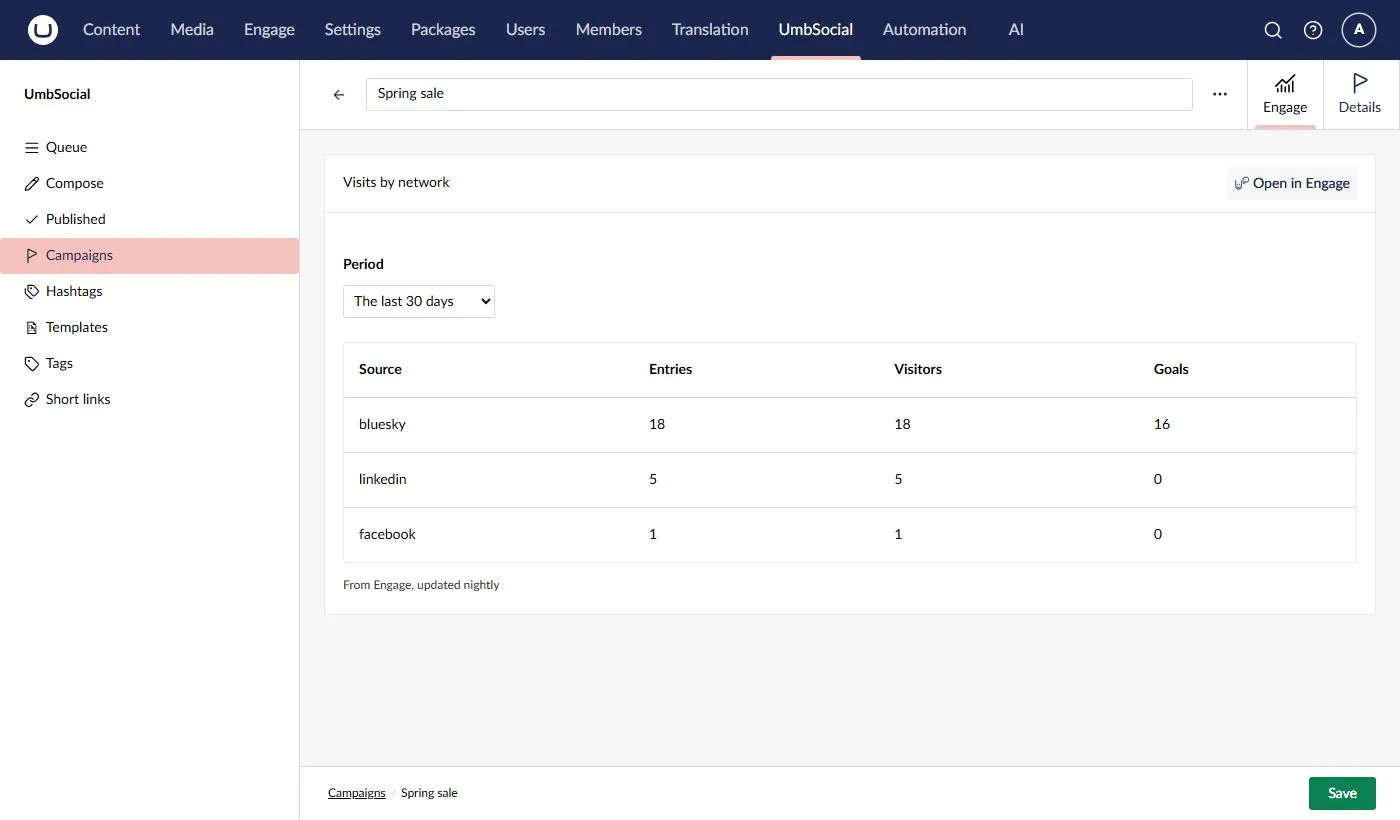
On a campaign. Each campaign has an Engage tab. It shows the campaign’s visits by network for the last 7, 30 or 90 days, or the last 12 months: Engage’s entries, visitors and goals for each source. A source Engage recorded as blank is shown as No source. Anyone who can read campaigns (View, Write or Manage settings) sees the tab.
-
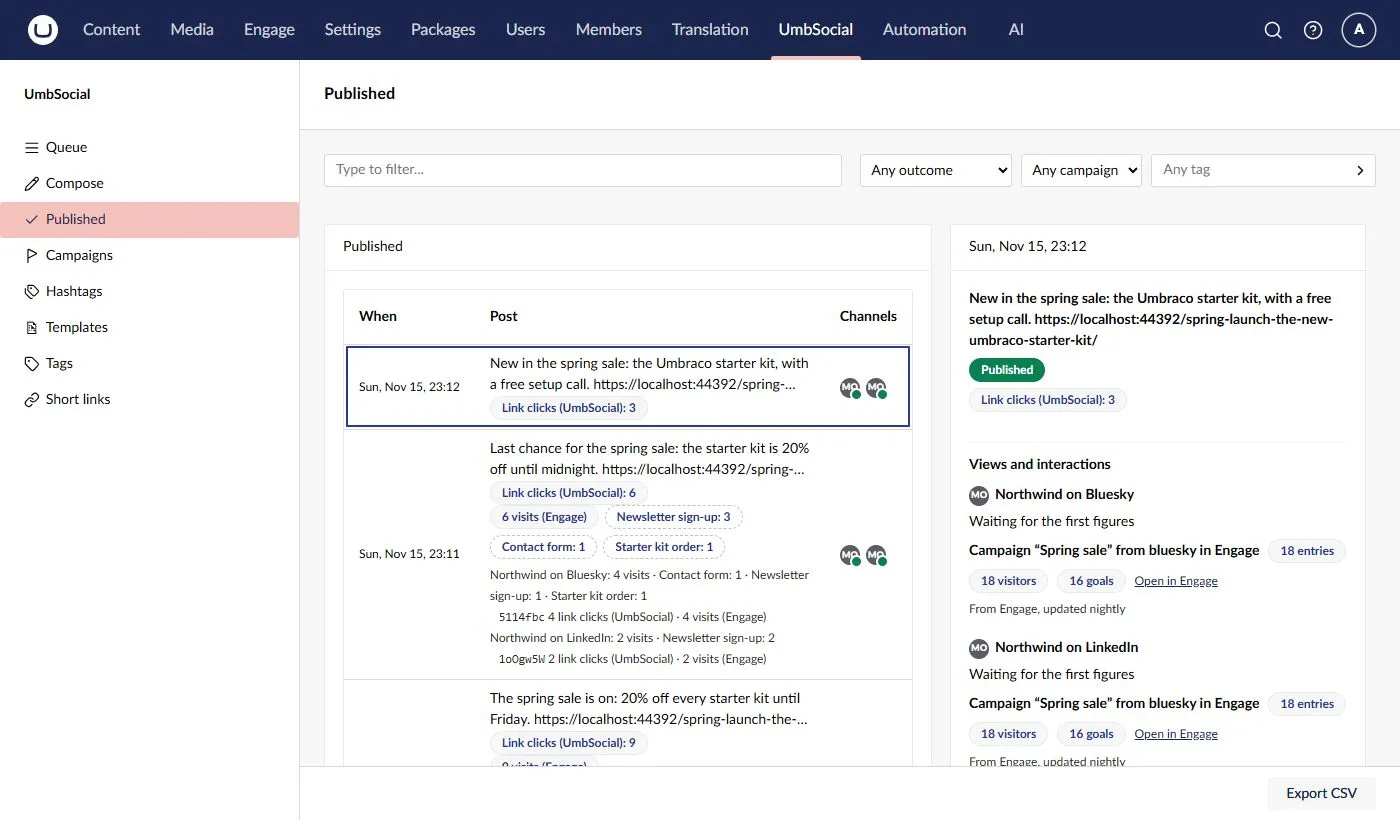
Beside a published channel. In a post’s detail on Published, and on its History tab, each channel’s views and interactions are followed by a line such as Campaign “Spring sale” from bluesky in Engage, with the campaign’s entries, visitors and goals from that channel’s source since the post went out. The line is for the channel’s whole source and campaign, not just for that post. It uses the post’s UTM values and the link settings as they are now, so if you change them after the post went out, the line follows the new values.
Both have an Open in Engage link to the campaign’s charts in Engage (see A campaign’s view), shown when Engage’s section is one of the user’s sections.
Both say From Engage, updated nightly. Until Engage has built its first report, the tab says so. Figures are kept for an hour on each server, for each campaign and period.
Level 2: visits and goals per post
Section titled “Level 2: visits and goals per post”The marker
Section titled “The marker”Every link in a post that points to your own site gets one more query parameter as it goes out: us=<code>. The code is a random seven-character code that the add-on makes for each post and channel, the first time a link is sent there. It is not the short link’s code. It says only “this visit came from a social post”, and which post and channel; it says nothing about the visitor. A site without the add-on never adds it.
- “Your own site” follows the same rule as the UTM tags: your pages (however their address is written), Umbraco’s domains and the main URL’s host, except a domain you switch off under Settings › UmbSocial › Links. Other hosts and the short link address don’t count.
- A link that already has a
usparameter is never changed. - The marker is added before the link is shortened, so a short link leads to the marked address.
- A short link made before the add-on was installed or licensed is reused when the post is sent again, so it still leads to the address without the marker, and visits through it aren’t counted.
- The composer’s previews show
us=xxxxxxx, so the length is right, and nothing is stored.
Engage stores the full query string of every page it records, us= included, in its own pageview table (umbracoEngageAnalyticsPageview). It is kept there for as long as Engage’s own retention settings keep pageviews.
Engage’s middleware also runs on the short link path (/s/<code> by default), and may set its visitor cookie there when the visitor allows it. That is Engage’s behaviour, not UmbSocial’s.
A landing
Section titled “A landing”When a page answers a marked visit, the add-on asks Engage to record the Arrived from a social post goal on that pageview. It writes its own row, a landing, with the post and channel only when Engage accepts the goal. All of these must hold, or nothing is recorded:
- the request is a
GETthat the page answered with a 2xx status; - the link has exactly one
us, and it is a code the add-on made (an unknown or malformed code is ignored); - the site is licensed for the add-on, and the visitor allows analytics;
- Engage has numbered a pageview for the request, and that pageview has no landing yet;
- the marker is under its cap: 60 landings a minute for each marker, on each server. A marker is public in every shared link, so the cap stops anyone writing a row per request by replaying it. Bot and link-preview fetches count towards the cap, because it is checked before Engage decides whether a request is a bot. A network’s preview crawlers fetching a freshly posted link many times can use up that minute’s allowance.
The add-on reads only the request’s method, status, path, the us parameter and the page Umbraco routed to. It never reads the visitor’s IP address, browser, referrer or cookies, and it adds nothing to the response. If it fails (Engage or the database is unavailable, say), it logs the failure and the page is served as normal.
When a visitor came through one of the post’s short links, the landing records which one: the channel’s short link to the page the visitor landed on (by the page’s key or, for a link stored as an address, by its path when that address carries this marker). If no link or more than one matches, the landing counts for the channel only.
Visits
Section titled “Visits”A landing counts as a visit only once Engage has stored its pageview. The add-on checks a few minutes after the landing, every 15 minutes, and gives up on a landing whose pageview Engage hasn’t stored within an hour. Engage keeps only the pageviews of browsers that run its script (the script pings Engage within 30 seconds), and drops bots. So a visit that bounced before the page loaded, a browser without JavaScript and most bots never become visits.
A visit counts once for each marker and Engage session: refreshing the page, or arriving through the same post’s link again in the same session, doesn’t add another. A post’s total is the number of distinct sessions, so a session that arrived through two of the post’s channels counts once for the post, and once for each channel.
The add-on then looks in each visit’s Engage session for the goals the visitor reached on or after the landing, within 4 hours of it, and credits them to the landing’s post and channel. The Arrived from a social post goal itself isn’t counted again. Engage ends a session after 30 minutes without activity, so later visits are new sessions.
- Goals appear after the 4-hour window plus an hour, so that Engage has stored them, and the add-on matches them every 6 hours. So a visit’s goals show between 5 and about 11 hours after the visit.
- A goal counts for every post with a landing in that session. If a visitor arrived from two posts before signing up, both get the sign-up, so goals added up across posts can be more than Engage recorded.
- A goal’s value comes from Engage’s activity history for the session. A value Engage gives no number for counts as 0, and the goal still counts.
- A goal is shown under its name in Engage, as it is now.
The window can be changed in configuration (at least an hour):
{ "UmbSocial": { "Engage": { "SessionWindowHours": 4 } }}Where you see them
Section titled “Where you see them”-
The queue, the calendar and Published show N visits (Engage) on each post that has visits, after Pro’s Link clicks (UmbSocial), with a tag for each goal (Newsletter: 3). When a post went to more than one channel, each channel gets its own line. When a post has two or more short links, each link gets a line: 12 link clicks (UmbSocial) · 5 visits (Engage). In the calendar, the number is shown, with the rest in its tooltip. Anyone who can read the post sees them: with View, every post’s; with Write alone, those of their own posts.
-
UmbSocial › Short links shows · N visits (Engage) after each link’s clicks, for people with Manage settings.
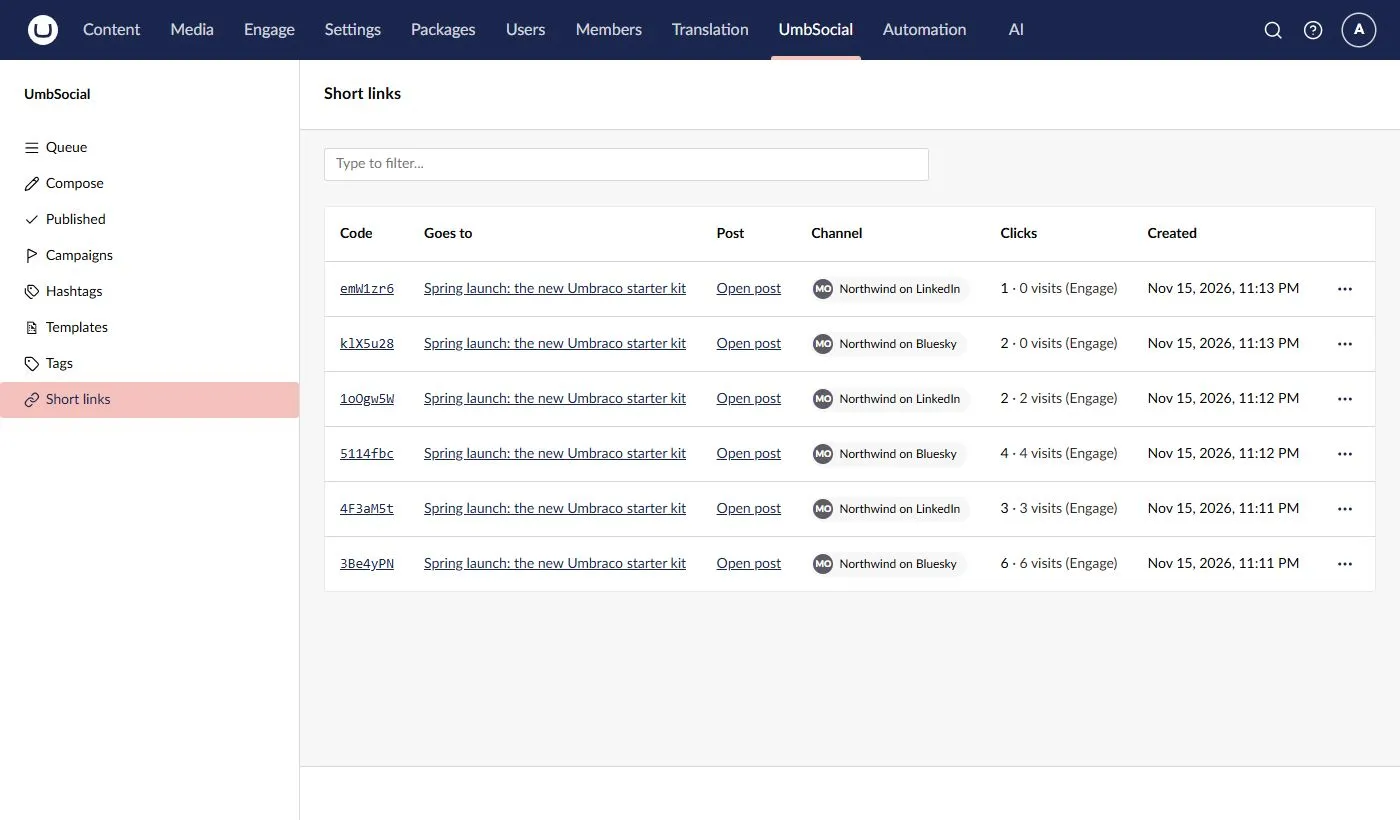
Clicks and visits are never added together. Link clicks are UmbSocial’s own count of every time a short link was followed (see Short links). Visits are Engage’s count of the people who allowed analytics and whose browser ran Engage’s script. Visits are lower than clicks, and the gap is not an error.
Landings and their goals are kept for 13 months, and landings that never became visits for 7 days. When a post is deleted, its markers, landings and goals are deleted with it.
Charts in Engage
Section titled “Charts in Engage”The add-on adds an UmbSocial screen to Engage’s own section, beside Engage’s Start, Analytics and Reporting, at /umbraco/section/engage/umbsocial. It is drawn with Engage’s own cards and charts, so it looks and behaves like the rest of Engage.
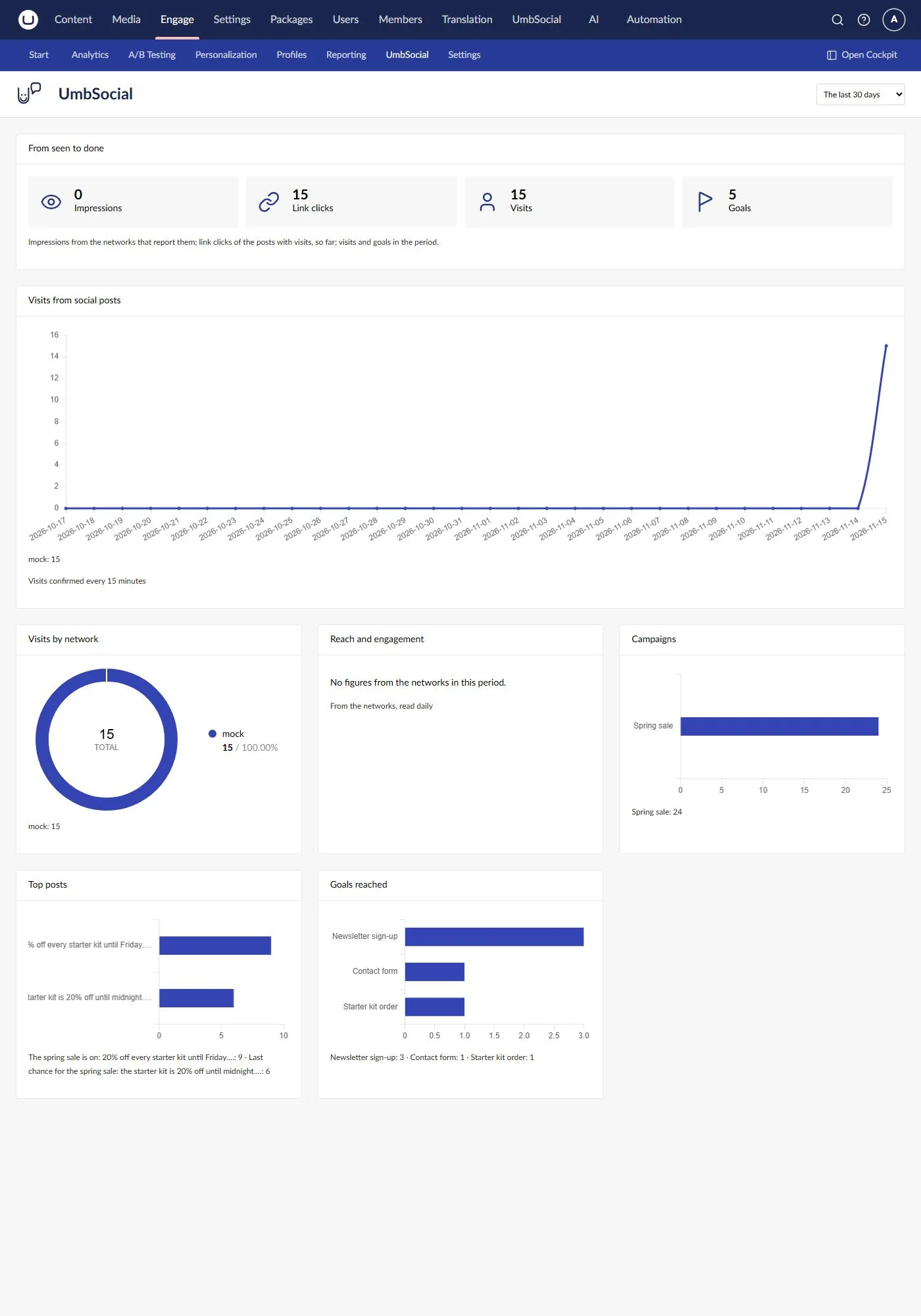
For the period you choose (the last 7, 30 or 90 days, or the last 12 months) it shows:
- From seen to done, the funnel: the impressions the networks report for your posts, the link clicks on the short links of the posts with visits, the visits and the goals reached. Impressions come from the networks that report them, as of the period’s last day. Link clicks are UmbSocial’s count so far, not just the period’s.
- Visits from social posts, a line for each network over every day of the period. Visits are confirmed every 15 minutes (see Visits).
- Visits by network, Engage’s donut chart of the same visits.
- Reach and engagement, the networks’ own figures over time (likes, reposts, replies, impressions and so on), added up across networks by what they mean. They are read from the networks once a day. Clicks the networks report are never added to UmbSocial’s link clicks.
- Campaigns, Top posts and Goals reached, ranked as bars: the ten campaigns with the most entries in Engage’s reports, the ten posts with the most visits, and the goals reached in those visits.
Under each chart its figures are also written out in words.
The screen shows to users with UmbSocial’s View permission while the site has the Engage add-on. It sits under Engage’s Analytics (Engage enables only its own screens), so Engage shows it when its analytics feature is licensed and the user has Engage’s analytics permission.
A campaign’s view
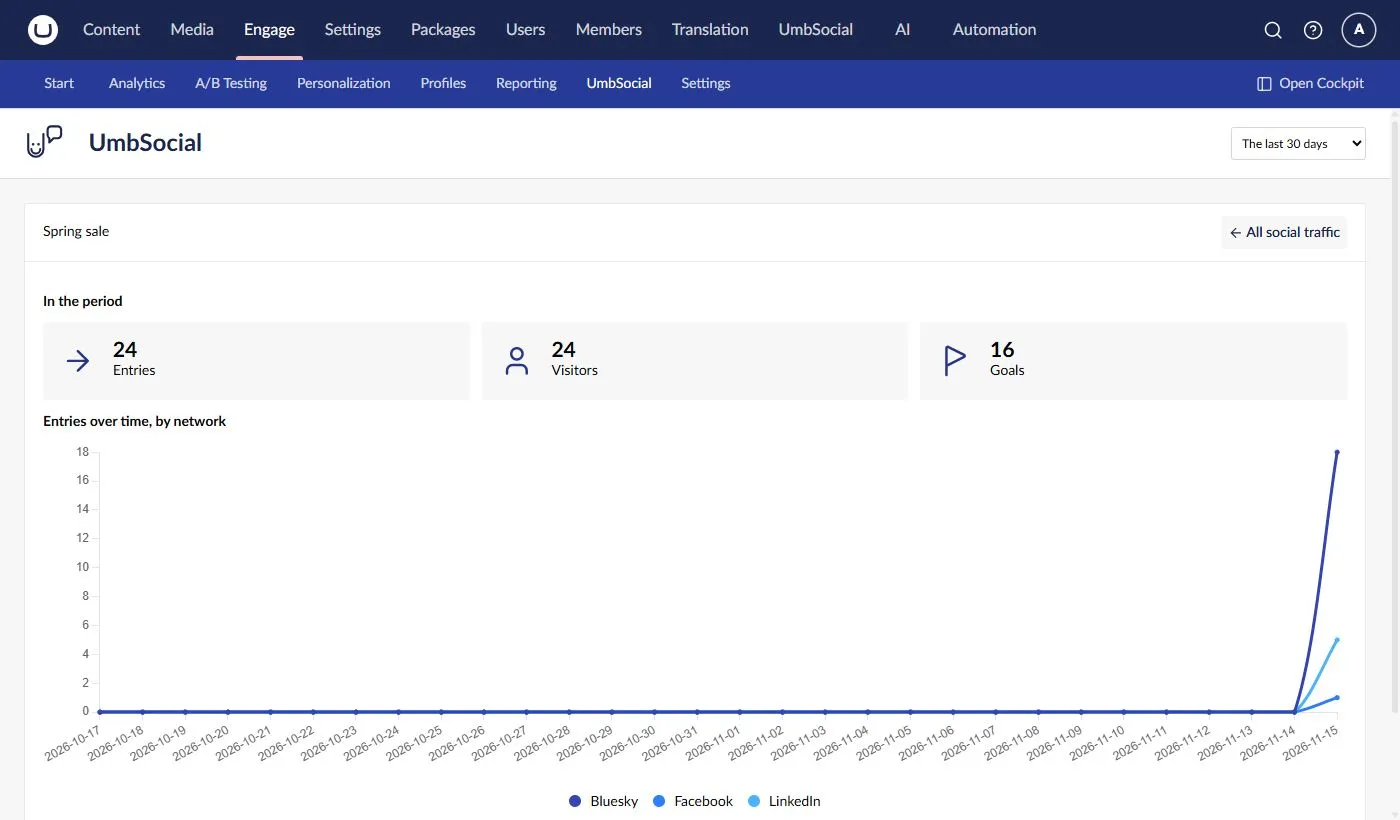
Section titled “A campaign’s view”Open in Engage, on a campaign’s Engage tab or beside a published channel, opens that campaign in the UmbSocial screen (?campaign=<key>). It shows the campaign’s entries, visitors and goals for the period in Engage’s cards, and its entries over time with a line for each network, by day for up to 31 days and by week (from Monday) beyond. The figures are Engage’s nightly reports, so today’s visits show tomorrow. All social traffic goes back to the whole screen.
In Engage’s own reports
Section titled “In Engage’s own reports”Engage’s own Analytics › Campaigns and Analytics › Goals show the same traffic in Engage’s words: your campaigns by their UTM value, with their sources, and the Arrived from a social post goal beside your other goals. They open on the last seven days without today, so today’s visits show there tomorrow.
Consent
Section titled “Consent”Engage decides who allows analytics, through the IModulePermissions service the site registers. With none registered, Engage treats every visitor as consenting, so register your own if your site asks for consent (see Engage’s documentation on its cookie and module permissions).
“No consent, no goal and no landing” is UmbSocial’s rule: the add-on records nothing for a visitor who hasn’t allowed analytics. Engage itself still records an anonymous pageview for that visitor, with its UTM values, so Level 1 includes them while Level 2 doesn’t. A short link’s click is counted either way.
Every figure is a lower bound: visitors who don’t allow analytics, who block scripts, or who leave before the page loads are never counted.
The goal
Section titled “The goal”The first marked landing creates a goal in Engage called Arrived from a social post: an active goal of Engage’s Custom code type. The add-on keeps its key, so you can rename it in Engage. If it is deleted in Engage, or Engage marks it invalid, the add-on creates it again the next time someone arrives.
It is an ordinary Engage goal, so you can use it anywhere Engage uses goals:
- Segments: build a segment on Engage’s Reached goals parameter with this goal, and personalise pages for visitors who came from social media.
- Personas: score a persona when the goal is reached, with the Engage add-on for Umbraco Automate (its custom goal completed trigger and score persona action). Engage’s own campaign groups can also score personas for visits with a given UTM medium, such as
social. - Reports: it appears in Engage’s goal reports, beside your other goals.
What isn’t possible
Section titled “What isn’t possible”- Engage can’t report on the marker,
utm_contentorutm_term. Its reports and query service have no dimension for any of them, so per-post figures come only from the add-on’s own landings (Level 2), never from Engage’s reports. Pro puts the channel inutm_contentby default; for per-channel rows in Engage’s own reports, use the medium instead (see above). - No figures from before the add-on was installed. Level 2 needs the marker, which only links sent since then carry. Level 1 covers whatever Engage recorded with your UTM tags.
- No live figures. Level 1 is as old as Engage’s last nightly report, and Level 2 waits for Engage to store pageviews and for the goal window to pass.
- No figures without an Engage licence for the site’s domain, other than on development hosts (see What you need).
For developers
Section titled “For developers”All the endpoints are under /umbraco/management/api/v1/umbsocial/pro/engage/, need UmbSocial to be licensed (licence.pro_required otherwise), and say why they refuse with the error codes.
| Request | Needs | What it does |
|---|---|---|
GET status |
View | The arrival goal’s key and its name in Engage; no goal before the first landing, or after the goal was deleted in Engage. |
GET campaigns/{key}/figures?from=&to= |
View, Write or Manage settings | A campaign’s entries, visitors and goals by source, for Engage’s reporting days from to to (at most 366 days). |
GET targets/{targetId}/figures |
View or Write | A published channel’s campaign figures for its source. A target of a post the caller can’t read is answered as one with nothing to show. |
POST posts/figures |
View or Write | { "postKeys": [ … ] }, at most 200: each post’s visits and goals, in all, per channel and per short link. Posts the caller can’t read, and posts without visits, are left out. |
POST short-links/visits |
Manage settings | { "shortLinkCodes": [ … ] }, at most 200: each code’s visits. |
GET social/overview?from=&to= |
View | The UmbSocial screen: visits by day and network, by network, the top campaigns, posts and goals, the networks’ own figures by day, and the funnel’s link clicks, visits and goals (at most 366 days). |
GET campaigns/{key}/series?from=&to= |
View, Write or Manage settings | A campaign’s name, and its entries, visitors and goals by period and source from Engage’s reports: by day for up to 31 days, else by week. |
The add-on extends UmbSocial and Pro through their public seams, which your own extensions can use too:
- The link step. The marker is a step of UmbSocial’s link rewriters (
EngageMarkerRewriter), inserted just before Pro’sShortLinkRewriter, or added last when a site has removed that step. See Replacing services. - The UmbSocial screen is an
engageScreenElement(Engage’s own extension type for its section’s screens), registered while the user may see it. Its charts extend Engage’s publishedUeBarChartElementfrom@umbraco-engage/backoffice/core, so they use Engage’s Chart.js, colours and legend. If an Engage version no longer has what the screen uses, it says so instead of failing. - The campaign tab is a
workspaceViewonUMB_SOCIAL_CAMPAIGN_WORKSPACE_ALIASthat readsUMB_SOCIAL_CAMPAIGN_WORKSPACE_CONTEXT. See A tab on a campaign. - The line beside a channel is an
umbSocialTargetMetricsDetailextension, and the visits on a post anumbSocialQueueItemDetailwith weight 199. Pro’s clicks detail has weight 200, so a detail weighted just below it is drawn right after it. - The visits in the Short links list are an
umbSocialProShortLinkDetailextension. Pro’s list draws this slot in each row’s clicks cell and gives each element the row’s link asitem(its code, post and channel). To load data for every row at once, consume Umbraco’sUMB_COLLECTION_CONTEXTand read its items. - Clicks for each link.
IShortLinkService.LinkClicksAsync(postKeys)(inUmbSocial.Pro.Links) returns each short link of up to 200 posts, with its post, channel, code and clicks, in one query (ShortLinkClicks). Removed links are left out; it returns null for more than 200 posts, and an empty list while UmbSocial isn’t licensed.